Recent Discussions
Feature request - adjustable scales and fonts
Hello, I'm using the ToDo app, it's very nice for me to coordinate daily tasks. On Win10 laptop with 15 inches, as a default it works 1920x1080 and 125% scale, and other apps work fine. But about ToDo, the font is a bit too large and I can only see 10 tasks at once. So I hope we can adjust the scale or fonts. For now, I can use ToDo via Web Browser and adjust the scale, but I hope I can do it with App. Best regards,530Views1like1CommentMicrosoft ToDo not showing badges counts on a Mac
Hi all, I've the latest versions of both Mac OsX and Microsoft ToDo. Unfortunately, the app is not showing the badged in the dock's icon. I've already tried to switch off and re-switch on the "Badge application icon" into the Notification menù of OsX. I've already tried to delete the app and re-install it. What can I do in order to fix this annoying issue? Many thanks and all the best, Luca17Views1like2CommentsMicrosoft To Do not working
Hello, My Microsoft To Do application is not working since I bought Office 365 Personal. The app shows a message "Gettings tasks list ready..." and it loads indefinitely. I tested on Windows application Microsoft To Do, Web application on Edge, Chrome or Firefox via https://to-do.live.com, Microsoft To Do application on iOS or Android, and also on different computers. It seems that my account is broken... The Microsoft support gave me the following ticket number 7091736234 Anyone can help me to solve this issue ? Thank you158Views0likes6CommentsList order not syncing between devices
The order of items in a list is not syncing between iPhone, Android, and Windows 11. If that list is open on both devices, the manual re-ordering happens immediately. But if it's not open on one device, then the changed order is not syncing after hours or days. The sync buttons are not working - having no effect on list order. This is a new issue - list order used to automatically update within a few minutes. Just started about a week ago. I'm doing anything different. List order is is a really important feature! I'm temporarily having manually reorder on every device. Not a sustainable solution.160Views2likes6CommentsRecurring subtasks remain checked off
I have multiple recurring tasks with subtasks. I check off the subtasks as completed, then the main task. The main task then correctly pops up as uncompleted at the next scheduled recurrence, but the subtasks remain marked as completed. Is there a fix for this? Thank you!450Views1like1CommentMissing Categories in Microsoft To Do Apps: Any Updates?
Hello everyone, I've been using the Microsoft To Do app and wanted to discuss an issue regarding the category/tag functionality in task lists. Recently, Microsoft introduced an update allowing the addition of customizable tags to each task within a list. I have successfully configured and assigned these categories via the web interface using a browser. However, I noticed that the categories/tags assigned through the web do not appear in the Microsoft To Do apps for Android, iOS, and Microsoft Store. This makes it challenging to find specific tasks when using these apps. Is anyone else experiencing this issue? Is there any update on when this functionality will be synchronized with the mobile and Microsoft Store apps? Thanks in advance for your help!2.9KViews17likes9Comments- 2.7KViews0likes5Comments
Feature request: location based reminders
One of of Google keep notes that I used the most when using that app was location reminders. Since coming over to ToDo full time for tasks, I have missed it to the point of using location reminders on a different app when I need them. Please add location reminders.14KViews43likes25CommentsMicrosoft To Do Tasks Disappeared
Hello, I used to have ~100 tasks in my To-Do application these days. As of yesterday, they have been reduced to ~50. Multiple tasks disappeared from various lists (the lists are all intact). I rely on To-Do a lot and that's why I have it on 2 Windows PCs, 3 iOS devices and 1 Android. All are synced to the ~50 baseline, which as of yesterday, since to be my as-is in Microsoft's servers. All 6 applications (in all 3 different platforms), are on To-Do version 2.55 (latest one as we speak today). Of course I have uninstalled/re-installed, log-out/in, and changed passwords to my Office 365 account several times, with no effect. When I visited the web app, to check the situation, my tasks were not deleted (i.e. reduced from ~100 to ~50), but I noticed, that these ~100 tasks, were not exactly my latest update (i.e. I have seen tasks here and there that I have recently closed, or changed that were not reflected in the web app). But at least the heavy reduction from ~100 to ~50 was not done (some hope there). But when I signed out and signed it again (always in the web app), then I saw all these tasks disappearing from here as well. So now, all 6 apps (Windows, iOS and Android), plus the web app, are ALL SYNCHORNIZED to this ~50 tasks baseline, which as of yesterday, seems to be my new as-is in Microsoft's servers. The disappeared messages are not in deleted tasks folder of Office365/Outlook, etc. They are totally gone. Can anyone support me, or suggest something to me ? Thank you!99KViews7likes78CommentsFeature Request - Due Dates for Sub-tasks in Microsoft TO DO
It would be really great if there were a way to have due dates for sub-tasks placed in Microsoft To Do. Right now, that is the thing keeping me with Asana. This is also what has prevented me from using the Microsoft Planner. I find that I have one main task, but frequently have multiple sub-tasks to accomplish the one task. (Welcome to the wonderful world of HR management!) It is often impractical to create a brand new list for each task, so the ability to have due dates for sub tasks would be a great addition. Thanks!8.9KViews39likes17CommentsFeature request: Add the "copy task to..." feature to the app versions of To Do
I don't unserstand why I can duplicate or "copy task to" and "move task to" in the web based version but can only "move task to" in both the Windows and Android app (and I'm betting the iOS/MacOS app also exhibit the same beahviour) I have some tasks with subtasks that I use a lot and I simply duplicate them by copying the task to it's existing list, thus creatng a duplicate, but it's annoying to have to open the web based version to do this simple operation. I'm not always at my PC when I want to do this and as the "move to" option is in the app, surely an oversight to not add "copy to" as well.2.2KViews2likes4CommentsFeatures Suggestions
I’ve been using Microsoft To Do for over five years, and I like its simplicity and reliability. That said, I believe a few additions could improve usability and productivity and would make To Do even more powerful without sacrificing its simplicity. the suggestions are: Start Date as a dedicated field: Currently, we only have the due date, and the start date ends up as a note. A proper start date field would help schedule task timelines more effectively. Task completion percentage: Instead of only checking tasks as done or not done, it would be great to manually set (or track) a progress indicator like 25%, 50%, 75%. Very useful for multi-step tasks. Voice-to-text input: For quick note-taking or adding tasks while walking, driving, or multitasking, a built-in voice-to-text feature would be extremely helpful. Search within individual lists: While the global search is useful, sometimes users need to search within a single list to stay focused and avoid unrelated results. Customizable task categories + filtering: Lists are helpful, but adding customizable categories or tags (separate from lists) would give users more flexibility. Paired with a filtering option, this would make organizing and navigating tasks much easier — especially for people managing work, personal, and project-based tasks in one place. Would love to hear if others feel the same — and hoping the team considers some of these in future updates!43Views0likes0CommentsLooking for Feedback on To-Do List Usage for Design thinking
Hello everyone I’m currently working on a design thinking project for a To-Do List apps and I’m trying to better understand how real users use task management tools like Microsoft To Do I would really appreciate it if you could share your experiences and problems by answering a few questions What features do you use most in to do list apps What are your biggest challenges or frustrations when using To-Do List apps Are there any features you wish existed in Microsoft To Do How do you usually organize your tasks and priorities Your feedback will be very valuable for my research and will help me design a more user-friendly task management experience Thank you so much for your time and insights Best regards89Views0likes1CommentTo Do Outlook Cal integration
As a leader/manager I need the ability to block time in my outlook calendar to do work (aka ToDo tasks). I would love to be able to easily add a To Do task in my calendar. And then need the ability to move/modify the task with minimal clicks, and check them off in the calendar AND/OR in a master To Do task list. The colors/categorization should be different To Do tasks that are not done and those that are done yet. For people who use their calendar as the backbone of their working day, this capability would be exceptionally useful. All the pieces exist, you just need to stitch them together. This truly would be a very substantial upgrade to my daily workflow.19Views0likes0CommentsMicrosoft TO DO language Change
Hello All, we are worked under cloud workplace , one of our user using MS to do application in his laptop all of sudden her MS to DO language change to turkey and this is happened for only one user , please help. Steps taken; 1.change the windows language and checked 2.checked and changed the browser language but no luck thanks in advance39KViews0likes9CommentsPlanner / To Do - Moving Tasks
I used to be able to move tasks that were assigned to me in Planner from the 'tasks assigned to me' section to any of my to do sub-lists. It is now not allowing me to move them. Has there been any setting changes or am I missing something? Help please anyone!16KViews8likes9CommentsHandwritten Tasks
Hi all, Just wondering if there is a way to have handwritten tasks on the iPad with the apple pencil. I am aware of the ink to text feature but i don't find it efficient. thank you! :)85Views0likes1Comment'TO DO' MICROSOFT *STAFF*
Is there a Microsoft staff member who's a specialist in To Do, pls? When you only get support staff who aren't familiar with To Do, and even the support page applies to an old version, it's necessary to give this feedback to a line mgr. They also need to view 2 transcripts from me that highlight all the extra work they're creating for themselves. Does anyone have an email address for the To Do support mgr? By PM if prefer.54Views0likes0CommentsMicrosoft To Do shared list – notifications arrive but the list on my account doesn’t update
Hi, Since Sept 7, 2025, I’ve had a problem with a shared list in Microsoft To Do. There are two users on the list. When the other user adds or completes a task, I get a notification but in my account the list itself does not update: the task still looks unchanged. This happens in all clients I use: web app on Windows PC and Android app (Galaxy A13 5G). If I add or complete tasks, everything syncs normally and the other user sees the updates. The other user does not have this problem. We tried reinstalling apps, rebooting devices, and even creating a new shared list, but the issue remains. Since the same behavior happens on every device with my account, it seems like a server-side sync problem rather than a device issue. Is anyone else experiencing this? Is this a known issue and are there any suggested workarounds? Thanks!150Views0likes1Comment
Events
Recent Blogs
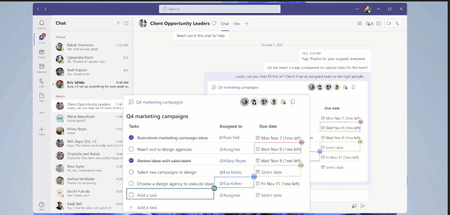
- 3 MIN READTask management while collaborating has never been easier. Now tasks created via Loop components sync across Microsoft 365 apps like Microsoft To Do, Microsoft Planner, and Tasks app in Teams. ...May 10, 202321KViews4likes7Comments
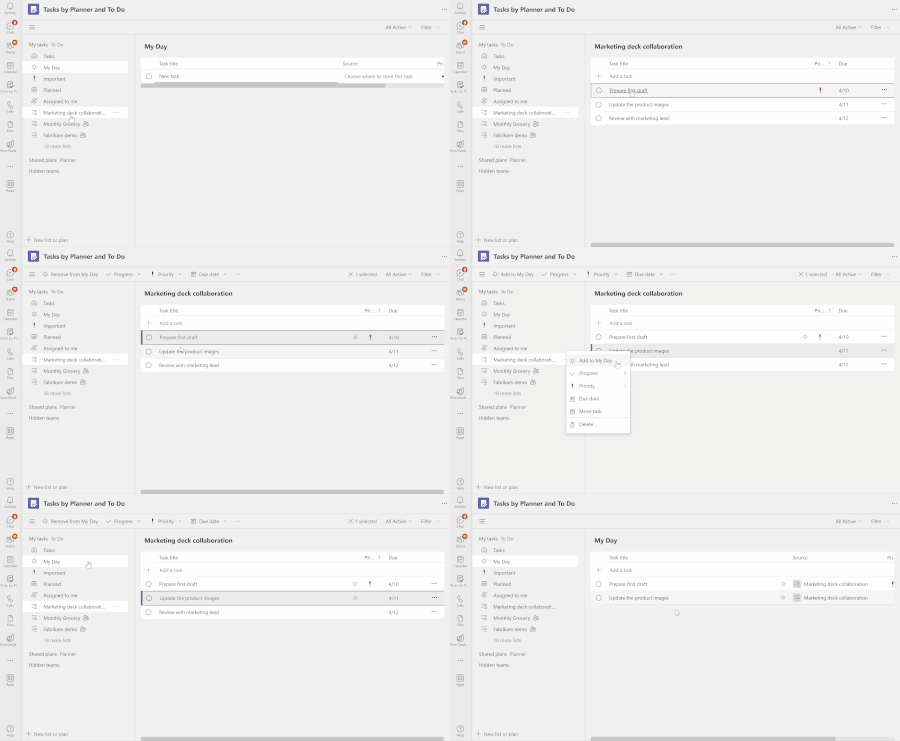
- 2 MIN READFeeling overwhelmed by tasks from multiple sources and struggling to stay organized? We have great news for you! We are thrilled to introduce the 'My Day' view in the 'Tasks by Planner and To Do' app...Apr 05, 202336KViews4likes37Comments