Recent Discussions

IIS Site Randomly Returns 404 While App Pool Remains Started
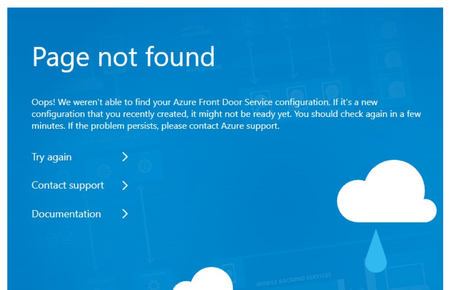
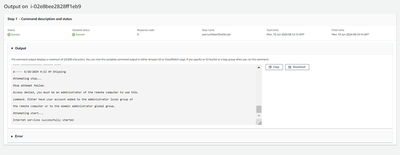
Hello, We have an IIS site running behind Azure Front Door that becomes unavailable every few days. Symptoms: Application Pool remains started Users see the blue "Not Found" page from Azure Front Door When accessing the site directly on the server during the failure, we get a 404 from IIS, not Front Door The site does not recover on its own Recovery requires an App Pool recycle or IIS restart, and sometimes a full server reboot because recycle or IIS restart does not help What it is NOT: No CPU, memory, disk, or network pressure Event logs do not correlate with the outage When it happens: Random and unpredictable Any insights would be appreciated. From the server itself: Please your support.116Views0likes0CommentsError executing JScript
I switched from Windows Server 2022 to 2025. I migrated all my domains and it works fine, but with an error: I can't run a script like "<SCRIPT Language="JScript" RUNAT=SERVER>" because it gives me a 500 error. If I go to https://www.vidauna.com/aaa.asp, there's an example from Microsoft, and if the page is refreshed, it gives a 500 error (once yes, once no). Looking for the reason for the error, I found it's because on another of my pages on the same domain I have set the string: "Session.Timeout = 20." If I create a new subdomain with just the example, it works fine, but without the example, I put: <% Session.Timeout = 20 %> It starts doing the same thing. When I refresh the page (F5), it gives a 500 error, and if I refresh it again, it appears fine, and so on. I've been searching for a solution for almost a month and can't find it. I can't have the page that uses JScript on the domain because it doesn't work (it worked fine on the previous server), and I'm trying to find the problem with the example. What I think is that I need to configure something in Windows Server 2025's IIS to prevent this error, but I don't know what it is. I hope someone knows the solution to this problem. Thank you. I'm Spanish, and the text was translated using Google Translate. The content of the aaa.asp example is: <%@ Language= "VBScript" %> <HTML> <BODY> <!-- Call the JScript procedure from within VBScript--> <% call printDate() %> <!--Call the VBScript procedure from within VBScrip--> <% Echo %> <BR> </BODY> </HTML> <%Sub Echo%> <!--Note: this will not output anything unless the page is called with a query string like https://localhost/test.asp?x=1%20have&y=a%20cunning&z=plan --> <% Response.Write "<TABLE BORDER=1>" & _ "<TR><TH>Name</TH><TH>Value</TH></TR>" Set objQueryString = Request.QueryString For Each strSelection In objQueryString Response.Write "<TR><TD>" & strSelection & "</TD><TD>" & _ objQueryString(strSelection) & "</TD></TR>" Next Response.Write "</TABLE>" End Sub %> <SCRIPT Language= "JScript" RUNAT=SERVER> function printDate() { var x x = new Date() Response.Write(x.toString()) Response.Write("<BR>") } </SCRIPT> The error is: Información detallada de error: Módulo IsapiModule Notificación ExecuteRequestHandler Controlador ASPClassic Código de error 0x00000000 Dirección URL solicitada https://www.vidauna.com:443/aaa.asp Ruta de acceso física ...\aaa.asp Método de inicio de sesión Anónimo Usuario de inicio de sesión Anónimo207Views0likes0Comments
ARR 3.0 Route to Server Farm Missing
I am encountering a persistent and frustrating issue with Application Request Routing (ARR) 3.0 on my Windows system (details below). I have successfully installed ARR 3.0, but the crucial "Route to Server Farm..." option is consistently missing from the "Action type:" dropdown when I edit or create a URL Rewrite rule in IIS Manager. I have spent a significant amount of time troubleshooting this, and I am hoping someone with more experience might be able to shed some light on what I am missing or what might be going wrong. Here is a detailed breakdown of my situation and the steps I have taken: System Information: Operating System: Windows 10 Pro 64-bit IIS Version: 10.0.19041.1 Problem Description: The "Route to Server Farm..." option is not present in the "Action type:" dropdown when configuring the "Action" of a URL Rewrite rule for my "Default Web Site" (and any other site I've tested). My goal is to use ARR as a reverse proxy to forward requests to a backend Nginx server (running on the same machine or a different one - please specify if relevant). I have created a Server Farm named "NginxFarm" (or whatever you named it) in IIS Manager. 3. Steps Taken So Far (in chronological order as best as I can recall): Initial ARR Installation: I downloaded and successfully ran the ARR 3.0 installer (requestRouter_amd64 (1).exe). The installation completed without any apparent errors. Verification of Modules: In IIS Manager, at the server level, under "Modules," I can see "ApplicationRequestRouting" listed with "Module Type: Native" and "Enabled: True". However, "RequestRouter" was initially missing. Manual Registration Attempts: I tried to register RequestRouter.dll (located in C:\Program Files (x86)\IIS\Application Request Routing\) using regsvr32, but it reported that the entry-point DllRegisterServer was not found. I tried using iisreg.exe (from C:\Windows\System32\inetsrv\) to register RequestRouter.dll, but the command was not recognized. I looked for gacutil.exe to register the DLL in the Global Assembly Cache but could not find it (Windows SDK is not installed). Manual Module Addition (Server Level Configuration Editor): I used the Configuration Editor at the server level to navigate to system.webServer -> modules. I found "ApplicationRequestRouting" listed, but the "type" attribute was empty. I set it to Microsoft.Web.Arr.ApplicationRequestRoutingModule, Microsoft.Web.Arr. "RequestRouter" was missing, so I added a new module with the name "RequestRouter" and the type Microsoft.Web.Arr.RequestRouterModule, Microsoft.Web.Arr. I applied these changes and restarted the entire computer. Checking "Configure Native Modules..." (Default Web Site): I checked the "Configure Native Modules..." option for my "Default Web Site" under "Modules," but "RequestRouter" was not listed there. Examination of applicationHost.config: I located C:\Windows\System32\inetsrv\config\applicationHost.config and made a backup. In the <globalModules> section, I found entries for ARRHelper, RequestRouter (pointing to C:\Program Files (x86)\IIS\Application Request Routing\requestRouter.dll), and ApplicationRequestRouting (which I changed to also point to C:\Program Files (x86)\IIS\Application Request Routing\requestRouter.dll to ensure consistency). The <modules> section within <system.webServer> at the server level now correctly lists ApplicationRequestRouting and RequestRouter with the type attributes set. IIS Logs: I examined the IIS logs in %SystemDrive%\inetpub\logs\LogFiles\ but did not find any specific errors related to the loading or initialization of the ARR modules. The logs primarily show 404 errors for the root and favicon.ico. Full System Restarts: I have restarted my computer multiple times after installing ARR and making configuration changes. Clean Re-installation of ARR 3.0: I uninstalled ARR 3.0 through "Programs and Features," restarted my computer, re-downloaded and re-installed ARR 3.0 as administrator, and restarted again. The issue persists. Server Level Rewrite Configuration: I checked system.webServer -> rewrite -> providers and rules at the server level in the Configuration Editor, and both had zero items. 4. Current Status: "ApplicationRequestRouting" is listed as a Native module and enabled at the server level. "RequestRouter" is listed as a Native module with the correct type at the server level. Neither "RequestRouter" nor "ApplicationRequestRouting" appears in the "Configure Native Modules..." list for the "Default Web Site". The "Route to Server Farm..." option is still missing from the "Action type:" dropdown in the URL Rewrite rule editor. 5. Questions for the Community: Has anyone else encountered this specific issue with ARR 3.0 on a similar system configuration? Are there any known compatibility issues between ARR 3.0 and specific versions of Windows or other IIS components? Are there any prerequisites for ARR 3.0 that might not be obvious or automatically installed? Are there any specific IIS features that need to be enabled for "Route to Server Farm..." to appear? (I have the core Web Server role and Management Tools installed). Could there be an issue with the permissions on the ARR installation directories or the DLL files? Are there any specific entries I should be looking for in the Windows Event Viewer (Application or System logs) that might indicate a problem with ARR? Is there a specific order in which ARR components need to be installed or configured? Are there any alternative methods to enable or verify the functionality of the RequestRouter module? I am at a loss and would greatly appreciate any guidance or suggestions you might have. Thank you in advance for your time and assistance.221Views0likes0Comments
IIS URL redirect
I want to enable access to the same website from two different URLs. The website is hosted for internal use. The internal URL is internal.example.com But now I want to open this website to the public using external.example.com There is no option to add a new building to this website. How can I enable URL redirect on IIS to achieve this? I want to access all the internal website pages from an outside URL without any issues. Is there an option to achieve this on IIS?94Views0likes0Comments
How to integrate with Angular ngCspNonce`
Good Day I'm trying to set up CSP Nonce support with Angular, using IIS on Windows-based Azure App Service Plans. I can't switch to a different web server due to other requirements, so I'm stuck with IIS. What I need to configure is a replacement for 'nonce-random_nonce_value' In Apache or Nginx, this is trivial, but on IIS how do I tell it to replace "nonce-random_nonce_value" with "nonce-<blah-long-hash>". Thanks491Views0likes0Comments
Need Help Understanding Why .NET SDK and Runtime Were Required for IIS Hosting of ASP.NET
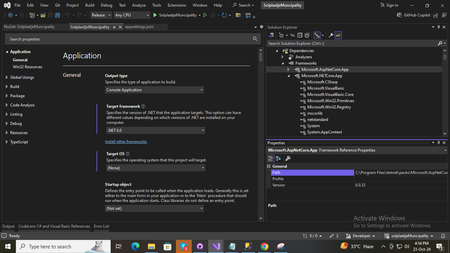
I'm hosting an ASP.NET Core application (v6.0.33) on an AWS virtual machine with IIS. I installed the .NET Hosting Bundle matching the application’s version. After verifying the website runs fine with dotnet run, I encountered an "HTTP Error 500.30 - ASP.NET Core App Failed to Start" when trying to access it via IIS. After troubleshooting extensively—including checking various threads on Stack Overflow, GitHub, and Microsoft forums—I found this article https://www.quickpickdeal.com/coding/http-error-500-30-asp-net-core-app-failed-to-start-with-iis-a-real-world-solut that suggested installing not only the Hosting Bundle but also the .NET SDK and Runtime. Surprisingly, this approach worked. My question is: Why did I need all three components (Hosting Bundle, SDK, and Runtime) to get this application working in IIS? I expected the Hosting Bundle alone to be sufficient for deployment. Could there be a dependency that IIS requires that isn't covered by the Hosting Bundle?254Views0likes0Comments
IIS Anonymous settings question
Hi Gang, When enabling the Anonymous Authentication, there is an Edit button to set a user. As well, there is also an option to specify a user in Basic Settings for a virtual folder/app in IIS. What is the difference between these two? Many thanks! ============== Found my answer in case anyone is curious...Basic Settings sets the user account for a more limited scope - disk access only. Setting the account via Edit button for the Anonymous auth option has broader access - disk, registry and network.260Views0likes0CommentsIIS URL Rewrite issue
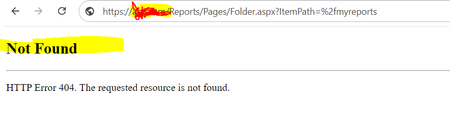
I was trying to implement IIS URL rewrite functionality but is is not working as it should be. There are two servers. Server1 has SQL and SSRS. Server2 has IIS installed. Both servers have Server 2022. SSRS is accessible on Server2. One domain is registered as abc.com. from abc.com, sites from Servers are accessible. For SSRS, rather that using http://server1/reports, we tried to implement URL rewrite function. if someone click for reports, it should display http://abc.com rather than http://server1/reports. on HTML page, we have used an anchor tag to navigate to reports ( <p>To continue to Stanford Reports, click <a href="https://abc.com/Reports/Pages/Folder.aspx?ItemPath=%2fmyreports">here</a> </p>) When I click this link, it is showing "Not Found" Error . rewrite section in web.config <rewrite> <outboundRules rewriteBeforeCache="true"> <clear /> <rule name="ReverseProxyOutboundRule1" preCondition="ResponseIsHtml1"> <match filterByTags="A, Form, Img" pattern="href=(.*?)http://server1/Reports/(.*?)\s" /> <conditions logicalGrouping="MatchAll" trackAllCaptures="true" /> <action type="Rewrite" value="http{R:1}://abc.com/{R:2}" /> </rule> <rule name="Restore-AcceptEncoding" preCondition="NeedsRestoringAcceptEncoding"> <match serverVariable="HTTP_ACCEPT_ENCODING" pattern="^(.*)" /> <conditions logicalGrouping="MatchAll" trackAllCaptures="true" /> <action type="Rewrite" value="{HTTP_X_ORIGINAL_ACCEPT_ENCODING}" /> </rule> <preConditions> <preCondition name="ResponseIsHtml1"> <add input="{RESPONSE_CONTENT_TYPE}" pattern="^text/(.+)" /> </preCondition> <preCondition name="NeedsRestoringAcceptEncoding"> <add input="HTTP_X_ORIGINAL_ACCEPT_ENCODING" pattern=".+" /> </preCondition> </preConditions> </outboundRules> <rules> <rule name="ReverseProxyInboundRule1" stopProcessing="true"> <match url="Reports/(.*)" negate="false" /> <action type="Rewrite" url="http://server1/Reports{R:1}" logRewrittenUrl="false" /> <serverVariables> <set name="HTTP_X_ORIGINAL_ACCEPT_ENCODING" value="{HTTP_ACCEPT_ENCODING}" /> <set name="HTTP_ACCEPT_ENCODING" value="" /> </serverVariables> </rule> </rules> </rewrite> Can someone please suggest for this issue?289Views0likes0CommentsIIS certificate renewals 2048 rsa key
Hello, When I use CSR mecanism to renew a certificate inside IIS, always IIS create a CSR with a 1024 public key length even if old certificate has a 2048 or 4096 public key length. Is there a way to force IIS to have 2048 key length by default and not 1024 ? I checked on registry key or IIS option but find nothing specific. I tried with IIS crypto to force 2048 but still create with 1024 length. Thank you318Views0likes0Comments
IIS and PHP access permissions
Hi. I'm not sure if this is a question for the IIS community, or the PHP forum, but since most of the guys running PHP seem to do this under Apache and Linux, I'd like to try here first: Most of our sites in IIS run PHP and connects as Application user. A couple of them are web shops and run Wordpress and WooCommerce. Some of these are integrating through the WooCommerce REST API with external Point-of-Sale systems, which then require me to open up for GET, PUT, DELETE on the separate PHP-instances. Am I jeopardizing the security of this IIS application by doing this? Thanks.219Views0likes0CommentsAccess network folder and files from .NET Core application in IIS
Greetings, I have an application deployed in IIS with .NET Core 7 and SQL Server, I want to access a network path, write and read files within a folder in the path (\\path\folder\) What steps should I follow to achieve this?219Views0likes0Comments
Unable to get compression on IIS
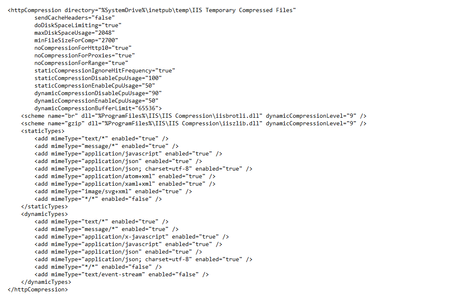
Hello, spend I am not sure how many hours on this one and was hoping to get some advice on what I may have missed. I follow the directions given to us by Microsoft which are https://learn.microsoft.com/en-us/iis/extensions/iis-compression/iis-compression-overview which has resulted still in no compression mention when performing API request on Web Services in Business Central. I'll add a few images to show the Dynamic Compression has been enabled. The two compression package specifically GZIP and BR from the documentation has been downloaded and added. I wonder if there is something that have been missed to allow approval for compression or any direction to truly check if it's being compressed but possible fillers when returning is showing something different. Thank you for all help on this matter or any point in direction258Views0likes0Comments
HTTP Error 403.16
Windows 11 IIS 10.0.22621.1 Some locations are being asked for an authentication certificate (for example my workstation), my co-workers work station is not being asked for anything. This isn't a big deal I can click "don't send a certificate" and continue on. IN the IIS manager the SSL settings is not required and client certificates is set to "ignore, my very limited understanding is this pop up shouldn't happen with those settings. The other issue is we have some customers that are getting a HTTP error 403.16 error I can't reproduce this error myself. Hoping someone could point me in the right direction. Thanks367Views0likes0CommentsIIS or XAMPP
I cannot get IIS to work. I have a Javascript / Node project on a Windows 11 laptop. I have a domain name pointed at my static IP. I cannot get XAMPP to work either. I would like someone to help me set up this web server. I have tried Wyzant and am going to try Upwork next. I am hoping some one from this forum can help me or may be able to connect me with someone.409Views0likes0CommentsSlow download speed from IIS
Hi, Hi am trying to troubleshoot "slow" files download from IIS server. I am testing locally connected to 2.5 gbit switch from my laptop. I have two virtual machines, same hardware, one running nginx, other IIS running on server 2022. Servers are connected through 10 gbit uplinks to network. I don't have any scanning, qos rules, etc. Just plain rule to perform test. Same testing machine, same switch port, same browser. I generated/uploaded 40GB.zip files to both servers. When I download from server running nginx download speed is around 230 MB per sec When I download from server running IIS download speed is around 25 MB per sec Is the anything I can do to make downloads faster from IIS? Thank you. Carlo709Views0likes0CommentsRunning python/flask app on IIS using ASP.Net Core Module handler
Looking for insight into running/flask app using a modern/maintained method. wfastcgi is essentially deprecated (version 3.0.0 was released 7 years ago). HttpPlatform handler was replaced by the http://asp.net/ core module even before that (2016). I’ve made some progress using the http://asp.net/ Core Module handler - but when I try to launch the app I get an error: Application ‘/LM/W3SVC/1/ROOT’ with physical root 'C:\inetpub\wwwroot' failed to start process with commandline ‘“C:\Python312\python.exe” C:\inetpub\wwwroot\app.py’ with multiple retries. Failed to bind to port ‘11905’. First 30KB characters of captured stdout and stderr logs from multiple retries: Nothing in the python log. Any feedback appreciated.380Views0likes0Comments



Events
Recent Blogs
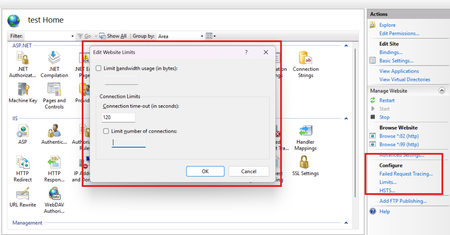
- In this blog, I am sharing learnings from multiple real-world issues I have worked on where the root cause came down to just three IIS Website Limit settings. On the surface, these options feel prett...Jun 12, 2026527Views0likes0Comments
- One of the most important UI capabilities is Adaptive Cards, which let your agent send structured, interactive content such as forms, inputs, buttons, and layouts. In this guide, you’ll learn exact...Mar 31, 2026616Views0likes0Comments
Tags
No tags to show