Recent Discussions

Joining PC to domain breaks Windows
Hey all. We have a machine in our facility that is running Windows 10 IoT Enterprise LTSC 21H2, and for some reason whenever we try to add it to our domain, it breaks a few things. Windows Search no longer works, trying to run services.msc will accept the command but will take the box literally over 5 minutes just to open, takes other things longer to load than when not joined, sometimes it hangs up after rebooting when "applying computer settings" right before it logs in to where I have to unhook the network cable, etc. The first time we tried, we rebooted after joining domain and about 10 seconds into creating the new profile after it says "Hi", the entire screen went black. We waited and waited but nothing happened, so when we hit ctrl + alt + del, the screen came up, but if we hit task manager, it just goes black again and the cursor showed up. The only way I found around this was to ctrl + alt + del and log off, then log back in. After the first scare, we unjoined and waited until a later time when production was down. Second time seemed to yield the same results, but atleast that time we tried a few other things to see and it just wouldnt work. We unjoined and I started diving in a little more to see what I could do, and after googling and running through ChatGPT, it was finally determined to run an in-place repair install. Well last night I deleted everything regarding it out of AD including the computer, user, and the GPOs created for it and started from scratch. Joined to the domain and it had the same issues but I pushed through and then started the install. Once I got through, all of the issues were still there AND now when I tried to open the software, it was having a "EtherCAT subsystem not started" error. Spent hours referencing it to a similar machine just to find out that during that in-place install, it must have lost its assignment to one of the NICs, Nonetheless I finally got that fixed, but I want to know if anyone here has ever seen that before and if you have any suggestions for a fix? Ive done like....10-15 other machines in the past 3-4 months that have not had this problem, all with a mixture of Windows 10 AND Windows 11. Any advice?5Views0likes0Comments 287Views0likes0Comments
Zigbee Dongle vs. Dedicated Gateway for Azure IoT: An Architecture Choice
Hello Azure IoT Community, I'm deep into the architecture phase of a large-scale smart building project, using Azure IoT Hub as our central command. We're incorporating numerous Zigbee-based sensors and actuators for energy and environment monitoring. A critical debate has emerged: should we rely on a centralized Zigbee USB dongle, or deploy distributed, dedicated Zigbee gateways like the OWON SEG-X5? This decision impacts system resilience, cloud integration efficiency, and long-term operational stability. The Core Trade-off: Simplicity vs. Resilience Option A: The Centralized Dongle Approach This model uses a USB dongle connected to a gateway server, which becomes the sole coordinator for the Zigbee network before relaying data to IoT Hub. The Appeal: Low initial cost and simplicity for prototyping. The Scalability Risk: This creates a Single Point of Failure (SPOF). If the host server needs maintenance or encounters an issue, the entire Zigbee network—and all dependent automations—go offline. For a commercial building, this is a critical operational risk. Option B: The Distributed Gateway Architecture This model employs dedicated, standalone Zigbee gateways (e.g., https://www.owon-smart.com/zigbee-gateway-zigbeeethernetble-seg-x5-product/) deployed across different zones or floors. Each forms its own robust mesh and connects directly to Azure IoT Hub. The Resilience Gain: Faults are isolated. One gateway’s maintenance affects only its zone. The Edge Intelligence Advantage: Modern gateways can process data and execute rules locally. For instance, a gateway can directly process inputs from a Zigbee Door/Window Sensor (DWS 312) and a Multi-Sensor (PIR 323) to trigger a local light switch, all without a round-trip to the cloud. This aligns perfectly with the Azure IoT Edge paradigm, ensuring responsiveness and offline operation. Streamlined Cloud Integration: Gateways like the SEG-X5 come with integrated MQTT API support, allowing them to send structured data directly to IoT Hub, simplifying device management and message routing in the cloud. A Practical Insight from an ODM Case Study Our experience as an IoT ODM manufacturer has shown this shift in practice. In a project akin to the Hotel Room Management case in our portfolio, the initial design using a central server with dongles presented reliability concerns. The final solution utilized distributed OWON SEG-X5 Zigbee Gateways in each hotel wing. These gateways managed all in-room devices—from Smart Sockets (WSP 406 series) and Light Switches (SLC series) to Thermostats (PCT 504)—locally. They used their MQTT API to send consolidated occupancy and energy data to the building's cloud platform (integrated with IoT Hub). The result was a system where guest room automation remained functional despite network fluctuations, and maintenance could be performed per wing without building-wide impact. Conclusion and Discussion For proof-of-concepts, dongles are sufficient. For production-grade, scalable deployments where uptime is critical, dedicated gateways provide the necessary architectural foundation. I'm keen to hear from the community: In your Azure IoT solutions, how have you integrated non-IP protocol devices like Zigbee? What strategies do you employ to balance edge processing with cloud analytics? For those using gateway architectures, how do you handle device provisioning and security at scale? If you're interested in the technical specifics of how Zigbee gateways interface with cloud platforms, including API structures and network design considerations, we've elaborated on these topics in a technical overview on our site: [https://www.owon-smart.com/news/zigbee-dongles-vs-gateways-how-to-choose-the-right-network-coordinator/ ]. Looking forward to a fruitful discussion.123Views0likes0Comments
Module identity fetch issue
I have registered an edge device[gateway] to Azure IoTHub using x509 self signed certificate. The device got registered fine and modules [edgeAgent,edgeHub] got deployed along with some custom edge modules- with deployment status 200, device and modules status reporting. The modules are running on the edge device but the modules keep restarting as they couldnt authenticate. edge Device registration is through x509 self signed certificate, with below properties in config.toml # Manual provisioning with x.509 certificates [provisioning] source = "manual" iothub_hostname = "REQUIRED_IOTHUB_HOSTNAME" device_id = "REQUIRED_DEVICE_ID_PROVISIONED_IN_IOTHUB" [provisioning.authentication] method = "x509" identity_cert = "REQUIRED_URI_OR_POINTER_TO_DEVICE_IDENTITY_CERTIFICATE" identity_pk = "REQUIRED_URI_TO_DEVICE_IDENTITY_PRIVATE_KEY" Logs from edgeHub: [INF] - Unable to authenticate client <deviceid>/<custom_edge_module> with cached service identity <deviceid>/<custom_edge_module> (Found: False). Resyncing service identity... <4> 2025-09-19 00:29:56.415 +00:00 [WRN] - Error while refreshing the service identity: <deviceid>/<custom_edge_module> OnBehalfOf: <deviceid> System.Collections.Generic.KeyNotFoundException: The given key '<deviceid>/<custom_edge_module>' was not present in the dictionary. at Microsoft.Azure.Devices.Edge.Hub.Core.DeviceScopeIdentitiesCache.RefreshServiceIdentityInternal(String refreshTarget, String onBehalfOfDevice, Boolean invokeServiceIdentitiesUpdated) in /mnt/vss/_work/1/s/edge-hub/core/src/Microsoft.Azure.Devices.Edge.Hub.Core/DeviceScopeIdentitiesCache.cs:line 187 device twin status: "deviceScope": "ms-azure-iot-edge://<devicescope>", "modelId": "", "status": "enabled", "statusUpdateTime": "0001-01-01T00:00:00.0000000Z", "lastActivityTime": "2025-09-19T00:47:10.0840495Z", "connectionState": "Connected", "cloudToDeviceMessageCount": 0, "authenticationType": "selfSigned", "x509Thumbprint": { "PrimaryThumbprint": "<thumbprint>" } Module identity twin of edgeHub: "modelId": "", "status": "enabled", "statusUpdateTime": "0001-01-01T00:00:00.0000000Z", "lastActivityTime": "2025-09-19T00:42:23.4967322Z", "connectionState": "Connected", "cloudToDeviceMessageCount": 0, "authenticationType": "sas", "x509Thumbprint": {} module identity twin of edgeAgent and other modules: "modelId": "", "status": "enabled", "statusUpdateTime": "0001-01-01T00:00:00.0000000Z", "lastActivityTime": "2025-09-19T00:54:15.6085296Z", "connectionState": "Disconnected", "cloudToDeviceMessageCount": 0, "authenticationType": "sas", "x509Thumbprint": {} The modules couldnt communicate to hub as they couldnt authenticate, where as the same modules works fine when the edge device is registered via shared access signature and send telemetry to iot hub. Please let me know where could the issue be for modules not able to communicate with iotHub129Views0likes0Comments
All Azure IoT Central Applications completly broken
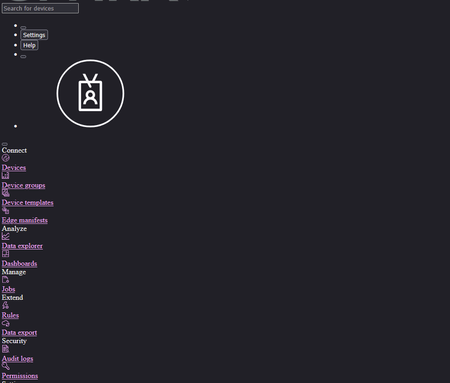
Dear community, I have big trouble regarding all Azure IoT Applications, which haven't been properly rendering since a couple of hours. Every link is broken and no data is shown as seen the screenshot below. We already tested different browser different tentants different computers No difference. Can anyone point out the reason for that or experiences similar issues right now? Best, Andy192Views3likes0CommentsSensor to AZURE IoT Hub to ADLS to Power BI
Discovery & Resolution ? By creating this workflow, I found the following: Device sensor firmware published data once every 30 seconds. AZURE IoT Hub routed this data to ADL BLOB as JSON once every 2 minutes. Power BI Power Query failed to interpret JSON files. "extra characters at end of JSON input". The PBI PQ error occurred because each BLOB file contained four individual JSON expressions - one for each device sensor publication. This can be resolved by reformatting each JSON file as a single document by bracketing all four expressions as one […] and adding a comma to the end of the first three. It works, but it's sloppy. I did it manually. A simpler resolution is to synchronize timing of device sensor publications with IoT Hub routing to ADL BLOB so that each file contains only a single JSON expression. In other words, by publishing and routing to ADL at the same frequency - only one publication / JSON expression is contained per file. This avoids the PBI PQ failure, but I have doubts about its scalability. Do any of you have a better suggestion? Is it possible to configure the IoT Hub to wrap multiple JSON expressions as a single JSON document for routing to ADLS?135Views0likes0CommentsEdge Module Authentication
Hi Folks, I've made my first IoT Edge Module (container), its just based off: FROM ubuntu:oracular For now, but it seems to start up and run correctly. I've pushed the container into ACR and added it to my manifest which pushed it down to my edge gateway and its up and running. So far so good. Now, I want my application in that container to publish events to the edgeHub, and subscribe to properties set in IoT Central. I followed some of the guides, but have had no luck. Firstly - not much love for a rust application, but aside from that, I've resorted to jumping into the container and trying to use the mosquitto clients likes so: $ docker exec -ti <module_id> bash # mosquitto_sub -d \ -V mqttv311 \ -h edgeHub \ -p 8883 \ -i "${IOTEDGE_DEVICEID}/${IOTEDGE_MODULEID}" \ -u "${IOTEDGE_IOTHUBHOSTNAME}/${IOTEDGE_DEVICEID}/${IOTEDGE_MODULEID}/?api-version=2018-06-30" \ -P "${SAS_TOKEN}" \ -t "devices/${IOTEDGE_DEVICEID}/modules/${IOTEDGE_MODULEID}/messages/events" \ --cafile /etc/ssl/certs/IoTHubRootCA.pem \ -q 1 Client <device_id>/<module_id> sending CONNECT OpenSSL Error[0]: error:0A000086:SSL routines::certificate verify failed Error: Protocol error I just cant get it to validate the certs in the edgeHub. If I look at the edgeHub container it shows: $ docker logs -f edgeHub <4> 2025-06-30 06:52:23.276 +00:00 [WRN] - "TLS handshake failed., System.AggregateException: One or more errors occurred. (Authentication failed, see inner exception.)\n ---> System.Security.Authentication.AuthenticationException: Authentication failed, see inner exception.\n ---> Interop+OpenSsl+SslException: SSL Handshake failed with OpenSSL error - SSL_ERROR_SSL.\n ---> Interop+Crypto+OpenSslCryptographicException: error:0A000418:SSL routines::tlsv1 alert unknown ca\n --- End of inner exception stack trace ---\n at Interop.OpenSsl.DoSslHandshake(SafeSslHandle context, ReadOnlySpan`1 input, Byte[]& sendBuf, Int32& sendCount)\n at System.Net.Security.SslStreamPal.HandshakeInternal(SafeDeleteSslContext& context, ReadOnlySpan`1 inputBuffer, Byte[]& outputBuffer, SslAuthenticationOptions sslAuthenticationOptions)\n --- End of inner exception stack trace ---\n at System.Net.Security.SslStream.ForceAuthenticationAsync[TIOAdapter](Boolean receiveFirst, Byte[] reAuthenticationData, CancellationToken cancellationToken)\n --- End of inner exception stack trace ---, 0af563ac" That error suggests the edgeHub does not like the CA in my module ? I'm looking for any references to get the right CA's setup so that my translation app can publish events to the edgeHub container.201Views1like0CommentsAnomalies IDs for Windows 10 IoT Enterprise LTSC 2021 for medical devices
I am working in the medical device industry and we use Windows 10 IoT Enterprise LTSC 2021 as the operating system for our devices. To comply with medical device regulations, we need access to a comprehensive and tracked list of anomalies (bugs) with specific IDs for this version of the operating system. I have been unable to find this documentation on Microsoft's official website, but it is essential for: Completing software risk analysis Documenting known vulnerabilities as required by regulations (MDR, FDA, etc.) Maintaining the traceability required for certification processes We have regular licenses for the operating system and I would like to know: Is this documentation available for Windows 10 IoT Enterprise LTSC 2021 license holders? Is there a specific channel (OEM Partner Program, Commercial Support, or other) through which we can access this information? Is there a dedicated process for medical device manufacturers to obtain this documentation? Any guidance on how to proceed would be greatly appreciated. Thank you in advance for your support!189Views0likes0Comments
Need help with updating disconnected devices
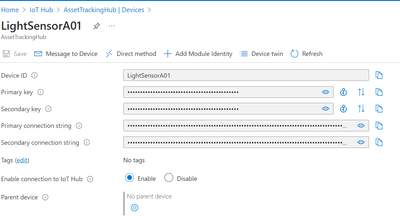
hey, I am new to azure and IOT and I need help with knowing how to do this. The scenario is that: I have a set of Linux devices that can't be connected to the internet ever, these devices should be connected to another device (will have internet) which will act as parent to all these disconnected devices. The challenge is to update these child devices using Azure IOT, the updates will be deployed in the hub, and it has to passed to child devices via parent device and automatically needs to be installed in the child devices. The parent might not require this update or might. How will I do this? also I can't use any scripting mechanisms. Now when I surfed a bit through azure documentation, I found out that I can use device update for this, What I found was: 1) setup every device in IOT hub 2)set the device with internet as parent and others a child 3)set up MCC module in parent 4)Connect the devices physically (Lan or Wi-Fi) 5)Roll out updates Now I don't know whether this is true or not, it's just my understanding. I am having few doubts: 1)do we also add the child devices (disconnected devices in IOT hub), if yes what if we have 1000 devices? (I'm asking about scalability) 2)How do I actually physically connect the parent and child devices, do I just plug in Lan/Wi-Fi, or do I have to do anything else? 3)How to add MCC Module? 4)how does this actually works? is it feasible?161Views0likes0Comments
Designing and developing for Unified Namespaces
I apologize if I am posting in the incorrect community. I would like to know if anyone has developed a Unified Namespace architecture and solution within Azure for IIOT without using third-party middleware such as ignition, high-byte, or HiveMQ. I am currently looking to use Azure IOT and ADF and Dynamics 365 as the ERP and MES.147Views0likes0CommentsIOT Central data export destination on waiting
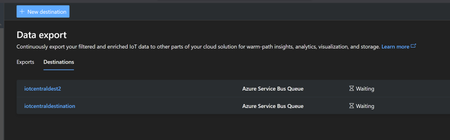
Hello. I have successfully created a demo sensor in iot central and now I would like to connect it to my service bus queue. I went to data export tab and create a new destination using the connection strings of my queue, it seemed ok but the destination is on "waiting" state since 10 hours. Is it normal? Can I check anything? Thanks Gianpaolo162Views0likes0CommentsEnable ipv6 for azure-iot-edge user-defined network
We have a Raspberry Pi that we use as an edge device. One of our modules needs to communicate over IPv6 in the local network. Since the module is automatically connected to the "azure-iot-edge" network in Docker, I'd like a method to easily enable IPv6 on this network. To achieve this, I tried following the steps described in the https://github.com/Azure/iotedge/blob/main/doc/IPv6Configuration.md. For me, this worked only for the default bridge network but not for the "azure-iot-edge" network. I also checked the https://github.com/Azure/iotedge/blob/1.5.16/doc/networking.md and attempted to configure the network using the mentioned /etc/aziot/edged/config.yaml file. However, this file did not exist initially, and when I manually added it, it seemed to be completely ignored. The only way I have been able to get IPv6 to work for the "azure-iot-edge" network so far is by completely removing it and manually recreating it with IPv6 enabled. This also required me to manually disconnect and later reconnect all modules. This does not feel like the correct way to achieve this. I would assume there should be a way to configure this either from the module definition in the IoT Hub or by adding some configuration on the device.185Views0likes0Comments- 126Views0likes0Comments
can't use create_from_edge_environment with proxy options - client doesn't connect to azure iot hub
Hello, I am trying to configure a client connection towards azure iot hub from a module. I've tried creating the client with create_from_edge_environment method and I get the following error: Traceback (most recent call last): File "/usr/local/lib/python3.10/site-packages/azure/iot/device/common/mqtt_transport.py", line 391, in connect rc = self._mqtt_client.connect( File "/usr/local/lib/python3.10/site-packages/paho/mqtt/client.py", line 914, in connect return self.reconnect() File "/usr/local/lib/python3.10/site-packages/paho/mqtt/client.py", line 1044, in reconnect sock = self._create_socket_connection() File "/usr/local/lib/python3.10/site-packages/paho/mqtt/client.py", line 3683, in _create_socket_connection return socks.create_connection(addr, timeout=self._connect_timeout, source_address=source, **proxy) File "/usr/local/lib/python3.10/site-packages/socks.py", line 209, in create_connection raise err File "/usr/local/lib/python3.10/site-packages/socks.py", line 199, in create_connection sock.connect((remote_host, remote_port)) File "/usr/local/lib/python3.10/site-packages/socks.py", line 47, in wrapper return function(*args, **kwargs) File "/usr/local/lib/python3.10/site-packages/socks.py", line 814, in connect raise GeneralProxyError("Socket error", error) socks.GeneralProxyError: Socket error: 407: Proxy Authentication Required This problem doesn't appear if I create the client using create_from_connection_string method. This adds complexity to my script and I would like to use create_from_edge_environment method. Does anybody have any insights on why one method works and the other doesn't? Thanks!188Views0likes0CommentsHow to active Windows IoT Enterprise LTSC2021 via phone
Dear Community, how can I activate Windows IoT Enterprise LTSC2021 via phone. I MUST activate via phone since the computers are installed in a facility without internet connection. What I have already tried that DID NOT work The activation dialogue does not show the "phone option" as seen in this video: https://www.youtube.com/watch?v=6RTu0_uWjMM Run "SLUI 4" from the command line with admin privilleges. It just returns without doing anything Rebuild some internal databases as described here before step 2: https://answers.microsoft.com/en-us/windows/forum/all/activate-windows-by-phone-not-there-in-settings/34b72b93-563f-463c-8614-4675cfd0143f Contacted the seller of the license (arrow), they referred me to mailto:email address removed for privacy reasons, who then told me to go to the forums What's left that I can try?680Views0likes0CommentsProblems with Edge Computing and Microsoft Azure IoT Edge. Any Advice?
Hi everyone, I'm currently experiencing some challenges with my https://www.lenovo.com/us/en/servers-storage/solutions/edge-computing/ setup and a Microsoft product. As someone relatively new to managing both hardware and software in this capacity, I could really use some advice from those more experienced. Here are the specifics of my setup: Edge Computing Setup: High-end CPUs, ample RAM, and SSD storage capacity. Microsoft Product: Microsoft Azure IoT Edge The Issues: Performance Challenges: The Microsoft Azure IoT Edge is not performing as expected with my edge computing setup, especially during high-traffic periods and intensive computational tasks. There are noticeable slowdowns and performance bottlenecks. Installation and Configuration Difficulties: During the setup of the Microsoft Azure IoT Edge with my edge computing infrastructure, I encountered several hurdles. While I managed to complete the installation, I suspect there may be lingering configuration issues affecting performance and usability. Integration and Compatibility Concerns: I'm facing compatibility issues with certain applications and third-party tools within the Microsoft Azure IoT Edge. These issues are disrupting workflows and reducing efficiency in system management. Steps Taken So Far: I've ensured that my hardware setup meets or exceeds the recommended specifications for the Microsoft Azure IoT Edge. I've followed the installation and setup documentation for the Microsoft Azure IoT Edge meticulously. I've reviewed and adjusted system configurations and resource allocations to optimize performance. Despite my efforts, the challenges persist. Have any of you encountered similar issues with Microsoft products in edge computing environments? Are there specific configurations, optimizations, or troubleshooting techniques you've found effective? Any advice, insights, or recommended resources would be greatly appreciated. Thank you in advance for your help!611Views0likes0CommentsIOT device event twin change
What are the ways to catch IOT device event twin change in azure? I want to send notification or execute something like function app, when device twin event occur and reported property get change. I am using .net 8 and azure. let me know all possible ways. Thanks, Bhavin Bhesaniya.289Views0likes0CommentsDetect IOT device twin report property and execute notification
Hello Community, I am seeking for the help to achieve one functionality for my IOT device. I have crated one Azure IOT device under azure IOT hub. Now on the device twin whenever my device report property get change( any property), It should send some event notification to the end user. What is the best way to achieve this? I want to use Azure event grid but the template is not available in message routing you can see below. If i use Event Hub then there is a risk to increase latency. let me know if there is any other way to get this with lowest latency. Thanks, Bhavin Bhesaniya.307Views0likes0CommentsDetect IOT device twin report property and execute notification
Hello Community, I am seeking for the help to achieve one functionality for my IOT device. I have crated one Azure IOT device under azure IOT hub. Now on the device twin whenever my device report property get change( any property), It should send some event notification to the end user. What is the best way to achieve this? I want to use Azure event grid but the template is not available in message routing you can see below. If i use Event Hub then there is a risk to increase latency. let me know if there is any other way to get this with lowest latency. Thanks, Bhavin Bhesaniya.281Views0likes0CommentsNetXDuo mDNS domain set issue
Hello, My issue is related to:- MCU: STM32H733 Middleware: Azure RTOS Middleware Component: NetxDuo (6.2.0) Addon: mDNS I am using Azure RTOS with NetxDuo, I implemented a secure https server in my device and implemented mDNS which was working very well for me till I required to change domain. I want to add a sub-domain like (myhostname.mysubdomain.local). In documentation it is stated that by default the domain is .local but can be changed using nx_mdns_domain_name_set API Now, I have implemented this API in my code like this: ``` status = nx_mdns_create(&mdns_instance, &ip_instance, &netxduo_packet_pool, MDNS_PRIORITY, mdns_thread_stack, sizeof(mdns_thread_stack), (UCHAR *)hostname, (VOID *)local_service_cache, sizeof(local_service_cache), (VOID *)peer_service_cache, sizeof(peer_service_cache), NX_NULL); if (status != NX_SUCCESS) { Error_Handler(); } status = nx_mdns_domain_name_set(&mdns_instance, "home"); status = nx_mdns_enable(&mdns_instance, PRIMARY_INTERFACE); ``` It returns success and according to the document I must be able to ping hostname.home but thats not the case not matter what I done it will be always accessible through hostname.local I checked the domain name buffer inside mdns_instance, its updated to home but even then changed domain is not accessible. Goal: To be able to add subdomain Bigger Picture: I want to use wild card while generating certificate and keys in alt name and CN so that same certificate can be used in many devices thats why I need subdomain as it allows wild card in *.example.local not in *.local1.2KViews0likes0Comments




Events
Recent Blogs
- Azure Sphere OS version 26.06 is now available in the Retail feed. This release includes updates to both the Azure Sphere OS and SDK. If your devices are connected to the internet, they will receive ...Jun 02, 202647Views0likes0Comments
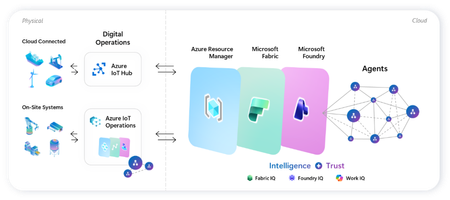
- Microsoft’s adaptive cloud approach enables organizations to turn operational technology (OT) data into intelligent actions, autonomously, without requiring everything to live in the cloud by unifyin...Apr 17, 2026740Views1like0Comments