Forum Widgets
Latest Discussions
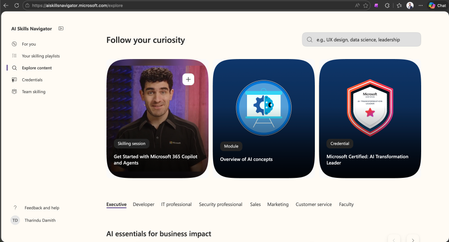
Microsoft AI Skills Navigator – What It Is and Why It Matters.
Microsoft AI Skills Navigator is a powerful, AI‑powered learning platform designed to help anyone build the skills they need to succeed in the AI era. It brings together training from Microsoft Learn, LinkedIn Learning, and GitHub into one unified space, making it easier for professionals, students, and organizations to build AI skills with clarity and confidence. [aiskillsna…rosoft.com] What Is Microsoft AI Skills Navigator? AI Skills Navigator is an agentic learning experience that uses artificial intelligence to create personalized, role-based skilling paths. It recommends content based on your goals, experience, and preferred learning style. You get access to videos, hands‑on labs, podcasts, expert‑led sessions, and curated playlists—all in one place. [techcommun…rosoft.com], [askai.glarity.app] It also brings together credentials from Microsoft, GitHub, and LinkedIn, helping you build both technical and human skills required for modern AI‑driven roles. [techcommun…rosoft.com] Key Features 1. Personalized Learning Paths The system analyzes your role, interests, and skill level to generate the most relevant training path. Whether you’re an IT professional, developer, security specialist, business leader, or student, it guides you to exactly what you need. [askai.glarity.app] 2. Unified Learning Experience The platform combines content from Microsoft, LinkedIn Learning, and GitHub so you don’t have to search across multiple websites. Everything is organized and easy to follow. [techcommun…rosoft.com] 3. Interactive and Human‑Enhanced Skilling AI Skills Navigator blends human‑led videos with real‑time AI coaching. These sessions feel like live classes and make learning faster and more engaging. [techcommun…rosoft.com] 4. AI‑Generated Playlists and Podcasts You can turn learning modules into podcasts or ask the system to generate a custom learning plan for your team. [youtube.com] 5. Accessible Worldwide The platform supports multiple languages and offers free resources, making AI skilling available to everyone. [askai.glarity.app] Benefits of Microsoft AI Skills Navigator 1. Saves Time Instead of browsing through hundreds of courses, you receive curated training that fits your needs right away. [techcommun…rosoft.com] 2. Helps You Stay Competitive AI is changing every industry. The platform helps you learn skills that are in high demand now and in the future. [askai.glarity.app] 3. Builds Confidence With AI Tools By learning concepts interactively and with AI coaching, you quickly develop confidence in using AI for work, projects, and decision‑making. [youtube.com] 4. Supports Teams and Organizations Leaders can create learning plans, track progress, and help teams adopt AI faster. This leads to better efficiency and improved business outcomes. [youtube.com] 5. One Place for Skills and Credentials You can learn, practice, and earn recognized certifications—all within one connected ecosystem. [techcommun…rosoft.com] Why It Matters Today With thousands of new AI tools launching each year, staying updated is challenging. AI Skills Navigator reduces the noise by giving you focused, relevant, and practical learning content. [techcommun…rosoft.com] It’s not just about learning technical skills. It’s about preparing to work confidently in an AI‑driven future. Thank you. Happy Learning.434Views3likes0CommentsHow to build a successful AI strategy that drives real business outcomes?
Building a successful AI strategy isn’t really about chasing the latest models or tools — it’s about solving the right business problems in a practical, sustainable way. Here’s a friendly way to think about it, especially if your goal is real business outcomes, not just AI experiments. 1.Start with business problems, not AI The biggest mistake organizations make is starting with “We want AI” instead of “What problem are we trying to fix?” Good starting questions: Where are we losing time, money, or customers? What decisions are slow, manual, or inconsistent? Which processes don’t scale with growth? Examples: Long customer response times → AI-assisted support Manual reporting → automated insights Sales teams drowning in data → AI summaries and recommendations If you can’t clearly explain the value in business terms, don’t build the AI yet. 2.Identify quick wins first Early success builds trust and funding. Look for use cases that are: Low risk Data already available Easy to measure Good early AI wins: Document summarization Chatbots for internal FAQs Sales or finance insights from existing data Email or meeting summarization Avoid starting with mission-critical automation on day one. 3.Get your data house in order AI is only as good as your data. Before scaling AI, ensure: Data is accurate and consistent Access is secure and role-based Sensitive data is protected and compliant You don’t need perfect data — but you do need trustworthy data. 4.Choose the right AI approach (not the fanciest one) Not every problem needs a large language model or custom AI. Options include: Prebuilt AI (Copilot, AI Builder, Azure AI services) Fine-tuned models for specific tasks Rule-based + AI hybrid solutions Rule of thumb: Use the simplest AI that delivers the outcome. 5.Embed AI into everyday workflows AI only creates value when people actually use it. Successful AI: Lives inside tools employees already use (Outlook, Teams, CRM, ERP) Reduces clicks and manual work Acts as an assistant, not a replacement If AI feels like “another tool to learn,” adoption will suffer. 6.Invest in people, not just technology AI strategy fails without people who understand it. You’ll need: Business leaders who own outcomes IT and security teams involved early Employees trained to work with AI Focus on AI literacy, not everyone becoming a data scientist. 7.Build governance and trust from day one To scale AI safely: Define clear usage policies Protect customer and employee data Ensure transparency and auditability Responsible AI isn’t optional — it’s a business requirement. 8.Measure what actually matters Track outcomes, not just usage. Good metrics: Time saved Cost reduction Revenue impact Employee productivity Customer satisfaction If AI isn’t moving these numbers, revisit the use case. 9.Scale what works, kill what doesn’t Not every AI experiment should survive. Double down on high-impact use cases Retire pilots that don’t deliver value Continuously improve models and prompts AI strategy is iterative, not one-and-done. In simple terms A successful AI strategy: Solves real business problems Delivers fast, measurable value Fits naturally into daily work Is trusted, secure, and scalable Evolves with the business36Views1like0Comments
How install .exe file to domain user by domain administrator
Need yours guidance how install a .exe file to domain users without administrator access or any work at client user end machine . simple easy way how to do ? answer in steps or linked video is highly appreciated . Thanks in advancewaqarahmed7869Dec 23, 2025Copper Contributor31Views3likes1CommentWhy should One learn AI ?
One should learn because, Microsoft is deep in the AI race right now — investing heavily, pushing into new product categories, expanding infrastructure, and building tools for both developers and end-users. Here’s a detailed snapshot of where Microsoft is on AI in late-2025, highlighting what they’ve achieved, what they’re working on, what challenges they face, and what it means for users/organizations 1.AI is Now the Core of Microsoft’s Strategy Microsoft isn’t treating AI as an add-on — it’s embedded into everything: Windows Copilot: AI built directly into the OS. Microsoft 365 Copilot: Automates Office apps like Word, Excel, Outlook, and Teams. Azure AI Services: Enterprise-grade infrastructure to build, deploy, and scale AI securely. GitHub Copilot & Azure DevOps: AI-driven development and deployment. Learning AI in Microsoft’s stack means you’re aligning with their long-term direction — it’s where every Microsoft product is headed. 2.Unified Ecosystem for Building & Deploying AI When you learn Microsoft AI, you get exposure to a connected environment that simplifies the AI lifecycle: Stage Microsoft Tools/Platforms Data Ingestion Azure Data Factory, Synapse, Fabric Model Training Azure Machine Learning, Custom Models, Azure AI Foundry Orchestration Azure AI Studio, Logic Apps, Power Automate Deployment Azure Kubernetes Service (AKS), Azure Functions Integration Power Platform, Copilot Studio, Microsoft Graph API You can move from “idea -prototype - enterprise-scale app” without leaving the Microsoft ecosystem. 3.Enterprise-Grade Security & Compliance Microsoft has the most trusted AI compliance posture among hyperscalers: 1000+ security and compliance certifications Responsible AI framework (human oversight, privacy, transparency) Seamless Azure AD / Entra ID integration for secure access If you work with enterprise or gov customers, this is critical — they already rely on Microsoft’s compliance backbone. 4.Massive Career & Business Demand According to recent LinkedIn and IDC reports: 80% of Fortune 500 companies use Azure AI services. “AI + Microsoft Cloud” roles (like AI Engineer, M365 Copilot Admin, Azure AI Specialist) are growing 3x faster than traditional cloud roles. Microsoft certifications (e.g., AI-102, DP-100, AI-900) are among the top-requested by employers. Learning Microsoft AI directly translates to employability and consulting value. 5.Democratized AI — Even for Non-Coders Not everyone needs to be a data scientist: Copilot Studio (Power Platform) → Build custom copilots using natural language. Azure AI Foundry → Build intelligent agents visually. Fabric AI Integration → Analyze data and auto-generate insights in Power BI. Microsoft’s goal is to make AI “as easy as Excel” — so business users can innovate too. 6.Future-Proof Skillset Microsoft is working closely with OpenAI and others to lead in: Agentic AI (autonomous reasoning agents) Multimodal AI (text, image, voice) Edge + Cloud AI (Windows + Azure hybrid AI) Responsible AI governance tools By learning Microsoft AI now, you’re future-proofing yourself for this next generation of AI-native applications.42Views1like1CommentAccess rights on domain controller
<p> I have three support team members, and I want to restrict their permissions so they only have rights to join computers to the domain and install software. Currently, someone from the team is frequently changing permissions, leading to confusion and blame-shifting. I’d like to prevent this by properly delegating roles. We are using on-premises Active Directory with Windows Server 2022, and all users authenticate via the domain controllers. Could you please guide me on how to set up these specific permissions? I tried delegations but had no luck. </p>42Views2likes1CommentEmpowerHER: Advancing Women through AI & Microsoft 365
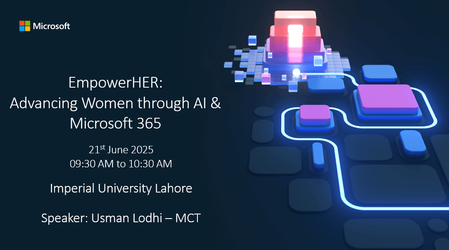
Details Global Cloud & AI Community is proud to host a powerful and practical session dedicated to empowering women through AI-driven tools in Microsoft 365. This event is designed to inspire, educate, and equip women—from educators to entrepreneurs—with the skills to confidently use AI in their daily workflows. With practical demos and real-life examples, we’ll explore how accessible technology can help women lead in classrooms, workplaces, and communities. Let’s unlock potential. Let’s build digital confidence. Let’s EmpowerHER. ### Topics & Agenda ### Introduction: Women, Technology & the Future Importance of digital empowerment for women How AI is shaping the modern workplace Why Microsoft 365 is a game-changer for productivity and inclusion Vision of the Global Cloud & AI Community: Inclusion, Innovation, Impact Microsoft 365 Copilot – Your Personal AI Assistant What is Copilot and how does it work Live demo: Generate professional content instantly (Word, Outlook) Summarize meetings and emails Create smart presentations with ease Use cases: Empowering educators, leaders, and professionals Boosting Productivity & Creativity with Microsoft 365 AI Tools Dictate Tool – Speak instead of type: hands-free writing Speaker Coach – Practice your voice, tone, and pace with confidence Immersive Reader – Make reading accessible and inclusive Microsoft Designer – Auto-create eye-catching slides and content Analyze Data in Excel – Get insights without formulas Microsoft Editor – Polish your writing with AI-powered grammar and style Learn More & Keep Growing Free AI learning resources on Microsoft Learn: Generative AI Responsible AI Machine Learning Join the Microsoft Learn CommunityUsmanLodhiMCTJun 20, 2025Learn Expert50Views3likes0Comments



Tags
- ai2 Topics
- Active Directory (AD)1 Topic
- agentic ai1 Topic
- azure ai1 Topic
- azure ml1 Topic
- azure ai foundry1 Topic
- skills1 Topic