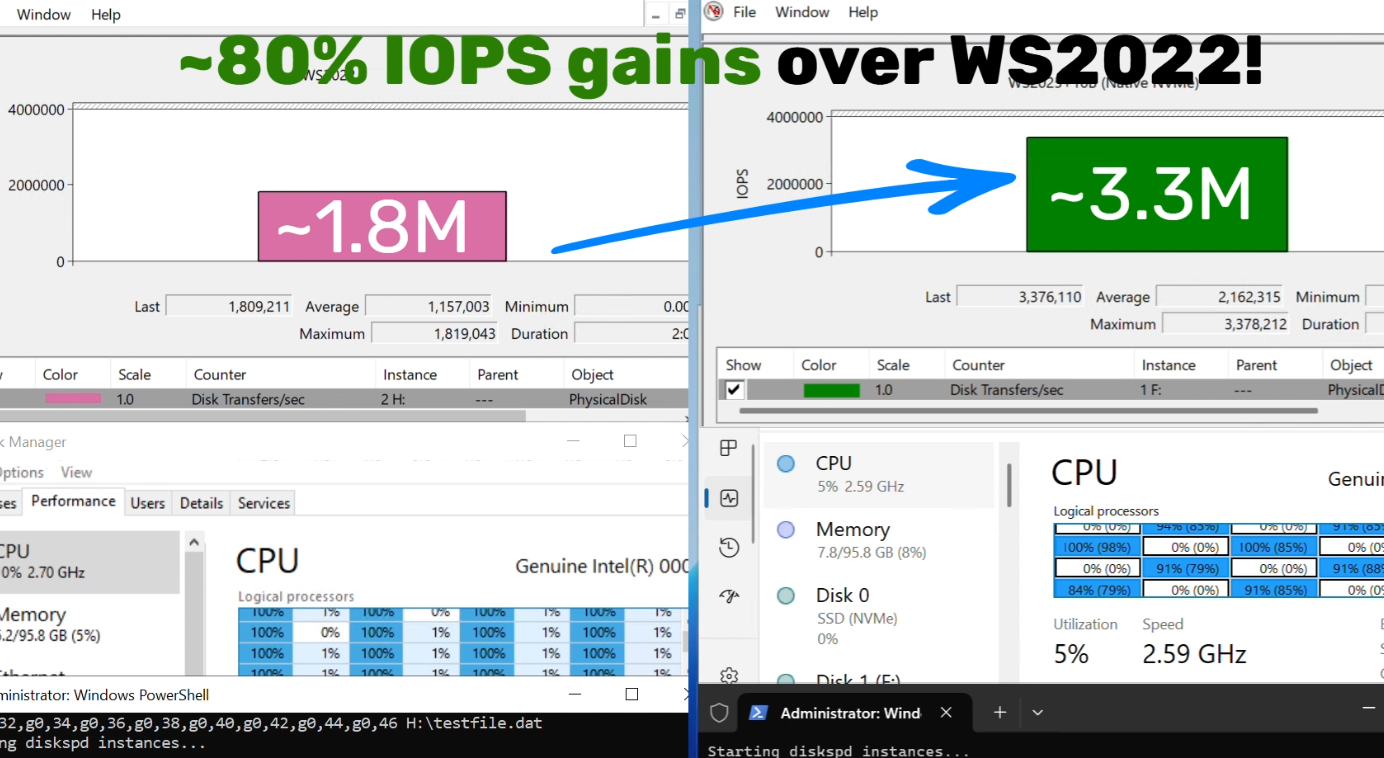
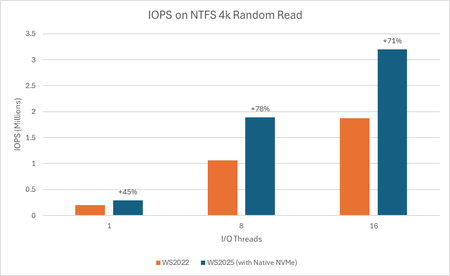
With these additional features enabled, I mange to get it running on Windows 11 (disk showing up under Storage Disks as NVMe) - but I can't measure any improvement, in fact I only get worse numbers after the change.
The article only talks about WS2025, do any of you know if it actually is suppose to work on clients?
Additional keys for Windows 11 - but I don't see any performance gains, so I might not work on clients at all - do you see a difference?
reg add HKEY_LOCAL_MACHINE\SYSTEM\CurrentControlSet\Policies\Microsoft\FeatureManagement\Overrides /v 1853569164 /t REG_DWORD /d 1 /f
reg add HKEY_LOCAL_MACHINE\SYSTEM\CurrentControlSet\Policies\Microsoft\FeatureManagement\Overrides /v 156965516 /t REG_DWORD /d 1 /f
reg add HKEY_LOCAL_MACHINE\SYSTEM\CurrentControlSet\Policies\Microsoft\FeatureManagement\Overrides /v 735209102 /t REG_DWORD /d 1 /f

 Microsoft


