Blog Post
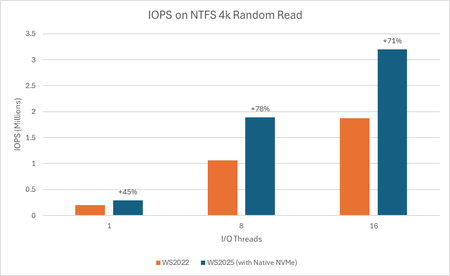
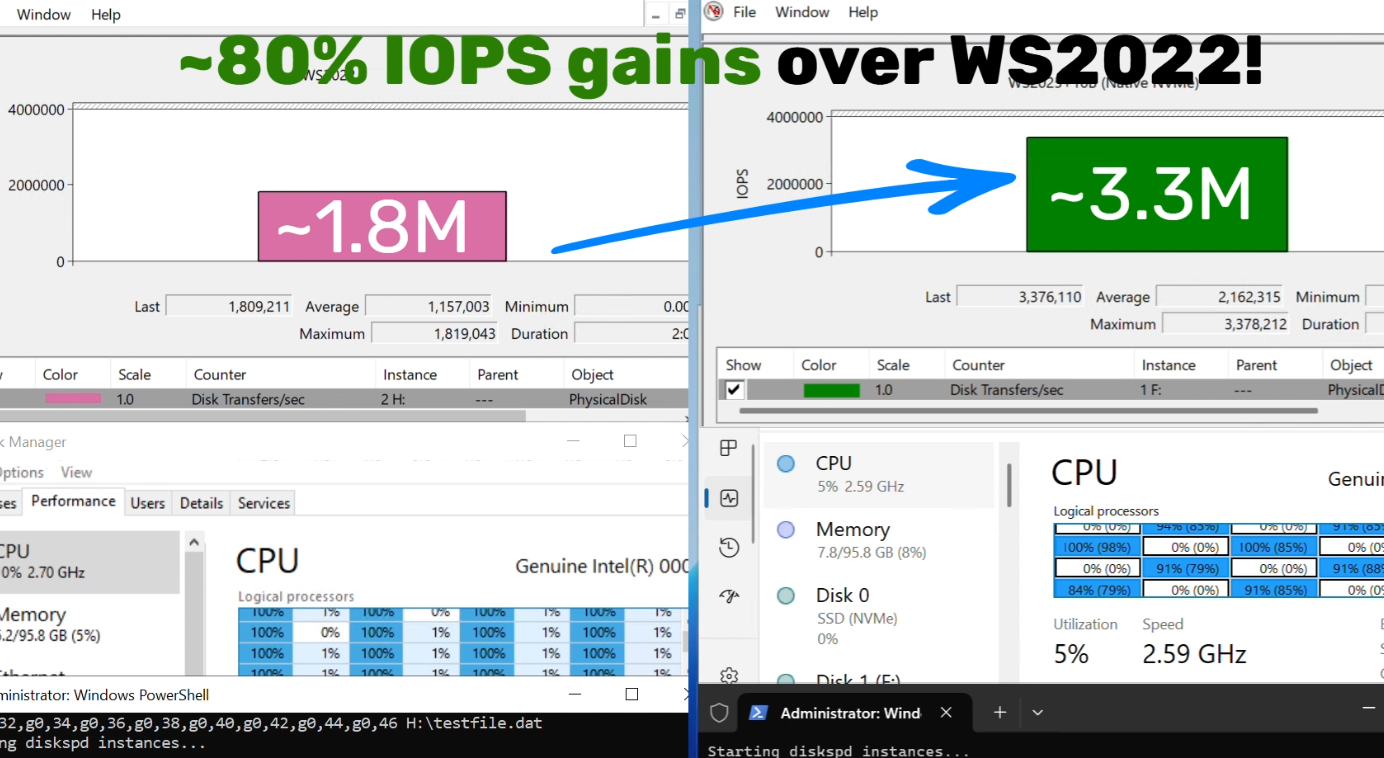
Announcing Native NVMe in Windows Server 2025: Ushering in a New Era of Storage Performance
With these additional features enabled, I mange to get it running on Windows 11 (disk showing up under Storage Disks as NVMe) - but I can't measure any improvement, in fact I only get worse numbers after the change.
The article only talks about WS2025, do any of you know if it actually is suppose to work on clients?
Additional keys for Windows 11 - but I don't see any performance gains, so I might not work on clients at all - do you see a difference?
reg add HKEY_LOCAL_MACHINE\SYSTEM\CurrentControlSet\Policies\Microsoft\FeatureManagement\Overrides /v 1853569164 /t REG_DWORD /d 1 /f
reg add HKEY_LOCAL_MACHINE\SYSTEM\CurrentControlSet\Policies\Microsoft\FeatureManagement\Overrides /v 156965516 /t REG_DWORD /d 1 /f
reg add HKEY_LOCAL_MACHINE\SYSTEM\CurrentControlSet\Policies\Microsoft\FeatureManagement\Overrides /v 735209102 /t REG_DWORD /d 1 /f
- MSP_Knuckle_DraggerDec 23, 2025Copper Contributor
On one Win11 25H2 system, I saw 12% higher max read speeds, 2% higher max write speeds, 167% higher IOPS between 512b and 8KB IOs. 138% more performance between 512kb-8MB reads & writes. It's a 4-year old OEM Samsung NVMe. While these results won't be representative of all hardware out there, the new nvme driver improved responsiveness and reduced time to login to desktop. Overall the results were improved across the board, with more consistent performance across a broad range of file sizes. This driver hits the performance limitations of the NVMe controller.
- Elden_ChristensenJan 08, 2026
Microsoft
We recognize this is an exciting change, and while I admire the passion and creativity I want to be really clear that Native NVMe is ONLY supported on Windows Server 2025 with the October update or later. We hear the feedback and we are absolutely exploring bringing more broadly to the entire Windows codebase in the future.
- CSharpFiascoJan 13, 2026Copper Contributor
I would also be excited for this to come to Windows 11!
- RHCDec 23, 2025Copper Contributor
Did you enable it by adding the 4 reg keys? Or did you do something else?
- hp18568Dec 23, 2025Copper Contributor
I run 23H2, and I don't see that any of the 4 registry keys are having the desired effect.
- Squall_LeonhartDec 23, 2025Copper Contributor
You need to register the class id's in these locations or safemode will be broken
HKEY_LOCAL_MACHINE\SYSTEM\CurrentControlSet\Control\SafeBoot\Network\{75416E63-5912-4DFA-AE8F-3EFACCAFFB14}
HKEY_LOCAL_MACHINE\SYSTEM\CurrentControlSet\Control\SafeBoot\Minimal\{75416E63-5912-4DFA-AE8F-3EFACCAFFB14}
They aren't present on server either......- TeknikFreak1975Jan 02, 2026Copper Contributor
How do I perform the registration of the class id's?
Just add the registry values?
What data should they contain? - user5242Dec 29, 2025Copper Contributor
Thanks for the info.
If i can ask a more explict explanation, class id of what ? where to be found ? how to register it ?
- Karl-WEDec 23, 2025MVP
Is this true for Windows Server as well? Anyone tested WinRE after the change?
I can check that, just looking for other references.