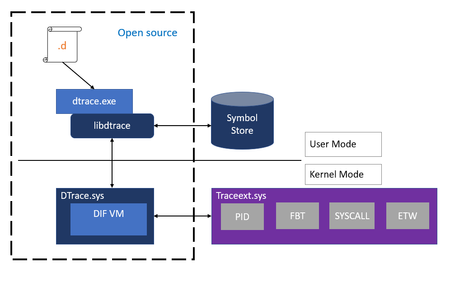
I get this error "Product: DTrace for Windows -- Error 1920. Service 'dtrace' (dtrace) failed to start. Verify that you have sufficient privileges to start system " 1) when i run the DTrace.amd64.msi in cmd box with Administrator priv and I have run the "bcdedit /set dtrace on" and I'm running Windows 10 build 18356.1. What could i be missing ?
1)
Log Name: Application
Source: MsiInstaller
Date: 3/14/2019 4:42:44 PM
Event ID: 11920
Task Category: None
Level: Error
Keywords: Classic
User: DESKTOP-M4I196O\pgram
Computer: DESKTOP-M4I196O
Description:
Product: DTrace for Windows -- Error 1920. Service 'dtrace' (dtrace) failed to start. Verify that you have sufficient privileges to start system services.
Event Xml:
<Event xmlns="http://schemas.microsoft.com/win/2004/08/events/event">
<System>
<Provider Name="MsiInstaller" />
<EventID Qualifiers="0">11920</EventID>
<Level>2</Level>
<Task>0</Task>
<Keywords>0x80000000000000</Keywords>
<TimeCreated SystemTime="2019-03-14T15:42:44.556932600Z" />
<EventRecordID>275</EventRecordID>
<Channel>Application</Channel>
<Computer>DESKTOP-M4I196O</Computer>
<Security UserID="S-1-5-21-2576452605-3747203651-1590175832-1001" />
</System>
<EventData>
<Data>Product: DTrace for Windows -- Error 1920. Service 'dtrace' (dtrace) failed to start. Verify that you have sufficient privileges to start system services.</Data>
<Data>(NULL)</Data>
<Data>(NULL)</Data>
<Data>(NULL)</Data>
<Data>(NULL)</Data>
<Data>(NULL)</Data>
<Data>
</Data>
<Binary>7B36343033373935422D424444432D343246322D394445432D4134363436343437354337327D</Binary>
</EventData>
</Event>