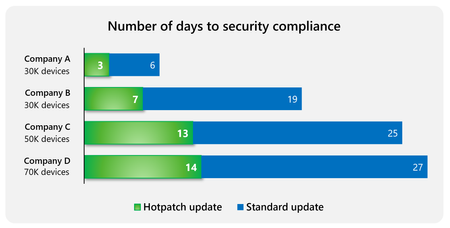
Windows Autopatch is enabling hotpatch security updates by default to help secure devices even faster. This change in default behavior comes to all eligible[i] devices in Microsoft Intune and those a...
I thought this announcement would mean it was worth trying Hotpatch on our Panasonic CF-33-2's from build and it looks like it's gone wrong right away.
The current base OEM image for this model uses 10.0.26100.1. It looks as though the CF-33 hasn't managed to apply any updates before Autopatch kicked-in. Autopatch has gone on to try to apply KB5085518 and it fails with 0x800f0991. Error displayed in Settings UI for WU, and was suggesting a reinstall of Windows:
After running a "DISM /Online /Cleanup-Image /RestoreHealth", and retrying KB5085518 it said Download error - 0x80248007:
It's like 10.0.26100.1 is missing a prerequisite or something. Often, Windows Update runs before Autopatch registration but it looks like Autopatch got there first today.
Based on Windows Error Reporting:
WU/Autopatch is trying to move it to 26100.7985 (ge_release_svc_hotpatch_im) via Package_for_RollupFix 26100.1742.1.10 (KB5085518 path).
CBS cannot stage that package → 0x800F0991. DISM /RestoreHealth doesn’t clear it
WU then later throws 0x80248007 as the metadata gets into a bad state.
There’s no visible package/manifest/registry corruption.
The failure appears to be on the Hotpatch servicing branch transition.

 Microsoft