Hey Jamie,
Thanks for reaching out. It sounds like you have the wrong idea around the scope of Autopatch as a product so happy to help clear that up!
All Windows Update policies and reports within Intune are dependent on Windows Autopatch. A couple of years ago, there update space was more fragmented and there were three update products from Microsoft: Windows Autopatch, Windows Update for Business Deployment Services, and Windows Update for Business. Those all got folded into one product called Windows Autopatch. What you're thinking of as the Automated system for managing rings is just one feature of the service called Autopatch Groups but the whole product spans update rings, quality update policies, driver update policies, feature update policies, update readiness and various other reports. Hope that helps clear things up :)
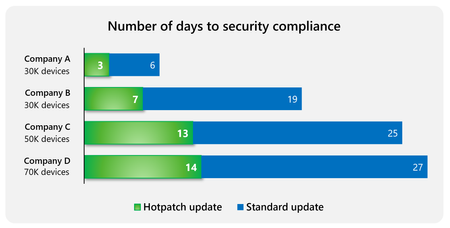
To your specific question: Yes, if you don't want to start receiving Hotpatch updates then all you need to do is toggle the button from the blog going live on April 1st from "Allow" to "Block". You can also set a desired behavior for specific devices using Quality Update policies.

 Microsoft
