Updated Nov 09, 2023
Version 7.0
abdias_ruiz Microsoft
MicrosoftMicrosoftMicrosoft
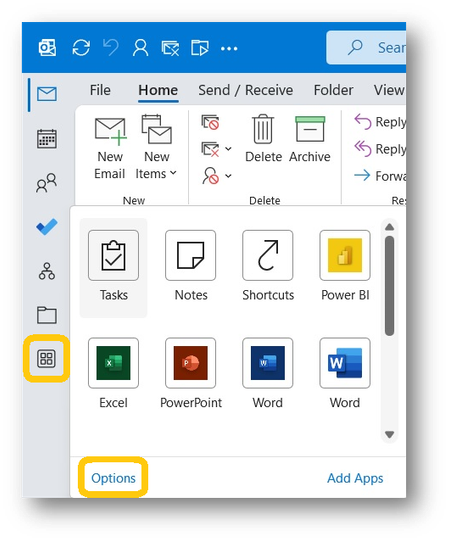
MikeOSacto I’m not one hundred percent sure we’re talking about the same thing. Desktop Outlook has from the beginning been a five-app product – Mail, Calendar, Contacts, Tasks and Notes. One could just as easily use Windows’ built-in apps performing similar functions which could all be easily accessed from either the Start Menu or the Task Bar (if pinned). But for users of Outlook, there must be a way of moving between Mail, Calendar, Contacts (I guess it’s People now), Tasks and Notes and that is the function of the tool bar that is the topic of discussion. Teams, like Outlook, has built in apps – Activity, Chat, Teams, Calendar, Calls and Files and one needs the tool bar to move between them. And, like Outlook, you can add other apps to the tool bar (which is IMHO senseless because, as you rightly point out, they can be launched elsewhere). At a minimum, you must have the built-in apps on a tool bar so they can be selected and that’s all I have on mine. Anything else that I regularly use is pinned to the Task Bar at the bottom of my computer screen. The tool bar only needs apps that cannot be gotten to any other way. Having a required tool bar on the upper left takes up valuable real estate on a laptop screen. Having it on the bottom does not.