Updated Jul 27, 2020
Version 13.0
Jessica_Wilczek Microsoft
MicrosoftMicrosoft
Downloaded as part of the Insider Fast program and I don't like several aspects of the new approach for the following reasons
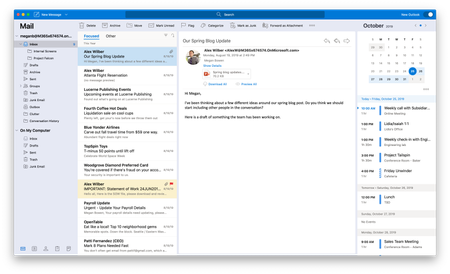
What concerns me in the current build of 16.32 (19110600) is the complete absence of being able to customise columns and appearance.
Specifically, I just want to work in a list of emails by arranged by date, emails on the right, folders on the left. I don't find Grouping by Conversation helpful at all so I never use that feature.
I don't want to have a Reading Pane as I prefer to open individual messages and display more emails in list view. I also work in public spaces so I don't necessarily want email contents to appear by default. Nor do I want my My Day/Calendar in view as a column since I can use Cmd-2 to bring up the calendar just as easily.
Whilst I know that I can hide the RP and the My Day column, my issue with the New Outlook message view is that it still displays the first part of the message in preview which makes every line the same length and is just too much clutter on screen. Worse, I cannot adjust the width of the columns to my liking. 'From' is way too narrow, 'Subject' is too wide and I can't seem to find a way to add 'Categories' (which I use a lot) to the default view.
Please can you give us the option to switch off 'first line preview' and let us choose our own columns and widths and keep the column headings. I don't see any benefit in making the Filter command a drop down. I much prefer just being able to click on the column headings to sort alphabetically or by date otherwise you have to keep going back to that filter button which is kind of annoying.
I guess this is a fundamental part of the new design but the benefit of a toolbar over the old ribbon, since the different ribbon components had more aggregate commands than seems to be the case with toolbar buttons, seems very overstated.
I hope this feedback, although not terribly positive, is helpful.