Search quality is easy to describe and difficult to engineer. A user may remember a sender, a phrase, or the approximate time of a message—but not the exact terms that an index expects. The system must retrieve the right candidates, rank them well, and respond quickly across large, noisy mailboxes.
We’ve been listening closely to customer feedback and looking at where the search experience isn’t meeting expectations and where we can do better. That feedback, together with our engineering signals, has helped us focus on the areas that matter most. Over the past several months, the Outlook team has been working on all three parts of that problem: improving result ranking, making search more resilient when connectivity is poor, and building a tighter feedback loop between user experience and our engineering signals. Here is what has changed, the technical reasoning behind it, and what we are testing next.
1. Changes users can see
Expanding the relevance-ranked set
The ranking system now has more room to surface likely matches before results transition to chronological order.
Outlook now shows up to seven relevance-ranked results at the top, followed by the remaining results ordered by date. Ranking considers signals such as recency, sender, and prior interaction with messages. Increasing the relevance-ranked set is a presentation change, but it also creates a larger surface for evaluating ranking quality. We are continuing to tune both the ranking logic and the boundary between relevance and date-based ordering, while keeping additional sort options accessible.
Availability: Classic Outlook for Windows Current Channel and Monthly Enterprise Channel with Subscription, Outlook on the web, new Outlook, and Outlook Mobile. Rollout on Outlook for Mac is in November. Available across Commercial and Consumer.
Comparison of the previous three-result relevance block with the expanded set of up to seven top results in Classic Outlook for Windows.Cloud-first search with automatic local fallback
The goal is consistent capability when online and graceful degradation when the network is not reliable.
Classic Outlook combines Microsoft’s cloud search service with Windows Desktop Search, which maintains a local index on the PC. Some query classes historically stayed local, including Find Related, portions of advanced search syntax, and queries in a broader set of languages. Eligible searches now use the cloud service so they can benefit from the same search capabilities and service-side improvements as other Outlook clients. Local search remains necessary for offline scenarios and for content that is not stored in the cloud, including PST files and POP or IMAP accounts. Classic Outlook search now automatically falls back to the local index when connectivity or service latency prevents a timely response from the cloud service.
Availability for automatic fallback: Classic Outlook for Windows Current Channel with Subscription, Outlook Mobile, Outlook for Mac. New Outlook is in development.
Classic Outlook search automatically falls back to the local index when connectivity or service latency prevents a timely response.Improving latency
Average latency matters, but the slowest searches disproportionately shape whether search feels dependable.
Two changes produced meaningful gains in the slowest 5% of Classic Outlook searches:
Authentication-path optimization: reduced latency for the slowest 5% of searches by 40% for Commercial mailboxes.
Migration to cloud search: for query classes moved from the local index to the cloud, latency for the slowest 5% fell from 4.5 seconds to 1.3 seconds.
Availability: Classic Outlook for Windows Current Channel and Monthly Enterprise Channel with Subscription. Available for Commercial and Consumer.
Calendar search spotlight adds temporal context
Calendar search spotlight renders matching events directly in the calendar view. That context matters: the event before or after a match, and any overlap, may be as useful as the match itself. Users can switch back to the traditional list with one click.
Availability: Rolling out to Outlook on the web and new Outlook in November. Available across Commercial and Consumer. We are evaluating feedback before expanding this experience across Outlook clients.
Calendar search spotlight displays matching events in their surrounding schedule context, with an option to return to list view.2. How we evaluate and improve ranking
How we measure search improvements
Search improvements need repeatable evaluation before they reach production.
We begin with offline tests against generated mailboxes designed to reproduce the characteristics of real enterprise inboxes: thousands of messages, meeting invitations, newsletters, group mail, and topics that overlap across projects. Generated data gives us control and repeatability without using a customer mailbox as a test fixture.
The evaluation set contains thousands of queries with known expected answers. Its distribution is informed by thousands of real search patterns, including keywords, names, email addresses, and combinations of those terms. Offline evaluation is useful for iteration, but it cannot reproduce every mailbox or intent. Before broad rollout, we therefore validate changes through controlled live experiments and online quality metrics.
Distilling a ranking model for Outlook scale
Better semantic ranking is useful only if it fits the latency and throughput constraints of a service used at Outlook scale.
We are building an Outlook-specific small language model ranker. The model is trained through distillation: a larger model provides supervision to a smaller model that is practical to serve within Outlook’s performance envelope. The engineering objective is not simply model quality in isolation; it is a better relevance-latency trade-off under production load. Early offline results are promising. Internal testing is underway.
Alongside this work, we rolled out several smaller service changes, including better handling of stop words such as “the,” “and,” and “is.” This stop-word improvement affected about 3% of searches. Those searches saw an increase in result clicks where users opened and engaged with the mail.
Availability for stop words handling: All Outlooks endpoints. Available for Commercial and Consumer.
Knowledge distillation trains a smaller, Outlook-specific student ranker to mimic a larger teacher model's relevance scores, meeting production latency requirements.3. Closing the gap between metrics and user intent
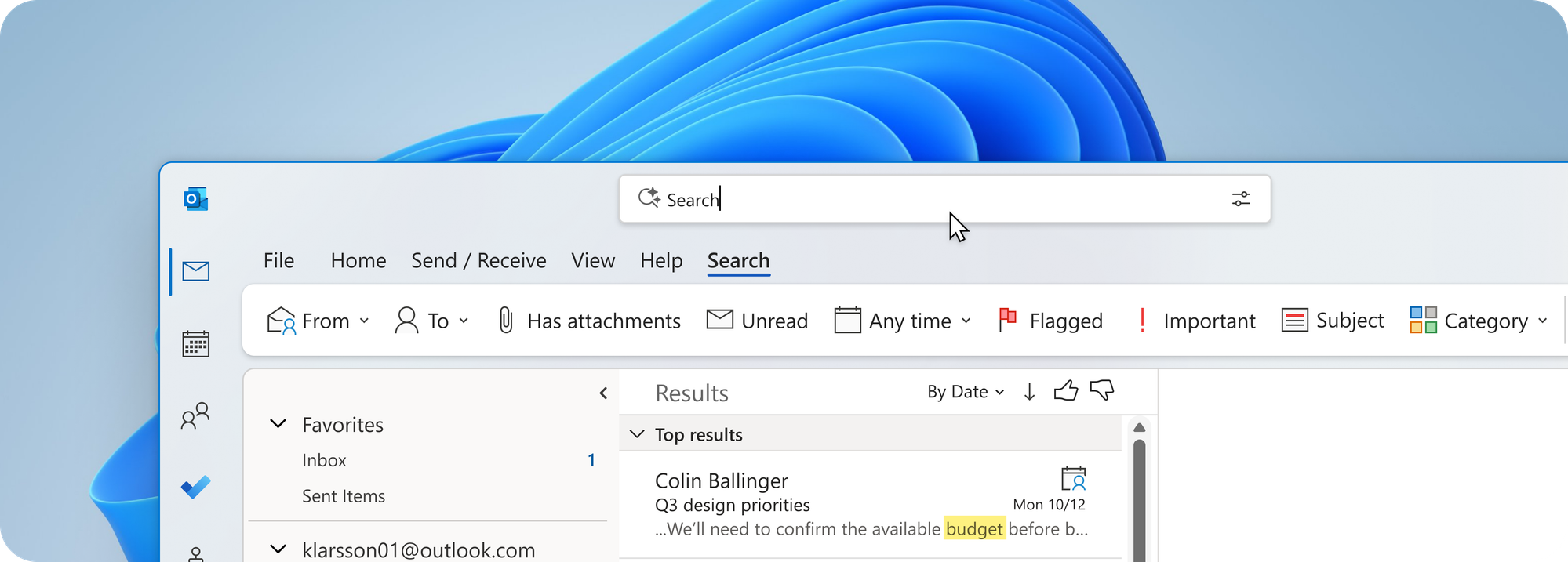
Outlook now includes a thumbs-up or thumbs-down prompt on the search results page. With appropriate diagnostic context, that signal helps engineers identify query classes and result patterns that need investigation. One finding is especially important: behavioral metrics can suggest success—for example, a result was opened or read—while the user still reports that the search failed. Explicit feedback exposes cases where proxy metrics do not capture intent.
Availability: Classic Outlook for Windows Exchange Online and Outlook.com accounts on Current Channel with Subscription, Outlook on the web, new Outlook, Outlook Mobile, and Mac. We are adding thumbs to more Outlook Search surfaces in November and December. Available for Commercial and Consumer.
The in-product feedback prompt captures an explicit quality signal alongside diagnostic context.Why explicit feedback matters
If a search result doesn’t match your intent, use the thumbs-up or thumbs-down prompt to tell us. Enterprise mailboxes vary widely in vocabulary, communication patterns, retention history, and organizational structure. Two users can issue the same query with different intended results, or remember the same message through entirely different details. That makes search a continuing systems problem rather than a feature that reaches a fixed endpoint. If a result set misses your intent, the thumbs signal gives us evidence that clicks and dwell time alone cannot provide—and helps us prioritize the next investigation.

 Microsoft