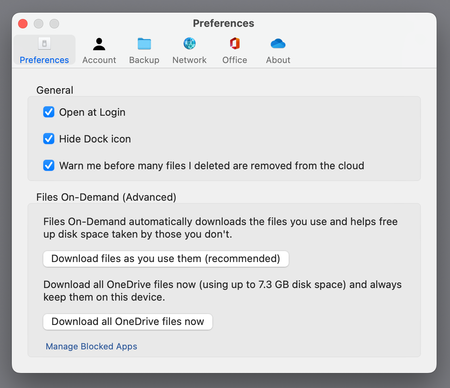
Liz_Atems_elisatems I'm pretty sure you'll find this won't work, because of the way Apple has implemented the File Provider framework, which OneDrive now uses. File Provider caches files from cloud storage providers in the Library folder of your home folder. There is currently no way to relocate this. OneDrive allows you cache files on an external drive by setting your storage location to the external drive, but it does this with a kluge of making the cache folder in your Library folder point to a second hidden folder in the root of your external drive. I gave up on this, because sometimes files were available and sometimes they weren't. Also, sometimes files were cached in my library folder and sometimes in the hidden folder on my external drive. For even more fun, sometimes files were corrupted by the time they made it to my computer. Marking a folder to stay local worked sometimes. Also, cloud status icons didn't work. Oh, and no actual files were ever available in the OneDrive storage location, which broke Time Machine and Carbonite backups. I was pissed off enough that I moved all my critical files to Dropbox, which still uses its own sync.
Because Apple requires that files be cached on the system drive, I suspect that moving your home directory to an external drive will break even iCloud Drive—that would be a good test of your current configuration. I've kept OneDrive on my computer in the default configuration (caching in the Library directory of my Home directory, on my system drive), because I work in IT in a MS first shop, and I need to sync some files between my home computer and my work computer. It's been stable in that configuration—I just restrict my storage to files I don't care about keeping local. Anything important goes on Dropbox and is backed up on Time Machine and Carbonite.
I'm hoping Apple catches enough heat that they stop breaking their own backup software with their File Provider framework—I'm an active amateur photographer, and I have a lot of large files that need to stay local and take far too long to download, even with a good broadband connection. I'm convinced this is a marketing decision across the industry to make user dependent on their cloud storage providers and to make it difficult to switch. All the big providers want you to be firmly stuck in their ecosystem with no practical way to move. If all your files are on their servers, even if you own them legally, it can be nearly impossible to get them all. I don't care how securely they're stored if I have wonky Internet and I can't get them, or if I live in a rural area and good broadband is difficult to impossible to find. It's a stupid policy that favors the soft middle of the market and leaves anyone with unusual or demanding configurations out in the cold.