BRETT COX Based on your screenshot this feature has already rolled out to your tenant.
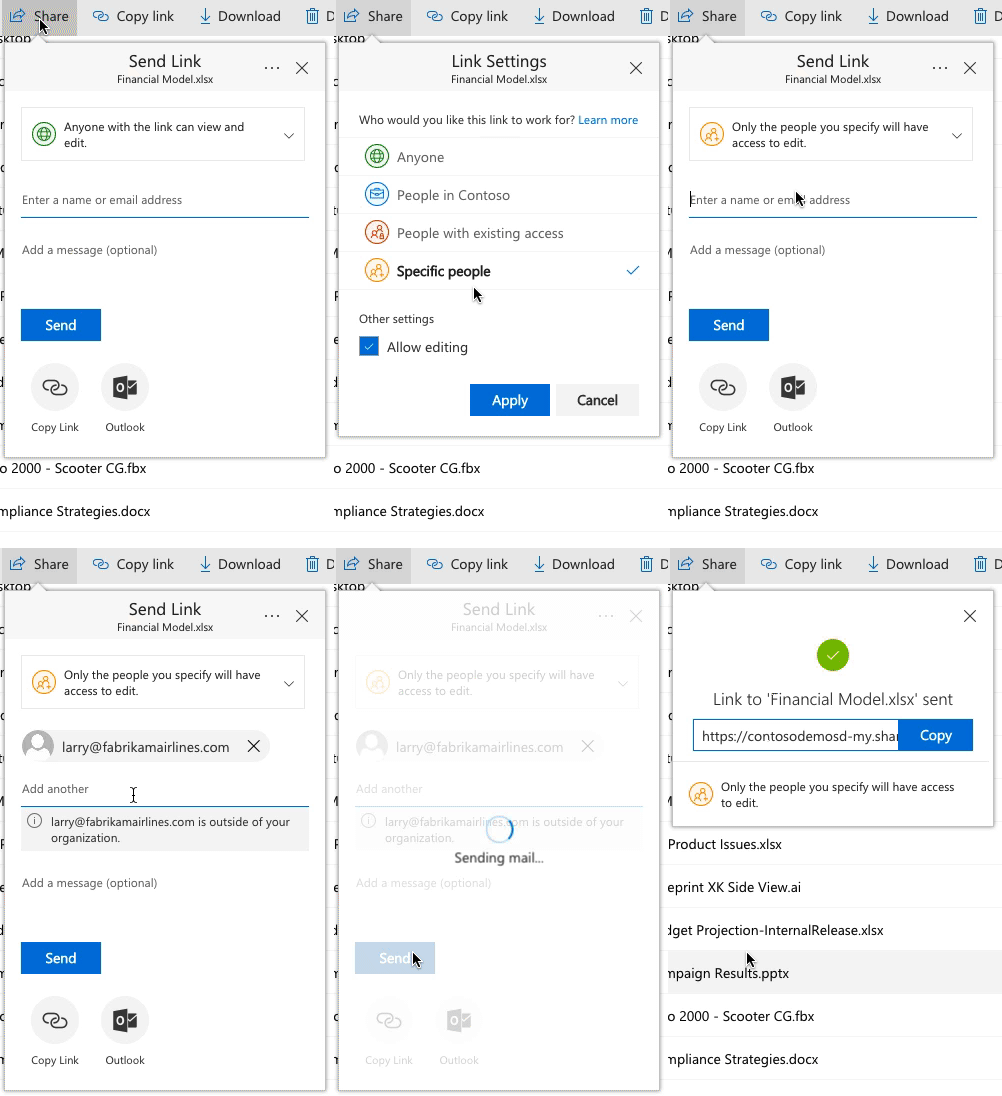
You can limit the type of external sharing allowed in your tenant or in specific groups/sites. This flow is enabled when your external sharing is set to allow new external users. If you turn external sharing off, or you limit it to only existing users in the directory then no users will go through this flow. But when you allow sharing to new external users then this flow will be used during secure sharing and there’s no way for admins to revert to the old experience.
The code itself can only be used once and must be used within 15 minutes of it being generated (it gets generated when the recipient clicks on the link). Once the code is entered, by default it will only allow access to the shared resource for the length of the browser session. If the browser session ends and the user clicks on the link again in a future session then a new code will be generated and sent to the email address the link is secured to.
If end users/recipients do not want to have to re-enter codes on every new session, they can choose the “keep me signed in” checkbox on the code verification page. When they do this, the access to the file will persist beyond the browser session. They can close their browser and open it again. When they click the link they will not be asked for a new code.
By default they can do this indefinitely (as long as they manually checked “keep me signed in”) but the setting in your screenshot allows admins to set a time limit for when recipients have to get a new code, even if they had checked to be kept signed in.