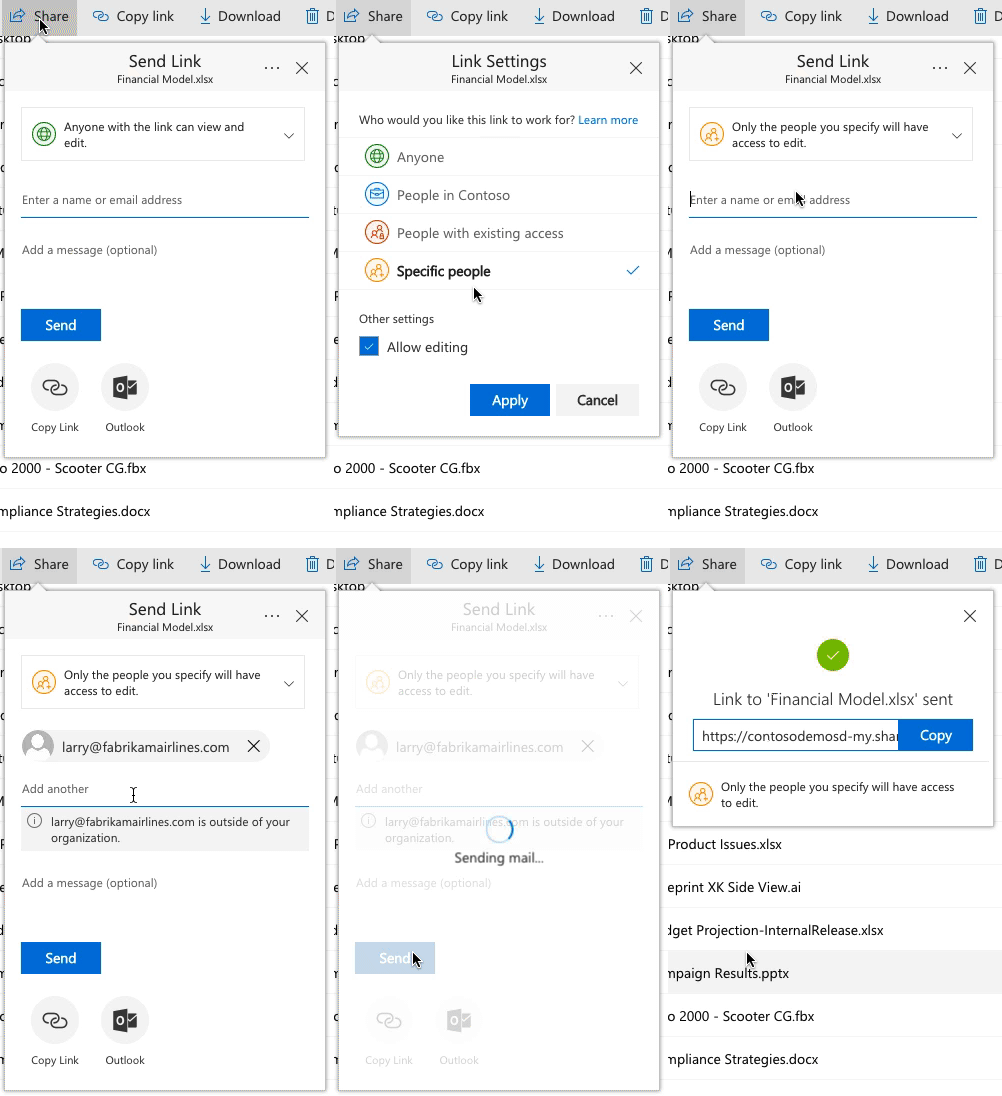
I have mixed feelings about this change.
Firstly although we received the message in September that it was slowly rolling out, we didn't get any further messages and so last Wednesday we started getting tickets from users that their partners (outside the organisation) were complaining they couldn't get to content. Turned out we had been rolled to the new experience without any further communications or warning - that needs to improve.
I saw elements of this at Ignite back in September so I knew when customers explained what they were seeing that we had been 'upgraded'.
To the feature itself.
1) Yes it makes adhoc sharing a little easier, previously some customers didn't get the 'Do you have a Microsoft account / O365 Account' screen. I struggle what was difficult about it but whatever. So on that point yep the verification code is a different approach and for some folk easier.
2) However if I invite say 6 external people to share a folder so we can collaborate then they all get that code and under permissions I see one entry, the link with a little 'x' to the right of it (more on that later) and underneath it small grey circles for each of the 6 people I shared it with. Say I no longer want to share with 1 of those folk, I can't remove just that one. I have to kill the link completely and reinvite the other 5 people - they then get a new link.
3) That link. That link needs to be kept and if it changes as per item 2 then it needs to be updated - that's a pain. Our users can't just send them a link to the folder and have them go through the login screen as they did previously. They have to remember when they send emails to the whole team that these 6 people have a different link to everyone else. And if they invite some more external people that will be another weird link. In just a few days for one of our external collaborations we have 3 of these odd verification code links and of course the 10 or so internal people. That means for every update email they have to send 4 links out and inform folk which link to click on to keep up to date on progress on the project. - that's absolutely horrible.
4) If I do have a long term external partner that we are working with then the best way is actually to onboard them into AD. This now becomes an IT ticket that the colleague has to submit and our managed service has to execute. Its also something the colleague has to think about up front. In the previous solution (last Tuesday) they just emailed them and they got added to AD. So an IT burden and a colleague burden has been added.
Overall I think the idea is good but the implementation is weak and not well thought out. Longer beta testing of this feature with companies that do large amounts of external collaboration would have been good. I also feel there needs to be a colleague option that lets them choose between 1-time adhoc collaboration and long term collaboration ie. verification code or onboard. The verification codes sent need to be broken into distinct permission entries, ie. an invite to 6 people should result in 6 distinct permission entries, not 1 link with 6 people listed under it.
This change really hurts us and to be honest its pushing us away from O365 towards Box and other solutions.