Updated Jul 28, 2026
Version 3.0
ScottSawyer Microsoft
MicrosoftMicrosoftMicrosoft
This is a helpful update. However, I wanted to raise a related issue with the Sync button functionality: it is only partially success when a device is on the login screen prior to a user logging in. That is, there's no user-authenticated session. I think one of the timed syncs (maybe at 8 hours) that is eventually fully successful, but the Sync button should be capable of that, even if it is the fallback functionality of it when it is not successful. Even Restart commands from Intune do not go through with the Sync button. The device is connected to the internet, connected to a power adapter, and is kept awake. I have an open MS Support case about why it was not successful on the login screen, but I suspect that either ScottSawyer or Iris_Yuning_Ye already knows the difference between how the timed events work compared to the Sync button.
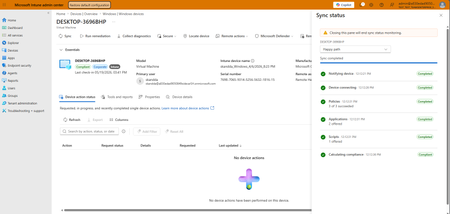
The new Sync Status shows this when I first press Sync:
Rebooting from the login screen (or maybe pressing Sync again?) shows this:
In case you're wondering about the use case, our automated offboarding steps apply a configuration profile targeting the device (not the user) which enables the "Exclude credential providers" policy so that the user is not able to log in with username - password/WHfB. This works fine. However, there are times when a user's employment contract is extended, but their account wasn’t properly updated. So, we need to re-enable their ability to log in. The steps to reverse this also target the device. However, the current process requires the user to keep the computer awake, and takes many hours for the device to fully sync, which results in downtime. It would be really helpful if the sync button was able to be fully successful while on the login screen.