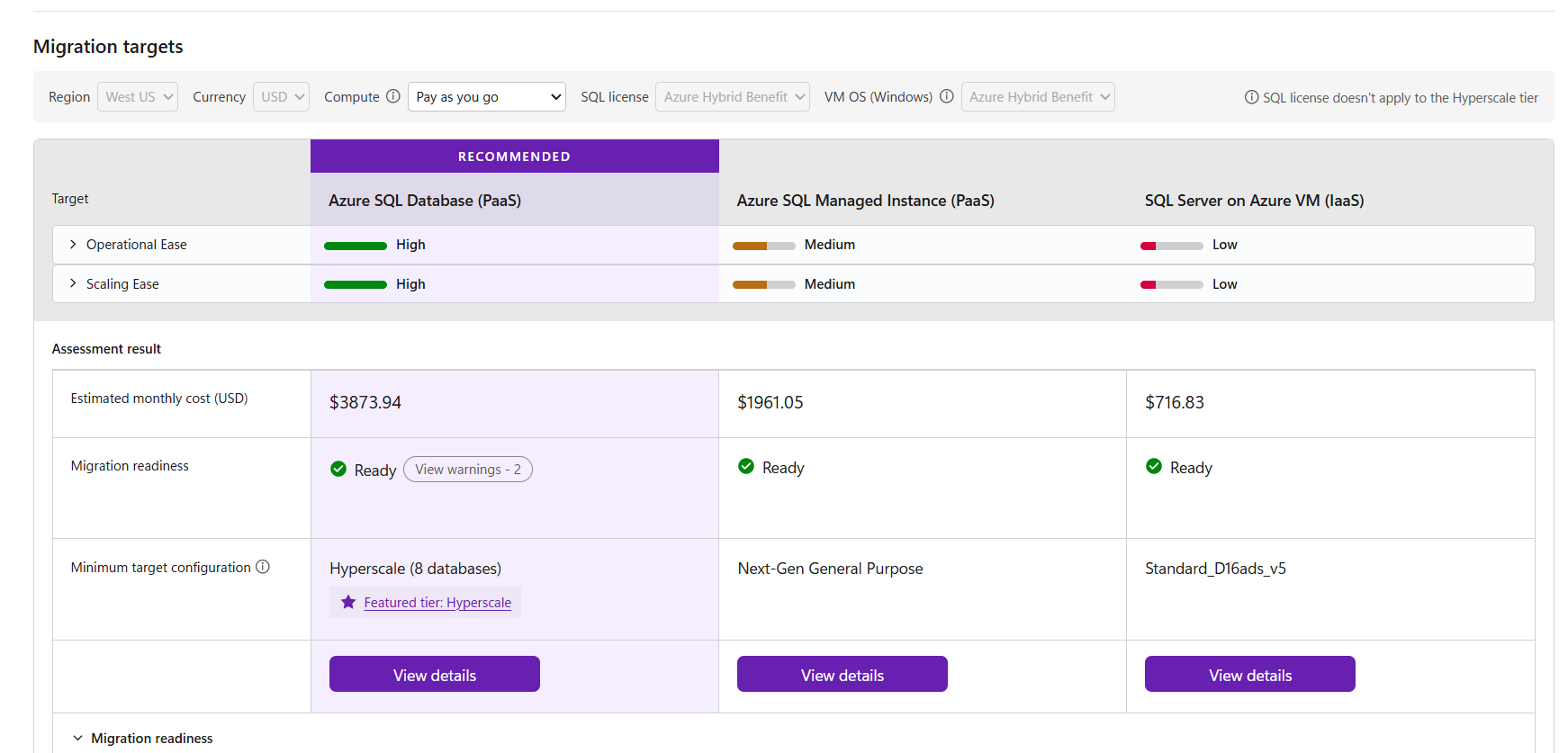
Migrating SQL Server to Azure starts with a simple question: Where should I move my databases, and what will it cost?
Compatibility is an important part of that decision, but it is only one part. Users also need to understand whether their current SQL Server configuration is suitable for the target, what Azure SQL configuration fits their workload, what that configuration may cost, and what they should do next when additional help is required.
We are evolving the migration experience in SQL Server Management Studio (SSMS) to bring these decisions closer together.
With the enhanced migration assessment experience, SSMS can help customers move from assessment to target recommendation, sizing and pricing, and ultimately migration, all from a familiar tool used by SQL professionals every day.
Moving beyond compatibility assessment
A traditional migration assessment primarily answers:
Can this database move to the selected Azure SQL target?
That remains essential, but migration planning requires a broader view.
Before starting a migration, customers may need answers to questions such as:
- Is my database ready for the selected Azure SQL target?
- Does my existing SQL Server configuration introduce migration considerations?
- What Azure SQL target and configuration should I consider?
- What compute and storage configuration is appropriate for my workload?
- What could the recommended configuration cost?
- What should I do if something requires attention?
The enhanced SSMS migration experience is designed to bring these questions into a more connected workflow.
Introducing configuration-based assessment in SSMS
One of the key additions is configuration-based assessment.
Alongside database compatibility, the migration experience can consider relevant source configuration when determining migration readiness. This provides customers with a more complete picture before they begin migration.
Instead of treating assessment as a simple pass-or-fail checkpoint, the goal is to make it a decision-support experience.
The assessment can organize information around two important dimensions:
Database readiness
Customers can understand compatibility findings that may affect migration to their selected Azure SQL target.
The experience helps distinguish between databases that are ready to proceed and scenarios where conditions or issues require attention before migration.
Configuration readiness
Migration decisions are not based on database compatibility alone. Source configuration can also influence the appropriate target and the steps needed before migration.
Bringing configuration considerations into the assessment helps surface these dependencies earlier in the migration journey, when you still have time to act on them.
From readiness to target recommendation
Once you understand migration readiness, the next question is usually:
What should I migrate to?
Rather than leaving customers to independently translate assessment results into an Azure configuration, the migration experience can bring target and configuration recommendations closer to the assessment.
The objective is to help customers understand a recommended Azure SQL destination and its associated configuration, including relevant compute and storage choices. This connects two activities that have traditionally required separate investigation:
Assess the workload → Identify the target → Size the target
Bring pricing into the migration decision
Sizing alone is not enough.
Before committing to a migration, customers also want to understand the potential cost of running the recommended target configuration.
By bringing pricing information alongside the target recommendation, SSMS can help customers evaluate technical readiness and potential cost together.
The workflow becomes much more natural:
Assess → Recommend → Size → Estimate cost → Migrate
You can review the recommended target configuration and its corresponding pricing information before proceeding.
Pricing should be treated as an estimate for planning, with actual Azure charges dependent on the selected configuration, region, purchasing options, usage, and other applicable pricing factors.
This is particularly valuable during early migration planning because architecture and cost decisions no longer need to happen independently.
When something needs attention, make the next step clear
A good assessment should not stop at identifying an issue.
When the assessment identifies an area that requires attention, the experience should help customers understand what they can do next.
Depending on the scenario, customers can be guided toward options such as:
Contact expert assistance
Migration can involve architectural or configuration decisions that benefit from deeper expertise.
Providing a direct path to expert assistance helps customers move forward when they need additional guidance instead of leaving them with an assessment finding and no obvious next step.
Launch AI-powered migration skills
You can also continue their migration journey using AI-powered migration skills.
Migration skills can help bring migration expertise into agentic developer experiences, supporting activities across the migration lifecycle, from assessment and planning through migration and validation.
This creates an important bridge between the structured experience in SSMS and AI-assisted migration workflows.
Making migration decisions easier
Database migration is rarely just a technical compatibility exercise.
Customers need to balance readiness, configuration, target selection, sizing, cost, and remediation before they can confidently move a production workload.
By bringing these signals together in SSMS, we want to make migration assessment more actionable.
Instead of simply telling customers whether they can migrate, the experience is designed to help answer the questions that naturally follow:
Where should I migrate?
What configuration should I use?
What could it cost?
What needs my attention?
Who or what can help me move forward?
That is the direction of the SSMS migration experience: turning assessment from a compatibility checkpoint into a guided path from SQL Server to Azure SQL.
More info, Migrate SQL Server - SSMS

 Microsoft