Update 07/07/2022: We have a new blog post! Check it out here
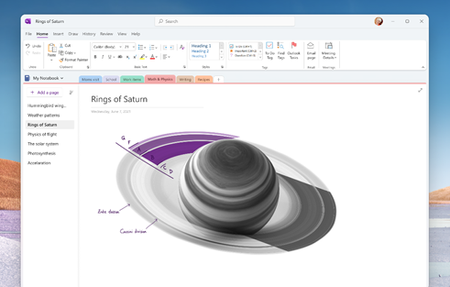
We’re excited to share that OneNote on Windows will get a series of updates over the next 12 months. These updates include a visual...
Other Cloud use (can't change away from onenote?), why not?
You can't currently use other cloud accounts, others are encrypted if you need to keep the syncing using “cloud” storage
Local sync only for 1 device - can you use laptop hubs and or usb to usb, network to share files over an existing network, if no, why not?
Will this change with the unified onenote 2021?
If you can silo notebooks better in onenote 2021 and offline you can then have lawyers/similar have private (cannot be on cloud) say shared in local network and then personal/not sensitive ones on private/other 'cloud' I don't know if this sort of thing has been looked at?
Though the above is over simple for the situations I refer to...
Onedrive - encryption?
encryption at rest, no? (Why?), onenote app is only only account/password, no 2 step verification?
Will the link between onedrive and onenote change? Will you provide encryption if onenote only syncs with onedrive on cloud devices?
Will it work with other encryption providers, like I guess VeraCypt?
Bitlocker only for windows 10 pro devices, will you supply this with win 10 home or Win 11 Home, and apply this to onenote docs?
Mobile devices, onenote on ios/andriod - encryption?
I understand I can encryption application - how do I do this? Will this be made easier going forward?
Disability
I can't think of everything, but is there some insider scheme for Disabled people?
How is the new product easier to use with say speech to text/nonstandard input devices? Microsoft is buying Nuance, Dragon text to speech provider...
Do you have a £1 education plan for Office 365, or discount on standalone licence for onenote separate or with other office?
If you have to use onedrive for storage, or discounted scheme of Office 365 temporarily for jobseekers/disabilities if someone loses their job or earns below a threshold be good not to lose access to their notes?
Can you link onenote to some of your Microsoft Garage projects such as https://www.microsoft.com/en-us/garage/profiles/group-transcribe/ So group transcribe can save direct to onenote?
Or Nuance Dragon Anywhere, dictate directly into onenote scrap note then save to onenote via cloud/API offline?
Formats/exports
What's the cut off of old onenote formats, will this work with Onenote 2007 or only 2010 onwards?
Can you use open formats, to share with other people more easily and backups?
Will you export to other providers such as Evernote or take inputs of them?
Export audio/video out of onenote to use other programs, like teachers using to clean up a recorded session to remove issues?
(Microsoft doesn't have a video editor I think?) Export to mindmaps (cleaning of handwriting into cleaner boxes and 'computer typed text'? Export format, flashcard creation with audio/video or just text and pictures?
https://en.wikipedia.org/wiki/Anki_(software)>
Pages
Can you set page size i.e. A3, but just move around on this page, as you generally autoscroll
Can you split autoscroll pages, i.e. you just keep typing or adding space into A4/A3 ect... later?
OCR improvements/handwriting
Can you import handwriting or from other handwriting apps and convert it partially to correct as you go on mobile then sync?
Can you train the OCR for handwriting like you can with Dragon?
Can you only have partial conversion so as OCR isn't 100% accurate you can have page 1 handwritten, insert page 2 of OCR of handwritten text
Can you import from other handwriting apps and run the OCR on them, as surface pros are expensive for many people?
Will you 'clean the handwriting' a bit like I think Samsung did so you draw a rough box and it cleans to a box?
Business Cards (see covid)
A worry due to covid, will onenote help with this?
OCR of text on business card picture has this changed, or do you still need to use OfficeLens then add to onenote later?
Speech to text
Will OCR be applicable if you insert an video or audio file, and it will try to convert spoken word, and text into written text?
Or is this only work if you record during the lecture/meeting on one note and the recording has finished. I.e. use dictaphone/phone for meeting/lecture be good to add that into onenote after the fact and run speech to text on this?
Will you able to embed/use Microsoft Group Translate during meetings/lectures and link this to onenote, like you could with audio.
Will cortana work with onenote but only offline/on device/computer, or you given choice when to send speech to server to transcribe and switch between server and offline cortana use?
I think you can record audio into my onenote computer and then type at the same time, and onenote sync/play back the audio where you have been typing... Will this come to the onenote 2021 app/ios/andriod/tablet?
Audio changes?
Do you have any filtering software to reduce background noise to help with speech to text conversion?
Can you export the cleaned audio?
Recording audio/meetings/video/OCR
On the app/desktop version, can I split the screen to type, handwrite and still record audio like Sonocent Audio note taker? (this might be done I'm not sure)
Source: https://sonocent.com/audio-notetaker
Evernote/other features
What features that Evernote/other competitors do, are you adding?
What features are due to be dropped as 2010-2020 desktop to app and desktop version caused feature drift and lost I think?
Otherwise good news as you are doing a lot of nice things, though windows 10 was meant to be the last release?