Updated Feb 10, 2023
Version 6.0
William Devereux Microsoft
MicrosoftMicrosoftMicrosoft
Eric Pellegrini - regarding the website, yes, Outlook.com's calendar is free. But where are the connectors from Sunrise? I used to be able to add things like Evernote's reminders to show up in my calendar. Sunrise supported dozens. Outlook on iOS substantially less, a paltry 4 in fact: Evernote, Facebook, Wunderlist, and Meetup. That's it. Oh, and a promise at the top of the Calendar addin screen that "more apps coming soon."
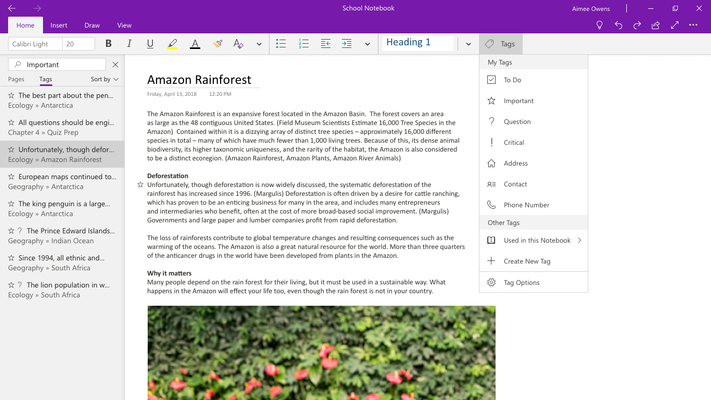
The new UI in OneNote for the Mac looks just like my phone. I cannot have my notebooks along the left side of the screen showing 100% of the time, with sections and sub-sections expanded, and with sections and sub-sections across the top of my screen for the current note I am in, and all of the pages of the note on the right side of the screen for easy access. I don't care if the "pages" are on the right or left, but removing the top bar and forcing the left most notebook/section/subsection to autohide and require multiple clicks to navigate is horrible - on a desktop that has plenty of room to expose this data 100% of the time.
The UI on the phone is pretty good. Works well on a 4" screen. It is horrible on a 27" screen, or even a 12" screen.
Your screenshots above don't tell me anything other than you've decided to hide most stuff in OneNote 2016, which is fine. User choice. My desktop looks radically different from yours.
Mine looks more like this. Everything is one click away, not 2-4 clicks away.