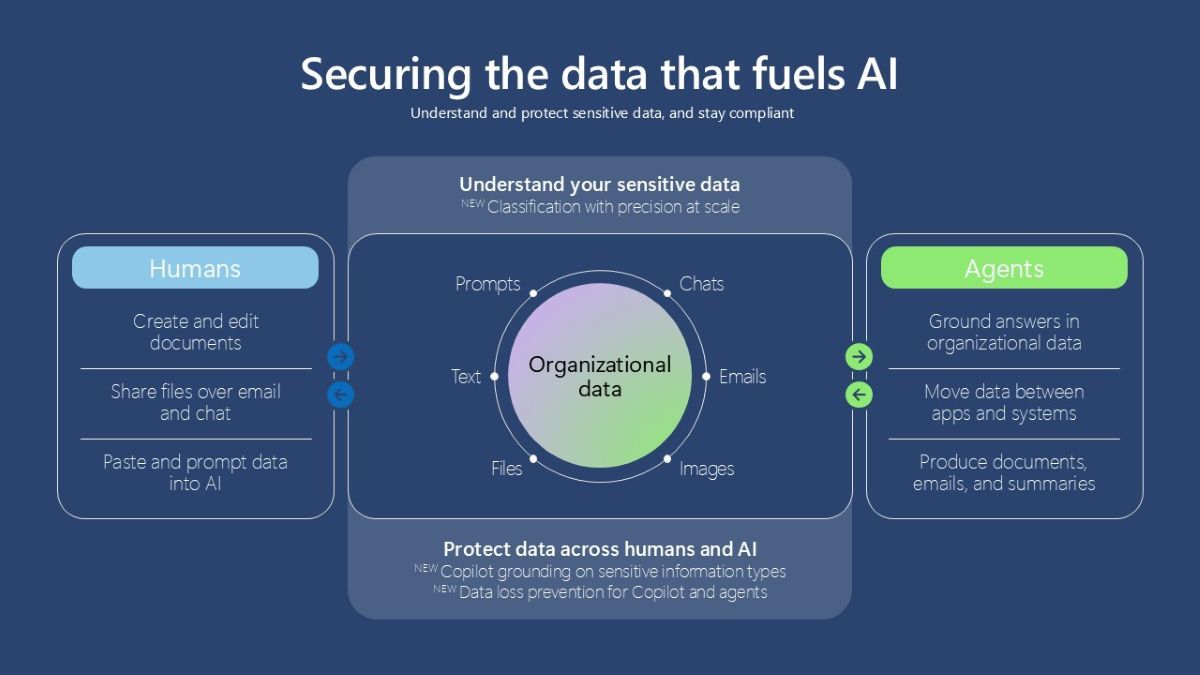
To act quickly and confidently in AI era, data security teams need a precise, current understanding of their sensitive data, without extra manual work, and controls that enforce protection across humans, apps, and agents. Microsoft Purview helps teams understand their sensitive data, protect data across humans and AI, and stay ahead of compliance with the auditability that evolving regulations demand.
Agents in Microsoft 365 grew 15x year-over-year, and every one of them can reach your organization's sensitive data. AI accesses, creates, and updates data, faster than current classification and labeling can keep up. At the same time, AI apps and agents introduce new surface areas for sensitive data to be exposed such as grounding data, prompts, responses, tool calls and more. Without the right controls, that data exposure can erode customer trust and create regulatory, legal, competitive, and financial consequences.
Microsoft Purview helps organizations secure the data that fuels AI. To act quickly and confidently, data security teams need a precise, current understanding of their sensitive data, without extra manual work, and controls that enforce protection across humans, apps, and agents. Purview helps teams understand their sensitive data, protect data across humans and AI, and stay ahead of compliance with the auditability that evolving regulations demand.
At Ignite, we're announcing enhanced classification and labeling at scale to help teams get to data protection faster, and new data loss prevention (DLP) controls that protect the data Microsoft Copilot and local agents use.
Ignite announcements at a glance
Get to data protection faster
- Stay current with recurring classification refresh (public preview January 2027): Automatically re-classify data that hasn’t been touched in years when classifiers are updated or improved.
- Deploy faster with enhanced built-in sensitive information types (SITs) (available starting January 2027): Get precise detection out of the box with less manual tuning and customization, starting with the 100+ most widely used SITs, such as credit card and U.S. Social Security numbers, and extending to all built-in SITs over time.
- Simplify workflows with a unified classification management experience (public preview): Find and manage all your classifiers in one place, with improved search and filtering.
- Accelerate data protection with auto-labeling scalability improvements (generally available): Now label up to 500,000 files per day, match 20M items in simulation, target sites by attribute instead of hand-picking with adaptive scopes; and apply default library labels to SharePoint libraries for data-at-rest (public preview).
Protect data across humans and AI
- Protect the sensitive data that Copilot uses (public preview January 2027): Apply DLP policies that prevent Copilot from processing files with sensitive data, even when those files aren't labeled. Additionally, Copilot will not process prompts with attached or linked files containing sensitive data.
- Protect the sensitive data local agents use (public preview January 2027): Gain visibility into local agent activity and apply DLP policies that prevent local agents from processing sensitive data, whether it comes from a prompt or from the files and tools the agent accesses. Additionally, data protection policies can be scoped to specific agents for more granular controls tailored to each agent’s role.
- Integrate agent activity signals into Unified Agent Risk score (public preview): Purview agent activity and interaction with sensitive data signals now feed into Unified Agent Risk score in Agent 365, so security teams can spot higher-risk agents, prioritize investigations, and apply the right controls.
Get to data protection faster
AI creates large volumes of new data. More than 2 billion files are uploaded to SharePoint every day, and SharePoint is now the top grounding source for Microsoft 365 Copilot. At that volume, admins can't pause to manually tune and validate classification before enforcing auto-labeling and DLP policies. That's why we're enhancing our built-in sensitive information types (SITs) for precise detection out of the box, so admins can move confidently from detecting sensitive data to enforcing protection. We're starting with the 100+ most widely used SITs, such as credit card and U.S. Social Security numbers, and will extend these enhancements to all built-in SITs over time.
To secure data effectively, classification must keep pace as your data estate grows and your definition of what's sensitive evolves. Purview classifies content as it is accessed, created, and shared, but AI tools can also access and process older files that no one has opened in years. If those files were never classified, protection policies have nothing to act on, leaving the sensitive data inside them exposed to AI.
Last year, we introduced on-demand classification to scan and classify that older content, so organizations can identify and protect sensitive data in older files before AI accesses it. Now, we're evolving it from a point-in-time scan into a recurring classification refresh. After a baseline scan, Purview will automatically re-classify existing content when an enhanced built-in sensitive information type (SIT) rolls out or your organization adds or updates custom SITs, so protection reflects the latest understanding of what's sensitive. For example, when the enhanced built-in credit card number SIT rolls out, the next refresh can identify card numbers in a years-old customer contract, so DLP can prevent Copilot from processing it, even if no one has opened or edited the file. The baseline scan and two recurring classification refreshes will be included in Microsoft 365 E5 licenses in the coming months.
Getting to protection faster also means making classification easier to manage. The new unified classification management experience brings all classifiers, including sensitive information types, exact data match, trainable classifiers, and document fingerprinting, into one place, with improved search and filtering.
Figure 1: Unified classification management brings different classifier types into one streamlined experienceOnce Purview classifies sensitive data at scale, new auto-labeling scalability improvements help admins apply sensitivity labels at scale, up to 500,000 SharePoint and OneDrive files per tenant per day (up from 100,000) and preview up to 20 million matched items in simulation mode before turning a policy on (up from 4 million).
Admins can now apply auto-labeling policies to every SharePoint site that matches a rule, such as all sites with “Finance” in the URL, and with no cap on matching sites, one policy keeps covering new sites as the organization grows. Finally, admins can extend a SharePoint library's default sensitivity label, previously applied to new and modified files, to data-at-rest, without anyone opening or editing the files. This helps organizations scale baseline protection across high-priority sites.
Figure 2: Admins can now extend a SharePoint library's default sensitivity label to all files in the library, including data-at-rest.Protect data across humans and AI
Sensitive data can be exposed in Copilot in three ways: text typed into prompts, files attached or linked in prompts, and content retrieved as grounding data. Organizations need to protect all three without getting in the way of productive AI use. Admins can already use Purview sensitivity labels and DLP policies to restrict Copilot from processing labeled files and emails, as well as prompts containing sensitive information. Today, we're taking that further: admins can protect the data Copilot uses, even when files aren't labeled. When Copilot retrieves content to ground a response, Purview can detect sensitive data such as financial information or personal ID numbers, and DLP can block Copilot from using it. This helps organizations deploy Copilot more quickly, with confidence.
Figure 3: DLP policy to prevent Copilot from grounding responses on files containing sensitive information, even if the file is not labeled.Protection also extends to the prompt itself: admins can now protect sensitive data in Copilot prompt attachments and linked files, in addition to typed text, so sensitive data is covered as it flows into and through Copilot.
Figure 4: DLP blocks Copilot from processing a prompt with a file containing sensitive information (SIT).For example, an employee might ask Copilot to analyze a linked financial planning document that hasn’t been labeled. Without a label, Purview can still identify a SIT, such as an ABA routing number, and apply the organization’s DLP policy to prevent it from grounding the response. The same protection extends to prompts and attachments. With protection integrated into Copilot, organizations can confidently turn AI innovation into everyday impact.
In addition to protecting Copilot, Purview currently provides visibility into agent activity and audit records for agents built on Microsoft Copilot Studio and Foundry, helping organizations understand how AI is being used. We are now extending that visibility and bringing new data protection capabilities across agents running locally on Windows devices, including Claude Code, GitHub CLI, the GitHub Copilot app, Claude Desktop, and the Claude Code and GitHub Copilot extensions for Visual Studio Code. Admins can now safeguard the sensitive data local agents use at runtime by blocking prompts and tool calls that contain sensitive information in text, files, and links. Data protection policies can also be scoped to specific agents for more granular controls tailored to each agent’s role. Security teams need a consistent way to identify higher-risk agents, prioritize investigation and scope the right controls. To address that, Purview agent activity and sensitive data interaction signals are now integrated into the Unified Agent Risk score, surfaced in Agent 365.
Figure 5: Local agent access to sensitive information is blocked by DLP policy.A local AI coding agent illustrates how interaction-level protection and broader risk-based controls work together. For example, a developer might use Claude Code on a corporate laptop to debug an application. Purview provides visibility into the agent’s activity and interactions with organizational data. As the agent accesses local files and invokes tools, it may attempt to send proprietary source code, API keys, or connection strings to an external AI service or connected tool through a prompt or tool call. A Purview DLP policy scoped specifically for Claude Code agents can identify the sensitive content and block the interaction before the data is exposed at runtime. To evaluate agent behavior, the security and IT teams can also leverage the Unified Agent Risk score to refine policies over time. By extending consistent data protection across a rapidly growing agent ecosystem, Purview helps organizations embrace the next wave of AI innovation with greater confidence.
Secure the data that fuels AI
Data security admins need to keep pace with AI adoption without compromising protection. With more precise, up-to-date classification and expanded protections for Copilot and agents, Microsoft Purview helps teams get to data protection faster and protect data across AI — turning an understanding of sensitive data into protections built into the workflows people and agents use.
Explore these enhancements at Ignite. Browse the Microsoft Ignite 2026 guide to Microsoft Purview to discover sessions, hands-on learning, and one-on-one time with experts.

 Microsoft