Forum Discussion

BPA Errors: DNS can't resolve GC, Kerberos, PDC Resource Record, etc.
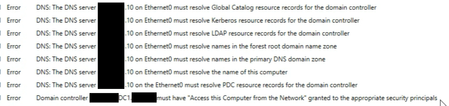

Just for check, the command "netdom query fsmo" give your active directory ? You have only 1 card ethernet on your DC ? you execute the BPA on your DC or from another server ?

That command returns the current and only DC. I'm running BPA from that DC
- L_Youtell_974Feb 13, 2025Iron Contributor
Con you check if your DC is global Catalogue ?
Or via powershell
To check on the current DC you are connected to, use the following command.
Get-ADDomainController | ft Name,IsGlobalCatalogTo check all DCs on a Site, use the following command.
Get-ADDomainController-Filter {Site-eq 'Default-First-Site-Name'}} | FT Name,IsGlobalCatalogTo check all DCs in a Forest, use the following command.
Get-ADForest <Forest Name> | FL GlobalCatalogsYou can try to:
ipconfig /flushdns
ipconfig /registerdnsand restart netlogon service and test BPA again.
Just to be sure, you did put only your DNS IP on the network card, you didn't put your ISP or others DNS on the DNS of the network card ?
For the IP DNS on the network did try to you use the loopback address 127.0.0.1 and the IP address of the server ?
- BenTheITGuyFeb 13, 2025Copper Contributor
Yeah all of that returns the proper server... The only DC1 I have. Decided just for kicks to try ipconfig stuff again as well as restarting netlogon... I've done that before... Re-ran BPA no changes...
I have done all these things with the loopback and the IP address of the server. No difference with either.
- L_Youtell_974Feb 13, 2025Iron Contributor
If everything work find with DCDIAG /TEST:DNS /V /E, i don't know why BPA tell us something else. Look in the event viewer in the DNS and active directory category and check if you find some error or warning.
did you try BPA via command line ?
In powershell:
Import-Module BestPractices
Get-BpaModel -> give all model available
Invoke-BpaModel -ModelId "Model BPA" -> example: Invoke-BpaModel -ModelId "Microsoft/Windows/DHCPServer"