We are excited to announce the latest release of Azure CycleCloud Workspace for Slurm, now available with the powerful features and enhancements introduced in CycleCloud 8.8.1. This update brings significant improvements to cluster management, monitoring, security, and platform support, empowering technical communities to build and operate scalable HPC environments with greater efficiency and flexibility.
Major Feature Updates in CycleCloud Workspace for Slurm 2025.12.01
- Integrated Monitoring with Prometheus self-agent and managed Grafana
- Entra ID Single Sign-On (SSO) for secure and seamless authentication
- Support for ARM64 compute nodes
- Compatibility with Ubuntu 24.04 and AlmaLinux 9
Enhanced Monitoring: Prometheus Self Agent and Managed Grafana
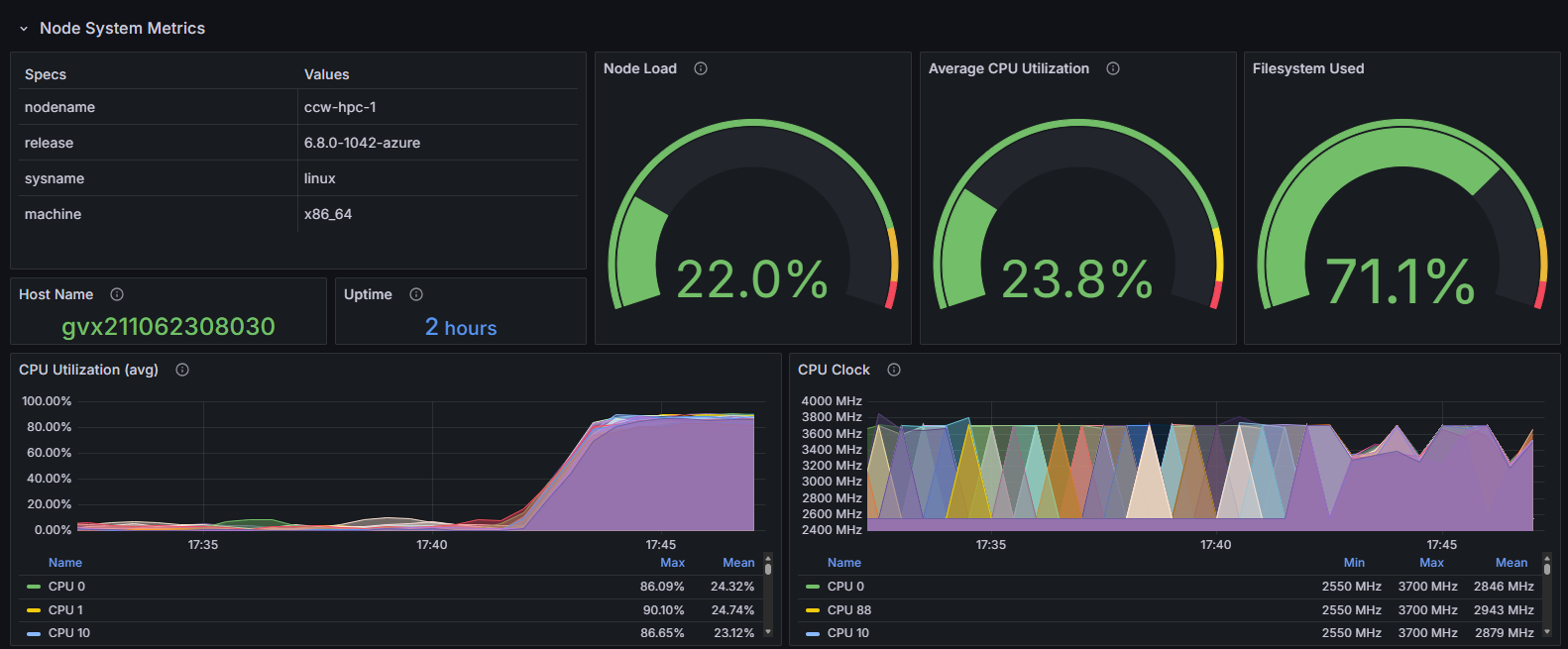
With CycleCloud 8.8.1, monitoring your Slurm clusters is easier and more powerful than ever. The integration of Prometheus self-agent enables automated collection of metrics from compute nodes and Slurm jobs, providing real-time insights into cluster performance and resource utilization. Coupled with managed Grafana, users can visualize these metrics through customizable dashboards, making it simple to track system health, identify bottlenecks, and optimize workloads. This seamless monitoring solution reduces operational overhead and enhances the reliability of your HPC environment.
Create the Managed Monitoring Infrastructure
To use this feature, simply set up an Azure Monitor Workspace for Prometheus and an Azure Managed Grafana environment. Follow these steps as outlined here: Azure/cyclecloud-monitoring: Cluster-init project and related tools for adding managed monitoring to a CycleCloud cluster.
- Create a resource group for the monitoring infrastructure
- Deploy with the provided commands
git clone https://github.com/Azure/cyclecloud-monitoring.git
cd cyclecloud-monitoring
./infra/deploy.sh <monitoring_resource_group>
After deployment to the specified resource group, you will find an Azure Monitor Workspace called ccw-mon-xxx and an Azure Managed Grafana named ccw-graf-xxx. To access the dashboards, go to the Grafana endpoint, enter the Grafana portal, and expand the Dashboards/Azure CycleCloud folder to view the available dashboards.
Depending on the node type, monitoring capabilities include:
- For GPUs: tracking utilization rates, memory copy utilization, various clock speeds, temperature, power consumption, ECC error counts, and NVLink throughput statistics.
- For Infiniband: assessing throughput and error occurrences.
- For other resources: evaluating CPU usage and frequency, memory utilization, disk space usage, network activity, file system capacity, as well as NFS operations and associated throughput.
Enable Monitoring
Monitoring can be enabled during Azure CycleCloud Workspace for Slurm deployment in the Marketplace UI:
You can get the “Monitoring ingestion endpoint” and “Data collection rules” from the Azure Monitor Workspace properties.
Starting with CycleCloud 8.8.1, this option is included in the Slurm default template, so you can enable monitoring directly in the cluster options.
The Client ID to be provided should correspond to the User Managed Identity assigned to the nodes, which has been granted permission to push metrics. For CCWS, this will be ccwLockerManagedIdentity.
Secure and Seamless Authentication: Entra ID SSO
The new Entra ID Single Sign-On (SSO) integration streamlines user authentication across your CycleCloud Workspace. By leveraging Azure Entra ID, users benefit from centralized identity management, enhanced security, and simplified access control. This feature supports multi-factor authentication and compliance requirements, making it easier for organizations to manage users and permissions while protecting sensitive HPC workloads. Entra ID SSO ensures a frictionless login experience, reducing administrative burden and improving overall security posture.
Entra ID Single Sign-On (SSO) facilitates authentication for both the CycleCloud user interface and Open OnDemand via OpenID Connect. Mapping to Linux users may be accomplished either through CycleCloud's local user creation process or through LDAP integration with the cc-ldap-auth CycleCloud cluster-init project. This article will concentrate on the former approach.
Pre-deployment Steps
Entra ID Single Sign-On (SSO) requires registration of an Entra ID application prior to deploying a CycleCloud Workspace for the Slurm environment. Additionally, a user-managed identity must be created, which serves as a replacement for the secret password by being integrated into the federated credentials of the application. This User Managed Identity (UMI) will be assigned to the Open OnDemand virtual machine and designated as a trusted authentication source.
Comprehensive instructions are available in our GitHub repository on the entra_instructions page.
Deployment
You can enable Microsoft ID SSO from the Basics tab in the latest marketplace UI, which is necessary if you plan to deploy Open OnDemand as well.
The required values may be obtained from the output generated by the pre-deployment script executed previously.
Post Deployment
When you register the Entra ID application, placeholders are initially used for the CycleCloud and Open OnDemand IP addresses. These need to be updated later, either manually or by using this utility script.
Once the application is configured, you need to now grant permissions to users. For this, retrieve the app in Enterprise Applications and select Manage/Users and groups.
To add users to the relevant CycleCloud roles, select "Add user/group" and choose one or more of the predefined roles. Assign Global.Node.User to standard users; for users requiring sudo privileges, assign Global.Node.Admin; and for those engaged in cluster administration within CycleCloud, select SuperUser or Administrator as appropriate.
After roles are assigned, users must first access the CycleCloud UI before they can interact with the cluster or Open OnDemand. This process ensures user profiles are retrieved, and local accounts are created on the nodes within the clusters.
Conclusion
The 2025.12.01 release of Azure CycleCloud Workspace for Slurm delivers substantial advancements that strengthen performance, security, and usability for HPC environments. With integrated Prometheus self‑agent monitoring, managed Grafana dashboards, support for ARM64 compute architectures, and compatibility with modern Linux distributions, this update empowers teams to operate clusters with greater visibility and efficiency. The addition of Entra ID Single Sign‑On further streamlines user authentication and reinforces security across both CycleCloud and Open OnDemand interfaces.
Together, these enhancements reflect our ongoing commitment to providing a flexible, scalable, and secure HPC platform that meets the evolving needs of technical and scientific communities. We look forward to seeing how you leverage these capabilities to accelerate innovation and simplify the operation of your HPC workloads.

 Microsoft