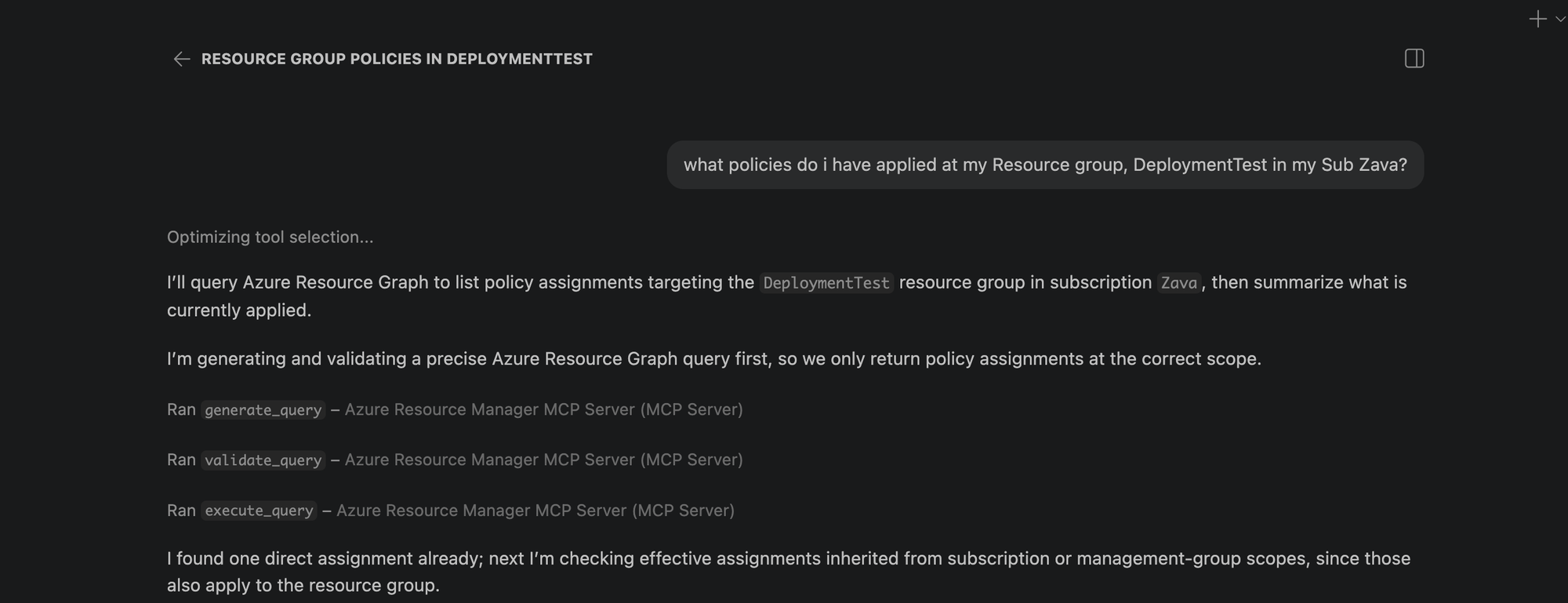
We're super excited to announce the public preview of the Azure Resource Manager MCP Server! This is a remote MCP server that provides tools to give AI agents first-class access to Azure infrastructure operations through Azure Resource Manager (ARM). AI agents can now be equipped with tools to generate, validate, execute Azure Resource Graph (ARG) queries and tools to deploy and manage ARM template deployments. This server is able to generate and execuite queries that return data across all your Azure resource types! At its core, this server is built to help AI agents interact with Azure resources seamlessly.
What this means for you
- Ask natural language questions about your Azure estate to your agents and get real time, accurate answers backed with an ARG query
- Deploy and manage infrastructure easily by having AI deploy ARM templates for you
- Monitor deployment status and catch issues before they escalate
- Ability to build more advanced AI agents that understand your Azure environment
What You Can Do Today
Generate, Validate, and Execute Azure Resource Graph Queries from Natural Language
No need to struggle with writing KQL from stratch! Describe what you need, and the MCP server tool generates Azure Resource Graph queries that match your intent. You ask an AI Agent: "Find all virtual machines in my subscription that don't have managed disks". It uses the tool and returns: A ready-to-execute ARG query without manual KQL writing. These queries spans across all your azure resource types so can learn and navigate across any type!
Deploy, monitor and cancel ARM Templates
Pass an ARM template, and the MCP server kicks off the deployment targeted to an existing resource group scope. Monitor the deployment by getting status about it and even cancel it if you decide its not doing what you need it to.
Here is the complete list of the tool available in this preview:
-
generate_query
-
validate_query
-
execute_query
-
create_template_deployment
-
get_arm_template_deployment_status
-
cancel_arm_template_deployment
Real-World Scenarios
Infrastructure Compliance Audit
"Show me all resources created in the last 30 days that don't have required tags." - The MCP server generates and executes the query, returning resources that need remediation. Your team can then fix them programmatically or through Copilot.
Rapid Infrastructure Provisioning
"Using this ARM template <path to template>, deploy a secure storage account with HTTPS-only access, private endpoints, and Standard_LRS replication to my production resource group." This will take an existing ARM template and deploy it to a resource group scope.
You can ask your Copilot to generate the ARM template for you as well but there is no quality guarantee on the generated template so we recommend providing your own template for certainty in deployment.
Policy Compliance Check
"Check if all resources in my subscription comply with the latest policy applied to it." - The MCP server generates and executes the query, returning resources that are non-compliant. Your team can then take corrective actions programmatically or through Copilot.
Building Agents with Azure Resource Manager MCP Server
The MCP server's tools can be integrated into custom agents you build with GitHub Copilot. What this means is you can create custom agents that automatically check compliance, track changes in a scope, or ensure all resources have a particular tag applied to them!
Getting Started
Prerequisites
- VS Code installed
- Valid Azure account with appropriate permissions
- GitHub Copilot subscription
Installation
- Install the MCP Server
-
- Open https://aka.ms/JoinARMMCP
- VS Code launches automatically
- Click Install under Azure Resource Manager MCP Server
- Sign in with your Azure credentials
- If you hit any authentication issues see Troubleshooting Guide in our repo
- Check tools are enabled in Chat
-
- Open Chat in VS Code (View > Chat)
- Click Configure Tools
- Ensure the six Azure Resource Manager MCP Server tools are enabled
- Start Using It
-
- Ask Copilot a question about your Azure resources or infrastructure needs
- The MCP server handles the rest
Governance & Security
The Azure Resource Manager MCP Server respects your Azure permissions and governance policies. All operations run in the context of your signed-in user. Additionally you can apply Azure Policies to prevent deployments via the MCP Server. Find more details in the README of our documentation repo.
What's Next?
We are actively expanding the capabilities of the Azure Resource Manager MCP Server! The Server will expand to include:
- Additional ARM API capabilities with ARM
- Enhanced query generation and optimization
- Support for additional MCP clients beyond VS Code, next up: Claude
Get Feedback
We want to hear from you. Try the public preview and share your feedback. Found a bug? Or have a feature request? Open an issue on GitHub at https://aka.ms/ARMMCPIssue
Resources
- 📖 Full Documentation – Complete setup and usage guide
- 🔗 Install Now – Get started with the public preview
- 🐛 Report Issues – Share feedback and bugs
- ❓ FAQ – Common questions answered
- 🛠️ Troubleshooting – Resolve common issues
Try It Today
The Azure Resource Manager MCP Server public preview is available now. Visit https://aka.ms/JoinARMMCP to install and start automating your Azure infrastructure with AI.
What agents will you build with these tools? We can't wait to see how you'll use this.
Steven Bucher
PM on Azure Resource Manager and Azure Governance

 Microsoft
