VS Code 1.147+ can now load agent skills straight from an MCP server! If your team runs an MCP server, you can ship skills from the same server as your tools, so every agent reads the same copy and gets updates the moment you deploy. Those skills can help models use your tools optimally and equip agents for the most common workflows.
Once agent skills are bundled inside the MCP server itself, the skills can be served with the same auth, access control, and trust model as the tools. One sign-in covers both, and each skill is versioned right alongside the tools it describes.
Skills-over-MCP: How it works
The MCP standard added support for skills in SEP-2640. Many thanks to the Skills Over MCP Working Group for getting it there! A server advertises that it can serve skills by declaring the extension in its capabilities:
{
  "capabilities": {
    "resources": {},
    "extensions": {
      "io.modelcontextprotocol/skills": {}
    }
  }
}
A client can then call skills/list to get each skill's name and description, along with a list of the skill's files:
{
  "uri": "skill://pdf-processing/SKILL.md",
  "frontmatter": {
    "name": "pdf-processing",
    "description": "Extract, fill, and assemble PDF documents"
  },
  "resources": [
    { "uri": "skill://pdf-processing/SKILL.md", "digest": "sha256:d5e6...", "size": 5120 },
    { "uri": "skill://pdf-processing/references/FORMS.md", "digest": "sha256:e6f7...", "size": 18433 }
  ]
}
The files themselves are ordinary skill:// resources that the client loads with resources/read as it needs them. So you get the same progressive disclosure you'd get from skills on disk, where the agent only pays for a skill when it uses one.
Adding skills to a FastMCP server
Adding skills to an existing MCP server is easy, especially if you are using the FastMCP framework for building your MCP servers.
In the example code below, we define a new Skill inline, with name, description, instructions, and files, and add that via the SkillCatalogProvider to the MCP server:
from fastmcp import FastMCP, Skill
from fastmcp.skills.provider import SkillCatalogProvider

release_notes = Skill(
  name="release-notes",
  description="Write release notes from merged pull requests.",
  instructions="# Release notes\n\nGroup changes by theme. Follow template.md.\n",
  files={"template.md": "## Highlights\n\n## Fixes\n"},
)

mcp = FastMCP("Team Skills")
mcp.add_provider(SkillCatalogProvider([release_notes]))
Learn more ways to add skills to FastMCP servers from their Skills over MCP documentation guide.
Using them in VS Code
Support for skills-over-MCP varies across MCP clients, as you can see from MCPJam's caniuse.dev compatibility matrix. VS Code is one of the first clients to add support, which makes it great for testing you MCP servers which bundle skills.
Verify that your VS Code is version 1.147 or higher, and has chat.agentHost.mcpSkills.enabled:
Run your server over HTTP:
fastmcp run server.py --transport http --port 8000
Add your server to ~/.copilot/mcp-config.json:
{
  "mcpServers": {
    "team-skills": {
      "type": "http",
      "url": "http://localhost:8000/mcp"
      "tools": ["*"]
    }
  }
}
Start a new chat and type /. Your server's skills show up as slash commands, right next to the built-in ones.
Pick one and VS Code asks before it loads skills from that server. Then the agent follows the skill like any skill on disk, and pulls in template.md when the instructions point to it.
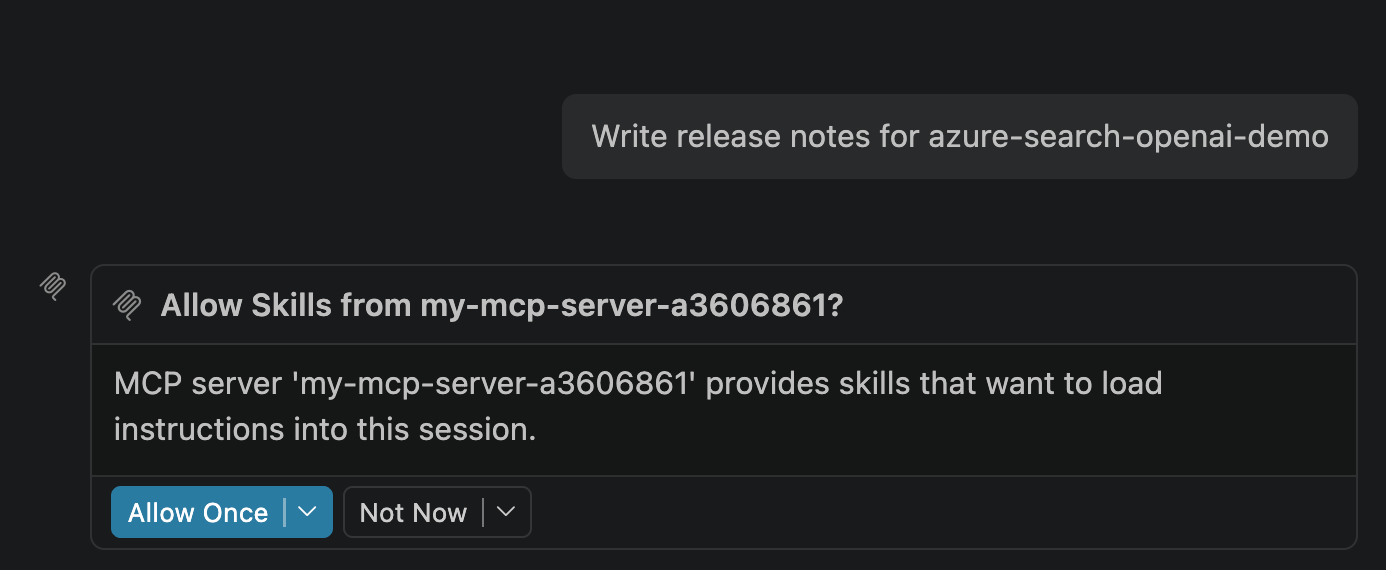
Of course, you don't need to explicitly invoke the skill. You can also write a prompt to the Copilot agent that causes it to invoke the bundled skill:
VS Code will prompt to ensure you want to allow the MCP server to load the skill instructions into the context, and you can decide whether to allow once or allow always. That prompt gives users more control over the instructions injected into their context windows.
Hosting MCP servers
A local MCP server works great if it's just for your personal workflows, but if you're like many developers, you're building MCP servers to share inside an organization or even externally for customers.
We have great ways for you to host MCP servers on Azure, like Azure Container Apps, Functions, App Service, or Kubernetes. Check our guide on choosing an Azure service for MCP servers.
The FastMCP team also makes it easy to deploy servers with their FastMCP Gateway, the quickest way to deploy a FastMCP server from a GitHub repo. For clients that aren't as far along as VS Code, the FastMCP Gateway can also offer your skills as plain tools, so the same URL works there too. They also offer FastMCP Skills Drop, a free page that turns your skills into an MCP server.
Start experimenting with skills in your MCP servers today! Give feedback to the VS Code team if you find any issues with invoking the skills, and share your experience in the MCP community on how MCP can better support skills.

 Microsoft