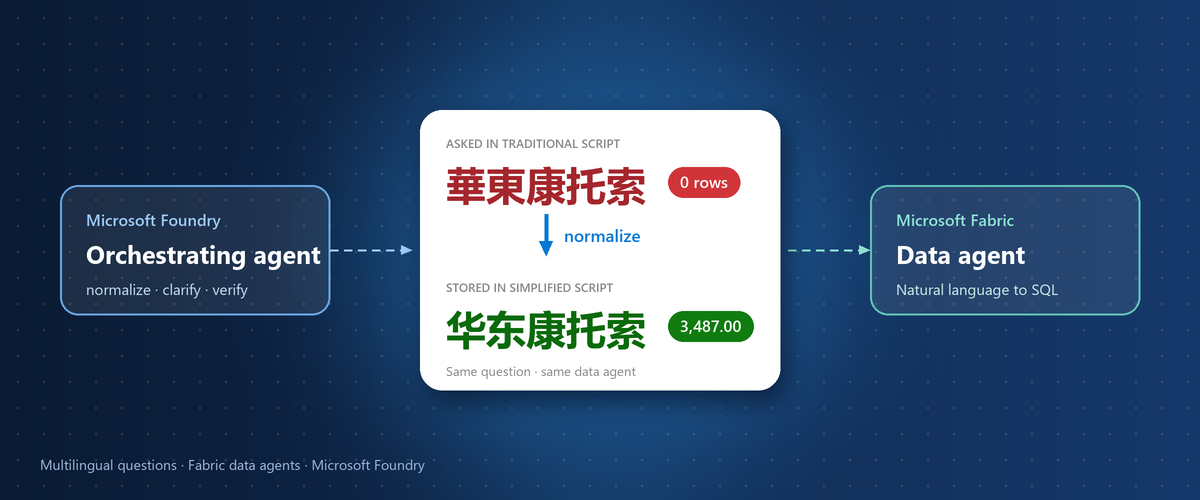
A Fabric data agent found no data for a customer named in Traditional Chinese; the name was stored in Simplified. A Foundry pattern and the Fabric IQ path.
A business user asks, in Traditional Chinese, for the August 2026 net revenue from the customer 華東康托索 through the distributor channel, 經銷. The Microsoft Fabric data agent finds no matching records and reports 0 CNY.
The warehouse holds 3,487.00 CNY for that customer and channel, stored in Simplified script as 华东康托索 and 经销. The filters listed in the answer used the Traditional strings. The exact comparison matched no rows, and no step in the chain reported an error.
In an exploratory test on synthetic data, 9 of 10 direct runs that named a customer in Traditional script failed this way. When a Microsoft Foundry agent first rewrote the request with the stored values, the main customer question returned 3,487.00 in each of its 4 completed runs. The lever appears to be the values, not the language. This post covers the test, a five-step pattern, and how to apply it with Fabric IQ (preview).
Figure 1. The test setup. The same Chinese questions went directly to one published Fabric data agent, or through a Foundry agent that normalized values first; both routes read one synthetic table, and each answer was graded against SQL.
Tool update: the Foundry route in this test used the Fabric data agent tool in Foundry Agent Service. Microsoft Learn gives November 6, 2026 as the deprecation date for that tool and points to Fabric IQ (preview), which connects a Foundry agent to a published data agent through the data agent's Model Context Protocol (MCP) endpoint. The direct route in the test already called the data agent through such an endpoint, so the pattern is expected to carry over. It was not re-run on Fabric IQ for this post; re-validate it in your environment.
How the test was set up
The test changed one thing, the text that reaches the data agent, and kept everything else fixed:
- Data: one synthetic Contoso retail sales table with 288 rows in a Fabric warehouse, with amounts in CNY. Region, channel and customer values are Chinese text stored in Simplified script, for example the regions 华东, 华南 and 华北 and the channels 直营 (direct) and 经销 (distributor).
- Data agent: one published Fabric data agent over that table. Its instructions defined the business rules: net revenue is the sum of NetRevenue by payment date, fiscal years start on July 1, cancelled orders are excluded from counts, and text filters must match stored values exactly. The instructions listed the stored regions and channels. Customer names were not listed, apart from one example in a rule.
- Direct route: each question went unchanged to the data agent through its MCP endpoint.
- Foundry route: a Foundry agent received the same question, rewrote it as one self-contained English request with every value in its stored form, called the data agent through the Fabric data agent tool, and answered in Chinese.
- Scoring: each answer was graded against a golden value from SQL run independently on the same table, as correct, incorrect, or did not complete. A tool or execution error with no answer counts as did not complete, not as wrong.
The question set had 36 golden questions. They covered Simplified and Traditional script, Cantonese and colloquial phrasing, fiscal periods and partial refunds, and traps such as payment date versus order date, or the customer 华东康托索, whose name contains a region word but who belongs to the 华北 region. Of these, 23 questions were asked on the direct route and 4 on the Foundry route. The main customer question was asked five times on each route.
Results: the failures followed the values
In this exploratory test on synthetic data, 42 responses were graded:
| Route | Responses | Correct | Incorrect | Did not complete |
|---|---|---|---|---|
| Direct, original Chinese question | 30 | 20 | 10 | 0 |
| Foundry agent, normalized English request | 10 | 7 | 0 | 3 |
| Direct, Chinese with stored values (control) | 1 | 1 | 0 | 0 |
| Direct, English question (control) | 1 | 1 | 0 | 0 |
| Total | 42 | 29 | 10 | 3 |
All 10 incorrect answers had the same shape. The data agent filtered on a Traditional-script string that does not occur in the table: a region name, or a customer name, in some runs together with a channel. The query matched no rows, and the answer reported no data or 0 CNY. Where an answer listed its filters, the date range, the status exclusion and the choice of column matched the business rules. Only the literals were off.
Figure 2. Results by question type and route, from an exploratory test on synthetic data. Direct questions that named a customer in Traditional script were correct in 1 of 10 runs; on the Foundry route, all 4 completed runs for those questions were correct.
By question type, the failures clustered where a question named a customer in Traditional script: those direct runs were correct in 1 of 10 cases, and the main customer question returned no data or 0 CNY in all 5 of its direct runs. Where the Traditional-script value was a region or a channel, values that the data agent instructions listed, direct runs were correct in 6 of 7 cases. Questions without a Traditional-script filter value, including Simplified questions and Traditional or Cantonese questions that filter on no stored value, were correct in 13 of 13 runs. On the Foundry route, all 7 completed runs were correct.
Two single-run controls are consistent with this reading. The main customer question, still in Chinese but written with the stored Simplified values, was answered correctly. A region question in Traditional script, asked in English instead, was also correct. Single runs prove little alone.
The three runs that did not complete were all on the Foundry route: one connection was missing its workspace and item IDs, and two Fabric executions failed for a reason that was not determined. They are reported separately and are not counted as correct or incorrect.
Why exact values matter in NL2SQL
A Fabric data agent answers a warehouse question by generating SQL from the question, a step known as natural language to SQL (NL2SQL). The generated SQL compares text exactly. To the database, N'华东' and N'華東' are different strings. A filter on the Traditional form returns an empty set, and the sum of an empty set reads as no data, not as an error.
The one SQL statement captured on the Foundry route shows the stored form in the filter. This excerpt, reformatted, comes from the year-over-year region question:
SELECT SUM(NetRevenue) AS net_rev_2025_04
FROM sales_orders_v1
WHERE Region = N'华东'
  AND OrderStatus <> 'Cancelled'
  AND PaymentDate >= DATE '2025-04-01'
  AND PaymentDate <  DATE '2025-05-01'
On the direct route, the first answer to the same question reported its filter as Region = 華東 and found no data for either year. The golden values were 5,979.76 CNY for April 2025 and 9,612.76 CNY for April 2026.
Two further observations shaped the pattern:
- Listing values helps, but does not settle it. The data agent instructions listed the stored regions and channels, and most Traditional-script region questions were mapped to them. Yet in the main customer runs, both the customer name and the channel stayed in Traditional script, although 经销 was in the list and 华东康托索 appeared, in Simplified script, in one of the rules.
- The orchestrating model does not change the data agent's NL2SQL. The data agent writes its own query from the text it receives. A Foundry agent influences the result only through that text: which values, which columns, which dates. That text is where normalization belongs.
The pattern: normalize, make explicit, delegate, verify
The Foundry route applied five steps. They live in the Foundry agent's instructions, not in code:
- Normalize stored values. Convert every filter value to the exact form stored in the table: script, spelling and full name. Keep the stored characters in the request, even when the rest of it is in English.
- Make semantics explicit. State the measure, the date column, the period as an inclusive start and an exclusive end, the fiscal rules and the status exclusions. Name the column that each filter applies to.
- Delegate the query. Send one self-contained request to the data agent, and let it generate and run the SQL.
- Verify the result. Compare the filters that the data agent reports with the request. Treat an empty result for a value that should exist as a filter problem, not as zero.
- Answer in the user's language. Reply in the user's script, and show the period and filters used, so that the user can spot a wrong assumption.
Figure 3. The pattern with Fabric IQ (preview). The Foundry agent normalizes values and makes the semantics explicit, calls the published data agent, verifies the result, and answers in the user's language.
The request was in English because the column names and the data agent instructions were in English. English is not the point: the Chinese control with stored values was also correct. What matters is a self-contained request that uses stored values.
The following instructions are an illustrative template, adapted from the Foundry agent used in the test. Replace the value lists and rules with your own:
You are an analyst for <business domain>. Users write in Simplified Chinese,
Traditional Chinese, Cantonese or English.

Use the connected Fabric data agent for every data answer. Do not calculate
or guess numbers yourself.

Before each call, rewrite the question as one self-contained request in English:
1. Normalize every filter value to its stored form. Stored text is in
   Simplified Chinese. Regions: 华东, 华南, 华北. Channels: 直营, 经销.
   Convert Traditional or colloquial forms, for example 華東 -> 华东 and
   經銷 -> 经销. For a customer name, use the exact stored name. If you are
   not sure of it, first ask the data agent to list the stored customer
   names that contain the key characters.
2. Keep stored values in their original characters inside the English text.
3. State the measure (net revenue = SUM(NetRevenue)), the date column
   (PaymentDate), the period as an inclusive start and an exclusive end,
   the fiscal-year rule (the fiscal year starts on July 1) and the order
   statuses to exclude.
4. Name the column for each filter. A customer name filters CustomerName,
   not Region, even when the name contains a region word.

After each call, check that the filters the data agent reports match your
request. If a normalized value returns no rows, say so and do not report 0
as a fact. Answer in the user's language and script, and list the period
and filters used.
For the main customer question, the exchange looked like this. It is illustrative and uses the placeholder name:
User question (Traditional Chinese):
2026 年 8 月,客戶「華東康托索」在「經銷」通路的淨營收是多少?

Request sent to the data agent:
Using only the selected table, calculate net revenue in CNY for calendar
August 2026 (PaymentDate >= 2026-08-01 and PaymentDate < 2026-09-01) for
the customer whose stored CustomerName is exactly '华东康托索', in the
stored Channel '经销'. Net revenue means SUM(NetRevenue). Exclude orders
with OrderStatus = 'Cancelled'. Filter on CustomerName only; do not filter
on Region. Return the total and list the filters you applied.

Answer to the user (Traditional Chinese):
2026 年 8 月,客戶「華東康托索」在「經銷」通路的淨營收為 3,487.00 CNY
(依付款日期 2026-08-01 至 2026-08-31 計算,已排除取消的訂單)。
Apply the pattern with Fabric IQ (preview)
With the Fabric data agent tool deprecated, a Foundry agent reaches the same published data agent through the Fabric IQ tool. Fabric IQ connects to a published item through its MCP endpoint; the item can be a data agent, an ontology or a Power BI semantic model. Because you can connect more than one data agent, the instructions need to say which agent handles which questions. The Fabric IQ page describes these portal steps:
- Open your agent in the Foundry portal.
- Under Tools, select Add > Browse all tools > Fabric IQ (OneLake Catalog), and then select Add tool.
- In the OneLake Catalog, filter by Data agent, select your published data agent, and then select Add.
- Update the agent instructions: name each connected data agent and describe the questions it handles. Add the normalization rules from the template here.
- Remove the earlier Fabric data agent tool, and save the agent.
- Test with representative questions for each connected data agent, in every script your users write in.
In code, replace the fabric_dataagent_preview tool with the fabric_iq_preview tool, and create a Foundry project connection to the data agent's MCP endpoint. Start from the samples on the Learn page rather than the old tool definition; the page's usage table lists Python, C#, JavaScript and REST.
Before you move users over, check these settings:
| Setting | What to check |
|---|---|
| Tool | fabric_iq_preview with project_connection_id, server_label and server_url; earlier tool removed |
| Endpoint | server_url is the MCP endpoint of the published data agent |
| Label | One descriptive server_label per connected data agent |
| Access | The calling identity can use the data agent and its data source |
| Capacity and region | Published data agent on a paid F2 or higher capacity; Fabric IQ is not available in regions where Power BI is the only Fabric workload |
| Long-running calls | Background mode needs a model that supports it; ontology and semantic model endpoints are synchronous |
Plan for the data boundary as well. The Learn page states: "When you connect to Fabric IQ, you may incur costs and data may be sent outside the Azure compliance boundary and processed according to the applicable service terms." It also notes that when the Foundry project and the Fabric workspace are in different Azure regions, query results are returned cross-region. Review both points with your data owners before production use.
Make normalization robust: lists, lookups or keys
A list in the instructions covers small sets; names need more. Choose the approach by value type:
| Value type | Example | Approach | Trade-off |
|---|---|---|---|
| Small, fixed set | Regions, channels, order statuses | List stored values and common variants in the instructions | Lists go stale when values change |
| Open-ended names | Customers, products, stores | Look up the stored name before the data call, through the data agent or a lookup tool | One extra call; an ambiguous match needs a follow-up question |
| Known aliases | Short names, former names, script variants | Keep an alias table that maps each variant to a canonical value | Needs an owner and a refresh process |
| Filter keys | Customer IDs | Filter on a script-neutral key column instead of the display name | Needs a model change and a name-to-key lookup |
The same lists can also go into the data agent's own instructions, which is where the test listed regions and channels. As the customer runs showed, that alone did not settle it.
Tradeoff: a script converter maps 華東 to 华东, but not abbreviations, former names, or names that differ in more than script. Use conversion as one input to the lookup, not as the lookup itself.
Evaluate before you rely on it
The failure in this test was silent: a plausible answer with a wrong number. Before you rely on the agent, verify:
- Golden answers come from SQL that you write and run yourself, independent of the agent.
- Each golden question is asked in every script and register your users write in, including traps such as name-region ambiguity, payment date versus order date, and fiscal-year boundaries.
- Outcomes are recorded as correct, incorrect, or did not complete. A tool error is neither a right answer nor a wrong one.
- Reviews cover the tool arguments and the filters that the data agent reports, not only the final number. An empty result for a value that should exist points to a filter literal.
- Key questions are repeated on each route, and results are reported as n of m rather than from single runs.
- The set is re-run after any change to the tool, the instructions, the model or the data. The move to Fabric IQ is such a change.
Limitations
- The test used one synthetic table of 288 rows, one data agent and one F8 capacity, in September 2026.
- Samples are small: 42 graded responses, and 4 questions on the Foundry route. Treat the counts as observations, not as rates.
- The Foundry route used the Fabric data agent tool, which is now deprecated. The pattern was not re-run on Fabric IQ for this post.
- SQL was captured for one Foundry run. For the direct runs, the filters come from the answers that the data agent returned.
- Three Foundry runs did not complete, and the cause of two of them was not determined.
- Models, data agent behavior and tools change. Re-validate the pattern in your own environment.
The takeaway
Normalize values to their stored form before the question reaches the data agent, instead of relying on the data agent to map script variants.
- In this test, the failures followed the filter values, not the language of the question.
- The data agent handled dates, measures and statuses when they were stated; literals were the weak point.
- An empty result for a value that should exist is a filter problem until shown otherwise.
- Moving from the deprecated Fabric data agent tool to Fabric IQ (preview) is a change that calls for re-running your evaluation set.
Next steps
- If you use the Fabric data agent tool in Foundry Agent Service, plan the move to Fabric IQ (preview), and re-run your golden questions on it before you move users over.
- If your users write in more than one script or dialect, list the small value sets in the agent instructions, and add a lookup step for names.
- If you evaluate agents over Fabric data, score against golden SQL, keep did-not-complete separate from wrong, and repeat the key questions.
Results from other scripts and languages, such as variant kanji forms in Japanese, would sharpen this pattern. Share what you see in the comments.
Resources
- Connect agents to Microsoft Fabric with Fabric IQ (preview) - set up the Fabric IQ tool, its connection and the code samples
- Use the Microsoft Fabric data agent (preview) - the deprecated tool used in this test
- Use a Fabric data agent with Foundry through Fabric IQ - the Fabric-side steps for the same connection
- What is Fabric IQ? - where Fabric IQ fits in Microsoft Fabric
This post describes an exploratory test on synthetic data. It is not a benchmark. Customer names are placeholders.

 Microsoft