Blog Post
Enabling SharePoint RAG with LogicApps Workflows
Hi, thanks for going through the blog post and your query.
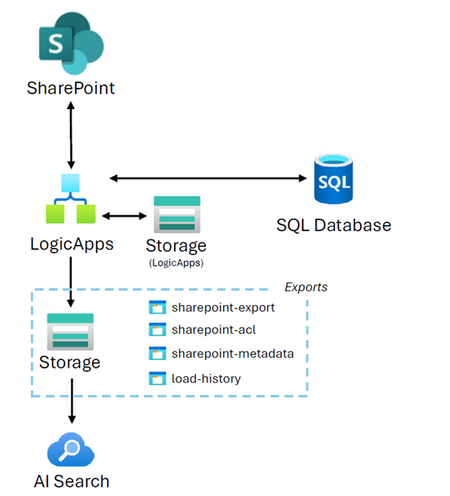
The solution above has 2 workflows - Historic and Ongoing.
For the first time load (e.g. 1 million document scenario), the historic workflow should be used which employs a sliding time window approach to ensure compliance with SharePoint throttling limits by preventing the export of all documents at once, you can customise the sliding window increment to your preference (e.g. 1 hr, 8 hrs, 24 hrs). Once the history export is completed which may take some time, the Ongoing workflow should be enabled (historic should be disabled) to only export documents getting created on ongoing basis.
For cost estimation, consider running workflow on small set of documents (e.g. 1000 or 5000) and extrapolate to get the indicative costs.
Since the blog was posted there have been a number of features we announced that can enable RAG on SharePoint, please check them out.
- Use a SharePoint indexer to ingest permission metadata - Azure AI Search | Microsoft Learn
- SharePoint in Microsoft 365 indexer (preview) - Azure AI Search | Microsoft Learn
- Create a SharePoint (Indexed) Knowledge Source - Azure AI Search | Microsoft Learn
- Create a SharePoint (Remote) Knowledge Source - Azure AI Search | Microsoft Learn
- Add SharePoint as a knowledge source - Microsoft Copilot Studio | Microsoft Learn
Hi MaheshMSFT​,
Thank you for your response.
Given that my end of goal is indeed to enable RAG on SharePoint, I have looked at the different approaches. It seems that for now those solutions are not production-ready just yet (public preview). I also wish to keep a certain control over how documents are processed / indexed with Azure AI Search. My options are therefore the following:
1. Wait until SharePoint (Indexed) is production ready (but how long?)
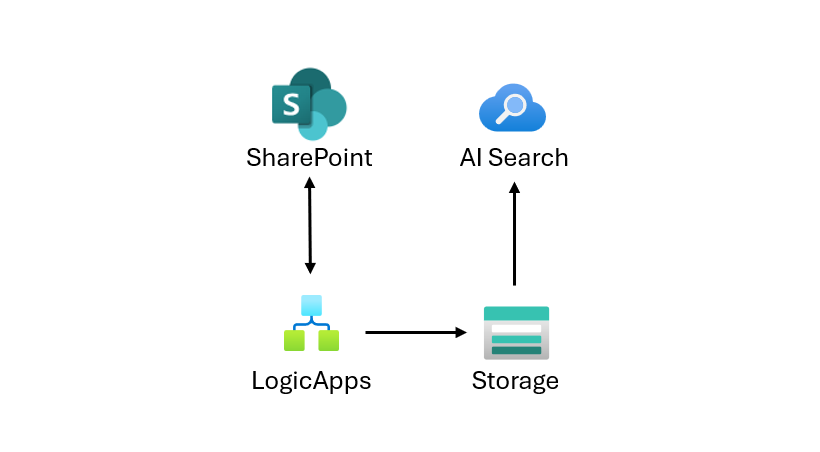
2. Transfer SharePoint files to an Azure Blob, and use the blob with Azure AI Search (as discussed in your blog)
I'll go with Option 2 for now, unless something changes in the near future.
For the Ongoing workflow, are you using the Delta graph API ? Could you export Documents from SharePoint to Azure Blob using ADF or Azure Synapse ? Why Logic Apps ?
Best,
- MaheshMSFTJan 13, 2026
Microsoft
Hi
- LogicApps provides built-in support for the SharePoint Online Connector, along with a variety of SharePoint actions such as sending HTTP requests to SharePoint and retrieving file content. You can use the Graph API / any other option that best suits your requirement.
Ref: SharePoint - Connectors | Microsoft Learn - Tip: To figure out if a Microsoft Graph REST API call is backed by SharePoint Online you can add $whatif to the end of the query to output the underlying SharePoint URL in MS Graph Explorer.
Ref: Operations using SharePoint REST v2 (Microsoft Graph) endpoints | Microsoft Learn
Ref: Graph Explorer | Try Microsoft Graph APIs - Microsoft Graph
Thanks.
- LogicApps provides built-in support for the SharePoint Online Connector, along with a variety of SharePoint actions such as sending HTTP requests to SharePoint and retrieving file content. You can use the Graph API / any other option that best suits your requirement.