Hi MaheshMSFT,
Thank you for your response.
Given that my end of goal is indeed to enable RAG on SharePoint, I have looked at the different approaches. It seems that for now those solutions are not production-ready just yet (public preview). I also wish to keep a certain control over how documents are processed / indexed with Azure AI Search. My options are therefore the following:
1. Wait until SharePoint (Indexed) is production ready (but how long?)
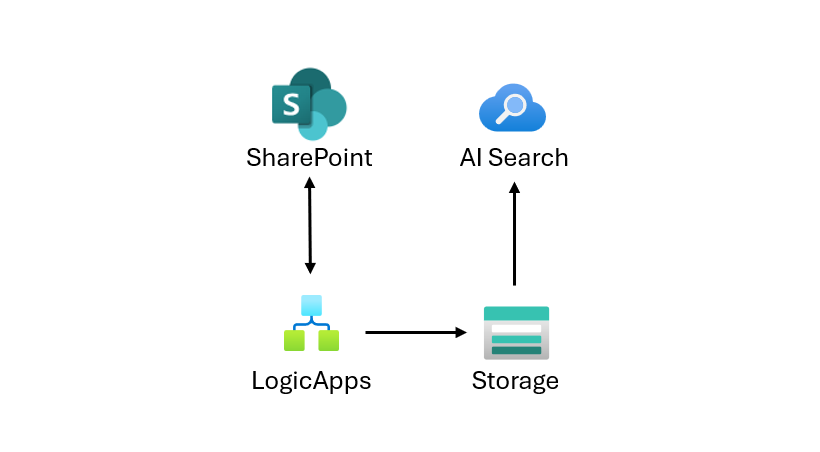
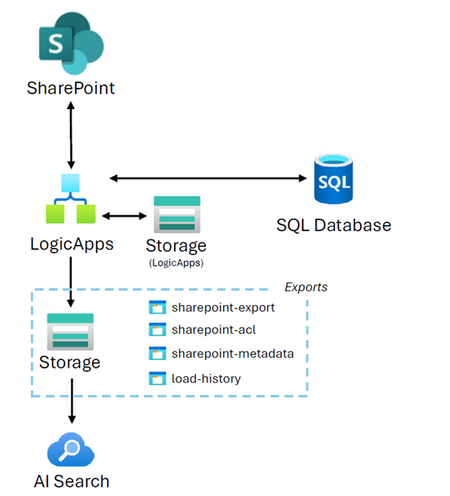
2. Transfer SharePoint files to an Azure Blob, and use the blob with Azure AI Search (as discussed in your blog)
I'll go with Option 2 for now, unless something changes in the near future.
For the Ongoing workflow, are you using the Delta graph API ? Could you export Documents from SharePoint to Azure Blob using ADF or Azure Synapse ? Why Logic Apps ?
Best,

 Microsoft
