
MCP Enterprise-Managed Authorization standardizes how enterprise identity reaches a resource authorization server. See what Entra ID and App Service provide today, what ID-JAG adds, and try both paths in a working Python sample.
A few weeks ago I wrote about what the latest MCP changes meant for scaling on Azure App Service. This time, the protocol change is about a different kind of scale: how an enterprise connects hundreds or thousands of employees to MCP servers without making every person authorize every server one at a time.
Enterprise-Managed Authorization (EMA) is now a stable MCP extension. It makes the organization's identity provider the policy decision point, replaces repeated server-by-server browser prompts with an identity assertion grant, and gives security teams a central place to grant and revoke access.
That sounds a lot like Microsoft Entra preauthorization and App Service Authentication. But while building the sample for this post, I found an important distinction:
A centrally governed OAuth experience is not automatically the EMA protocol.
App Service and Entra can give you a strongly governed MCP endpoint today. The full EMA flow additionally requires the enterprise identity provider to issue an Identity Assertion JWT Authorization Grant, or ID-JAG, and the MCP authorization server to exchange it. Same goal, related building blocks, different wire protocol.
So I built both.
Why the normal OAuth flow gets expensive
Standard MCP authorization is user-driven. A client discovers an MCP server, sends the user through that server's authorization flow, receives an access token, and repeats the process for the next server.
That is a good property for consumer scenarios. The user chooses which application can reach which data.
At enterprise scale, the same pattern becomes an authorization tax:
- Every employee has to connect every approved MCP server.
- Consent and account-selection prompts create inconsistent setup.
- Security teams have to reason about access across many separate authorization relationships.
- Offboarding and policy changes are harder to apply from one control plane.
- Work and personal identities can get mixed together at the worst possible boundary: the tool that can act on a user's behalf.
EMA moves the authoritative decision back to the enterprise IdP.
What EMA changes on the wire
The user still signs in to the MCP host with the corporate identity provider. The difference comes when the client needs an access token for an MCP server.
- The MCP client exchanges the user's identity assertion at the enterprise IdP for an ID-JAG. The stable extension uses OAuth token exchange semantics from RFC 8693.
- The IdP evaluates enterprise policy for the requested client, MCP resource, user, and scopes.
- If policy allows access, the IdP issues a short-lived, audience-bound ID-JAG.
- The client presents that JWT to the MCP authorization server using the JWT bearer grant from RFC 7523.
- The authorization server validates the assertion and returns the resource access token the client uses for MCP calls.
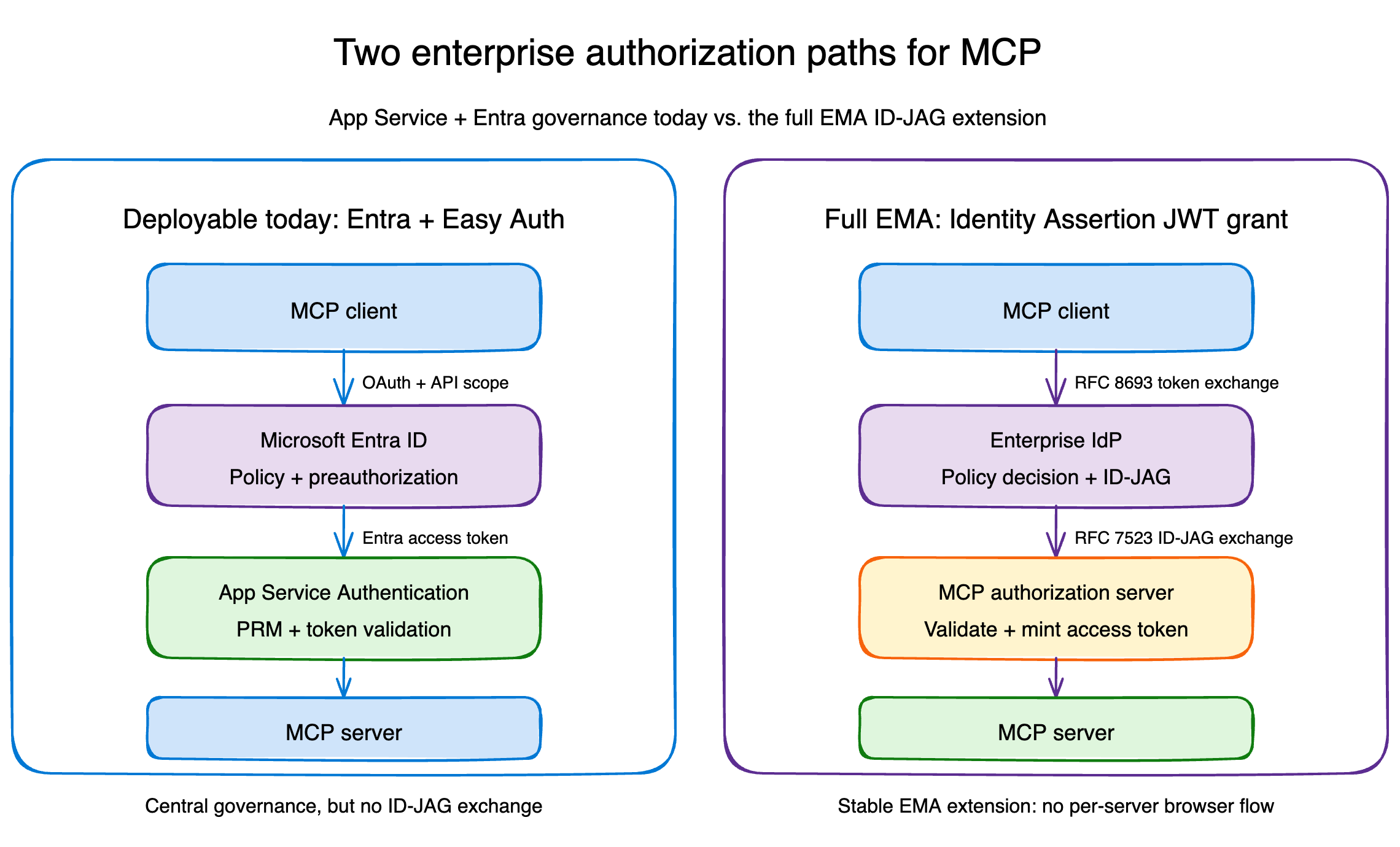
The user never goes through a second browser flow at the MCP authorization server. The enterprise IdP already made the decision.
That gives the organization three useful properties:
- Authorize once, inherit everywhere. Admins enable approved servers and users receive access according to their existing groups and roles.
- Central policy and revocation. Conditional access, employment state, device requirements, and other policy remain in the IdP.
- A cleaner identity boundary. The enterprise login is the source of authority instead of an account picker at every MCP server.
What Entra and App Service provide today
Azure App Service already has a very good home for an enterprise MCP resource server: App Service Authentication sits in front of the application and validates Microsoft Entra access tokens before a request reaches your Python process. App Service Authentication’s MCP authorization integration and protected resource metadata support are currently in preview.
In the deployable half of the sample, App Service:
- publishes OAuth protected resource metadata for MCP discovery;
- requires authentication on
/mcpand returns401to unauthenticated requests; - validates token signature, issuer, audience, and lifetime;
- allows only the configured client application IDs;
- injects the validated principal into platform-controlled request headers;
- leaves only
/and/healthpublic; - sends OpenTelemetry data to Application Insights with managed identity.
The Entra application exposes user_impersonation and preauthorizes Visual Studio Code and Azure CLI. Tenant administrators can then apply Conditional Access to the enterprise application and inspect Entra sign-in logs.
That is centrally governed OAuth. It removes consent prompts for known clients and puts token validation at the platform edge.
It is not native EMA because this path does not ask Entra to issue an ID-JAG through RFC 8693, and there is no RFC 7523 assertion exchange at a separate MCP authorization server.
Here is the practical comparison:
| Capability | Entra + App Service path | EMA path |
|---|---|---|
| Central tenant policy | Yes | Yes |
| Protected resource metadata | Yes | Yes |
| Known-client preauthorization | Yes, through Entra preauthorization | Often still required at the IdP and authorization server |
| Per-server browser flow | Avoided for preauthorized clients | Avoided by protocol design |
| Enterprise IdP issues an ID-JAG | No | Yes |
| MCP authorization server exchanges the ID-JAG | No | Yes |
| Included in the sample | Deployable Azure app | Local interoperability lab |
The distinction matters because "no consent prompt" describes a user experience, not a protocol proof.
Could you run full EMA on App Service today?
Yes. App Service does not prevent you from deploying the complete EMA flow. If your enterprise IdP can issue ID-JAGs, you can implement the resource authorization server and MCP token validation in application code—or point the MCP server at a separate authorization service. App Service then remains the compute platform rather than the authorization boundary.
That approach replaces Easy Auth’s platform-managed token validation with responsibilities such as token issuance, signing-key management, ID-JAG validation, replay protection, scope enforcement, and audit logging. The remaining prerequisite is still an enterprise IdP and MCP client that support the ID-JAG exchange.
I built both paths on purpose
The companion repository is seligj95/app-service-ema-mcp.
The Azure path is a FastAPI MCP server running on Linux App Service. It exposes two read-only tools:
whoamireturns the tenant, client, subject, roles, and scopes that App Service Authentication validated.authorization_modelstates exactly which authorization model protects the deployment.
The local path runs four components in one process:
- a stand-in enterprise IdP;
- an MCP authorization server;
- an MCP resource server;
- an MCP client using the official Python SDK's identity-assertion APIs.
The SDK's IdentityAssertionOAuthProvider covers the second leg: the RFC 7523 JWT bearer grant from the MCP client to the MCP authorization server. The first leg, the RFC 8693 exchange with the enterprise IdP that produces the ID-JAG, is deployment-specific and supplied through the SDK's assertion_provider callback. The lab fulfills that callback with its in-process stand-in IdP.
The lab validates the ID-JAG signature, typ, issuer, audience, client ID, resource, scopes, expiration, and single-use jti. It also tests rejection cases for the wrong issuer, wrong audience, wrong resource, scope escalation, expiration, and replay. The lab deliberately requires a resource claim, which is stricter than the stable specification's optional claim; production authorization servers should choose that posture explicitly.
The stand-in IdP and in-memory token store are deliberately not production components. They make the protocol visible and testable without pretending Entra currently exposes the exact issuance flow used by the lab.
Run the EMA flow locally
Clone the repository and install the project:
git clone https://github.com/seligj95/app-service-ema-mcp
cd app-service-ema-mcp
python3 -m venv .venv
source .venv/bin/activate
python -m pip install -e ".[dev]"
Then run the complete ID-JAG exchange:
python -m examples.ema_lab.client
The final result is the identity and authorization context returned by the MCP server:
{'subject': 'alice@example.com', 'client_id': 'finance-agent',
 'scopes': ['mcp:whoami'], 'resource': 'http://localhost/mcp'}
Run the test suite to see both the successful exchange and the rejection boundaries:
python -m ruff check .
python -m pytest
One implementation note: at the time of writing, PyPI mcp 1.28.1 package does not yet contain the identity-assertion APIs used by the stable extension. The sample pins an exact commit from the official Python SDK until those APIs ship in a release.
Deploy the Entra-governed MCP server
The repository includes azd and Bicep for a Basic B1 Linux App Service plan, Python 3.14, App Service Authentication, protected resource metadata, Log Analytics, Application Insights, and managed-identity telemetry.
After choosing a subscription:
azd auth login
azd env new ema-mcp
azd env set AZURE_SUBSCRIPTION_ID <subscription-id>
azd env set AZURE_LOCATION eastus
./scripts/configure-entra-app.sh
azd up
The Entra bootstrap runs once before azd up because azd resolves required Bicep parameters before the preprovision hook. After that, the hook reruns the same idempotent configuration on each provision.
Verify the deployed boundary:
./scripts/verify-deployment.sh
The script checks that protected resource metadata is available, an anonymous MCP request is rejected, Azure CLI can obtain the delegated API token, and the same MCP request succeeds with that token.
During deployment validation, I invoked whoami against the deployed app. App Service returned the expected Azure CLI client and the delegated scope:
{
  "authentication_type": "aad",
  "client_id": "04b07795-8ddb-461a-bbee-02f9e1bf7b46",
  "scopes": ["user_impersonation"]
}
The corresponding custom trace arrived in Application Insights through the App Service managed identity, with local telemetry authentication disabled.
The response above is shortened for readability. The complete tool result also includes name, subject, tenant_id, and roles.
Three details worth carrying into production
The platform did the hard security work, but three integration details were easy to miss.
1. Allow the audience Entra actually emits
The client requests api://<application-id>/user_impersonation, but a v2 delegated access token can carry the bare application client ID in aud. The sample allows both the bare client ID and the api:// form while still rejecting tokens for every other resource.
2. Keep the SDK's DNS-rebinding protection
The MCP Python SDK defaults to localhost when a server does not declare its deployment hostname. That is a safe local default, but a deployed request correctly fails with 421 Invalid Host header.
The sample reads WEBSITE_HOSTNAME and allowlists only that exact App Service hostname and its optional port form. It does not disable the protection.
3. Account for App Service claim mapping
App Service maps some JWT claim names before it builds X-MS-CLIENT-PRINCIPAL. For example, the delegated scp value can arrive under the mapped scope claim URI.
The application accepts both representations, while continuing to trust only the principal header injected by App Service. A caller-supplied identity header never becomes proof of authentication because the platform strips and replaces these headers at the edge.
The production checklist
This sample gives you the authorization boundary, not every production control. Before using the pattern for a real tool surface:
- Apply Conditional Access deliberately, starting in report-only mode.
- Add tool-level scope or role checks when different tools have different sensitivity.
- Use managed identity or an explicit on-behalf-of flow for downstream APIs; never forward the MCP resource token.
- Add private networking or an API gateway when the workload requires network isolation.
- Keep access tokens and ID-JAGs short-lived.
- Validate ID-JAG signatures with the enterprise IdP's published JWKS, discovered from its authorization server metadata. The lab's shared HMAC key exists only to keep the local flow self-contained.
- Enforce single-use ID-JAG replay protection at the authorization server.
- Log authorization decisions without logging bearer tokens or assertion contents.
- Replace the SDK Git pin after the identity-assertion APIs reach a tested package release.
The takeaway
EMA is bigger than eliminating another consent screen. It defines how an enterprise IdP becomes the authorization control plane for an MCP fleet, with a portable assertion that an MCP authorization server can validate.
Entra ID and App Service already give you many of the outcomes enterprises need: tenant policy, known-client governance, protected resource discovery, platform token validation, Conditional Access, and centralized telemetry.
Just name the boundary honestly.
Use App Service and Easy Auth when you want a deployable, Entra-governed MCP endpoint today. If your IdP already supports ID-JAG issuance, App Service can also host a custom EMA authorization implementation. Otherwise, use the local lab to understand and test the protocol while platform-native support develops.
That is the part I like most about the extension: enterprise authorization stops being an experience every MCP server invents and becomes a protocol the ecosystem can share.
Resources

 Microsoft

