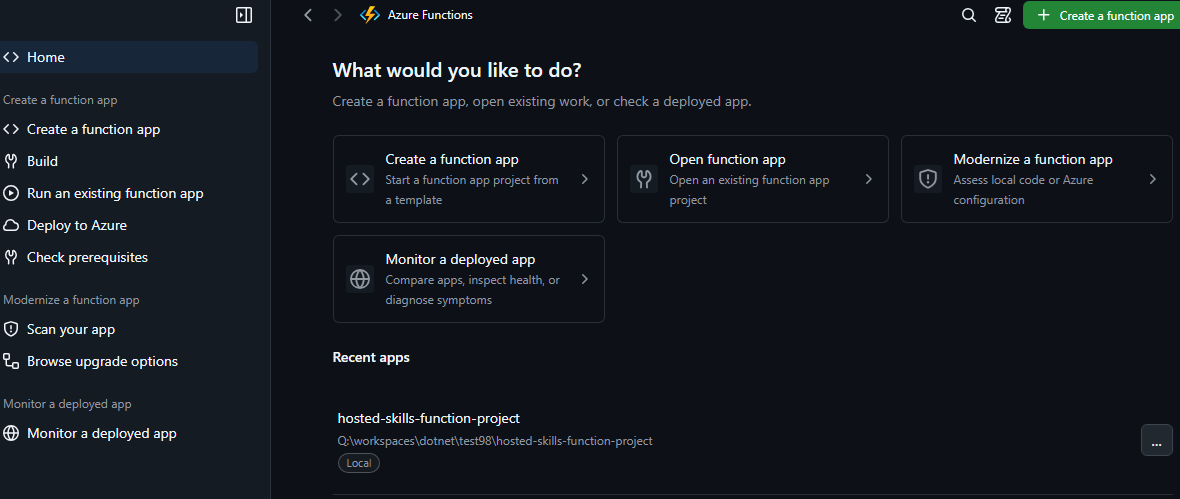
The Azure Functions canvas brings 90 templates, local run, deployment, and modernization checks into the GitHub Copilot app and VS Code. Build Function Apps and Hosted Skills faster, and find outdated or risky code and configuration before they cause incidents.
If you use the GitHub Copilot app or Visual Studio Code, meet the Azure Functions canvas.
More and more developers now build with coding agents. The Azure Functions canvas helps you get more from that workflow. It addresses three common problems in Azure Functions development:
- Use official templates without leaving your workflow. Get the same high-quality Azure Functions templates available in VS Code, directly in the GitHub Copilot app. Start building without switching tools.
- Agents get there eventually, but slowly. A coding agent can produce an app that runs, but it can take many turns. You also can't always tell whether the result follows best practices.
- Outdated choices cause incidents. Programming models, hosting plans, and runtime versions that reach end of support can cause outages. So can incorrect code or settings.
Canvases are new in the GitHub Copilot app. A canvas runs deterministic tasks quickly, without a round trip through the agent. It also gives you a visual workspace with state that you and the agent share. We're only starting to explore what canvases make possible.
Build faster with up-to-date templates
The canvas includes 90 starter and scenario templates for Azure Functions and Hosted Skills. They're more than samples: many include Bicep templates that deploy with the Azure Developer CLI (azd).
The canvas applies a template directly, so the agent needs fewer turns and less time to give you working code.
This is real code in your local work tree. You own the code and can extend it with GitHub Copilot, add it to your repository, and deploy it to Azure.
The canvas supports the full development loop: create, run locally, test, and deploy. You can also open your project in VS Code to continue development and debugging.
Select Triggers include Hosted SkillsTest your event-driven functions
Azure Functions is built for event-driven applications, but testing different triggers isn't always straightforward.
The Azure Functions canvas brings event-driven testing into your development workflow. It supports HTTP, Timer, Event Hubs, Service Bus, Storage Queue, Blob, Durable Functions, and Blob triggers with Event Grid.
Instead of switching between tools, you can test your functions as you build them, making it easier to develop and validate event-driven applications.
Build Hosted Skills with templates and an agent
With Hosted Skills, you build event-driven agents in natural language. The canvas includes 14 templates for them. Start from the template that matches your scenario to scaffold quickly, then let the agent continue. Built-in skills help the agent with creation, deployment, and configuration.
To build and test a Hosted Skill step by step, see Quickstart: Build and test a hosted skill with the Azure Functions hosted skills canvas.
Modernize with confidence
On PaaS and serverless platforms, you must regularly review programming models, hosting plans, and supported runtime versions. This is important for security and reliability. Internal data from the Azure Functions team shows that 58% of incidents come from code or configuration issues. These issues are easy to miss. With the canvas, you can quickly find them in local projects and in apps deployed to Azure, and then have the agent fix them. Checks are read-only, and fixes need your approval.
The canvas helps you follow current Azure Functions security and runtime best practices, from choosing supported configurations to identifying issues in existing applications.
Continue development in VS Code
Your project is real code, not a prototype locked inside the canvas.
Open it in VS Code to continue development with your familiar tools. The generated project includes configuration and infrastructure files to help you run locally and deploy to Azure.
Select Open In VSCodeVS Code integration
Available in seven languages
From day one, the canvas supports seven languages: English, Chinese (Simplified), German, Japanese, Korean, Portuguese (Brazil), and Spanish.
Translate featureGet started
Find Azure Functions on Awesome GitHub Copilot, or install it from the marketplace: in the GitHub Copilot app, open Customize > Plugins, select Awesome Copilot, and install Azure Functions.
Pro tip: install it directly.
Start a new session, then ask:
Open Azure Functions canvas.
Use it in VS Code (Preview). Canvases are available in VS Code 1.142 and later for local sessions that use the Copilot harness. Install the plugin in the GitHub Copilot app as shown above. Then, in VS Code, enable chat.canvases.enabled, start a new session with the Copilot harness, and ask the agent to open the Azure Functions canvas. For details, see Canvases (Preview).
On Home, choose a task: Create, Open, Modernize, or Monitor. You don't need extra tools to open the canvas. To create from a template or deploy, install the Azure Developer CLI (azd). To run locally, install Azure Functions Core Tools 4. Check prerequisites in the canvas shows what you're missing.
Give it a try, and tell us what you think.

 Microsoft