Practical strategies for managing PostgreSQL connections and scaling read-intensive workloads
Introduction
PostgreSQL is a robust and highly scalable database system, but as applications grow in size and complexity, performance challenges can begin to emerge. Slow queries, high resource consumption, and inefficient configuration can create bottlenecks that affect query execution and the overall responsiveness of an application.
Identifying and addressing these bottlenecks is essential for maintaining consistent PostgreSQL performance, particularly as workloads increase.
In this blog, we’ll explore two common performance challenges: managing a high number of database connections and handling read-intensive workloads. We’ll look at how excessive connections can affect PostgreSQL performance and discuss approaches for efficiently scaling read workloads.
Too many connections can slow PostgreSQL down
- The Problem: A high number of concurrent connections can increase memory and CPU usage, potentially affecting overall database performance.
- The Root Cause: PostgreSQL uses a process-based architecture, where each client connection is handled by a dedicated backend process. As the number of connections grows, the associated resource overhead can become significant.
- The Solution: Configure max_connections according to the available server resources and workload requirements and use a connection pooler to efficiently manage application connections at scale.
In Postgresql servers establishing a connection is a very expensive operation that requires server resources, and when not properly handled, can lead to several performance issues with resource consumption. This is attributed to the fact that each new connection requires forking of the OS process and a new memory allocation for the connection.
As a result, transactional applications frequently opening and closing the connections at the end of transactions can experience higher connection latency, resulting in lower database throughput (transactions per second) and overall higher application latency.
Using a connection pooling mechanism when designing applications can significantly reduce connection latency by reusing existing connections and enables higher database throughput on the server. With connection pooling, a fixed set of connections are established at the startup time and maintained. This also helps reduce the memory fragmentation on the server that is caused by the dynamic new connections established on the database server.
Connection pooling reduces the number of times that new connections must be opened. The pooler maintains ownership of the physical connection. It manages connections by keeping alive a set of active connections for each given connection configuration. Whenever a user calls Open on a connection, the pooler looks for an available connection in the pool. If a pooled connection is available, it returns it to the caller instead of opening a new connection. When the application calls Close on the connection, the pooler returns it to the pooled set of active connections instead of closing it. Once the connection is returned to the pool, it is ready to be reused on the next Open call.
It is therefore recommended to leverage connection pooling, i.e., PgBouncer, which is a built-in feature in Azure PostgreSQL Flexible Server.
Architecture
The diagram illustrates how connection pooling with PgBouncer can reduce the number of direct connections to PostgreSQL. Without connection pooling, each application establishes connections directly to the database, which can increase resource usage as the number of clients grows. With PgBouncer acting as an intermediary, application connections are pooled and a smaller set of database connections can be reused, helping PostgreSQL handle connection-heavy workloads more efficiently.
Additionally, consider setting idle/timeout parameters which can reduce the number of unnecessary connections established to your server and make a huge difference on your server resources availability:
Scaling read-intensive workloads with Azure Read Replicas
- The Problem: Read-heavy workloads can place significant pressure on the primary PostgreSQL server, potentially affecting performance as application traffic and query volume increase.
- The Root Cause: When read and write operations are handled by the same primary server, resource-intensive or high-volume read queries compete with write operations for available database resources.
- The Solution: Use PostgreSQL read replicas to offload read traffic from the primary server and introduce a routing layer, such as Virtual endpoints or Pgpool-II, to direct read queries to replicas while keeping write operations on the primary.
Read-heavy applications often reach a point where vertically scaling the primary is no longer the most efficient answer. Azure Database for PostgreSQL read replicas provide separate read-only servers, but the application still needs a routing strategy.
|
Flow |
Destination |
Purpose |
|
INSERT / UPDATE / DELETE / DDL |
Primary writer |
Preserve write semantics |
|
SELECT |
Read replica |
Offload read-intensive work |
Important distinction: This is read scaling, not write scaling. Read replicas do not reduce the write-capacity burden on the primary, and replication is asynchronous, so applications must tolerate some lag.
Virtual endpoints, which is a built-in feature in, can provide stable connection points for Azure Database for PostgreSQL, helping applications maintain consistent connection strings when server roles change after a promotion.
- Writer endpoint (read/write): Always points to the current primary server, ensuring that write operations are directed to the correct server after a role change.
- Read-only endpoint: Can point to either a read replica or the primary server. It targets one server at a time.
This is a valid option when the application can route read and write operations through separate connections. However, the read-only endpoint targets a single server at a time and does not distribute read traffic across multiple replicas.
Virtual endpoints simplify connection management by allowing applications to use consistent endpoints while the underlying server roles can change.
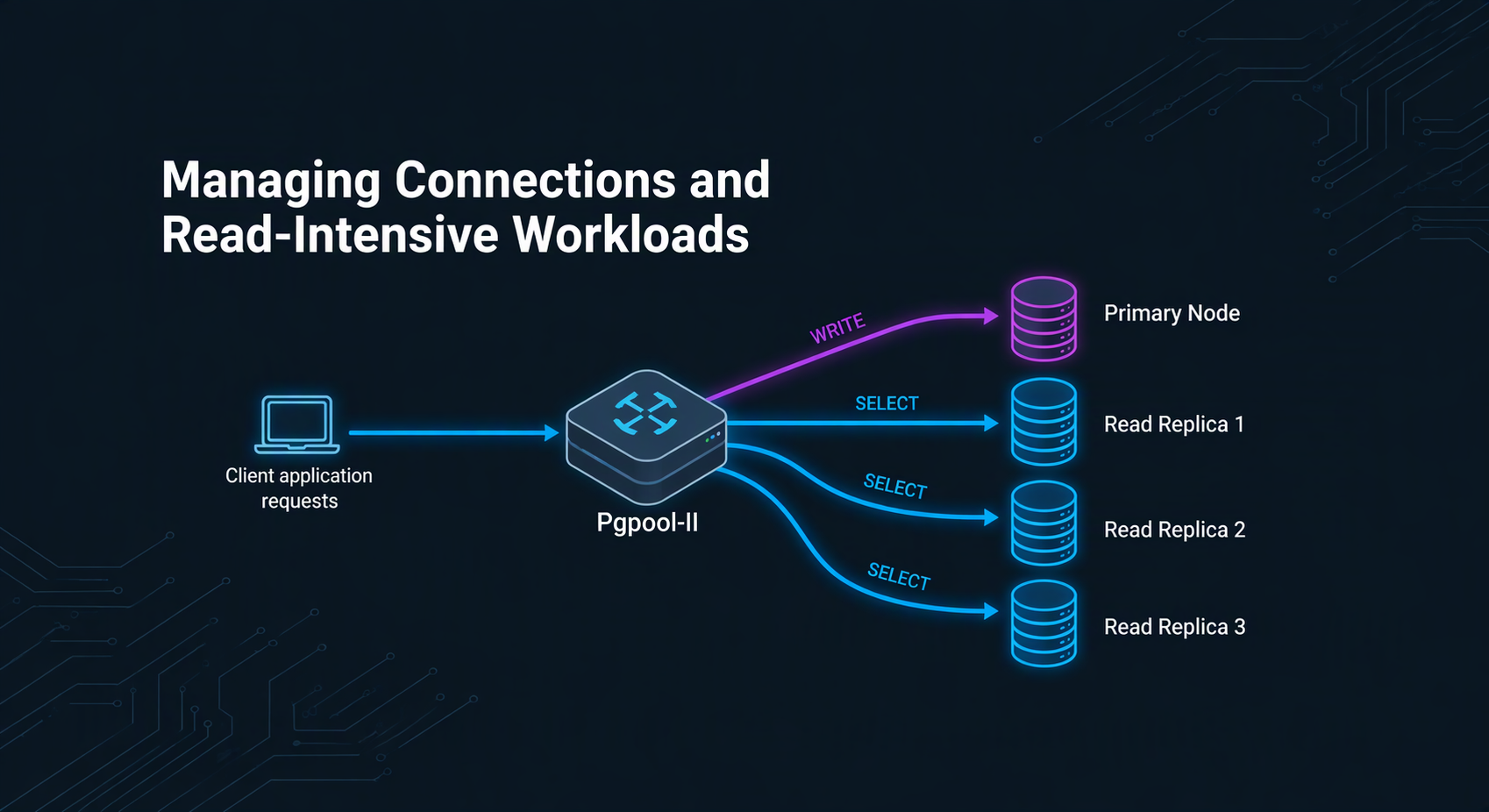
Pgpool-II can sit between clients and the database endpoints, inspect eligible SQL statements, and distribute read traffic while keeping writes on the primary.
Useful when the application cannot separate read and write traffic itself, or when read workloads need to be distributed across multiple replicas. However, this approach introduces an additional component that needs to be deployed, configured, and managed.
Architecture
Below diagram illustrates Pgpool-II as a single PostgreSQL endpoint between an application and Azure Database for PostgreSQL:
- Writes and consistency-sensitive reads go to the primary.
- Eligible SELECT queries are distributed across two read replicas.
- Pgpool-II handles SQL-aware routing, load balancing, and backend health checks.
Overall, it demonstrates how read-heavy workloads can scale without requiring the application to select individual database servers.
Install Pgpool-II on Ubuntu VM
The following section describes the installation steps for Pgpool-II version 4.7.2 on an Ubuntu VM version 24.04.4. Package names and paths can vary by Ubuntu and Pgpool-II version, so test in a non-production environment first.
We will install Pgpool-II and psql client tools and check the connection from the VM to involved Postgresql servers. Afterwards we will configure Pgpool-II by setting the main configuration file and the authentication files needed to connect to Postgresql servers.
Prerequisites and assumptions:
- An Azure Database for PostgreSQL Flexible Server primary and at least one read replica.
- Network connectivity and DNS resolution from the client host to every database endpoint on TCP 5432.
- A PostgreSQL login for application access plus suitable accounts for Pgpool-II health and streaming-replication checks.
- TLS validation appropriate to the environment.
- A workload that can tolerate asynchronous replica lag for the reads that will be offloaded.
All the examples below are performed from a bash shell:
sudo apt install -y curl ca-certificates gnupg lsb-release

# Optional: PostgreSQL client from the PGDG repository

sudo install -d /usr/share/postgresql-common/pgdg

sudo curl -o /usr/share/postgresql-common/pgdg/apt.postgresql.org.asc  --fail https://www.postgresql.org/media/keys/ACCC4CF8.asc

echo "deb [signed-by=/usr/share/postgresql-common/pgdg/apt.postgresql.org.asc] https://apt.postgresql.org/pub/repos/apt $(lsb_release -cs)-pgdg main" \
| sudo tee /etc/apt/sources.list.d/pgdg.list

sudo apt update

sudo apt install -y postgresql-client-17 pgpool2

sudo systemctl enable --now pgpool2
Validate the database endpoints first
Test and validate the connection from the VM client to Postgres servers to resolve endpoint, authentication, TLS, and firewall issues before introducing Pgpool-II.
export PGUSER="<app_user>"

export PGDATABASE="postgres"

export PGPASSWORD="<password>"

psql "host=<primary>.postgres.database.azure.com port=5432 sslmode=require" -c "select pg_is_in_recovery(), inet_server_addr();"

psql "host=<replica>.postgres.database.azure.com port=5432 sslmode=require" -c "select pg_is_in_recovery(), inet_server_addr();"
Expected result: pg_is_in_recovery() is false on the primary and true on a read replica.
Configure Pgpool-II for read scaling
Below is a minimal illustrative of main Pgpool-II configuration file. Review all defaults in your installed version before production use.
Configuration file
# /etc/pgpool2/pgpool.conf
backend_clustering_mode = 'streaming_replication'

# - pgpool Connection Settings -

listen_addresses = '*'
port = 9999

# - pgpool Communication Manager Connection Settings -

pcp_listen_addresses = 'localhost'
pcp_port = 9898

# - Backend Connection Settings -

backend_hostname0 = '<primary>.postgres.database.azure.com'
backend_port0 = 5432
backend_weight0 = 0
backend_application_name0 = 'primary'
backend_hostname1 = '<replica-1>.postgres.database.azure.com'
backend_port1 = 5432
backend_weight1 = 1
backend_application_name1 = 'replica1'

# Add more replicas as backend_hostname2, backend_port2, and so on.

load_balance_mode = on
connection_cache = on
sr_check_user = '<check_user>'
health_check_user = '<check_user>'
ssl = on
Why primary weight 0? This example intentionally sends load-balanced reads only to replicas. If your consistency or capacity design should allow reads on the primary, assign it a non-zero relative weight instead.
An example of pgpool.conf changed configuration:
backend_clustering_mode = streaming_replication
listen_addresses = '*'
port = 9999
pcp_listen_addresses = ‘*’
pcp_port = 9898
backend_hostname0 = 'pgpool-prim.postgres.database.azure.com'
backend_port0 = 5432
backend_weight0 = 0
backend_application_name0 = 'primary'
backend_hostname1 = 'pgpool-repl1.postgres.database.azure.com'
backend_port1 = 5432
backend_weight1 = 1
backend_application_name1 = 'repl1'
backend_hostname2 = 'pgpool-repl2.postgres.database.azure.com'
backend_port2 = 5432
backend_weight2 = 1
backend_application_name2 = 'repl2'
pool_passwd = 'pool_passwd'
ssl = on
ssl_ca_cert_dir = '/etc/ssl/certs/'
load_balance_mode = on
read_only_function_list = 'inet_server_addr(),pg_is_in_recovery()'
sr_check_user = 'edu'
sr_check_password = ''
health_check_user = 'edu'
Authentication files
Pgpool-II primarily uses two authentication configuration files to manage connections and privileges: pool_hba.conf and pool_passwd.
Similar to PostgreSQL's native pg_hba.conf, this file handles client-to-Pgpool-II access control. It defines which hosts, IP ranges, databases, and users are allowed to connect, and specifies the required authentication method (such as trust, md5, scram-sha-256).
Avoid broad 0.0.0.0/0 trust or password rules. Restrict source networks, prefer SCRAM where supported, and control file ownership and permissions.
# /etc/pgpool2/pool_hba.conf
host all all <trusted-client-cidr> scram-sha-256
When using password-based methods like md5 or scram-sha-256, Pgpool-II cannot look up user passwords directly from the PostgreSQL system catalogs in real-time. Instead, it references the pool_passwd file to verify client credentials before passing the connection to the backend server.
This file is populated using commands like pg_md5 or pg_enc.
# /etc/pgpool2/pool_passwd
cd /etc/pgpool2

sudo pg_enc -m -k /etc/pgpool2/.pgpoolkey -f /etc/pgpool2/pgpool.conf -u <app_user> -p
By using SCRAM authentication, we need to provide a protected encryption key used by pg_enc. This file is by default located in the users home directory but can be referenced by environment variable PGPOOLKEYFILE.
# /etc/pgpool2/.pgpoolkey
sudo sh -c 'umask 077; printf %s '<encryption-key>' > /etc/pgpool2/.pgpoolkey'

sudo chmod 600 /etc/pgpool2/.pgpoolkeyNote: Pgpool-II commonly runs as the postgres operating-system user and it will look for the pgpoolkey under its home directory.
Though not used for standard database traffic, pcp.conf is a third critical authentication file used by Pgpool-II. It contains credentials that authorize administrators to execute remote management commands via the Pgpool Control Protocol (PCP) toolset.
This file contains user ID and his password for pgpool communication manager authentication and store username:md5(password).
# /etc/pgpool2/pcp.conf
echo -n '<pcp_password>' | pg_md5

## Add the generated hash, for example: <pcp_user>:<md5_hash>

sudo chmod 600 /etc/pgpool2/pcp.conf

## Optional client password file: ~/.pcppass

echo 'localhost:9898:<pcp_user>:<pcp_password>' > ~/.pcppass

chmod 600 ~/.pcppass
After changes the pgpool-II service needs to be restarted
sudo systemctl restart pgpool2

sudo systemctl status pgpool2 --no-pager
PCP administration quick reference
In Pgpool-II, as mentioned above, PCP stands for Pgpool Control Protocol, which is an administrative interface and command set used to manage and monitor a running Pgpool-II instance.
Pgpool-II management operations, such as checking node status or detaching nodes, are available through PCP commands, independently of normal PostgreSQL client connections. The examples below use PCP's default port, 9898, and a dedicated PCP account. Limit access to the local host or a controlled administration network.
Common command pattern:
pcp_<command> -h localhost -p 9898 -U <pcp_user> -w [command options]
Choose -W when you want the utility to ask for the PCP password. Choose -w for unattended execution; in that case the credential must already be available through ~/.pcppass or the file named by PCPPASSFILE.
|
Task |
Command |
Operational note |
|
List configured node count |
pcp_node_count -h localhost -p 9898 -U <pcp_user> -w |
Returns the number of backend entries known to the current Pgpool-II configuration; the total is not limited to nodes that are presently attached. |
|
Show one node |
pcp_node_info -h localhost -p 9898 -U <pcp_user> -w -n 1 -v |
Reports Pgpool-II's view of the selected backend, together with backend status and role details available for that node. |
|
Show all nodes |
pcp_node_info -h localhost -p 9898 -U <pcp_user> -w -a -v |
Useful before and after maintenance to compare all configured backends. |
|
Health-check statistics |
pcp_health_check_stats -h localhost -p 9898 -U <pcp_user> -w -n 1 |
Returns the accumulated health-check results and timing information for the requested backend ID. |
|
Show effective configuration |
pcp_pool_status -h localhost -p 9898 -U <pcp_user> -w |
Prints the configuration values currently reported by Pgpool-II. |
|
Detach a node gracefully |
pcp_detach_node -h localhost -p 9898 -U <pcp_user> -w -n 1 -g |
Requests a controlled detach and allows active client work to drain until Pgpool-II's configured limits are reached. |
|
Detach a node immediately |
pcp_detach_node -h localhost -p 9898 -U <pcp_user> -w -n 1 |
Removes the selected backend from Pgpool-II service immediately; established client sessions can be interrupted. |
|
Attach a node |
pcp_attach_node -h localhost -p 9898 -U <pcp_user> -w -n 1 |
Returns a configured backend to the Pgpool-II pool. Check connectivity, expected role and replication health before doing so. |
|
Show child processes |
pcp_proc_info -h localhost -p 9898 -U <pcp_user> -w -a -v |
Provides details about Pgpool-II worker processes and their connection slots. |
|
Reload configuration |
pcp_reload_config -h localhost -p 9898 -U <pcp_user> -w |
Asks the local Pgpool-II instance to reread its configuration; settings that require a restart remain unchanged until restart. |
Safe detach and attach workflow
- Check the current topology with pcp_node_info -a -v and confirm the target node ID.
- If possible, detach with -g so active clients can drain. Remember that detach changes Pgpool-II state only; it does not stop the PostgreSQL backend.
- Perform the planned maintenance and validate the backend directly, including DNS, TLS, authentication, pg_is_in_recovery(), and replication health.
- Use pcp_attach_node only when the backend is safe to rejoin with the expected role and acceptable replication state. Otherwise use the documented recovery procedure for your topology.
- Re-run pcp_node_info -a -v and SHOW POOL_NODES, then open fresh application sessions to validate routing.
Important: pcp_attach_node does not repair or resynchronise a PostgreSQL replica. It only returns an existing backend to Pgpool-II service. Avoid pcp_promote_node for Azure Database for PostgreSQL read replicas because Azure role changes should be performed through Azure-supported promotion or failover operations, then reconciled with the Pgpool-II configuration and state.
An example of pcp administration command:
psql -p 9999 -h localhost -U edu -d postgres -c "show pool_nodes;"
| node_id | hostname | port | status | pg_status | lb_weight | role | pg_role | select_cnt | load_balance_node | replication_delay | last_status_change |
|---|---|---|---|---|---|---|---|---|---|---|---|
| 0 | pgpool-prim.postgres.database.azure.com | 5432 | up | unknown | 0.000000 | primary | unknown | 10 | false | 0 | 2026-09-15 16:48:00 |
| 1 | pgpool-repl1.postgres.database.azure.com | 5432 | up | unknown | 0.500000 | standby | unknown | 5 | true | 0 | 2026-09-15 16:48:00 |
| 2 | pgpool-repl2.postgres.database.azure.com | 5432 | down | unknown | 0.500000 | standby | unknown | 0 | false | 0 | 2026-09-15 16:53:58 |
pcp_attach_node -n 2

psql -p 9999 -h localhost -U edu -d postgres -c "show pool_nodes;"
| node_id | hostname | port | status | pg_status | lb_weight | role | pg_role | select_cnt | load_balance_node | replication_delay | replication_state | replication_sync_state | last_status_change |
|---|---|---|---|---|---|---|---|---|---|---|---|---|---|
| 0 | pgpool-prim.postgres.database.azure.com | 5432 | up | unknown | 0.000000 | primary | unknown | 0 | false | 0 | 2026-09-15 16:48:00 | ||
| 1 | pgpool-repl1.postgres.database.azure.com | 5432 | up | unknown | 0.500000 | standby | unknown | 0 | true | 0 | 2026-09-15 16:48:00 | ||
| 2 | pgpool-repl2.postgres.database.azure.com | 5432 | up | unknown | 0.500000 | standby | unknown | 0 | false | 0 | 2026-09-15 16:53:58 |
Check if load balancing works
A single long-lived connection can remain assigned to one load-balancing node. Therefore, test both routing correctness and distribution across multiple new sessions.
|
Check |
What to verify |
|
Backend status |
Primary and replicas appear up, with the expected roles. |
|
SELECT distribution |
select_cnt increases on intended read backends. |
|
Write routing |
A controlled INSERT/UPDATE reaches the primary. |
|
Read-after-write |
Application paths requiring fresh data remain on the primary or otherwise handle lag. |
|
Failure behaviour |
Replica loss, Pgpool-II restart, and recovery are tested without assuming automatic correctness. |
psql -h localhost -p 9999 -U <app_user> -d postgres -c "show pool_nodes;"

for i in $(seq 1 20); do
    psql -h localhost -p 9999 -U <app_user> -d postgres -Atc  "select inet_server_addr(), pg_is_in_recovery();"
done

psql -h localhost -p 9999 -U <app_user> -d postgres -c "show pool_nodes;"
An example of expected output:
| node_id | hostname | port | status | pg_status | lb_weight | role | pg_role | select_cnt | load_balance_node | replication_delay | replication_state | replication_sync_state | last_status_change |
|---|---|---|---|---|---|---|---|---|---|---|---|---|---|
| 0 | pgpool-prim.postgres.database.azure.com | 5432 | up | unknown | 0.000000 | primary | unknown | 0 | false | 0 | 2026-09-28 09:35:07 | ||
| 1 | pgpool-repl1.postgres.database.azure.com | 5432 | up | unknown | 0.500000 | standby | unknown | 9 | true | 0 | 2026-09-28 09:35:07 | ||
| 2 | pgpool-repl2.postgres.database.azure.com | 5432 | up | unknown | 0.500000 | standby | unknown | 11 | false | 0 | 2026-09-28 09:35:07 |
Troubleshooting quick reference
|
Symptom |
Likely area to inspect |
|
All reads go to primary |
load_balance_mode, weights, query eligibility, transaction state, and backend roles |
|
FATAL: unable to get session context |
Pgpool-II authentication files, pool_passwd, key permissions, user mapping, and service logs |
|
Replica shown down |
DNS, firewall, TLS, credentials, health checks, and PCP state |
|
Uneven read distribution |
Session reuse, backend weights, number of client sessions, and statement_level_load_balance |
|
Stale results |
Replica lag and application consistency requirements |
|
Performance worsened after adding middleware |
Separate query execution time from time waiting for a connection; compare representative tests through and around the proxy |
Consistency and routing caveats
- Read replicas are asynchronously updated. A replica can return older data than the primary.
- A SELECT inside a transaction might be routed differently after a write, at serializable isolation, or when it contains functions Pgpool-II cannot safely classify as read-only.
- Session-level load balancing does not guarantee an even per-query distribution when applications keep connections open for long periods.
- Health detection and query routing are not the same as a complete high-availability design for the Pgpool-II tier itself. A single Pgpool-II VM is a single point of failure.
- Customer-managed middleware remains the customer’s operational responsibility, including patching, monitoring, capacity, certificates, secrets, and recovery procedures.
Production checklist
- Benchmark with realistic concurrency, transaction boundaries, prepared statements, and connection lifetimes.
- Define which application paths tolerate eventual consistency, and which must read from the primary.
- Monitor Pgpool-II backend state, SELECT counters, process utilization, logs, health checks, and replica lag.
- Run Pgpool-II redundantly if the endpoint is business-critical; test the load balancer or failover mechanism in front of it.
- Use TLS, least privilege, restricted network access, protected secrets, and documented certificate rotation.
- Test primary maintenance, replica unavailability, Pgpool-II restart, DNS changes, and application retry behaviour.
- Keep Pgpool-II and operating-system packages patched, and review release notes before upgrades.
What problem does each technology solve?
These technologies address different bottlenecks in different scenarios. Choose the component that matches the problem first and combine them only when the workload has clearly distinct requirements.
|
Technology |
Primary problem solved |
Best fit |
Important limitation |
|
Virtual Endpoints |
Stable writer and read-only connection points when Azure PostgreSQL server roles change. |
Applications that can use separate read/write and read-only connection strings and want role changes without changing those strings. |
The read-only endpoint targets one server at a time; it does not inspect SQL or distribute reads across multiple replicas. |
|
Pgpool-II |
SQL-aware read/write routing, read distribution across replicas, connection reuse, and backend health visibility. |
A single PostgreSQL endpoint when the application cannot split traffic itself or reads must be distributed across multiple replicas. |
Customer-managed middleware adds deployment, patching, monitoring, security, capacity, and availability responsibilities. |
|
PgBouncer |
Lightweight connection pooling that reduces connection churn and backend-connection pressure. |
Many short-lived or idle client connections, especially when the built-in Flexible Server endpoint is suitable. |
It is not a SQL-aware read/write router across Azure read-replica endpoints, and transaction pooling requires compatibility testing. |
|
Azure Managed Redis |
Application-level caching that serves reusable data before another PostgreSQL query is required. |
Frequently repeated, cacheable reads with explicit freshness, expiry, and invalidation rules. |
Requires application integration and a deliberate consistency, eviction, security, and cost design. |
Decision guide
|
If the main problem is… |
Start with… |
Why |
|
Connection strings must remain stable when primary and replica roles change. |
Virtual Endpoints |
The writer and read-only endpoints abstract the underlying server names after supported role changes. |
|
The application can already separate writes from reads and needs one read target. |
Virtual Endpoints |
They provide dedicated writer and read-only connection points without adding customer-managed SQL-routing middleware. |
|
One SQL endpoint must route writes to the primary and distribute eligible reads across multiple replicas. |
Pgpool-II |
It can inspect eligible statements and apply read distribution in a streaming-replication topology. |
|
Short-lived or excessive idle PostgreSQL connections are consuming resources. |
PgBouncer |
Connection pooling directly reduces connection churn and the number of server-side backend connections. |
|
Frequently requested objects can be served without querying PostgreSQL. |
Azure Managed Redis |
Cached values can satisfy repeated reads before they reach the primary or replicas. |
Conclusion
PostgreSQL performance problems should be addressed at the layer where they originate. PgBouncer is the most direct option for reducing connection churn and controlling backend-connection pressure. Azure Database for PostgreSQL read replicas add read capacity, while Virtual Endpoints provide stable writer and read-only connection points for applications that can separate those traffic paths.
When the application cannot perform that separation, or when eligible reads must be distributed across multiple replicas through a single PostgreSQL endpoint, Pgpool-II provides SQL-aware routing, load balancing, connection reuse, and backend health visibility. That flexibility comes with additional operational responsibility, so the Pgpool-II tier must be secured, monitored, patched, capacity-tested, and designed for availability.
Azure Managed Redis complements these database-side approaches by serving reusable data before a PostgreSQL query is issued. It is valuable for cacheable reads, but it requires explicit application logic for freshness, expiry, invalidation, and failure handling.
The strongest design is therefore not the one with the most components. It is the one that identifies the actual bottleneck and introduces the smallest appropriate capability: Virtual Endpoints for stable role-based connection points, Pgpool-II for SQL-aware routing across replicas, PgBouncer for connection efficiency, and Azure Managed Redis for application-level caching. Validate the chosen design with realistic concurrency, replica lag, failover, session behaviour, and application consistency requirements before production adoption.
References
Azure Database for PostgreSQL server parameters:
https://learn.microsoft.com/azure/postgresql/parameters/concepts-parameters
Azure Database for PostgreSQL connection pooling strategy:
https://learn.microsoft.com/azure/postgresql/connectivity/concepts-connection-pooling-best-practices
PgBouncer in Azure Database for PostgreSQL:
https://learn.microsoft.com/azure/postgresql/connectivity/concepts-pgbouncer
PgBouncer feature compatibility:
https://www.pgbouncer.org/features.html
Azure Database for PostgreSQL read replicas:
https://learn.microsoft.com/azure/postgresql/read-replica/concepts-read-replicas
https://learn.microsoft.com/azure/postgresql/read-replica/concepts-read-replicas-virtual-endpoints
Pgpool-II documentation:
https://www.pgpool.net/docs/4.7/html/intro-whatis.html
https://www.pgpool.net/docs/4.7/html/auth-methods.html
https://www.pgpool.net/docs/4.7/html/runtime-config-load-balancing.html
https://www.pgpool.net/docs/4.7/html/pcp-commands.html
Azure Managed Redis documentation:
https://learn.microsoft.com/azure/redis
Azure Cache for Redis retirement guidance:
https://azure.microsoft.com/products/cache

 Microsoft