With the new Get Started landing page, PostgreSQL developers can move from connection to productivity faster, with quick access to helpful actions, feature highlights, docs, and learning resources.
The PostgreSQL extension for Visual Studio Code now includes a Get Started landing page that helps you discover key features, access helpful resources, and become productive faster after connecting to a server.
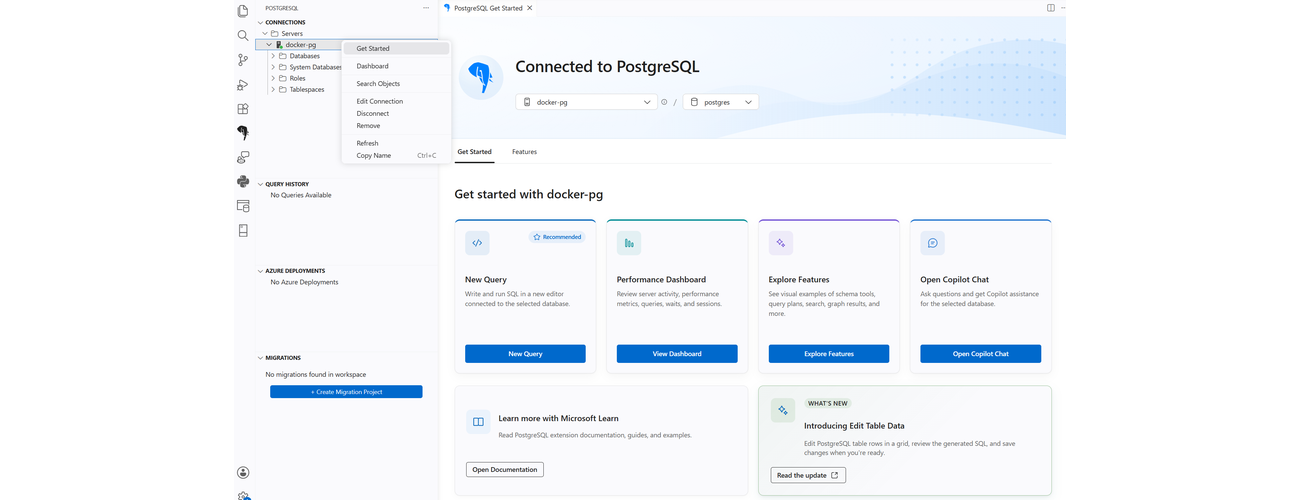
The image below shows the Get Started landing page, highlighting quick-action cards, learning resources, and featured updates available after you connect to a server.
Quick Actions
Each entry point applies to the database you have selected, so whatever you click picks up from the connection you just made.
Explore additional resources to navigate to PostgreSQL documentation
View at your Convenience
The landing page is shown only after a new server connection is added. Users who do not wish to see this page can disable it by clearing the "Show this page after adding a new connection" option at the bottom of the landing page.
Open the landing page anytime:Right-click any server in the connections tree and choose Get Started.
Try it out
Head over to PostgreSQL for Visual Studio Code and spin up a new server connection, or right-click a server you already have and choose Get Started.
Your feedback helps us improve. If you have ideas, suggestions, or resources you’d like to see included, reach out to AskAzurePostgreSQL@microsoft.com and help shape the experience for the PostgreSQL community.

 Microsoft
