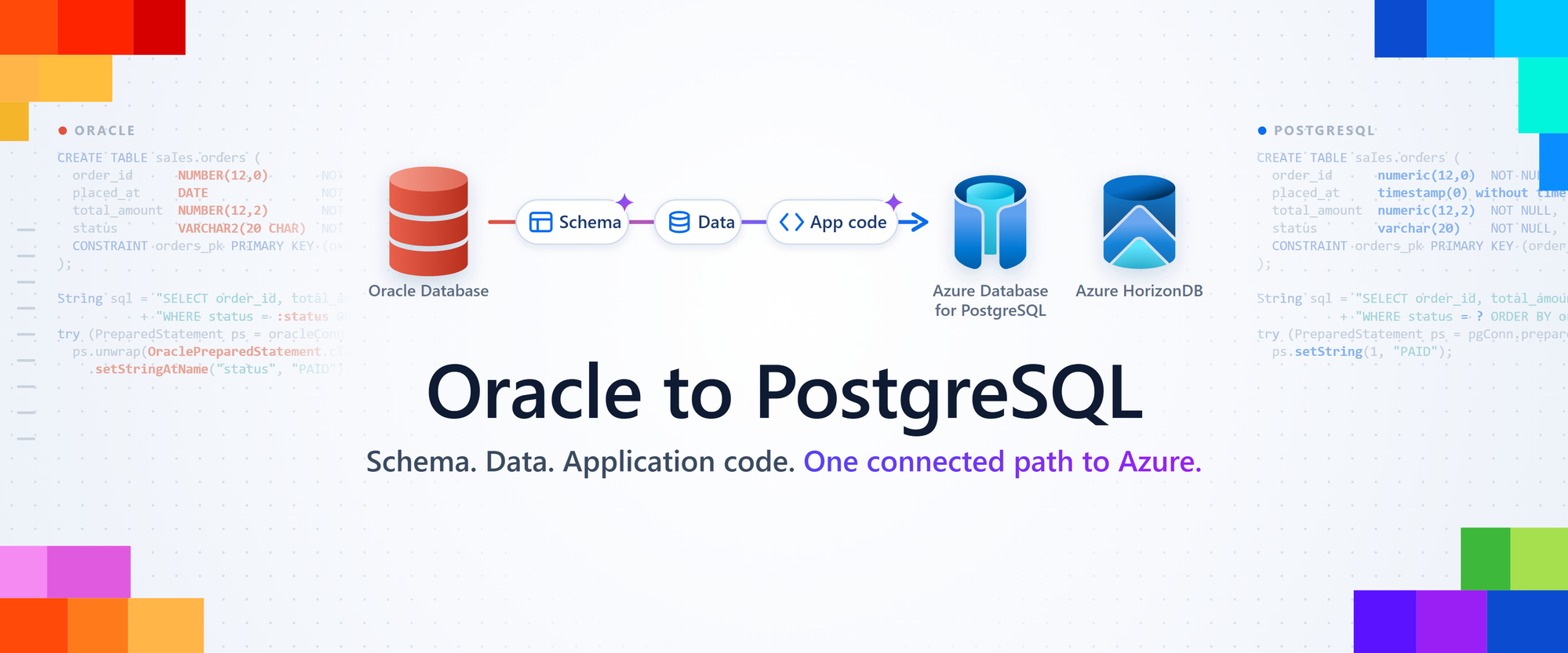
AI-assisted schema conversion, Azure DMS, and a new Copilot CLI skill now come together for your Oracle migration.
Jonathon Frost, Principal Group Product Manager, PostgreSQL at Microsoft
Moving your Oracle workloads to PostgreSQL on Azure just got a lot easier. Schema conversion, data migration, and AI-assisted application conversion now work together as one connected path to Azure Database for PostgreSQL flexible server and Azure HorizonDB. Convert your schema with the PostgreSQL extension for VS Code, move your data with Azure Database Migration Service (Azure DMS), and update your application code with the new migrate-oracle-app skill in the postgres-skills plugin. Your database and application teams can now work through the migration together, from the first converted object to the application that uses it.
To see how the pieces fit together, we’ll follow an example order-processing service through all three stages: schema, data, and application code. We’ll convert its orders table, move the order data, and update the Java code that retrieves paid orders, all in a nonproduction rehearsal of the migration.
Schema: convert your Oracle schema
Connect and run discovery on your application’s Oracle database
Schema conversion is built right into the PostgreSQL extension for VS Code. Create a migration project, connect to your Oracle database, and select the schemas your application uses. Discovery then checks your Oracle permissions and inventories the selected schemas, showing which objects it found, which it will extract, and which are excluded or invalid. It also lists dependencies on schemas you didn’t select, with a diagram of the references, so you can confirm the scope before extraction begins.
Behind the scenes, schema conversion agents use your Microsoft Foundry model to translate the Oracle definitions into PostgreSQL. The tool then compiles the results in a scratch database and runs available static checks, such as plpgsql_check for PL/pgSQL routines. Translation and compilation work together across your tables, constraints, indexes, sequences, views, triggers, and PL/SQL packages, procedures, and functions.
Configure your Azure destination
Next, choose the scratch database where the tool validates the converted schema. Select Azure HorizonDB or Azure Database for PostgreSQL flexible server as the target type, then pick the connection and database. Validating on the same service you plan to run means the schema, data, and application stages all build on one environment.
Give the conversion an empty or dedicated database of its own. Align its PostgreSQL major version, extensions, permissions, encoding, and locale with your planned deployment; readiness checks run as soon as you select the database and make no changes. Finally, connect your Microsoft Foundry model deployment using an API key or Microsoft Entra ID.
Then select Migrate. The tool extracts your Oracle definitions and converts them in chunks, and the project view tracks progress as it goes. For our example order service, the orders table packs several common mapping decisions into a few columns. Here’s the Oracle definition:
CREATE TABLE sales.orders (
    order_id NUMBER(12,0) NOT NULL,
    placed_at DATE NOT NULL,
    total_amount NUMBER(12,2) NOT NULL,
    status VARCHAR2(20 CHAR) NOT NULL,
    CONSTRAINT orders_pk PRIMARY KEY (order_id)
);
And here’s a representative PostgreSQL conversion, created in the sales schema:
CREATE TABLE sales.orders (
    order_id numeric(12,0) NOT NULL,
    placed_at timestamp(0) without time zone NOT NULL,
    total_amount numeric(12,2) NOT NULL,
    status varchar(20) NOT NULL,
    CONSTRAINT orders_pk PRIMARY KEY (order_id)
);
Each choice preserves the values your application expects. The numeric(12,0) type keeps the identifier’s declared precision, and numeric(12,2) keeps amounts exact to the cent. Oracle DATE includes a time of day, so timestamp(0) without time zone carries the full wall-clock value into PostgreSQL. VARCHAR2(20 CHAR) becomes varchar(20), which PostgreSQL also measures in characters. Back in the project view, you can follow extraction and conversion progress across the whole schema:
Review, refine, and deploy
When conversion finishes, the HTML conversion report opens automatically with your discovery, extraction, and conversion results. Conversion Object Explorer then lets you compare each object’s Oracle and PostgreSQL definitions side by side and read its conversion notes, for converted and not-converted objects alike. Select Ask to have GitHub Copilot explain a conversion and its dependencies, or Fix to refine the object’s PostgreSQL file with Copilot’s help.
Your PL/SQL converts too. Each package member becomes its own PostgreSQL routine: in the example below, the assign_manager procedure in hr_pkg becomes the function hr_pkg$assign_manager. Review each converted routine, then exercise the business operations it supports, such as assigning an order number or calculating an order total.
When the schema is ready, select Setup instruction on the Conversion summary. The Setup Experience generates deployment instructions, PowerShell and Bash runners, and supporting SQL. Keep the setup directory inside the complete migration project, since the runners reference the converted deployment SQL next to it. From the setup directory, check your destination’s readiness first:
bash setup.sh --validate-onlyTo deploy into a database that already exists, use the existing-database mode:
bash setup.sh --database-mode existing --validate-onlyA validate-only run checks connectivity, the PostgreSQL version, encoding and locale, permissions, target-schema occupancy, and extension availability, then writes a validation report without changing the destination. When the report looks good, run the same command without --validate-only to deploy the converted schema to your nonproduction destination. You now have a PostgreSQL schema ready for the data rehearsal.
Schema conversion also produces coding notes that describe the Oracle patterns it found and how each one maps to PostgreSQL. Keep them with the deployed object names, types, and routine signatures. Together they form a shared contract between your teams: Azure DMS maps data into the same schema, and the application skill uses the notes to line up code changes with the objects you actually deployed.
Data: move your data with Azure DMS
The Oracle route in Azure DMS, now in Public Preview, supports offline migration from Oracle 19c and later to both Azure Database for PostgreSQL flexible server and Azure HorizonDB. With your converted schema deployed, DMS moves the rows from Oracle into the tables you prepared.
Start with a rehearsal that uses representative data and your chosen Azure destination. For production, plan a migration window around four steps: pause writes to the source, copy the data, validate the results, and switch the application over. Pause scheduled jobs and integrations too, so the source data stays stable throughout the move.
Select your prepared flexible server or HorizonDB resource and database, then configure the migration runtime and destination access. Use the same target in the application rehearsal, so schema, data, and code all come together in one environment.
Azure DMS supports public and private network paths, along with Oracle connections over TLS. Configure connectivity to both endpoints: DNS and routing for private access, or firewall rules for public access. Set up certificate trust for TLS, then run the connection tests to confirm each route.
Map schemas and follow the copy
In the Azure portal, choose Oracle as the source, your Azure destination as the target, and offline mode. Then map each source schema to the target database and schema from your conversion project. For our order service, that maps Oracle’s SALES schema to the reviewed PostgreSQL sales schema.
Start the migration and watch table-level progress and row counts as DMS copies the data. The monitoring view gives the whole team a shared picture of the run. Keep the migration record with the schema revision, so every rehearsal builds on the same configuration.
Validate the order data
After the copy, run the same read-only query against the paused Oracle source and the PostgreSQL destination. Grouping orders by status gives a quick comparison of row counts, total value, and date range for each group:
SELECT status,
       COUNT(*) AS order_count,
       SUM(total_amount) AS order_total,
       MIN(placed_at) AS first_order_at,
       MAX(placed_at) AS last_order_at
FROM sales.orders
GROUP BY status
ORDER BY status;
Pair these totals with lookups of specific orders by key. Counts confirm the size of each group, while totals and timestamps confirm the business values. Include fractional amounts, character data, and date boundaries that represent your workload.
Finish the load by checking constraints, indexes, privileges, and statistics on the destination. If your application uses sequences or identity columns, advance each one past the highest loaded key before you enable writes.
The copied orders also make great fixtures for the application work ahead. Pick a few orders with known totals and statuses, and write down the results you expect when the application retrieves or updates them. That gives the code conversion a concrete set of business operations to verify.
App Code: convert your Oracle application
Add migration skills to your coding agent
The new migrate-oracle-app skill completes the journey inside your application repository. It ships in Microsoft’s postgres-skills plugin and gives your coding agent migration workflows, scripts, language guidance, and PostgreSQL tools. The skill uses your deployed schema and the coding notes from schema conversion to guide changes to the code that calls the database.
The skill covers Java, .NET, Python, C, and C++, with toolchain guidance for discovery, builds, tests, integration, and packaging. For our order service, we’ll follow a small Java query through the conversion.
In GitHub Copilot CLI, install the complete plugin from its marketplace:
copilot plugin marketplace add microsoft/postgres-skills
copilot plugin install postgres-skills@postgres-skills
You’ll need Node.js 22 or later, npm and npx, Git, Copilot access, and your application’s toolchain, which for our Java service means the JDK and Maven. Add Docker for PostgreSQL integration tests, and start a new agent session after you install the plugin.
In Copilot CLI, the skill reaches PostgreSQL through the bundled postgres-mcp server. In VS Code Copilot, it uses the PostgreSQL extension’s MCP tools. Either way, save a connection profile in the provider your host uses.
For this example, we saved a read-only profile named orders-rehearsal that points to the orders_pg database and its sales schema. The profile supplies the connection, while the schema and coding notes connect that target to the source repository.
Assess with the schema conversion context
Pass the extracted Oracle DDL with oracle-ddl-folder and the reviewed coding notes with notes. You can point notes at the coding_notes.md file itself, or at a migration project directory, where the skill looks for results/application_guidance/coding_notes.md.
This assessment prompt brings together the order-service repository, the saved PostgreSQL profile, and the schema review artifacts:
/migrate-oracle-app
   mode=assess
   codebase=.
   postgres-connection=orders-rehearsal
   database=orders_pg
   schema=sales
   oracle-ddl-folder="./schema-review"
   notes="./schema-review/coding_notes.md"
Assessment starts by finding where the application actively uses Oracle and identifying its language and toolchain. It traces database calls, SQL, driver dependencies, and test coverage to build a focused conversion plan.
Read-only checks against your PostgreSQL target then match those code references to the deployed objects and routine signatures. For the order service, ask the agent to trace the order query, its parameter binding, its result types, and any package calls through the reviewed mappings.
Then open .github/migrate-oracle-app/assessment/assessment-report.md in the repository. The report brings the Oracle inventory, target mappings, test discovery, and baseline results together in one place, with machine-readable assessment data alongside it, giving the team a concrete starting point for the code changes.
Convert the query and its tests
The skill has three modes: assess builds the plan, convert applies a current assessment, and assess-and-convert runs both in one pass. In convert mode, the skill previews source changes for your approval. Edits land in your existing Git worktree, ready for your team’s usual diff review and commit process.
For our order service, we’ll focus the conversion on the JDBC driver, parameter binding, and tests while keeping the API contract intact. This prompt turns on the tests option:
/migrate-oracle-app
   mode=convert
   codebase=.
   postgres-connection=orders-rehearsal
   database=orders_pg
   schema=sales
   oracle-ddl-folder="./schema-review"
   notes="./schema-review/coding_notes.md"
   options=tests
The tests option adds a test baseline, generated unit and integration tests, and fixes for affected tests. The skill also discovers and runs the project’s existing tests. PostgreSQL integration tests run in a disposable Docker environment, and you can separately authorize tests that write to the target database.
Here’s the order service’s read path for paid orders on the Oracle JDBC driver. It binds the status through an Oracle named parameter, :status, using the driver’s OraclePreparedStatement extension:
String sql = "SELECT order_id, total_amount FROM sales.orders "
           + "WHERE status = :status ORDER BY order_id";
try (PreparedStatement ps = oracleConn.prepareStatement(sql)) {
    ps.unwrap(OraclePreparedStatement.class)
      .setStringAtName("status", "PAID");
    try (ResultSet rs = ps.executeQuery()) {
        while (rs.next()) {
            orders.add(new Order(rs.getLong("order_id"),
                                 rs.getBigDecimal("total_amount")));
        }
    }
}
After conversion, the same method runs on the PostgreSQL JDBC driver with a standard positional parameter:
String sql = "SELECT order_id, total_amount FROM sales.orders "
           + "WHERE status = ? ORDER BY order_id";
try (PreparedStatement ps = pgConn.prepareStatement(sql)) {
    ps.setString(1, "PAID");
    try (ResultSet rs = ps.executeQuery()) {
        while (rs.next()) {
            orders.add(new Order(rs.getLong("order_id"),
                                 rs.getBigDecimal("total_amount")));
        }
    }
}
The PostgreSQL JDBC driver binds ? placeholders by position, so the Oracle-specific setStringAtName call becomes a standard setString(1, "PAID"). The query keeps its columns and ordering, and getBigDecimal returns the numeric(12,2) amounts exactly. For production list endpoints, add paging or streaming.
Keep decimal values and the API’s agreed serialization unchanged. Follow the reviewed object mappings, package the PostgreSQL JDBC driver (org.postgresql:postgresql) with the application, and use the skill’s language guidance for timestamps, transaction boundaries, and connection pooling.
Run the application workflow on PostgreSQL
Testing is built into the conversion. Docker-based PostgreSQL integration tests exercise the application’s real driver paths, and read-only checks confirm that the code matches the destination’s actual objects and capabilities. With your authorization, runtime tests can also exercise the target environment as part of the rehearsal.
Match the PostgreSQL test image to your target’s major version, then run the service-specific checks against your chosen Azure resource, using its deployed objects, extensions, application identity, and connection configuration on flexible server or HorizonDB.
Bring the order fixtures from the data rehearsal into these tests: an unpaid order, a paid order with a fractional total, and an order at a timestamp boundary. Run the same application operations and compare the results with the expected business behavior. That continuity turns schema, data, and code into one connected migration.
The conversion report at .github/migrate-oracle-app/conversions/conversion-report.md collects the file diffs and results for code conversion, build and packaging, unit tests, PostgreSQL integration tests, and target validation. It gives the database and application teams one shared place to review the release.
Bring Oracle migration into Modernize CLI
Java and .NET teams already using Modernize CLI can run Oracle-to-PostgreSQL application migration there too, now in Public Preview. The source-based workflow follows three steps (assess, plan create, and plan execute) and runs during development, well ahead of the production data-migration window. It can use exported PostgreSQL definitions to carry object names, type mappings, and routine signatures into assessment and conversion.
To bring the converted schema into a Java or .NET application, place its schema-only PostgreSQL definitions in the application workspace and point .github/modernize/oracle-postgres.json at that folder:
{
  "postgres-ddl-folder": "database/postgres",
  "options": ["tests"]
}
Run modernize assess with --format html, and supply an assessment YAML file that sets analysisCoverage: full through --assess-config. The assessment produces an HTML aggregate report, an Oracle-to-PostgreSQL component report, and Markdown planning context. Then pass the assessment report path that the run prints to modernize plan create with --assess-file-path.
The plan uses migration-oracle-to-postgresql-app-java for Java or migration-oracle-to-postgresql-app-dotnet for .NET. Review the plan, then run modernize plan execute to convert the code. Modernize tracks task progress, code edits, build and test results, and local commits as it works.
Here too, the tests option adds a test baseline, unit tests, disposable PostgreSQL integration tests, and fixes for affected tests, all exercising real driver and repository paths against the converted objects. Then bring the converted application into the Azure rehearsal described above, so schema, data, and code are validated together.
One connected journey from Oracle to PostgreSQL
With your schema, data, and application rehearsals complete, you’re ready for the production window: pause, copy, validate, and switch. Choose Azure Database for PostgreSQL flexible server or Azure HorizonDB, start with an application your team knows well, and get your first Oracle workload running on PostgreSQL in Azure. Happy migrating!
Migration resources
Schema Conversion
Data Movement
- Oracle to Azure Database for PostgreSQL flexible server - Azure DMS documentation
- Oracle to Azure HorizonDB - Azure DMS tutorial
App Code Conversion
Modernize CLI Integration

 Microsoft