In January we released SQL Server Management Studio (SSMS) 22.2.1 and I commented that it might look like a minor release, but it really wasn’t. That’s true for SSMS 22.3 as well, which dropped yesterday (February 10). Read on to learn what’s new and a couple changes that may impact your daily workflow.
Fixes
Our engineers have continued to fix bugs in addition to making improvements around fundamentals (which I mentioned in the last post). Many fixes for this release come from feedback items, and we thank those of you who log and upvote issues. You can view the full list in the release notes, but it includes:
- Addressing an error encountered when browsing a multi-dimensional model when connected to Analysis Services
- Fixing the error list notification count in the query editor
- No longer prompting to save a file when closing it from the query editor if no actual changes were made
- Ensuring that data shows for the correct time range in Query Store reports
- Restoring the ability for CTRL+R to hide or restore the results pane when viewing an execution plan
In addition, startup performance for the modern connection dialog has been improved, and we made changes to ensure that if you set any of the advanced options when connecting to something like Object Explorer, those options carry over to connections subsequently initiated (e.g. if you open a query editor from OE).
Important changes
In this release we also updated to later releases of Microsoft.Data.SqlClient (MDS) and SQL Management Objects (SMO). While these updates are invisible and foundational to core SSMS functionality, they are quite impactful to components like third-party extensions that have dependencies on them. We are aware that SSMS 22.3 does not work when certain third-party extensions are installed, and we are following up with extension owners based on feedback items that have already been opened. If you use a third-party extension, be aware this could happen. If you uninstall the third-party extension and the problem no longer occurs in SSMS 22.3, please file a ticket with the extension owner. Have questions about extensions in SSMS, please check out our FAQ.
In the event that you ever need to rollback to a previous release, you can do that from the Visual Studio Installer. From the SSMS 22 entry in the VS Installer, select More > Rollback to previous version. If you happen to uninstall SSMS entirely, you can find previous versions on the Release History page. While you can install different major versions of SSMS side by side (e.g. SSMS 21.6 and 22.3), you can only install one version of SSMS 22 GA on your machine.
Database instructions
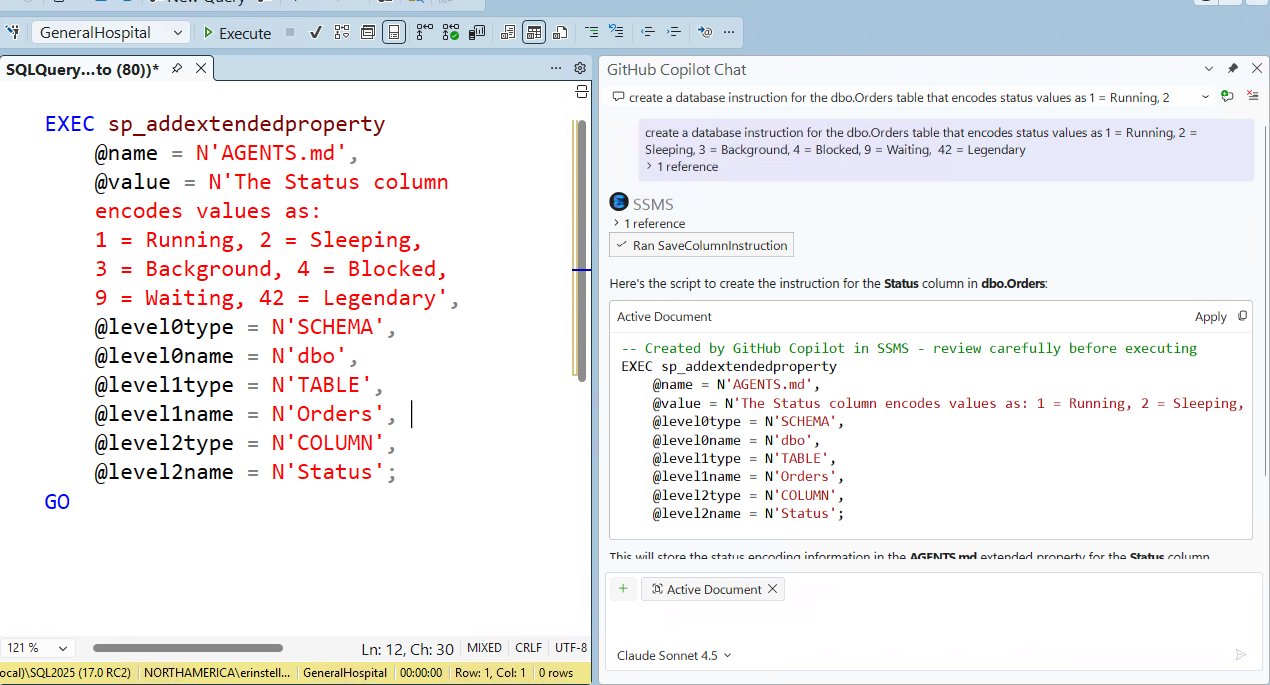
If you’re using GitHub Copilot in SSMS, this release introduces support for database instructions. Folks that have used GitHub Copilot in Visual Studio or VS Code may already be familiar with custom instructions, which provide persisted guidance for how GitHub Copilot should behave across all your interactions. Custom instructions are implemented using markdown (.md) files in your repository or user profile, and while helpful for a developer, they may not be readily available to all SSMS users that connect to a database.
The database instructions feature allows you to add database-specific context that describe business rules and leverages extended properties. By storing this information in the database, it’s available to anyone who uses GitHub Copilot when connected to that database. The instructions follow the AGENTS.md format to provide context. Once in place, you no longer need to ask the person who’s supported the application for 20 years what the values 9 and 42 mean for the Status column in the Orders table.
EXEC sp_addextendedproperty
    @name = N'AGENTS.md',
    @value = N'The dbo.Apts table stores information about patient appointments',
    @level0type = N'SCHEMA',
    @level0name = N'dbo',
    @level1type = N'TABLE',
    @level1name = N'Apts';
GO
No additional configuration or setting is required for database instructions to be available to GitHub Copilot. Extended properties can exist for a host of objects in your database, starting with tables, columns and stored procedures and extending 😉 to functions, constraints, and more.
We recognize the following:
- Not everyone uses extended properties (yet)
-
We’ve seen folks mention that it would be great if you could add an extended property as part of the CREATE syntax for an object. We haven’t seen a feedback item filed anywhere for that…we will need one (and allllllllll your votes) if SSMS users want us to drive this change on the engine side. To be clear, a change in T-SQL syntax happens in the engine, that's not an enhancement to the query editor in SSMS.
-
Some companies do a fantastic job of documenting their business definitions, etc. but it lives elsewhere, outside the database. If that’s your scenario, then please create a feedback item for us (please search in case someone else submits it first) so we can understand where that information lives and in what form (e.g. is it in a Word doc, OneNote, a proprietary system, etc. and stored as plain text, YAML, JSON, something else?).
We expect – we want – this feature to advance, but we need your input to help guide that evolution. The feedback site is your friend. Please search first, please add constructive comments, and please upvote.
Final thoughts
I’ve seen some recent comments along the lines of “I don’t understand why it takes so long to fix something simple.” We appreciate everyone’s passion for SSMS and fully understand that in an application that you use daily, certain bugs can be very frustrating and affect your workflow. What’s often going on behind the scenes is:
- Sometimes it takes time to find the root issue. Logging a feedback issue with an error is only the start of the journey. Very often folks don’t include exact steps to recreate the issue, or even if they do, we can’t recreate it internally because there is a specific configuration that wasn’t captured in the steps to recreate.
- There are competing priorities that we work to continually balance and re-balance.
- Issues that appear “simple” are not always easy to fix, and in some scenarios require extensive testing (e.g. those involving connections).
- Issues can be marked as Fixed - Pending Release but not appear in the immediate next release because of timing. There are branches, code complete dates, testing, and sign-offs by multiple teams before we get to a release.
As a team, we regularly review the issues and suggestions that have a severe impact on users, and those that are highly voted. There is a perpetual review of what we have planned and what we’re being asked to do, and we continue to adjust priorities as necessary. Thank you for your dedication and support.

 Microsoft