with Microsoft Agent Framework and Foundry Local
Introduction
Multi-agent systems represent the next evolution of AI applications. Instead of a single model handling everything, specialised agents collaborate—each with defined responsibilities, passing context to one another, and producing results that no single agent could achieve alone. But building these systems typically requires cloud infrastructure, API keys, usage tracking, and the constant concern about what data leaves your machine.
What if you could build sophisticated multi-agent workflows entirely on your local machine, with no cloud dependencies? The Local Research & Synthesis Desk demonstrates exactly this. Using Microsoft Agent Framework (MAF) for orchestration and Foundry Local for on-device inference, this demo shows how to create a four-agent research pipeline that runs entirely on your hardware—no API keys, no data leaving your network, and complete control over every step.
This article walks through the architecture, implementation patterns, and practical code that makes multi-agent local AI possible. You'll learn how to bootstrap Foundry Local from Python, create specialised agents with distinct roles, wire them into sequential, concurrent, and feedback loop orchestration patterns, and implement tool calling for extended functionality. Whether you're building research tools, internal analysis systems, or simply exploring what's possible with local AI, this architecture provides a production-ready foundation.
Why Multi-Agent Architecture Matters
Single-agent AI systems hit limitations quickly. Ask one model to research a topic, analyse findings, identify gaps, and write a comprehensive report—and you'll get mediocre results. The model tries to do everything at once, with no opportunity for specialisation, review, or iterative refinement.
Multi-agent systems solve this by decomposing complex tasks into specialised roles. Each agent focuses on what it does best:
- Planners break ambiguous questions into concrete sub-tasks
- Retrievers focus exclusively on finding and extracting relevant information
- Critics review work for gaps, contradictions, and quality issues
- Writers synthesise everything into coherent, well-structured output
This separation of concerns mirrors how human teams work effectively. A research team doesn't have one person doing everything—they have researchers, fact-checkers, editors, and writers. Multi-agent AI systems apply the same principle to AI workflows, with each agent receiving the output of previous agents as context for their own specialised task.
The Local Research & Synthesis Desk implements this pattern with four primary agents, plus an optional ToolAgent for utility functions. Here's how user questions flow through the system:
This architecture demonstrates three essential orchestration patterns: sequential pipelines where each agent builds on the previous output, concurrent fan-out where independent tasks run in parallel to save time, and feedback loops where the Critic can send work back to the Retriever for iterative refinement.
The Technology Stack: MAF + Foundry Local
Before diving into implementation, let's understand the two core technologies that make this architecture possible and why they work so well together.
Microsoft Agent Framework (MAF)
The Microsoft Agent Framework provides building blocks for creating AI agents in Python and .NET. Unlike frameworks that require specific cloud providers, MAF works with any OpenAI-compatible API—which is exactly what Foundry Local provides.
The key abstraction in MAF is the ChatAgent. Each agent has:
- Instructions: A system prompt that defines the agent's role and behaviour
- Chat client: An OpenAI-compatible client for making inference calls
- Tools: Optional functions the agent can invoke during execution
- Name: An identifier for logging and observability
MAF handles message threading, tool execution, and response parsing automatically. You focus on designing agent behaviour rather than managing low-level API interactions.
Foundry Local
Foundry Local brings Azure AI Foundry's model catalog to your local machine. It automatically selects the best hardware acceleration available (GPU, NPU, or CPU) and exposes models through an OpenAI-compatible API. Models run entirely on-device with no data leaving your machine.
The foundry-local-sdk Python package provides programmatic control over the Foundry Local service. You can start the service, download models, and retrieve connection information—all from your Python code. This is the "control plane" that manages the local AI infrastructure.
The combination is powerful: MAF handles agent logic and orchestration, while Foundry Local provides the underlying inference. No cloud dependencies, no API keys, complete data privacy:
Bootstrapping Foundry Local from Python
The first practical challenge is starting Foundry Local programmatically. The FoundryLocalBootstrapper class handles this, encapsulating all the setup logic so the rest of the application can focus on agent behaviour.
The bootstrap process follows three steps: start the Foundry Local service if it's not running, download the requested model if it's not cached, and return connection information that MAF agents can use. Here's the core implementation:
from dataclasses import dataclass
from foundry_local import FoundryLocalManager

@dataclass
class FoundryConnection:
    """Holds endpoint, API key, and model ID after bootstrap."""
    endpoint: str
    api_key: str
    model_id: str
    model_alias: str
This dataclass carries everything needed to connect MAF agents to Foundry Local. The endpoint is typically http://localhost:<port>/v1 (the port is assigned dynamically), and the API key is managed internally by Foundry Local.
class FoundryLocalBootstrapper:
    def __init__(self, alias: str | None = None) -> None:
        self.alias = alias or os.getenv("MODEL_ALIAS", "qwen2.5-0.5b")

    def bootstrap(self) -> FoundryConnection:
        """Start service, download & load model, return connection info."""
        from foundry_local import FoundryLocalManager

        manager = FoundryLocalManager()
        model_info = manager.download_and_load_model(self.alias)

        return FoundryConnection(
            endpoint=manager.endpoint,
            api_key=manager.api_key,
            model_id=model_info.id,
            model_alias=self.alias,
        )
Key design decisions in this implementation:
- Lazy import: The
foundry_localimport happens insidebootstrap()so the application can provide helpful error messages if the SDK isn't installed - Environment configuration: Model alias comes from
MODEL_ALIASenvironment variable or defaults toqwen2.5-0.5b - Automatic hardware selection: Foundry Local picks GPU, NPU, or CPU automatically—no configuration needed
The qwen2.5 model family is recommended because it supports function/tool calling, which the ToolAgent requires. For higher quality outputs, larger variants like qwen2.5-7b or qwen2.5-14b are available via the --model flag.
Creating Specialised Agents
With Foundry Local bootstrapped, the next step is creating agents with distinct roles. Each agent is a ChatAgent instance with carefully crafted instructions that focus it on a specific task.
The Planner Agent
The Planner receives a user question and available documents, then breaks the research task into concrete sub-tasks. Its instructions emphasise structured output—a numbered list of specific tasks rather than prose:
from agent_framework import ChatAgent
from agent_framework.openai import OpenAIChatClient

def _make_client(conn: FoundryConnection) -> OpenAIChatClient:
    """Create an MAF OpenAIChatClient pointing at Foundry Local."""
    return OpenAIChatClient(
        api_key=conn.api_key,
        base_url=conn.endpoint,
        model_id=conn.model_id,
    )

def create_planner(conn: FoundryConnection) -> ChatAgent:
    return ChatAgent(
        chat_client=_make_client(conn),
        name="Planner",
        instructions=(
            "You are a planning agent. Given a user's research question and a list "
            "of document snippets (if any), break the question into 2-4 concrete "
            "sub-tasks. Output ONLY a numbered list of tasks. Each task should state:\n"
            "  • What information is needed\n"
            "  • Which source documents might help (if known)\n"
            "Keep it concise — no more than 6 lines total."
        ),
    )
Notice how the instructions are explicit about output format. Multi-agent systems work best when each agent produces structured, predictable output that downstream agents can parse reliably.
The Retriever Agent
The Retriever receives the Planner's task list plus raw document content, then extracts and cites relevant passages. Its instructions emphasise citation format—a specific pattern that the Writer can reference later:
def create_retriever(conn: FoundryConnection) -> ChatAgent:
    return ChatAgent(
        chat_client=_make_client(conn),
        name="Retriever",
        instructions=(
            "You are a retrieval agent. You receive a research plan AND raw document "
            "text from local files. Your job:\n"
            "  1. Identify the most relevant passages for each task in the plan.\n"
            "  2. Output extracted snippets with citations in the format:\n"
            "     [filename.ext, lines X-Y]: \"quoted text…\"\n"
            "  3. If no relevant content exists, say so explicitly.\n"
            "Be precise — quote only what is relevant, keep each snippet under 100 words."
        ),
    )
The citation format [filename.ext, lines X-Y] creates a consistent contract. The Writer knows exactly how to reference source material, and human reviewers can verify claims against original documents.
The Critic Agent
The Critic reviews the Retriever's work, identifying gaps and contradictions. This agent serves as a quality gate before the final report and can trigger feedback loops for iterative improvement:
def create_critic(conn: FoundryConnection) -> ChatAgent:
    return ChatAgent(
        chat_client=_make_client(conn),
        name="Critic",
        instructions=(
            "You are a critical review agent. You receive a plan and extracted snippets. "
            "Your job:\n"
            "  1. Check for gaps — are any plan tasks unanswered?\n"
            "  2. Check for contradictions between snippets.\n"
            "  3. Suggest 1-2 specific improvements or missing details.\n"
            "Start your response with 'GAPS FOUND' if issues exist, or 'NO GAPS' if satisfied.\n"
            "Then output a short numbered list of issues (or say 'No issues found')."
        ),
    )
The Critic is instructed to output GAPS FOUND or NO GAPS at the start of its response. This structured output enables the orchestrator to detect when gaps exist and trigger the feedback loop—sending the gaps back to the Retriever for additional retrieval before re-running the Critic. This iterates up to 2 times before the Writer takes over, ensuring higher quality reports.
Critics are essential for production systems. Without this review step, the Writer might produce confident-sounding reports with missing information or internal contradictions.
The Writer Agent
The Writer receives everything—original question, plan, extracted snippets, and critic review—then produces the final report:
def create_writer(conn: FoundryConnection) -> ChatAgent:
    return ChatAgent(
        chat_client=_make_client(conn),
        name="Writer",
        instructions=(
            "You are the final report writer. You receive:\n"
            "  • The original question\n"
            "  • A plan, extracted snippets with citations, and a critic review\n\n"
            "Produce a clear, well-structured answer (3-5 paragraphs). "
            "Requirements:\n"
            "  • Cite sources using [filename.ext, lines X-Y] notation\n"
            "  • Address any gaps the critic raised (note if unresolvable)\n"
            "  • End with a one-sentence summary\n"
            "Do NOT fabricate citations — only use citations provided by the Retriever."
        ),
    )
The final instruction—"Do NOT fabricate citations"—is crucial for responsible AI. The Writer has access only to citations the Retriever provided, preventing hallucinated references that plague single-agent research systems.
Implementing Sequential Orchestration
With agents defined, the orchestrator connects them into a workflow. Sequential orchestration is the simpler pattern: each agent runs after the previous one completes, passing its output as input to the next agent.
The implementation uses Python's async/await for clean asynchronous execution:
import asyncio
import time
from dataclasses import dataclass, field

@dataclass
class StepResult:
    """Captures one agent step for observability."""
    agent_name: str
    input_text: str
    output_text: str
    elapsed_sec: float

@dataclass
class WorkflowResult:
    """Final result of the entire orchestration run."""
    question: str
    steps: list[StepResult] = field(default_factory=list)
    final_report: str = ""

async def _run_agent(agent: ChatAgent, prompt: str) -> tuple[str, float]:
    """Execute a single agent and measure elapsed time."""
    start = time.perf_counter()
    response = await agent.run(prompt)
    elapsed = time.perf_counter() - start
    return response.content, elapsed
The StepResult dataclass captures everything needed for observability: what went in, what came out, and how long it took. This information is invaluable for debugging and optimisation.
The sequential pipeline chains agents together, building context progressively:
async def run_sequential_workflow(
    question: str,
    docs: LoadedDocuments,
    conn: FoundryConnection,
) -> WorkflowResult:
    wf = WorkflowResult(question=question)
    doc_block = docs.combined_text if docs.chunks else "(no documents provided)"

    # Step 1 — Plan
    planner = create_planner(conn)
    planner_prompt = f"User question: {question}\n\nAvailable documents:\n{doc_block}"
    plan_text, elapsed = await _run_agent(planner, planner_prompt)
    wf.steps.append(StepResult("Planner", planner_prompt, plan_text, elapsed))

    # Step 2 — Retrieve
    retriever = create_retriever(conn)
    retriever_prompt = f"Plan:\n{plan_text}\n\nDocuments:\n{doc_block}"
    snippets_text, elapsed = await _run_agent(retriever, retriever_prompt)
    wf.steps.append(StepResult("Retriever", retriever_prompt, snippets_text, elapsed))

    # Step 3 — Critique
    critic = create_critic(conn)
    critic_prompt = f"Plan:\n{plan_text}\n\nExtracted snippets:\n{snippets_text}"
    critique_text, elapsed = await _run_agent(critic, critic_prompt)
    wf.steps.append(StepResult("Critic", critic_prompt, critique_text, elapsed))

    # Step 4 — Write
    writer = create_writer(conn)
    writer_prompt = (
        f"Original question: {question}\n\n"
        f"Plan:\n{plan_text}\n\n"
        f"Extracted snippets:\n{snippets_text}\n\n"
        f"Critic review:\n{critique_text}"
    )
    report_text, elapsed = await _run_agent(writer, writer_prompt)
    wf.steps.append(StepResult("Writer", writer_prompt, report_text, elapsed))
    wf.final_report = report_text

    return wf
Each step receives all relevant context from previous steps. The Writer gets the most comprehensive prompt—original question, plan, snippets, and critique—enabling it to produce a well-informed final report.
Adding Concurrent Fan-Out and Feedback Loops
Sequential orchestration works well but can be slow. When tasks are independent—neither needs the other's output—running them in parallel saves time. The demo implements this with asyncio.gather.
Consider the Retriever and ToolAgent: both need the Planner's output, but neither depends on the other. Running them concurrently cuts the wait time roughly in half:
async def run_concurrent_retrieval(
    plan_text: str,
    docs: LoadedDocuments,
    conn: FoundryConnection,
) -> tuple[str, str]:
    """Run Retriever and ToolAgent in parallel."""
    retriever = create_retriever(conn)
    tool_agent = create_tool_agent(conn)

    doc_block = docs.combined_text if docs.chunks else "(no documents)"

    retriever_prompt = f"Plan:\n{plan_text}\n\nDocuments:\n{doc_block}"
    tool_prompt = f"Analyse the following documents for word count and keywords:\n{doc_block}"

    # Execute both agents concurrently
    (snippets_text, r_elapsed), (tool_text, t_elapsed) = await asyncio.gather(
        _run_agent(retriever, retriever_prompt),
        _run_agent(tool_agent, tool_prompt),
    )

    return snippets_text, tool_text
The asyncio.gather function runs both coroutines concurrently and returns when both complete. If the Retriever takes 3 seconds and the ToolAgent takes 1.5 seconds, the total wait is approximately 3 seconds rather than 4.5 seconds.
Implementing the Feedback Loop
The most sophisticated orchestration pattern is the Critic–Retriever feedback loop. When the Critic identifies gaps in the retrieved information, the orchestrator sends them back to the Retriever for additional retrieval, then re-evaluates:
async def run_critic_with_feedback(
    plan_text: str,
    snippets_text: str,
    docs: LoadedDocuments,
    conn: FoundryConnection,
    max_iterations: int = 2,
) -> tuple[str, str]:
    """
    Run Critic with feedback loop to Retriever.
    Returns (final_snippets, final_critique).
    """
    critic = create_critic(conn)
    retriever = create_retriever(conn)

    current_snippets = snippets_text

    for iteration in range(max_iterations):
        # Run Critic
        critic_prompt = f"Plan:\n{plan_text}\n\nExtracted snippets:\n{current_snippets}"
        critique_text, _ = await _run_agent(critic, critic_prompt)

        # Check if gaps were found
        if not critique_text.upper().startswith("GAPS FOUND"):
            return current_snippets, critique_text

        # Gaps found — send back to Retriever for more extraction
        gap_fill_prompt = (
            f"Previous snippets:\n{current_snippets}\n\n"
            f"Gaps identified:\n{critique_text}\n\n"
            f"Documents:\n{docs.combined_text}\n\n"
            "Extract additional relevant passages to fill these gaps."
        )
        additional_snippets, _ = await _run_agent(retriever, gap_fill_prompt)
        current_snippets = f"{current_snippets}\n\n--- Gap-fill iteration {iteration + 1} ---\n{additional_snippets}"

    # Max iterations reached — run final critique
    final_critique, _ = await _run_agent(critic, f"Plan:\n{plan_text}\n\nExtracted snippets:\n{current_snippets}")
    return current_snippets, final_critique
This feedback loop pattern significantly improves output quality. The Critic acts as a quality gate, and when standards aren't met, the system iteratively improves rather than producing incomplete results.
The full workflow combines all three patterns—sequential where dependencies require it, concurrent where independence allows it, and feedback loops for quality assurance:
async def run_full_workflow(
    question: str,
    docs: LoadedDocuments,
    conn: FoundryConnection,
) -> WorkflowResult:
    """
    End-to-end workflow showcasing THREE orchestration patterns:
      1. Planner runs first (sequential — must happen before anything else).
      2. Retriever + ToolAgent run concurrently (fan-out on independent tasks).
      3. Critic reviews with feedback loop (iterates with Retriever if gaps found).
      4. Writer produces final report (sequential — needs everything above).
    """
    wf = WorkflowResult(question=question)

    # Step 1: Planner (sequential)
    plan_text, elapsed = await _run_agent(create_planner(conn), planner_prompt)
    wf.steps.append(StepResult("Planner", planner_prompt, plan_text, elapsed))

    # Step 2: Concurrent fan-out (Retriever + ToolAgent)
    snippets_text, tool_text = await run_concurrent_retrieval(plan_text, docs, conn)

    # Step 3: Critic with feedback loop
    final_snippets, critique_text = await run_critic_with_feedback(
        plan_text, snippets_text, docs, conn
    )

    # Step 4: Writer (sequential — needs everything)
    writer_prompt = (
        f"Original question: {question}\n\n"
        f"Plan:\n{plan_text}\n\n"
        f"Snippets:\n{final_snippets}\n\n"
        f"Stats:\n{tool_text}\n\n"
        f"Critique:\n{critique_text}"
    )
    report_text, elapsed = await _run_agent(create_writer(conn), writer_prompt)
    wf.final_report = report_text

    return wf
This hybrid approach maximises both correctness and performance. Dependencies are respected, independent work happens in parallel, and quality is ensured through iterative feedback.
Implementing Tool Calling
Some agents benefit from deterministic tools rather than relying entirely on LLM generation. The ToolAgent demonstrates this pattern with two utility functions: word counting and keyword extraction.
MAF supports tool calling through function declarations with Pydantic type annotations:
from typing import Annotated
from pydantic import Field

def word_count(
    text: Annotated[str, Field(description="The text to count words in")]
) -> int:
    """Count words in a text string."""
    return len(text.split())

def extract_keywords(
    text: Annotated[str, Field(description="The text to extract keywords from")],
    top_n: Annotated[int, Field(description="Number of keywords to return", default=5)]
) -> list[str]:
    """Extract most frequent words (simple implementation)."""
    words = text.lower().split()
    # Filter common words, count frequencies, return top N
    word_counts = {}
    for word in words:
        if len(word) > 3:  # Skip short words
            word_counts[word] = word_counts.get(word, 0) + 1
    sorted_words = sorted(word_counts.items(), key=lambda x: x[1], reverse=True)
    return [word for word, count in sorted_words[:top_n]]
The Annotated type with Field descriptions provides metadata that MAF uses to generate function schemas for the LLM. When the model needs to count words, it invokes the word_count tool rather than attempting to count in its response (which LLMs notoriously struggle with).
The ToolAgent receives these functions in its constructor:
def create_tool_agent(conn: FoundryConnection) -> ChatAgent:
    return ChatAgent(
        chat_client=_make_client(conn),
        name="ToolHelper",
        instructions=(
            "You are a utility agent. Use the provided tools to compute "
            "word counts or extract keywords when asked. Return the tool "
            "output directly — do not embellish."
        ),
        tools=[word_count, extract_keywords],
    )
This pattern—combining LLM reasoning with deterministic tools—produces more reliable results. The LLM decides when to use tools and how to interpret results, but the actual computation happens in Python where precision is guaranteed.
Running the Demo
With the architecture explained, here's how to run the demo yourself. Setup takes about five minutes.
Prerequisites
You'll need Python 3.10 or higher and Foundry Local installed on your machine. Install Foundry Local by following the instructions at github.com/microsoft/Foundry-Local, then verify it works:
foundry --help
Installation
Clone the repository and set up a virtual environment:
git clone https://github.com/leestott/agentframework--foundrylocal.git
cd agentframework--foundrylocal

python -m venv .venv

# Windows
.venv\Scripts\activate

# macOS / Linux
source .venv/bin/activate

pip install -r requirements.txt
copy .env.example .env
CLI Usage
Run the research workflow from the command line:
python -m src.app "What are the key features of Foundry Local and how does it compare to cloud inference?" --docs ./data
You'll see agent-by-agent progress with timing information:
Web Interface
For a visual experience, launch the Flask-based web UI:
python -m src.app.web
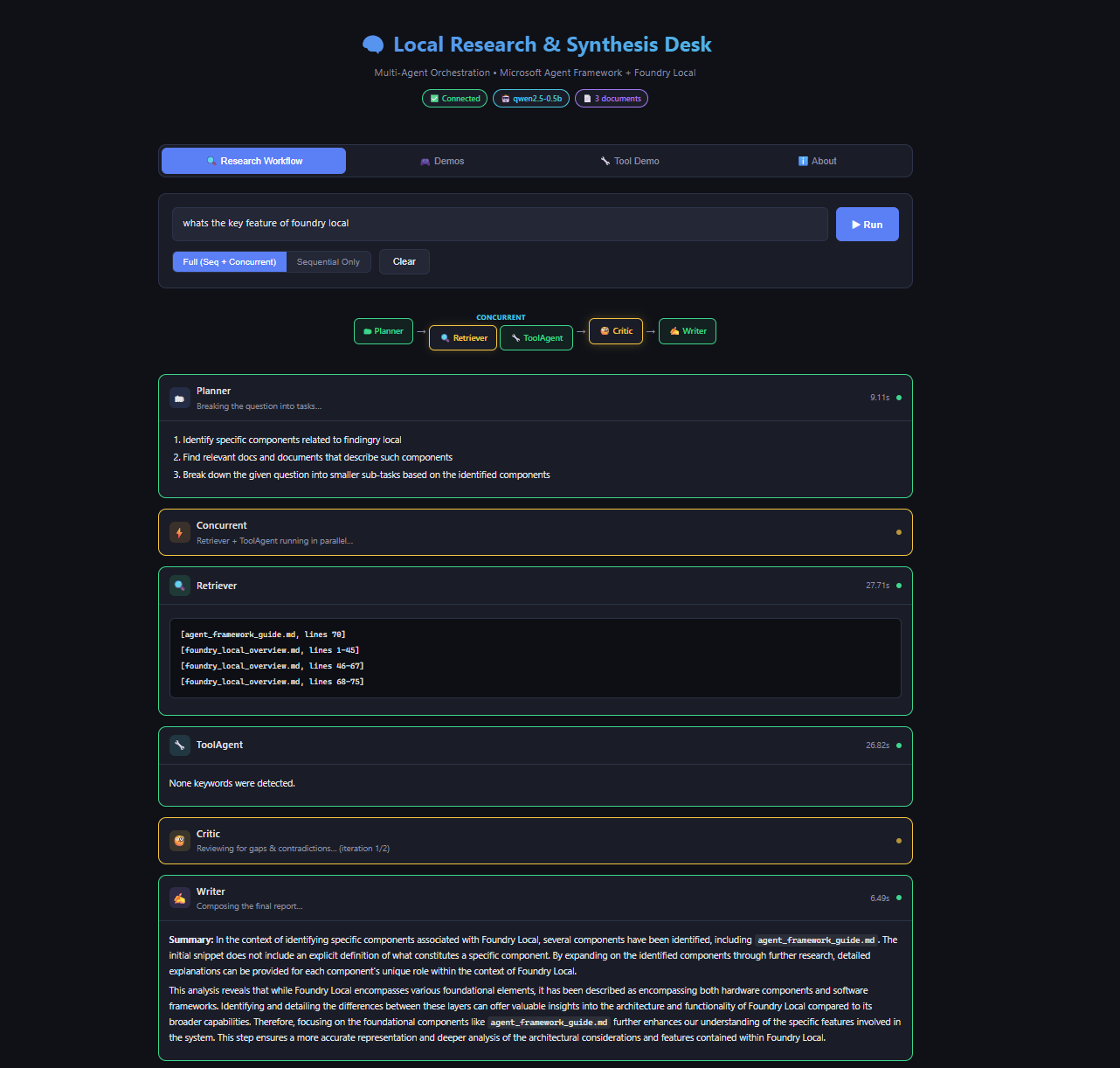
Open http://localhost:5000 in your browser. The web UI provides real-time streaming of agent progress, a visual pipeline showing both orchestration patterns, and an interactive demos tab showcasing tool calling capabilities.
CLI Options
The CLI supports several options for customisation:
- --docs: Folder of local documents to search (default: ./data)
- --model: Foundry Local model alias (default: qwen2.5-0.5b)
- --mode:
fullfor sequential + concurrent, orsequentialfor simpler pipeline - --log-level: DEBUG, INFO, WARNING, or ERROR
For higher quality output, try larger models:
python -m src.app "Explain multi-agent benefits" --docs ./data --model qwen2.5-7b
Validate Tool/Function Calling
Run the dedicated tool calling demo to verify function calling works:
python -m src.app.tool_demo
This tests direct tool function calls (word_count, extract_keywords), LLM-driven tool calling via the ToolAgent, and multi-tool requests in a single prompt.
Run Tests
Run the smoke tests to verify your setup:
pip install pytest pytest-asyncio
pytest tests/ -v
The smoke tests check document loading, tool functions, and configuration—they do not require a running Foundry Local service.
Interactive Demos: Exploring MAF Capabilities
Beyond the research workflow, the web UI includes five interactive demos showcasing different MAF capabilities. Each demonstrates a specific pattern with suggested prompts and real-time results.
Weather Tools demonstrates multi-tool calling with an agent that provides weather information, forecasts, city comparisons, and activity recommendations. The agent uses four different tools to construct comprehensive responses.
Math Calculator shows precise calculation through tool calling. The agent uses arithmetic, percentage, unit conversion, compound interest, and statistics tools instead of attempting mental math—eliminating the calculation errors that plague LLM-only approaches.
Sentiment Analyser performs structured text analysis, detecting sentiment, emotions, key phrases, and word frequency through lexicon-based tools. The results are deterministic and verifiable.
Code Reviewer analyses code for style issues, complexity problems, potential bugs, and improvement opportunities. This demonstrates how tool calling can extend AI capabilities into domain-specific analysis.
Multi-Agent Debate showcases sequential orchestration with interdependent outputs. Three agents—one arguing for a position, one against, and a moderator—debate a topic. Each agent receives the previous agent's output, demonstrating how multi-agent systems can explore topics from multiple perspectives.
Troubleshooting
Common issues and their solutions:
foundry: command not found: Install Foundry Local from github.com/microsoft/Foundry-Localfoundry-local-sdk is not installed: Runpip install foundry-local-sdk- Model download is slow: First download can be large. It's cached for future runs.
No documents foundwarning: Add.txtor.mdfiles to the--docsfolder- Agent output is low quality: Try a larger model alias, e.g.
--model phi-3.5-mini - Web UI won't start: Ensure Flask is installed:
pip install flask - Port 5000 in use: The web UI uses port 5000. Stop other services or set
PORT=8080environment variable
Key Takeaways
- Multi-agent systems decompose complex tasks: Specialised agents (Planner, Retriever, Critic, Writer) produce better results than single-agent approaches by focusing each agent on what it does best
- Local AI eliminates cloud dependencies: Foundry Local provides on-device inference with automatic hardware acceleration, keeping all data on your machine
- MAF simplifies agent development: The
ChatAgentabstraction handles message threading, tool execution, and response parsing, letting you focus on agent behaviour - Three orchestration patterns serve different needs: Sequential pipelines maintain dependencies; concurrent fan-out parallelises independent work; feedback loops enable iterative quality improvement
- Feedback loops improve quality: The Critic–Retriever feedback loop catches gaps and contradictions, iterating until quality standards are met rather than producing incomplete results
- Tool calling adds precision: Deterministic functions for counting, calculation, and analysis complement LLM reasoning for more reliable results
- The same patterns scale to production: This demo architecture—bootstrapping, agent creation, orchestration—applies directly to real-world research and analysis systems
Conclusion and Next Steps
The Local Research & Synthesis Desk demonstrates that sophisticated multi-agent AI systems don't require cloud infrastructure. With Microsoft Agent Framework for orchestration and Foundry Local for inference, you can build production-quality workflows that run entirely on your hardware.
The architecture patterns shown here—specialised agents with clear roles, sequential pipelines for dependent tasks, concurrent fan-out for independent work, feedback loops for quality assurance, and tool calling for precision—form a foundation for building more sophisticated systems. Consider extending this demo with:
- Additional agents for fact-checking, summarisation, or domain-specific analysis
- Richer tool integrations connecting to databases, APIs, or local services
- Human-in-the-loop approval gates before producing final reports
- Different model sizes for different agents based on task complexity
Start with the demo, understand the patterns, then apply them to your own research and analysis challenges. The future of AI isn't just cloud models—it's intelligent systems that run wherever your data lives.
Resources
- Local Research & Synthesis Desk Repository – Full source code with documentation and examples
- Foundry Local – Official site for on-device AI inference
- Foundry Local GitHub Repository – Installation instructions and CLI reference
- Foundry Local SDK Documentation – Python SDK reference on Microsoft Learn
- Microsoft Agent Framework Documentation – Official MAF tutorials and user guides
- MAF Orchestrations Overview – Deep dive into workflow patterns
- agent-framework-core on PyPI – Python package for MAF
- Agent Framework Samples – Additional MAF examples and patterns

 Microsoft
