agent framework
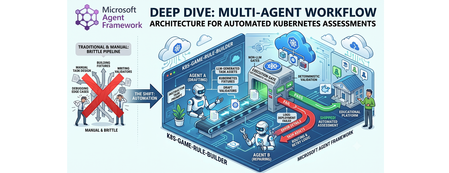
7 TopicsMicrosoft Agent Framework Multi-Agent Workflow Architecture for Automated Kubernetes Assessments
Why this system generates tests (design rationale) This project does not generate tests just to "check code." It generates tests because, in a Kubernetes learning game, the test suite is the grading contract. The design goals are: Scale content creation: instructors should not hand-author every task and checker. Keep grading objective: student success is measured against Kubernetes API state, not subjective review. Avoid fragile tasks: generated tasks must survive empty/wrong cluster states without crashing. Make failures repairable: when checks break, the system should patch and re-validate automatically. So the pipeline generates a full task package (setup, answer, check, cleanup) where tests define exactly what "correct" means. Lifecycle: from concept to production-ready grader Reader mental model: this is a content compiler with validation stages, not a single chat completion. Phase 1: Pedagogical intent -> structured concept The Idea Agent converts a topic into a constrained concept object (objective, progression, task IDs, difficulty variants). Memory rules block duplicates and previously failed concepts. Phase 2: Concept -> executable grading package The Generator Agent turns that concept into files: student instructions (instruction.md) learning material (concept.md) parameter source (session.json) setup and answer manifests (setup.template.yaml, answer.template.yaml) deterministic pytest flow (test_01 ... test_06) At this point, output is still untrusted draft content. Phase 3: Structural correctness gate Deterministic validation checks file presence, syntax, JSON/YAML shape, and template correctness. This catches basic integrity issues before cluster execution. Phase 4: Behavioral correctness gate (real cluster) Pytest executes against Kubernetes and verifies runtime behavior using real kubectl-derived state. This proves that generated checks actually evaluate cluster resources as intended. Phase 5: Anti-false-positive gate (skip-answer mode) The same suite runs with SKIP_ANSWER_TESTS=True to verify grader integrity: answer deployment is skipped test_05_check.py must fail If it still passes, the grader is invalid (it would accept wrong student submissions). Phase 6: Self-healing repair loop On any failure, deterministic error logs are fed into the Fixer Agent, which patches only broken files. The workflow then re-enters validation + test gates. Phase 7: Finalization If all gates pass -> task is kept as production-ready content. If retries are exhausted -> task is moved to unsuccessful/ with FAILURE_REPORT.txt for human triage. This lifecycle explains the core architecture decision: LLMs generate candidate graders, deterministic execution certifies them. Concrete generated sample (what the pipeline actually produces) Below is a representative generated task for topic: ConfigMap Environment Variable Injection. Generated directory layout tests/game01/050_configmap_env_injection/ ├── __init__.py ├── instruction.md ├── concept.md ├── session.json ├── setup.template.yaml ├── answer.template.yaml ├── test_01_setup.py ├── test_02_ready.py ├── test_03_answer.py ├── test_05_check.py └── test_06_cleanup.py session.json (runtime variables) { "namespace": "{{random_name()}}{{random_number(100,999)}}{{student_id()}}", "configmap_name": "{{random_name()}}", "deployment_name": "{{random_name()}}", "container_name": "app", "env_key": "APP_MODE", "env_value": "production" } Why this exists: task values are randomized per student/session, so tests verify behavior by variable contract instead of hardcoded names. setup.template.yaml (baseline state only) apiVersion: v1 kind: Namespace metadata: name: {{ namespace }} Why this exists: setup should create prerequisites only. It must not accidentally include the final answer. answer.template.yaml (expected correct solution) apiVersion: v1 kind: ConfigMap metadata: name: {{ configmap_name }} namespace: {{ namespace }} data: {{ env_key }}: "{{ env_value }}" --- apiVersion: apps/v1 kind: Deployment metadata: name: {{ deployment_name }} namespace: {{ namespace }} spec: replicas: 1 selector: matchLabels: app: env-demo template: metadata: labels: app: env-demo spec: containers: - name: {{ container_name }} image: nginx:latest env: - name: {{ env_key }} valueFrom: configMapKeyRef: name: {{ configmap_name }} key: {{ env_key }} Why this exists: defines canonical "correct cluster state" that graders must detect. test_02_ready.py (wait for setup resources) import json import time from tests.helper.kubectrl_helper import build_kube_config, run_kubectl_command class TestReady: def test_001_namespace_active(self, json_input): kube_config = build_kube_config( json_input["cert_file"], json_input["key_file"], json_input["host"] ) time.sleep(2) result = run_kubectl_command( kube_config, f"kubectl get namespace {json_input['namespace']} -o json", ) data = json.loads(result) assert data.get("status", {}).get("phase") == "Active" Why this matters: validates setup-stage readiness only. It should not check answer resources yet. test_05_check.py (student grading contract) import json from tests.helper.kubectrl_helper import build_kube_config, run_kubectl_command class TestCheck: def test_001_configmap_key_exists(self, json_input): kube_config = build_kube_config( json_input["cert_file"], json_input["key_file"], json_input["host"] ) result = run_kubectl_command( kube_config, f"kubectl get configmap {json_input['configmap_name']} -n {json_input['namespace']} -o json", ) data = json.loads(result) assert data["data"][json_input["env_key"]] == json_input["env_value"] def test_002_deployment_uses_configmap_env(self, json_input): kube_config = build_kube_config( json_input["cert_file"], json_input["key_file"], json_input["host"] ) result = run_kubectl_command( kube_config, f"kubectl get deployment {json_input['deployment_name']} -n {json_input['namespace']} -o json", ) data = json.loads(result) env = data["spec"]["template"]["spec"]["containers"][0].get("env", []) matched = [ e for e in env if e.get("name") == json_input["env_key"] and e.get("valueFrom", {}).get("configMapKeyRef", {}).get("name") == json_input["configmap_name"] and e.get("valueFrom", {}).get("configMapKeyRef", {}).get("key") == json_input["env_key"] ] assert matched, "Deployment container must consume env var from ConfigMap key" Why this matters: this is the real grading logic. If a student deploys wrong resource wiring, this test fails with explicit reason. Why skip-answer validation is essential for this sample When SKIP_ANSWER_TESTS=True, answer deployment is skipped. In this mode: test_03_answer.py should be skipped test_05_check.py must fail (ConfigMap/Deployment wiring is absent) If test_05_check.py still passes, the grader is broken (false positive), and the workflow routes to Fixer. Rule Builder Workflow Flowchart Multi-graph architecture views 1) Control-plane graph (orchestration DAG) 2) Runtime sequence (who calls what) 3) State machine (task lifecycle) 4) Prompt lifecycle graph (how prompts evolve) 5) MCP + Kubernetes execution boundary graph Core Agent Framework Primitives Used This repository is a practical example of Agent Framework as a graph orchestrator, not just an agent wrapper. WorkflowBuilder builds a typed DAG with explicit edges. @executor functions implement deterministic nodes (validation, pytest, decisions, routing prep). AgentExecutor wraps LLM agents so they behave as graph nodes. WorkflowContext shared state carries typed data and retry metadata between nodes. add_multi_selection_edge_group(...) + selector functions enforce conditional routing. MCPStdioTool connects filesystem MCP tools into agents for controlled file I/O. Production graph construction (from workflow/builder.py) looks like this: workflow = ( WorkflowBuilder(start_executor=initialize_retry) .add_edge(initialize_retry, generator_executor) .add_edge(generator_executor, parse_generated_task) .add_edge(parse_generated_task, run_validation) .add_edge(run_validation, run_pytest) .add_edge(run_pytest, make_decision) .add_multi_selection_edge_group( make_decision, [keep_task, remove_task], selection_func=select_action, ) .add_edge(keep_task, run_pytest_skip_answer) .add_multi_selection_edge_group( run_pytest_skip_answer, [check_loop, complete_workflow], selection_func=select_skip_answer_action, ) .add_multi_selection_edge_group( check_loop, [fix_task, complete_workflow], selection_func=select_loop_action, ) .add_edge(fix_task, fixer_executor) .add_edge(fixer_executor, parse_generated_task) .build() ) This is the architectural heart of the system: agents and deterministic executors are first-class nodes in the same graph. Detailed Node-by-Node Mechanics 1. Idea Agent (🧠): Concept Synthesis with Memory Constraints The Idea Agent (agents/k8s_task_idea_agent.py) generates a structured concept with three difficulty variations (BEGINNER/INTERMEDIATE/ADVANCED). It is memory-aware: task_ideas_memory.json tracks successful concepts. task_ideas_failure_memory.json tracks concepts that failed downstream. Memory constraints are injected using AgentMiddleware (system-level prompt injection) to avoid duplicate or previously failed concepts. For Responses-only models, the agent switches to a tool-call contract (save_k8s_task_concept) instead of structured response formatting. 2. Generator Agent (⚙️): MCP-Backed File Authoring The Generator Agent receives a strict prompt and writes task files through MCP filesystem tools. Key framework details: Built through chat_client.as_agent(...). MCP tool attached via tools=mcp_tool. Function-call execution observability added with LoggingFunctionMiddleware. Uses absolute-path-only policy in instructions to prevent path drift. 3. Deterministic Validation + Test (✅): Non-LLM Gates After generation, the graph moves through deterministic executors: run_validation calls pure Python checks (k8s_task_validator). run_pytest executes pytest --import-mode=importlib --rootdir=. .... Raw pytest output is persisted in workflow state for later fixing. This is critical: no LLM is asked whether code is correct. 4. Skip-Answer Test (🧪): Grader Correctness Gate Even if standard tests pass, the workflow enforces a second tier: SKIP_ANSWER_TESTS=True pytest --import-mode=importlib --rootdir=. Implementation detail: the executor writes JUnit XML, parses it, and asserts that: test_03_answer.py is skipped test_05_check.py fails as expected If test_05_check.py does not fail, the task is treated as invalid and sent back to retry/fix. 5. Fixer Agent + Retry Loop (🔧): Bounded Self-Healing On failure, fix_task builds a targeted prompt containing: failure reasons from deterministic nodes full captured pytest output explicit rule to patch only broken files in place The Fixer Agent runs through AgentExecutor, writes patches via MCP, and the graph loops back to parse_generated_task. Retries are stateful (retry_count, max_retries) and hard-bounded. On exhaustion, complete_workflow moves the task to unsuccessful/<game>/ and writes FAILURE_REPORT.txt. Agent Prompt Design (The Part That Makes It Work) If you want to understand why this pipeline works, you need to inspect prompts as operational contracts, not generic instructions. Real Idea Agent Prompt (from code) IDEA_AGENT_INSTRUCTIONS = ( "You are a Kubernetes task idea generator that creates detailed task concepts with three difficulty variations. " "Read official K8s documentation and propose comprehensive learning concepts for a Kubernetes game. " "\n\nYour task:\n" "1. Choose ONE Kubernetes concept not yet covered (check context for existing concepts)\n" "2. Generate exactly 3 variations: BEGINNER, INTERMEDIATE, and ADVANCED\n" "3. Use 3-digit task IDs (001-999) in format: XXX_concept_name_level (e.g., 041_secrets_basic)\n" "4. Each variation should build on the previous one with increasing complexity\n" "5. Include practical, hands-on scenarios covering: Workloads, Services, Storage, Configuration, Security, Scheduling, Policies\n" "\nProvide the concept, tags, description, and 3 variations with task_id, difficulty, title, objective, key_skills, and estimated_time." ) Responses-only models use a stricter tool-call version: IDEA_AGENT_INSTRUCTIONS_TOOL_CALL = ( IDEA_AGENT_INSTRUCTIONS + "\n\n" "**CRITICAL**: You MUST call the save_k8s_task_concept tool to save your generated concept.\n" "...\n" "Always call save_k8s_task_concept with your generated concept." ) Idea Agent Prompt Contract The Idea Agent prompt enforces: one concept per run exactly three difficulty variations strict task ID format (XXX_concept_name_level) practical skill progression Core pattern: You are a Kubernetes task idea generator... 1. Choose ONE Kubernetes concept not yet covered 2. Generate exactly 3 variations: BEGINNER, INTERMEDIATE, ADVANCED 3. Use 3-digit task IDs in format XXX_concept_name_level ... It is strengthened by runtime memory injection: previously generated concepts are blocked previously failed concepts are blocked For Responses-only models, the contract becomes tool-driven: CRITICAL: You MUST call the save_k8s_task_concept tool... This reduces ambiguity in output structure and makes downstream parsing deterministic. Real Generator Agent Prompt (from code) def _get_generator_instructions(): return ( "You are a Kubernetes task generator with filesystem tools.\n" f"The MCP filesystem is rooted at: {PATHS.tests_root.parent}\n" f"You MUST use ABSOLUTE paths for ALL file operations.\n" f"Task directory: {PATHS.game_root}/XXX_task_name/\n" "...\n" "CRITICAL: test_02_ready.py checks resources from setup.template.yaml, NOT answer.template.yaml.\n" "...\n" "MUST use polling loops (60s timeout, 15s interval)\n" "MUST use try/except and safe .get() JSON access\n" ) The generator prompt is long on purpose: it encodes path correctness, file schema, YAML/Jinja structure, and testing strategy in a single deterministic contract. Generator Agent Prompt Contract The Generator prompt is intentionally long and prescriptive because it defines filesystem safety and grading correctness requirements. Key constraints encoded in the prompt: Absolute path writes only (prevents writing to wrong workspace paths) No directory creation (directory is pre-created by executor) Required file set (instruction.md, concept.md, session.json, templates, tests) test-flow invariants: test_01_setup.py deploys setup test_02_ready.py checks setup resources only test_03_answer.py deploys answer test_05_check.py validates final solution robust test coding style: polling loops, try/except, .get()-based JSON parsing, explicit debug output Example contract fragment: CRITICAL PATH RULES: ✅ CORRECT: /abs/path/tests/gameXX/050_task/file.py ❌ WRONG: tests/gameXX/050_task/file.py (relative) CRITICAL: test_02_ready.py checks resources from setup.template.yaml, NOT answer.template.yaml. This is why generation quality is high before the Fixer loop even starts. Real Runtime Retry Prompt Builder (from code) def _build_retry_generation_prompt(combined: CombinedValidationResult) -> str: task_id = combined.test.task_id failure_reasons = _build_failure_reasons(combined) return ( f"Generate a complete Kubernetes learning task with ID '{task_id}' about '{combined.target_topic}'. " f"This is retry attempt {combined.retry_count + 1} of {combined.max_retries}. " f"\n\n⚠️ PREVIOUS ATTEMPT FAILED:" f"\n{chr(10).join([f' - {reason}' for reason in failure_reasons])}" f"\n\nIMPORTANT: You MUST use the exact task ID '{task_id}' - do not generate a new ID." f"\n\n✅ Directory already exists: {PATHS.game_root}/{task_id}/" f"\nWrite all files directly into this directory. Do NOT call create_directory." "..." ) This means retries are not generic retries; they are failure-conditioned retries with precise constraints. Fixer Agent Prompt Contract The Fixer prompt is a repair protocol, not a regeneration prompt. It includes: exact failure reasons from deterministic validators raw pytest output instruction to read current task files first strict directive to patch only broken files Core behavior constraints: DO NOT rewrite all files. Make TARGETED FIXES to ONLY the broken files. Use ABSOLUTE paths for all file operations. This keeps retries cheap, preserves working artifacts, and improves convergence speed. Real Runtime Fix Prompt Builder (from code) def _build_fix_prompt(combined: CombinedValidationResult, raw_test_output: str) -> str: task_id = combined.test.task_id failure_reasons = _build_failure_reasons(combined) prompt = ( f"Fix the failed Kubernetes task '{task_id}' located in '{PATHS.game_root}/{task_id}/'." f"\n\nThis is fix attempt {combined.retry_count + 1} of {combined.max_retries}." f"\n\n⚠️ TASK FAILED WITH THESE ERRORS:" f"\n{chr(10).join([f' - {reason}' for reason in failure_reasons])}" ) if raw_test_output: prompt += f"\n\n📋 FULL TEST OUTPUT:\n```\n{raw_test_output}\n```" prompt += ( f"\n\n🔍 YOUR TASK:" f"\n1. READ all files from '{PATHS.game_root}/{task_id}/'" f"\n6. Make TARGETED FIXES to ONLY the broken files" f"\n7. WRITE ONLY the fixed files back" f"\n\n⚠️ CRITICAL: DO NOT rewrite all files! Only fix the broken ones!" ) return prompt How Prompt Output Enters the Agent Framework Graph The prompt builders above are used by deterministic executors and sent to agent nodes through AgentExecutorRequest: await ctx.send_message( AgentExecutorRequest( messages=[Message(role="user", contents=[fix_prompt])], should_respond=True ) ) So prompt generation and graph routing are tightly coupled: each route transition emits a specific prompt payload into the next LLM node. Runtime-Constructed Prompts in Executors The most important prompts are built dynamically in workflow executors: _build_retry_generation_prompt(...) _build_fix_prompt(...) These functions inject live context: retry_count / max_retries concept + objective metadata validation/test failure reasons full captured test logs So each retry is context-rich and specific, not another blind generation attempt. Prompt + Middleware + Deterministic Gates = Reliability In this repository, reliability does not come from prompt text alone. It comes from three layers working together: Prompt contracts constrain agent behavior. Middleware injects memory and logs tool invocations. Deterministic executors enforce objective pass/fail gates. That combination is why the workflow remains auditable and predictable even when LLM outputs vary. Agent Framework Execution Model in This Repo Strongly-Typed Message Passing workflow/models.py defines transport models used between nodes: ValidationResult and TestResult (Pydantic) CombinedValidationResult (dataclass with should_keep and should_retry) InitialWorkflowState (seed payload for each run) This keeps node contracts explicit and simplifies selector logic. Fail-Fast Shared State Management Executors use ctx.get_state(...) with a sentinel (_MISSING) and raise explicit exceptions if required state is absent. This prevents hidden fallback behavior and catches graph/data wiring errors early. Conditional Routing with Selectors Selectors (workflow/selectors.py) encode graph decisions: select_action → keep vs remove select_skip_answer_action → complete vs loop select_loop_action → fix vs complete This separates decision policy from executor implementation. Streaming Workflow Runtime workflow.run(initial_state, stream=True) emits output events incrementally. The runner (workflow/runner.py) consumes these events to detect successful completions and update concept memory accordingly. Agent Construction and API Selection Strategy The repository uses Azure CLI auth (AzureCliCredential) and dynamically selects API mode by deployment name (agents/config.py): Chat Completions path: OpenAIChatCompletionClient Responses-only model path: OpenAIChatClient or custom ResponsesAgent Why this matters: some codex-class deployments are Responses-only, so the architecture supports both without changing workflow logic. How MCP Actually Controls Kubernetes (Important Distinction) In this repo, MCP is used for filesystem control; Kubernetes control is done through kubectl tools. 1) MCP server role: controlled file I/O The workflow starts MCP stdio servers (official filesystem server) and mounts them into agents: docs_mcp_tool = MCPStdioTool( name="filesystem_docs", command="npx", args=["-y", "@modelcontextprotocol/server-filesystem", str(PATHS.k8s_docs_root)], load_prompts=False, ) tests_mcp_tool = MCPStdioTool( name="filesystem_tests", command="npx", args=["-y", "@modelcontextprotocol/server-filesystem", str(PATHS.tests_root.parent)], load_prompts=False, ) Those MCP tools are passed into Generator/Fixer agents, which then call MCP file functions (read/write/list) inside allowed roots only. 2) Kubernetes cluster control role: kubectl execution tool Cluster actions are not performed by MCP filesystem server; they are performed by a dedicated function tool: def run_kubectl_command(command: str) -> str: kubeconfig_path = os.environ.get("KUBECONFIG", "/home/developer/.kube/config") cmd_list = ["kubectl"] + command.split() result = subprocess.run( cmd_list, capture_output=True, text=True, check=True, env={**os.environ, "KUBECONFIG": kubeconfig_path}, ) return result.stdout And the Kubernetes agent forces tool usage: agent = responses_client.as_agent( name="KubernetesAgent", instructions="...You MUST use the run_kubectl_command tool...", tools=[run_kubectl_command], default_options={"tool_choice": "required"}, ) So the control plane is: MCP filesystem → manipulate generated task files. kubectl tool → query/mutate real cluster state. deterministic pytest/validator executors → accept or reject results. 3) End-to-end command flow in practice When generated tests run, they execute real kubectl get ... -o json checks in test code, and the deterministic runner captures raw output: pytest_command = f"pytest --import-mode=importlib --rootdir=. {task_with_val.task_directory}/" result = run_pytest_command(pytest_command) ctx.set_state(f"raw_output_{task_with_val.task_id}", raw_output) This means Kubernetes state verification is always grounded in live command output, not model speculation. Should MCP run Kubernetes tests? Short answer: not in this design. Current architecture keeps test execution deterministic and local: pytest is run by run_pytest_command(...) (pure Python subprocess runner) test results are parsed and stored in workflow state retry/fix routing uses those deterministic outputs This is intentional. If test execution were delegated to an LLM-facing MCP command tool, you would lose strict control over execution semantics and error handling. Recommended pattern: Use MCP for file/document access and controlled editing. Use deterministic executors for pytest and validation. Use LLM agents only for generation and repair. If you still want MCP-driven test execution, add a separate locked-down command MCP server (only whitelisted pytest/kubectl commands), but keep pass/fail decision logic in deterministic executors. How tests are run in this workflow (with code) The workflow executes tests in deterministic executors, not inside LLM agents. 1) Workflow node calls pytest runner run_pytest executor builds the command and calls the pure Python runner: @executor(id="run_pytest") async def run_pytest(task_with_val: TaskWithValidation, ctx: WorkflowContext[TestResult]) -> None: from agents.pytest_runner import run_pytest_command pytest_command = f"pytest --import-mode=importlib --rootdir=. {task_with_val.task_directory}/" result = run_pytest_command(pytest_command) raw_output = result["details"][0] if result.get("details") else "" ctx.set_state(f"raw_output_{task_with_val.task_id}", raw_output) ... 2) Deterministic subprocess execution The runner normalizes command flags and executes pytest via subprocess: def run_pytest_command(command: str) -> dict[str, Any]: normalized_command = _normalize_pytest_command(command) # adds -s if needed cmd_list = shlex.split(normalized_command) result = subprocess.run( cmd_list, capture_output=True, text=True, check=False, cwd=str(PATHS.pytest_rootdir), ) combined_output = result.stdout + "\n" + result.stderr _save_test_output(normalized_command, combined_output, skip_answer) ... Exit codes are interpreted deterministically: 0 → pass 5 → no tests collected (fail) others → fail with exit code reason 3) Skip-answer validation tier After normal pass, the workflow runs pytest again with SKIP_ANSWER_TESTS=True and parses JUnit XML: os.environ["SKIP_ANSWER_TESTS"] = "True" pytest_command = f"pytest --import-mode=importlib --rootdir=. --junitxml={junit_path} {task_dir}/" result = run_pytest_command(pytest_command) test_05_failed, test_03_skipped = _parse_skip_answer_junit(junit_path) The parser checks per-testcase outcomes: if "test_05_check.py" in context and has_failure_or_error: test_05_failed = True if "test_03_answer.py" in context and has_skipped: test_03_skipped = True 4) How failures trigger fix loop If pytest fails (or skip-answer logic fails), failure reasons and raw output are pushed into state, then the Fixer Agent receives a generated fix prompt containing that output: ctx.set_state(f"failure_reasons_{task_id}", reasons) ctx.set_state(f"raw_output_{task_id}", raw_output) fix_prompt = _build_fix_prompt(combined, raw_test_output) await ctx.send_message( AgentExecutorRequest( messages=[Message(role="user", contents=[fix_prompt])], should_respond=True ) ) That is the key loop: deterministic test output drives LLM repair, then deterministic tests re-run. ResponsesAgent Internals (Advanced Agent Framework Pattern) The custom ResponsesAgent (agents/responses_agent.py) demonstrates a lower-level integration pattern: Connect MCP tool lazily. Call Responses API. Parse ResponseFunctionToolCall items. Execute tools (MCP + custom callables). Feed function_call_output back to model. Repeat until final text response. It also runs a middleware chain around tool invocations, preserving observability and consistency with standard agent paths. Why This Architecture Is Robust This design works because Agent Framework is used as a deterministic orchestration layer around probabilistic generation: LLM creativity is constrained by typed state and strict prompts. deterministic executors act as objective quality gates. retries are targeted, bounded, and auditable. failures produce durable forensic artifacts (FAILURE_REPORT.txt + test logs). For Kubernetes education pipelines, this yields high throughput without sacrificing grader reliability. GitHub Repo - https://github.com/wongcyrus/k8s-game-rule-builder About the Author Cyrus Wong is the senior lecturer of Hong Kong Institute of Information Technology (HKIIT) @ IVE(Lee Wai Lee).and he focuses on teaching public Cloud technologies. He is a passionate advocate for the adoption of cloud technology across various media and events. With his extensive knowledge and expertise, he has earned prestigious recognitions such as AWS AI Hero, Microsoft MVP- Microsoft Foundry, and Google Developer Expert - Cloud(AI).405Views0likes0CommentsStep-by-Step: Deploy the Architecture Review Agent Using AZD AI CLI
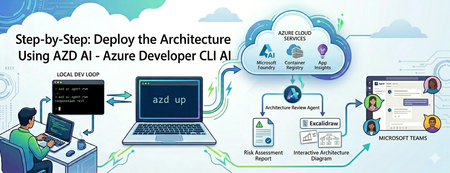
Building an AI agent is easy; operating it is an infrastructure trap. Discover how to use the azd ai CLI extension to streamline your workflow. From local testing to deploying a live Microsoft Foundry hosted agent and publishing it to Microsoft Teams—learn how to do it all without writing complex deployment scripts or needing admin permissions.844Views1like0CommentsStop Drawing Architecture Diagrams Manually: Meet the Open-Source AI Architecture Review Agents
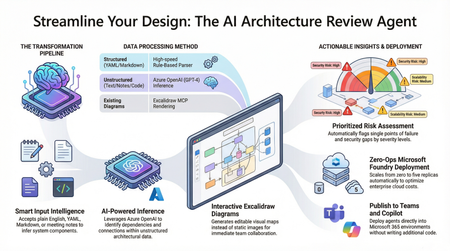
Designing and documenting software architecture is often a battle against static diagrams that become outdated the moment they are drawn. The Architecture Review Agent changes that by turning your design process into a dynamic, AI-powered workflow. In this post, we explore how to leverage Microsoft Foundry Hosted Agents, Azure OpenAI, and Excalidraw to build an open-source tool that instantly converts messy text descriptions, YAML, or README files into editable architecture diagrams. Beyond just drawing boxes, the agent acts as a technical co-pilot, delivering prioritized risk assessments, highlighting single points of failure, and mapping component dependencies. Discover how to eliminate manual diagramming, catch security flaws early, and deploy your own enterprise-grade agent with zero infrastructure overhead.18KViews7likes5CommentsBuilding a Local Research Desk: Multi-Agent Orchestration
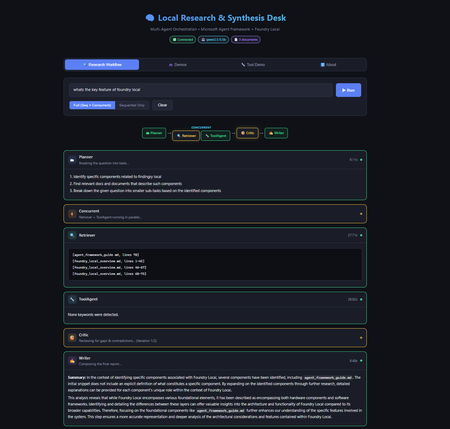
Introduction Multi-agent systems represent the next evolution of AI applications. Instead of a single model handling everything, specialised agents collaborate—each with defined responsibilities, passing context to one another, and producing results that no single agent could achieve alone. But building these systems typically requires cloud infrastructure, API keys, usage tracking, and the constant concern about what data leaves your machine. What if you could build sophisticated multi-agent workflows entirely on your local machine, with no cloud dependencies? The Local Research & Synthesis Desk demonstrates exactly this. Using Microsoft Agent Framework (MAF) for orchestration and Foundry Local for on-device inference, this demo shows how to create a four-agent research pipeline that runs entirely on your hardware—no API keys, no data leaving your network, and complete control over every step. This article walks through the architecture, implementation patterns, and practical code that makes multi-agent local AI possible. You'll learn how to bootstrap Foundry Local from Python, create specialised agents with distinct roles, wire them into sequential, concurrent, and feedback loop orchestration patterns, and implement tool calling for extended functionality. Whether you're building research tools, internal analysis systems, or simply exploring what's possible with local AI, this architecture provides a production-ready foundation. Why Multi-Agent Architecture Matters Single-agent AI systems hit limitations quickly. Ask one model to research a topic, analyse findings, identify gaps, and write a comprehensive report—and you'll get mediocre results. The model tries to do everything at once, with no opportunity for specialisation, review, or iterative refinement. Multi-agent systems solve this by decomposing complex tasks into specialised roles. Each agent focuses on what it does best: Planners break ambiguous questions into concrete sub-tasks Retrievers focus exclusively on finding and extracting relevant information Critics review work for gaps, contradictions, and quality issues Writers synthesise everything into coherent, well-structured output This separation of concerns mirrors how human teams work effectively. A research team doesn't have one person doing everything—they have researchers, fact-checkers, editors, and writers. Multi-agent AI systems apply the same principle to AI workflows, with each agent receiving the output of previous agents as context for their own specialised task. The Local Research & Synthesis Desk implements this pattern with four primary agents, plus an optional ToolAgent for utility functions. Here's how user questions flow through the system: This architecture demonstrates three essential orchestration patterns: sequential pipelines where each agent builds on the previous output, concurrent fan-out where independent tasks run in parallel to save time, and feedback loops where the Critic can send work back to the Retriever for iterative refinement. The Technology Stack: MAF + Foundry Local Before diving into implementation, let's understand the two core technologies that make this architecture possible and why they work so well together. Microsoft Agent Framework (MAF) The Microsoft Agent Framework provides building blocks for creating AI agents in Python and .NET. Unlike frameworks that require specific cloud providers, MAF works with any OpenAI-compatible API—which is exactly what Foundry Local provides. The key abstraction in MAF is the ChatAgent . Each agent has: Instructions: A system prompt that defines the agent's role and behaviour Chat client: An OpenAI-compatible client for making inference calls Tools: Optional functions the agent can invoke during execution Name: An identifier for logging and observability MAF handles message threading, tool execution, and response parsing automatically. You focus on designing agent behaviour rather than managing low-level API interactions. Foundry Local Foundry Local brings Azure AI Foundry's model catalog to your local machine. It automatically selects the best hardware acceleration available (GPU, NPU, or CPU) and exposes models through an OpenAI-compatible API. Models run entirely on-device with no data leaving your machine. The foundry-local-sdk Python package provides programmatic control over the Foundry Local service. You can start the service, download models, and retrieve connection information—all from your Python code. This is the "control plane" that manages the local AI infrastructure. The combination is powerful: MAF handles agent logic and orchestration, while Foundry Local provides the underlying inference. No cloud dependencies, no API keys, complete data privacy: Bootstrapping Foundry Local from Python The first practical challenge is starting Foundry Local programmatically. The FoundryLocalBootstrapper class handles this, encapsulating all the setup logic so the rest of the application can focus on agent behaviour. The bootstrap process follows three steps: start the Foundry Local service if it's not running, download the requested model if it's not cached, and return connection information that MAF agents can use. Here's the core implementation: from dataclasses import dataclass from foundry_local import FoundryLocalManager @dataclass class FoundryConnection: """Holds endpoint, API key, and model ID after bootstrap.""" endpoint: str api_key: str model_id: str model_alias: str This dataclass carries everything needed to connect MAF agents to Foundry Local. The endpoint is typically http://localhost:<port>/v1 (the port is assigned dynamically), and the API key is managed internally by Foundry Local. class FoundryLocalBootstrapper: def __init__(self, alias: str | None = None) -> None: self.alias = alias or os.getenv("MODEL_ALIAS", "qwen2.5-0.5b") def bootstrap(self) -> FoundryConnection: """Start service, download & load model, return connection info.""" from foundry_local import FoundryLocalManager manager = FoundryLocalManager() model_info = manager.download_and_load_model(self.alias) return FoundryConnection( endpoint=manager.endpoint, api_key=manager.api_key, model_id=model_info.id, model_alias=self.alias, ) Key design decisions in this implementation: Lazy import: The foundry_local import happens inside bootstrap() so the application can provide helpful error messages if the SDK isn't installed Environment configuration: Model alias comes from MODEL_ALIAS environment variable or defaults to qwen2.5-0.5b Automatic hardware selection: Foundry Local picks GPU, NPU, or CPU automatically—no configuration needed The qwen2.5 model family is recommended because it supports function/tool calling, which the ToolAgent requires. For higher quality outputs, larger variants like qwen2.5-7b or qwen2.5-14b are available via the --model flag. Creating Specialised Agents With Foundry Local bootstrapped, the next step is creating agents with distinct roles. Each agent is a ChatAgent instance with carefully crafted instructions that focus it on a specific task. The Planner Agent The Planner receives a user question and available documents, then breaks the research task into concrete sub-tasks. Its instructions emphasise structured output—a numbered list of specific tasks rather than prose: from agent_framework import ChatAgent from agent_framework.openai import OpenAIChatClient def _make_client(conn: FoundryConnection) -> OpenAIChatClient: """Create an MAF OpenAIChatClient pointing at Foundry Local.""" return OpenAIChatClient( api_key=conn.api_key, base_url=conn.endpoint, model_id=conn.model_id, ) def create_planner(conn: FoundryConnection) -> ChatAgent: return ChatAgent( chat_client=_make_client(conn), name="Planner", instructions=( "You are a planning agent. Given a user's research question and a list " "of document snippets (if any), break the question into 2-4 concrete " "sub-tasks. Output ONLY a numbered list of tasks. Each task should state:\n" " • What information is needed\n" " • Which source documents might help (if known)\n" "Keep it concise — no more than 6 lines total." ), ) Notice how the instructions are explicit about output format. Multi-agent systems work best when each agent produces structured, predictable output that downstream agents can parse reliably. The Retriever Agent The Retriever receives the Planner's task list plus raw document content, then extracts and cites relevant passages. Its instructions emphasise citation format—a specific pattern that the Writer can reference later: def create_retriever(conn: FoundryConnection) -> ChatAgent: return ChatAgent( chat_client=_make_client(conn), name="Retriever", instructions=( "You are a retrieval agent. You receive a research plan AND raw document " "text from local files. Your job:\n" " 1. Identify the most relevant passages for each task in the plan.\n" " 2. Output extracted snippets with citations in the format:\n" " [filename.ext, lines X-Y]: \"quoted text…\"\n" " 3. If no relevant content exists, say so explicitly.\n" "Be precise — quote only what is relevant, keep each snippet under 100 words." ), ) The citation format [filename.ext, lines X-Y] creates a consistent contract. The Writer knows exactly how to reference source material, and human reviewers can verify claims against original documents. The Critic Agent The Critic reviews the Retriever's work, identifying gaps and contradictions. This agent serves as a quality gate before the final report and can trigger feedback loops for iterative improvement: def create_critic(conn: FoundryConnection) -> ChatAgent: return ChatAgent( chat_client=_make_client(conn), name="Critic", instructions=( "You are a critical review agent. You receive a plan and extracted snippets. " "Your job:\n" " 1. Check for gaps — are any plan tasks unanswered?\n" " 2. Check for contradictions between snippets.\n" " 3. Suggest 1-2 specific improvements or missing details.\n" "Start your response with 'GAPS FOUND' if issues exist, or 'NO GAPS' if satisfied.\n" "Then output a short numbered list of issues (or say 'No issues found')." ), ) The Critic is instructed to output GAPS FOUND or NO GAPS at the start of its response. This structured output enables the orchestrator to detect when gaps exist and trigger the feedback loop—sending the gaps back to the Retriever for additional retrieval before re-running the Critic. This iterates up to 2 times before the Writer takes over, ensuring higher quality reports. Critics are essential for production systems. Without this review step, the Writer might produce confident-sounding reports with missing information or internal contradictions. The Writer Agent The Writer receives everything—original question, plan, extracted snippets, and critic review—then produces the final report: def create_writer(conn: FoundryConnection) -> ChatAgent: return ChatAgent( chat_client=_make_client(conn), name="Writer", instructions=( "You are the final report writer. You receive:\n" " • The original question\n" " • A plan, extracted snippets with citations, and a critic review\n\n" "Produce a clear, well-structured answer (3-5 paragraphs). " "Requirements:\n" " • Cite sources using [filename.ext, lines X-Y] notation\n" " • Address any gaps the critic raised (note if unresolvable)\n" " • End with a one-sentence summary\n" "Do NOT fabricate citations — only use citations provided by the Retriever." ), ) The final instruction—"Do NOT fabricate citations"—is crucial for responsible AI. The Writer has access only to citations the Retriever provided, preventing hallucinated references that plague single-agent research systems. Implementing Sequential Orchestration With agents defined, the orchestrator connects them into a workflow. Sequential orchestration is the simpler pattern: each agent runs after the previous one completes, passing its output as input to the next agent. The implementation uses Python's async/await for clean asynchronous execution: import asyncio import time from dataclasses import dataclass, field @dataclass class StepResult: """Captures one agent step for observability.""" agent_name: str input_text: str output_text: str elapsed_sec: float @dataclass class WorkflowResult: """Final result of the entire orchestration run.""" question: str steps: list[StepResult] = field(default_factory=list) final_report: str = "" async def _run_agent(agent: ChatAgent, prompt: str) -> tuple[str, float]: """Execute a single agent and measure elapsed time.""" start = time.perf_counter() response = await agent.run(prompt) elapsed = time.perf_counter() - start return response.content, elapsed The StepResult dataclass captures everything needed for observability: what went in, what came out, and how long it took. This information is invaluable for debugging and optimisation. The sequential pipeline chains agents together, building context progressively: async def run_sequential_workflow( question: str, docs: LoadedDocuments, conn: FoundryConnection, ) -> WorkflowResult: wf = WorkflowResult(question=question) doc_block = docs.combined_text if docs.chunks else "(no documents provided)" # Step 1 — Plan planner = create_planner(conn) planner_prompt = f"User question: {question}\n\nAvailable documents:\n{doc_block}" plan_text, elapsed = await _run_agent(planner, planner_prompt) wf.steps.append(StepResult("Planner", planner_prompt, plan_text, elapsed)) # Step 2 — Retrieve retriever = create_retriever(conn) retriever_prompt = f"Plan:\n{plan_text}\n\nDocuments:\n{doc_block}" snippets_text, elapsed = await _run_agent(retriever, retriever_prompt) wf.steps.append(StepResult("Retriever", retriever_prompt, snippets_text, elapsed)) # Step 3 — Critique critic = create_critic(conn) critic_prompt = f"Plan:\n{plan_text}\n\nExtracted snippets:\n{snippets_text}" critique_text, elapsed = await _run_agent(critic, critic_prompt) wf.steps.append(StepResult("Critic", critic_prompt, critique_text, elapsed)) # Step 4 — Write writer = create_writer(conn) writer_prompt = ( f"Original question: {question}\n\n" f"Plan:\n{plan_text}\n\n" f"Extracted snippets:\n{snippets_text}\n\n" f"Critic review:\n{critique_text}" ) report_text, elapsed = await _run_agent(writer, writer_prompt) wf.steps.append(StepResult("Writer", writer_prompt, report_text, elapsed)) wf.final_report = report_text return wf Each step receives all relevant context from previous steps. The Writer gets the most comprehensive prompt—original question, plan, snippets, and critique—enabling it to produce a well-informed final report. Adding Concurrent Fan-Out and Feedback Loops Sequential orchestration works well but can be slow. When tasks are independent—neither needs the other's output—running them in parallel saves time. The demo implements this with asyncio.gather . Consider the Retriever and ToolAgent: both need the Planner's output, but neither depends on the other. Running them concurrently cuts the wait time roughly in half: async def run_concurrent_retrieval( plan_text: str, docs: LoadedDocuments, conn: FoundryConnection, ) -> tuple[str, str]: """Run Retriever and ToolAgent in parallel.""" retriever = create_retriever(conn) tool_agent = create_tool_agent(conn) doc_block = docs.combined_text if docs.chunks else "(no documents)" retriever_prompt = f"Plan:\n{plan_text}\n\nDocuments:\n{doc_block}" tool_prompt = f"Analyse the following documents for word count and keywords:\n{doc_block}" # Execute both agents concurrently (snippets_text, r_elapsed), (tool_text, t_elapsed) = await asyncio.gather( _run_agent(retriever, retriever_prompt), _run_agent(tool_agent, tool_prompt), ) return snippets_text, tool_text The asyncio.gather function runs both coroutines concurrently and returns when both complete. If the Retriever takes 3 seconds and the ToolAgent takes 1.5 seconds, the total wait is approximately 3 seconds rather than 4.5 seconds. Implementing the Feedback Loop The most sophisticated orchestration pattern is the Critic–Retriever feedback loop. When the Critic identifies gaps in the retrieved information, the orchestrator sends them back to the Retriever for additional retrieval, then re-evaluates: async def run_critic_with_feedback( plan_text: str, snippets_text: str, docs: LoadedDocuments, conn: FoundryConnection, max_iterations: int = 2, ) -> tuple[str, str]: """ Run Critic with feedback loop to Retriever. Returns (final_snippets, final_critique). """ critic = create_critic(conn) retriever = create_retriever(conn) current_snippets = snippets_text for iteration in range(max_iterations): # Run Critic critic_prompt = f"Plan:\n{plan_text}\n\nExtracted snippets:\n{current_snippets}" critique_text, _ = await _run_agent(critic, critic_prompt) # Check if gaps were found if not critique_text.upper().startswith("GAPS FOUND"): return current_snippets, critique_text # Gaps found — send back to Retriever for more extraction gap_fill_prompt = ( f"Previous snippets:\n{current_snippets}\n\n" f"Gaps identified:\n{critique_text}\n\n" f"Documents:\n{docs.combined_text}\n\n" "Extract additional relevant passages to fill these gaps." ) additional_snippets, _ = await _run_agent(retriever, gap_fill_prompt) current_snippets = f"{current_snippets}\n\n--- Gap-fill iteration {iteration + 1} ---\n{additional_snippets}" # Max iterations reached — run final critique final_critique, _ = await _run_agent(critic, f"Plan:\n{plan_text}\n\nExtracted snippets:\n{current_snippets}") return current_snippets, final_critique This feedback loop pattern significantly improves output quality. The Critic acts as a quality gate, and when standards aren't met, the system iteratively improves rather than producing incomplete results. The full workflow combines all three patterns—sequential where dependencies require it, concurrent where independence allows it, and feedback loops for quality assurance: async def run_full_workflow( question: str, docs: LoadedDocuments, conn: FoundryConnection, ) -> WorkflowResult: """ End-to-end workflow showcasing THREE orchestration patterns: 1. Planner runs first (sequential — must happen before anything else). 2. Retriever + ToolAgent run concurrently (fan-out on independent tasks). 3. Critic reviews with feedback loop (iterates with Retriever if gaps found). 4. Writer produces final report (sequential — needs everything above). """ wf = WorkflowResult(question=question) # Step 1: Planner (sequential) plan_text, elapsed = await _run_agent(create_planner(conn), planner_prompt) wf.steps.append(StepResult("Planner", planner_prompt, plan_text, elapsed)) # Step 2: Concurrent fan-out (Retriever + ToolAgent) snippets_text, tool_text = await run_concurrent_retrieval(plan_text, docs, conn) # Step 3: Critic with feedback loop final_snippets, critique_text = await run_critic_with_feedback( plan_text, snippets_text, docs, conn ) # Step 4: Writer (sequential — needs everything) writer_prompt = ( f"Original question: {question}\n\n" f"Plan:\n{plan_text}\n\n" f"Snippets:\n{final_snippets}\n\n" f"Stats:\n{tool_text}\n\n" f"Critique:\n{critique_text}" ) report_text, elapsed = await _run_agent(create_writer(conn), writer_prompt) wf.final_report = report_text return wf This hybrid approach maximises both correctness and performance. Dependencies are respected, independent work happens in parallel, and quality is ensured through iterative feedback. Implementing Tool Calling Some agents benefit from deterministic tools rather than relying entirely on LLM generation. The ToolAgent demonstrates this pattern with two utility functions: word counting and keyword extraction. MAF supports tool calling through function declarations with Pydantic type annotations: from typing import Annotated from pydantic import Field def word_count( text: Annotated[str, Field(description="The text to count words in")] ) -> int: """Count words in a text string.""" return len(text.split()) def extract_keywords( text: Annotated[str, Field(description="The text to extract keywords from")], top_n: Annotated[int, Field(description="Number of keywords to return", default=5)] ) -> list[str]: """Extract most frequent words (simple implementation).""" words = text.lower().split() # Filter common words, count frequencies, return top N word_counts = {} for word in words: if len(word) > 3: # Skip short words word_counts[word] = word_counts.get(word, 0) + 1 sorted_words = sorted(word_counts.items(), key=lambda x: x[1], reverse=True) return [word for word, count in sorted_words[:top_n]] The Annotated type with Field descriptions provides metadata that MAF uses to generate function schemas for the LLM. When the model needs to count words, it invokes the word_count tool rather than attempting to count in its response (which LLMs notoriously struggle with). The ToolAgent receives these functions in its constructor: def create_tool_agent(conn: FoundryConnection) -> ChatAgent: return ChatAgent( chat_client=_make_client(conn), name="ToolHelper", instructions=( "You are a utility agent. Use the provided tools to compute " "word counts or extract keywords when asked. Return the tool " "output directly — do not embellish." ), tools=[word_count, extract_keywords], ) This pattern—combining LLM reasoning with deterministic tools—produces more reliable results. The LLM decides when to use tools and how to interpret results, but the actual computation happens in Python where precision is guaranteed. Running the Demo With the architecture explained, here's how to run the demo yourself. Setup takes about five minutes. Prerequisites You'll need Python 3.10 or higher and Foundry Local installed on your machine. Install Foundry Local by following the instructions at github.com/microsoft/Foundry-Local, then verify it works: foundry --help Installation Clone the repository and set up a virtual environment: git clone https://github.com/leestott/agentframework--foundrylocal.git cd agentframework--foundrylocal python -m venv .venv # Windows .venv\Scripts\activate # macOS / Linux source .venv/bin/activate pip install -r requirements.txt copy .env.example .env CLI Usage Run the research workflow from the command line: python -m src.app "What are the key features of Foundry Local and how does it compare to cloud inference?" --docs ./data You'll see agent-by-agent progress with timing information: Web Interface For a visual experience, launch the Flask-based web UI: python -m src.app.web Open http://localhost:5000 in your browser. The web UI provides real-time streaming of agent progress, a visual pipeline showing both orchestration patterns, and an interactive demos tab showcasing tool calling capabilities. CLI Options The CLI supports several options for customisation: --docs: Folder of local documents to search (default: ./data) --model: Foundry Local model alias (default: qwen2.5-0.5b) --mode: full for sequential + concurrent, or sequential for simpler pipeline --log-level: DEBUG, INFO, WARNING, or ERROR For higher quality output, try larger models: python -m src.app "Explain multi-agent benefits" --docs ./data --model qwen2.5-7b Validate Tool/Function Calling Run the dedicated tool calling demo to verify function calling works: python -m src.app.tool_demo This tests direct tool function calls ( word_count , extract_keywords ), LLM-driven tool calling via the ToolAgent, and multi-tool requests in a single prompt. Run Tests Run the smoke tests to verify your setup: pip install pytest pytest-asyncio pytest tests/ -v The smoke tests check document loading, tool functions, and configuration—they do not require a running Foundry Local service. Interactive Demos: Exploring MAF Capabilities Beyond the research workflow, the web UI includes five interactive demos showcasing different MAF capabilities. Each demonstrates a specific pattern with suggested prompts and real-time results. Weather Tools demonstrates multi-tool calling with an agent that provides weather information, forecasts, city comparisons, and activity recommendations. The agent uses four different tools to construct comprehensive responses. Math Calculator shows precise calculation through tool calling. The agent uses arithmetic, percentage, unit conversion, compound interest, and statistics tools instead of attempting mental math—eliminating the calculation errors that plague LLM-only approaches. Sentiment Analyser performs structured text analysis, detecting sentiment, emotions, key phrases, and word frequency through lexicon-based tools. The results are deterministic and verifiable. Code Reviewer analyses code for style issues, complexity problems, potential bugs, and improvement opportunities. This demonstrates how tool calling can extend AI capabilities into domain-specific analysis. Multi-Agent Debate showcases sequential orchestration with interdependent outputs. Three agents—one arguing for a position, one against, and a moderator—debate a topic. Each agent receives the previous agent's output, demonstrating how multi-agent systems can explore topics from multiple perspectives. Troubleshooting Common issues and their solutions: foundry: command not found : Install Foundry Local from github.com/microsoft/Foundry-Local foundry-local-sdk is not installed : Run pip install foundry-local-sdk Model download is slow: First download can be large. It's cached for future runs. No documents found warning: Add .txt or .md files to the --docs folder Agent output is low quality: Try a larger model alias, e.g. --model phi-3.5-mini Web UI won't start: Ensure Flask is installed: pip install flask Port 5000 in use: The web UI uses port 5000. Stop other services or set PORT=8080 environment variable Key Takeaways Multi-agent systems decompose complex tasks: Specialised agents (Planner, Retriever, Critic, Writer) produce better results than single-agent approaches by focusing each agent on what it does best Local AI eliminates cloud dependencies: Foundry Local provides on-device inference with automatic hardware acceleration, keeping all data on your machine MAF simplifies agent development: The ChatAgent abstraction handles message threading, tool execution, and response parsing, letting you focus on agent behaviour Three orchestration patterns serve different needs: Sequential pipelines maintain dependencies; concurrent fan-out parallelises independent work; feedback loops enable iterative quality improvement Feedback loops improve quality: The Critic–Retriever feedback loop catches gaps and contradictions, iterating until quality standards are met rather than producing incomplete results Tool calling adds precision: Deterministic functions for counting, calculation, and analysis complement LLM reasoning for more reliable results The same patterns scale to production: This demo architecture—bootstrapping, agent creation, orchestration—applies directly to real-world research and analysis systems Conclusion and Next Steps The Local Research & Synthesis Desk demonstrates that sophisticated multi-agent AI systems don't require cloud infrastructure. With Microsoft Agent Framework for orchestration and Foundry Local for inference, you can build production-quality workflows that run entirely on your hardware. The architecture patterns shown here—specialised agents with clear roles, sequential pipelines for dependent tasks, concurrent fan-out for independent work, feedback loops for quality assurance, and tool calling for precision—form a foundation for building more sophisticated systems. Consider extending this demo with: Additional agents for fact-checking, summarisation, or domain-specific analysis Richer tool integrations connecting to databases, APIs, or local services Human-in-the-loop approval gates before producing final reports Different model sizes for different agents based on task complexity Start with the demo, understand the patterns, then apply them to your own research and analysis challenges. The future of AI isn't just cloud models—it's intelligent systems that run wherever your data lives. Resources Local Research & Synthesis Desk Repository – Full source code with documentation and examples Foundry Local – Official site for on-device AI inference Foundry Local GitHub Repository – Installation instructions and CLI reference Foundry Local SDK Documentation – Python SDK reference on Microsoft Learn Microsoft Agent Framework Documentation – Official MAF tutorials and user guides MAF Orchestrations Overview – Deep dive into workflow patterns agent-framework-core on PyPI – Python package for MAF Agent Framework Samples – Additional MAF examples and patterns2.3KViews2likes2CommentsChoosing the Right Intelligence Layer for Your Application
Introduction One of the most common questions developers ask when planning AI-powered applications is: "Should I use the GitHub Copilot SDK or the Microsoft Agent Framework?" It's a natural question, both technologies let you add an intelligence layer to your apps, both come from Microsoft's ecosystem, and both deal with AI agents. But they solve fundamentally different problems, and understanding where each excels will save you weeks of architectural missteps. The short answer is this: the Copilot SDK puts Copilot inside your app, while the Agent Framework lets you build your app out of agents. They're complementary, not competing. In fact, the most interesting applications use both, the Agent Framework as the system architecture and the Copilot SDK as a powerful execution engine within it. This article breaks down each technology's purpose, architecture, and ideal use cases. We'll walk through concrete scenarios, examine a real-world project that combines both, and give you a decision framework for your own applications. Whether you're building developer tools, enterprise workflows, or data analysis pipelines, you'll leave with a clear understanding of which tool belongs where in your stack. The Core Distinction: Embedding Intelligence vs Building With Intelligence Before comparing features, it helps to understand the fundamental design philosophy behind each technology. They approach the concept of "adding AI to your application" from opposite directions. The GitHub Copilot SDK exposes the same agentic runtime that powers Copilot CLI as a programmable library. When you use it, you're embedding a production-tested agent, complete with planning, tool invocation, file editing, and command execution, directly into your application. You don't build the orchestration logic yourself. Instead, you delegate tasks to Copilot's agent loop and receive results. Think of it as hiring a highly capable contractor: you describe the job, and the contractor figures out the steps. The Microsoft Agent Framework is a framework for building, orchestrating, and hosting your own agents. You explicitly model agents, workflows, state, memory, hand-offs, and human-in-the-loop interactions. You control the orchestration, policies, deployment, and observability. Think of it as designing the company that employs those contractors: you define the roles, processes, escalation paths, and quality controls. This distinction has profound implications for what you build and how you build it. GitHub Copilot SDK: When Your App Wants Copilot-Style Intelligence The GitHub Copilot SDK is the right choice when you want to embed agentic behavior into an existing application without building your own planning or orchestration layer. It's optimized for developer workflows and task automation scenarios where you need an AI agent to do things, edit files, run commands, generate code, interact with tools, reliably and quickly. What You Get Out of the Box The SDK communicates with the Copilot CLI server via JSON-RPC, managing the CLI process lifecycle automatically. This means your application inherits capabilities that have been battle-tested across millions of Copilot CLI users: Planning and execution: The agent analyzes tasks, breaks them into steps, and executes them autonomously Built-in tool support: File system operations, Git operations, web requests, and shell command execution work out of the box MCP (Model Context Protocol) integration: Connect to any MCP server to extend the agent's capabilities with custom data sources and tools Multi-language support: Available as SDKs for Python, TypeScript/Node.js, Go, and .NET Custom tool definitions: Define your own tools and constrain which tools the agent can access BYOK (Bring Your Own Key): Use your own API keys from OpenAI, Azure AI Foundry, or Anthropic instead of GitHub authentication Architecture The SDK's architecture is deliberately simple. Your application communicates with the Copilot CLI running in server mode: Your Application ↓ SDK Client ↓ JSON-RPC Copilot CLI (server mode) The SDK manages the CLI process lifecycle automatically. You can also connect to an external CLI server if you need more control over the deployment. This simplicity is intentional, it keeps the integration surface small so you can focus on your application logic rather than agent infrastructure. Ideal Use Cases for the Copilot SDK The Copilot SDK shines in scenarios where you need a competent agent to execute tasks on behalf of users. These include: AI-powered developer tools: IDEs, CLIs, internal developer portals, and code review tools that need to understand, generate, or modify code "Do the task for me" agents: Applications where users describe what they want—edit these files, run this analysis, generate a pull request and the agent handles execution Rapid prototyping with agentic behavior: When you need to ship an intelligent feature quickly without building a custom planning or orchestration system Internal tools that interact with codebases: Build tools that explore repositories, generate documentation, run migrations, or automate repetitive development tasks A practical example: imagine building an internal CLI that lets engineers say "set up a new microservice with our standard boilerplate, CI pipeline, and monitoring configuration." The Copilot SDK agent would plan the file creation, scaffold the code, configure the pipeline YAML, and even run initial tests, all without you writing orchestration logic. Microsoft Agent Framework: When Your App Is the Intelligence System The Microsoft Agent Framework is the right choice when you need to build a system of agents that collaborate, maintain state, follow business processes, and operate with enterprise-grade governance. It's designed for long-running, multi-agent workflows where you need fine-grained control over every aspect of orchestration. What You Get Out of the Box The Agent Framework provides a comprehensive foundation for building sophisticated agent systems in both Python and .NET: Graph-based workflows: Connect agents and deterministic functions using data flows with streaming, checkpointing, human-in-the-loop, and time-travel capabilities Multi-agent orchestration: Define how agents collaborate, hand off tasks, escalate decisions, and share state Durability and checkpoints: Workflows can pause, resume, and recover from failures, essential for business-critical processes Human-in-the-loop: Built-in support for approval gates, review steps, and human override points Observability: OpenTelemetry integration for distributed tracing, monitoring, and debugging across agent boundaries Multiple agent providers: Use Azure OpenAI, OpenAI, and other LLM providers as the intelligence behind your agents DevUI: An interactive developer UI for testing, debugging, and visualizing workflow execution Architecture The Agent Framework gives you explicit control over the agent topology. You define agents, connect them in workflows, and manage the flow of data between them: ┌─────────────┐ ┌──────────────┐ ┌──────────────┐ │ Agent A │────▶│ Agent B │────▶│ Agent C │ │ (Planner) │ │ (Executor) │ │ (Reviewer) │ └─────────────┘ └──────────────┘ └──────────────┘ Define Execute Validate strategy tasks output Each agent has its own instructions, tools, memory, and state. The framework manages communication between agents, handles failures, and provides visibility into what's happening at every step. This explicitness is what makes it suitable for enterprise applications where auditability and control are non-negotiable. Ideal Use Cases for the Agent Framework The Agent Framework excels in scenarios where you need a system of coordinated agents operating under business rules. These include: Multi-agent business workflows: Customer support pipelines, research workflows, operational processes, and data transformation pipelines where different agents handle different responsibilities Systems requiring durability: Workflows that run for hours or days, need checkpoints, can survive restarts, and maintain state across sessions Governance-heavy applications: Processes requiring approval gates, audit trails, role-based access, and compliance documentation Agent collaboration patterns: Applications where agents need to negotiate, escalate, debate, or refine outputs iteratively before producing a final result Enterprise data pipelines: Complex data processing workflows where AI agents analyze, transform, and validate data through multiple stages A practical example: an enterprise customer support system where a triage agent classifies incoming tickets, a research agent gathers relevant documentation and past solutions, a response agent drafts replies, and a quality agent reviews responses before they reach the customer, with a human escalation path when confidence is low. Side-by-Side Comparison To make the distinction concrete, here's how the two technologies compare across key dimensions that matter when choosing an intelligence layer for your application. Dimension GitHub Copilot SDK Microsoft Agent Framework Primary purpose Embed Copilot's agent runtime into your app Build and orchestrate your own agent systems Orchestration Handled by Copilot's agent loop, you delegate You define explicitly, agents, workflows, state, hand-offs Agent count Typically single agent per session Multi-agent systems with agent-to-agent communication State management Session-scoped, managed by the SDK Durable state with checkpointing, time-travel, persistence Human-in-the-loop Basic, user confirms actions Rich approval gates, review steps, escalation paths Observability Session logs and tool call traces Full OpenTelemetry, distributed tracing, DevUI Best for Developer tools, task automation, code-centric workflows Enterprise workflows, multi-agent systems, business processes Languages Python, TypeScript, Go, .NET Python, .NET Learning curve Low, install, configure, delegate tasks Moderate, design agents, workflows, state, and policies Maturity Technical Preview Preview with active development, 7k+ stars, 100+ contributors Real-World Example: Both Working Together The most compelling applications don't choose between these technologies, they combine them. A perfect demonstration of this complementary relationship is the Agentic House project by my colleague Anthony Shaw, which uses an Agent Framework workflow to orchestrate three agents, one of which is powered by the GitHub Copilot SDK. The Problem Agentic House lets users ask natural language questions about their Home Assistant smart home data. Questions like "what time of day is my phone normally fully charged?" or "is there a correlation between when the back door is open and the temperature in my office?" require exploring available data, writing analysis code, and producing visual results—a multi-step process that no single agent can handle well alone. The Architecture The project implements a three-agent pipeline using the Agent Framework for orchestration: ┌─────────────┐ ┌──────────────┐ ┌──────────────┐ │ Planner │────▶│ Coder │────▶│ Reviewer │ │ (GPT-4.1) │ │ (Copilot) │ │ (GPT-4.1) │ └─────────────┘ └──────────────┘ └──────────────┘ Plan Notebook Approve/ analysis generation Reject Planner Agent: Takes a natural language question and creates a structured analysis plan, which Home Assistant entities to query, what visualizations to create, what hypotheses to test. This agent uses GPT-4.1 through Azure AI Foundry or GitHub Models. Coder Agent: Uses the GitHub Copilot SDK to generate a complete Jupyter notebook that fetches data from the Home Assistant REST API via MCP, performs the analysis, and creates visualizations. The Copilot agent is constrained to only use specific tools, demonstrating how the SDK supports tool restriction. Reviewer Agent: Acts as a security gatekeeper, reviewing the generated notebook to ensure it only reads and displays data. It rejects notebooks that attempt to modify Home Assistant state, import dangerous modules, make external network requests, or contain obfuscated code. Why This Architecture Works This design demonstrates several principles about when to use which technology: Agent Framework provides the workflow: The sequential pipeline with planning, execution, and review is a classic Agent Framework pattern. Each agent has a clear role, and the framework manages the flow between them. Copilot SDK provides the coding execution: The Coder agent leverages Copilot's battle-tested ability to generate code, work with files, and use MCP tools. Building a custom code generation agent from scratch would take significantly longer and produce less reliable results. Tool constraints demonstrate responsible AI: The Copilot SDK agent is constrained to only specific tools, showing how you can embed powerful agentic behavior while maintaining security boundaries. Standalone agents handle planning and review: The Planner and Reviewer use simpler LLM-based agents, they don't need Copilot's code execution capabilities, just good reasoning. While the Home Assistant data is a fun demonstration, the pattern is designed for something much more significant: applying AI agents for complex research against private data sources. The same architecture could analyze internal databases, proprietary datasets, or sensitive business metrics. Decision Framework: Which Should You Use? When deciding between the Copilot SDK and the Agent Framework, or both, consider these questions about your application. Start with the Copilot SDK if: You need a single agent to execute tasks autonomously (code generation, file editing, command execution) Your application is developer-facing or code-centric You want to ship agentic features quickly without building orchestration infrastructure The tasks are session-scoped, they start and complete within a single interaction You want to leverage Copilot's existing tool ecosystem and MCP integration Start with the Agent Framework if: You need multiple agents collaborating with different roles and responsibilities Your workflows are long-running, require checkpoints, or need to survive restarts You need human-in-the-loop approvals, escalation paths, or governance controls Observability and auditability are requirements (regulated industries, enterprise compliance) You're building a platform where the agents themselves are the product Use both together if: You need a multi-agent workflow where at least one agent requires strong code execution capabilities You want Agent Framework's orchestration with Copilot's battle-tested agent runtime as one of the execution engines Your system involves planning, coding, and review stages that benefit from different agent architectures You're building research or analysis tools that combine AI reasoning with code generation Getting Started Both technologies are straightforward to install and start experimenting with. Here's how to get each running in minutes. GitHub Copilot SDK Quick Start Install the SDK for your preferred language: # Python pip install github-copilot-sdk # TypeScript / Node.js npm install @github/copilot-sdk # .NET dotnet add package GitHub.Copilot.SDK # Go go get github.com/github/copilot-sdk/go The SDK requires the Copilot CLI to be installed and authenticated. Follow the Copilot CLI installation guide to set that up. A GitHub Copilot subscription is required for standard usage, though BYOK mode allows you to use your own API keys without GitHub authentication. Microsoft Agent Framework Quick Start Install the framework: # Python pip install agent-framework --pre # .NET dotnet add package Microsoft.Agents.AI The Agent Framework supports multiple LLM providers including Azure OpenAI and OpenAI directly. Check the quick start tutorial for a complete walkthrough of building your first agent. Try the Combined Approach To see both technologies working together, clone the Agentic House project: git clone https://github.com/tonybaloney/agentic-house.git cd agentic-house uv sync You'll need a Home Assistant instance, the Copilot CLI authenticated, and either a GitHub token or Azure AI Foundry endpoint. The project's README walks through the full setup, and the architecture provides an excellent template for building your own multi-agent systems with embedded Copilot capabilities. Key Takeaways Copilot SDK = "Put Copilot inside my app": Embed a production-tested agentic runtime with planning, tool execution, file edits, and MCP support directly into your application Agent Framework = "Build my app out of agents": Design, orchestrate, and host multi-agent systems with explicit workflows, durable state, and enterprise governance They're complementary, not competing: The Copilot SDK can act as a powerful execution engine inside Agent Framework workflows, as demonstrated by the Agentic House project Choose based on your orchestration needs: If you need one agent executing tasks, start with the Copilot SDK. If you need coordinated agents with business logic, start with the Agent Framework The real power is in combination: The most sophisticated applications use Agent Framework for workflow orchestration and the Copilot SDK for high-leverage task execution within those workflows Conclusion and Next Steps The question isn't really "Copilot SDK or Agent Framework?" It's "where does each fit in my architecture?" Understanding this distinction unlocks a powerful design pattern: use the Agent Framework to model your business processes as agent workflows, and use the Copilot SDK wherever you need a highly capable agent that can plan, code, and execute autonomously. Start by identifying your application's needs. If you're building a developer tool that needs to understand and modify code, the Copilot SDK gets you there fast. If you're building an enterprise system where multiple AI agents need to collaborate under governance constraints, the Agent Framework provides the architecture. And if you need both, as most ambitious applications do, now you know how they fit together. The AI development ecosystem is moving rapidly. Both technologies are in active development with growing communities and expanding capabilities. The architectural patterns you learn today, embedding intelligent agents, orchestrating multi-agent workflows, combining execution engines with orchestration frameworks, will remain valuable regardless of how the specific tools evolve. Resources GitHub Copilot SDK Repository – SDKs for Python, TypeScript, Go, and .NET with documentation and examples Microsoft Agent Framework Repository – Framework source, samples, and workflow examples for Python and .NET Agentic House – Real-world example combining Agent Framework with Copilot SDK for smart home data analysis Agent Framework Documentation – Official Microsoft Learn documentation with tutorials and user guides Copilot CLI Installation Guide – Setup instructions for the CLI that powers the Copilot SDK Copilot SDK Getting Started Guide – Step-by-step tutorial for SDK integration Copilot SDK Cookbook – Practical recipes for common tasks across all supported languages1.7KViews3likes0CommentsPrivyDoc: Building a Zero-Data-Leak AI with Foundry Local & Microsoft's Agent Framework
Tired of choosing between powerful AI insights and sacrificing your data's privacy? PrivyDoc offers a groundbreaking solution. In this article, Microsoft MVP in AI, Shivam Goyal, introduces his innovative project that brings robust AI document analysis directly to your local machine, ensuring zero data ever leaves your device. Discover how PrivyDoc leverages two cutting-edge Microsoft technologies: Foundry Local: The secret sauce for 100% on-device AI processing, allowing advanced models to run securely without cloud dependency. Microsoft Agent Framework: The intelligent orchestrator that builds a sophisticated multi-agent pipeline, handling everything from text extraction and entity recognition to summarization and sentiment analysis. Learn about PrivyDoc's intuitive web UI, its multi-format support, and crucial features that make it perfect for sensitive industries like legal, healthcare, and finance. Say goodbye to privacy concerns and hello to AI-powered document intelligence without compromise.621Views3likes0CommentsGetting Started with AI Agents: A Student Developer’s Guide to the Microsoft Agent Framework
AI agents are becoming the backbone of modern applications, from personal assistants to autonomous research bots. If you're a student developer curious about building intelligent, goal-driven agents, Microsoft’s newly released Agent Framework is your launchpad. In this post, we’ll break down what the framework offers, how to get started, and why it’s a game-changer for learners and builders alike. What Is the Microsoft Agent Framework? The Microsoft Agent Framework is a modular, open-source toolkit designed to help developers build, orchestrate, and evaluate AI agents with minimal friction. It’s part of the AI Agents for Beginners curriculum, which walks you through foundational concepts using reproducible examples. At its core, the framework helps you: Define agent goals and capabilities Manage memory and context Route tasks through tools and APIs Evaluate agent performance with traceable metrics Whether you're building a research assistant, a coding helper, or a multi-agent system, this framework gives you the scaffolding to do it right. What’s Inside the Framework? Here’s a quick look at the key components: Component Purpose AgentRuntime Manages agent lifecycle, memory, and tool routing AgentConfig Defines agent goals, tools, and memory settings Tool Interface Lets you plug in custom tools (e.g., web search, code execution) MemoryProvider Supports semantic memory and context-aware responses Evaluator Tracks agent performance and goal completion The framework is built with Python and .NET and designed to be extensible, perfect for experimentation and learning. Try It: Your First Agent in 10 Minutes Here’s a simplified walkthrough to get you started: Clone the repo git clone https://github.com/microsoft/ai-agents-for-beginners Open the Sample cd ai-agents-for-beginners/14-microsoft-agent-framework Install dependencies pip install -r requirements.txt Run the sample agent python main.py You’ll see a basic agent that can answer questions using a web search tool and maintain context across turns. From here, you can customize its goals, memory, and tools. Why Student Developers Should Care Modular Design: Learn how real-world agents are structured—from memory to evaluation. Reproducible Workflows: Build agents that can be debugged, traced, and improved over time. Open Source: Contribute, fork, and remix with your own ideas. Community-Ready: Perfect for hackathons, research projects, or portfolio demos. Plus, it aligns with Microsoft’s best practices for agent governance, making it a solid foundation for enterprise-grade development. Why Learn? Here are a few ideas to take your learning further: Build a custom tool (e.g., a calculator or code interpreter) Swap in a different memory provider (like a vector DB) Create an evaluation pipeline for multi-agent collaboration Use it in a class project or student-led workshop Join the Microsoft Azure AI Foundry Discord https://aka.ms/Foundry/discord share your project and build your AI Engineer and Developer connections. Star and Fork the AI Agents for Beginners repo for updates and new modules. Final Thoughts The Microsoft Agent Framework isn’t just another library, it’s a teaching tool, a playground, and a launchpad for the next generation of AI builders. If you’re a student developer, this is your chance to learn by doing, contribute to the community, and shape the future of agentic systems. So fire up your terminal, fork the repo, and start building. Your first agent is just a few lines of code away.1.1KViews0likes1Comment