Enable private access to Azure Databricks workspaces with overlapping CIDRs using Azure Private Link and a shared Transit VNet.
Consider a common enterprise networking challenge:
You have three Azure Databricks workspaces. Each workspace uses classic VNet-injected compute, and each compute VNet uses the same address space:
10.100.0.0/20
Your networking team immediately sees the problem:
If multiple networks advertise 10.100.0.0/20, which workspace should traffic for that prefix reach?
At first glance, this looks like an IP-renumbering problem.
But there is another question worth asking first:
Do enterprise users actually need network access to the Databricks compute subnets, or do they only need private access to the Databricks workspace service?
For standard workspace web UI and REST API access, that distinction can fundamentally change the architecture.
The key design principle is:
Route to uniquely addressed private endpoints, not to the overlapping compute networks.
The architecture challenge
RFC1918 address space may be private, but in large enterprises it is often far from unlimited.
Acquisitions, independently designed environments, large historical reservations, and decentralized networking can result in multiple environments using the same address ranges.
Imagine this deployment:
- Three Azure Databricks workspaces: A, B, and C
- Three isolated VNet-injected compute VNets
- Each compute VNet uses 10.100.0.0/20
- Enterprise users require private access to all three workspaces
- Enterprise connectivity arrives through ExpressRoute private peering or VPN
Directly exposing all three compute VNets to a shared routing domain creates an obvious ambiguity because the same prefix exists three times.
Fortunately, workspace service access does not require enterprise clients to route directly into those compute networks.
Service access is different from compute-network access
Azure Databricks distinguishes between front-end Private Link, classic compute back-end Private Link, and serverless outbound connectivity.
For front-end access, private endpoints can provide connectivity to the Databricks workspace web application and REST APIs without requiring enterprise clients to route into the workspace compute VNet.
That separation gives us the basis for this design.
Instead of importing the overlapping compute prefixes into the enterprise network:
- Create a uniquely addressed Transit VNet.
- Place the Databricks front-end private endpoints in that Transit VNet.
- Make the Transit VNet reachable from the enterprise connectivity hub.
- Keep each overlapping compute VNet in its own isolated routing domain.
The enterprise network then routes only to addresses that are unique.
Important: This does not make overlapping VNets routable to one another. It avoids adding those overlapping prefixes to the common enterprise routing domain.
Compute still requires its own control-plane connectivity, data access, and egress design. Those paths need to be considered independently.
Example topology
Consider the following illustrative single-region deployment.
Databricks compute networks
- Workspace A VNet: 10.100.0.0/20
- Workspace B VNet: 10.100.0.0/20
- Workspace C VNet: 10.100.0.0/20
Enterprise-reachable Transit VNet
- Transit VNet: 10.200.0.0/16
- Private endpoint subnet: 10.200.10.0/24
Example private endpoint addresses
| Private endpoint | Example IP | Purpose |
|---|---|---|
| PE-A | 10.200.10.10 | Workspace A databricks_ui_api |
| PE-B | 10.200.10.11 | Workspace B databricks_ui_api |
| PE-C | 10.200.10.12 | Workspace C databricks_ui_api |
| Browser-auth PE | 10.200.10.20 | Shared regional browser_authentication |
These addresses are examples only and are not production sizing recommendations.
The enterprise network connects to either:
- a conventional connectivity hub, or
- an Azure Virtual WAN hub.
The example does not require chaining both hub models together.
Enterprise connectivity reaches the selected hub through ExpressRoute private peering or VPN, and the Transit VNet connects using the appropriate mechanism for that topology.
Architecture diagram
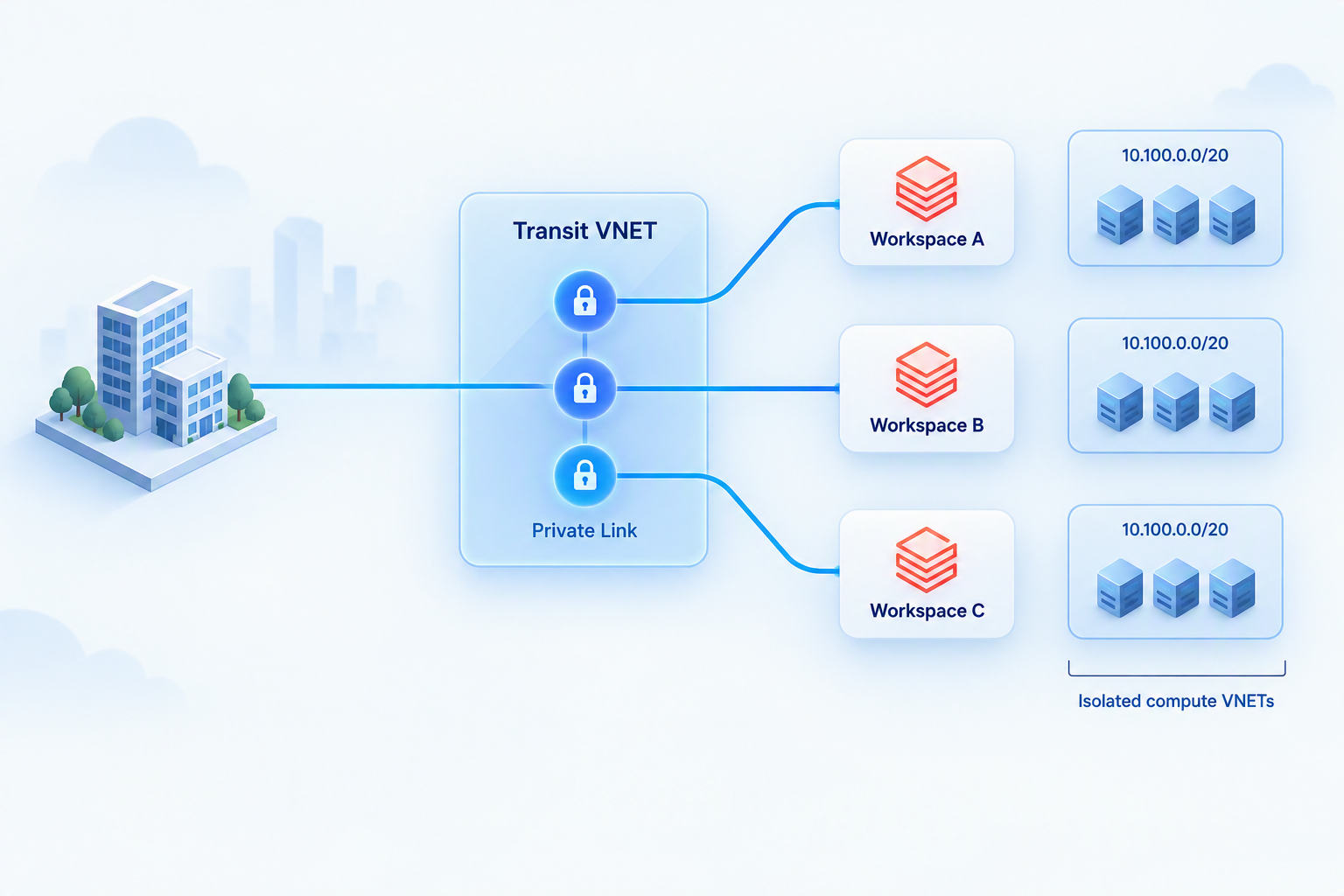
Figure 1. Enterprise routes terminate at uniquely addressed Transit VNet private endpoints for Databricks workspace services. The overlapping compute networks remain outside the enterprise routing domain.
The important part is what is not connected.
The three compute VNets are not:
- peered to the enterprise-connected Transit VNet,
- peered to the conventional enterprise hub,
- attached to the Azure Virtual WAN hub, or
- advertised into enterprise routing.
Therefore, the three instances of 10.100.0.0/20 never compete in the same enterprise routing table.
The address-space benefit is quite specific:
Enterprise routing consumes a unique ingress range rather than requiring three unique enterprise-visible compute ranges.
Each Databricks workspace still consumes its own subnet address space locally.
How the private service path works
Suppose a user wants to open Workspace B.
The flow is conceptually:
Client → enterprise connectivity → hub → Transit VNet → PE-B → Databricks workspace service
The user accesses the normal workspace hostname.
DNS resolves that hostname to the appropriate private endpoint address in the Transit VNet. Enterprise routing carries the traffic to that address, and Azure Private Link provides connectivity from the endpoint to the corresponding Databricks workspace service.
The association remains deterministic:
- PE-A → Workspace A
- PE-B → Workspace B
- PE-C → Workspace C
This is service-specific private connectivity.
It is not a routed entrance into Workspace A, B, or C's compute subnet.
Applications and users should also continue to use the standard Databricks workspace hostname, rather than configuring private endpoint IP addresses directly in browsers or API clients.
Don't forget browser authentication
There is another dependency that deserves special attention.
The databricks_ui_api endpoint provides workspace UI and REST API connectivity.
The browser_authentication endpoint has a different purpose: browser single sign-on callbacks.
It is not the authentication endpoint used for REST API requests.
Microsoft documents a browser-authentication endpoint per Azure region and private DNS zone that can be shared by workspaces in that region that use the same DNS configuration.
Microsoft also recommends using a separate production web-auth workspace that:
- has no compute workloads,
- does not have a databricks_ui_api private endpoint on that host, and
- is treated as a shared infrastructure dependency.
This dependency matters operationally because removing the workspace that hosts the browser-authentication endpoint can break browser authentication for dependent workspaces.
Design note: This example is intentionally region-local. It should not be interpreted as a single global browser-authentication endpoint design.
Other Databricks access scenarios may also use endpoints such as general_access or service_direct. Those scenarios should be evaluated separately against the current Azure Databricks documentation.
DNS is as important as routing
A route to PE-B does not help if the Workspace B hostname resolves somewhere else.
For hybrid clients, the DNS design should make the normal Databricks workspace hostname resolve to the private endpoint that the client can actually reach.
Microsoft's hybrid Private Endpoint DNS guidance recommends conditionally forwarding the relevant public service suffix to a reachable Azure DNS Private Resolver inbound endpoint.
For Azure Databricks, that means forwarding:
azuredatabricks.net
rather than designing the hybrid forwarding path around only:
privatelink.azuredatabricks.net
On-premises DNS should also not query Azure's 168.63.129.16 virtual IP directly.
The resolver VNet context should be linked to the central:
privatelink.azuredatabricks.net
private DNS zone.
Azure-provided DNS can then process the normal workspace hostname through the service DNS chain and private-zone lookup so that the client ultimately receives the appropriate Transit private endpoint address.
An outbound Private Resolver endpoint is not required solely for servicing these inbound queries.
DNS architecture
Figure 2. DNS resolution and HTTPS traffic are separate paths. DNS returns the reachable Transit private endpoint address; the private DNS zone itself is not part of the HTTPS routing path.
Private Endpoint DNS zone groups should be used to maintain the service mappings instead of manually guessing record names.
A subtle DNS trap with front-end and back-end Private Link
There is an important architectural trap when both front-end and back-end private endpoints exist.
Your enterprise clients need DNS to return the front-end Transit endpoint they can reach.
Compute environments using back-end connectivity may require a different DNS view that returns endpoints reachable from those networks.
If both endpoint types compete to update the same records in the same shared private DNS zone, name resolution may succeed while returning an endpoint that the client cannot reach.
That leads to a useful design principle:
DNS visibility should follow network reachability.
Keep the central front-end DNS view populated with the Transit endpoints.
Where isolated compute environments also require back-end private endpoints, design an appropriate reachable DNS view for those environments instead of peering overlapping VNets merely to solve DNS.
And remember: DNS is not an access-control mechanism. Hiding a DNS record does not replace network or identity controls.
Private access does not automatically mean private-only
This is one of the most important distinctions in the design.
Creating front-end private endpoints establishes a private access path.
It does not, by itself, guarantee that public workspace access has been disabled.
Microsoft distinguishes an inbound-only configuration from a complete private-isolation configuration.
Complete private isolation introduces additional requirements, including back-end Private Link connectivity and the corresponding workspace networking configuration.
Therefore:
Do not disable public network access on workload workspaces simply because the front-end Transit private endpoints are working.
First validate the required back-end/control-plane path, compute connectivity, data dependencies, and egress requirements against the complete-isolation guidance.
Otherwise, a successful browser test could hide a broken compute environment.
The dedicated browser-authentication workspace is also configured differently from workload workspaces. Its configuration should not be copied indiscriminately to the compute workspaces.
What this pattern solves
This design is useful when:
- multiple classic VNet-injected Databricks environments use overlapping compute address spaces,
- those compute networks can remain isolated,
- enterprise users need private UI access,
- applications need private REST API access, and
- the organization has a uniquely addressed enterprise-reachable Transit VNet.
It reduces the requirement for unique enterprise-visible compute prefixes.
It does not reduce the local address consumption of each Databricks workspace.
What this pattern does not solve
This design is not a general solution for overlapping networks.
It does not make the overlapping compute VNets mutually routable.
It also does not replace the design for:
- storage connectivity,
- data-service private endpoints,
- compute-to-control-plane connectivity,
- outbound/egress controls,
- direct cross-workspace compute communication, or
- serverless outbound networking.
If workloads in Workspace A must communicate directly with workloads in Workspace B, and both networks use 10.100.0.0/20, you have returned to an address-ambiguity problem.
That requirement needs a separate connectivity and addressing strategy.
Operational considerations
Before adopting this architecture, review the documented Azure Databricks Private Link prerequisites.
These include considerations around:
- Premium workspaces,
- VNet injection,
- Secure Cluster Connectivity / No Public IP,
- configuration permissions,
- regional placement requirements, and
- potential downtime when retrofitting existing workspaces.
Also consider the following operational areas.
Address capacity and cost
Plan enough space for private endpoints, subnet reservations, future endpoints, DNS infrastructure, and applicable platform limits.
Private Endpoint, DNS Private Resolver, ExpressRoute/VPN, and the selected hub architecture also have associated costs.
Reusing compute CIDRs does not mean the connectivity layer is free.
Network controls
When private endpoint network policies and NSG controls are applicable, validate the current documented service flows.
Azure Databricks documentation currently lists inbound TCP requirements including:
- 443
- 6666
- 3306
- 8443-8451
Use appropriately scoped rules based on the current service requirements rather than assuming that allowing only TCP 443 is sufficient.
Traffic inspection
A centralized private endpoint does not automatically imply centralized firewall inspection.
Verify:
- effective routes,
- the selected hub topology,
- firewall traversal where required, and
- the actual data path.
Validation checklist
Before declaring the design operational, validate it from each relevant network.
DNS
- [ ] Resolve every standard Databricks workspace hostname.
- [ ] Confirm that each hostname returns its expected Transit private endpoint IP.
- [ ] Validate browser-authentication DNS resolution.
- [ ] Confirm that isolated compute environments receive only endpoints they can reach.
Workspace connectivity
- [ ] Open each workspace using its standard hostname.
- [ ] Verify connectivity follows the intended private path.
- [ ] Complete browser sign-in.
- [ ] Test an authenticated REST API request to each workspace.
Security
- [ ] Verify unauthorized network sources are denied by the intended network controls.
- [ ] Verify unauthorized identities cannot access workspace resources.
- [ ] If complete private isolation is required, confirm public UI/API access is unavailable from outside the approved private path.
Compute
- [ ] Start representative classic compute.
- [ ] Validate control-plane connectivity independently.
- [ ] Validate storage and data-service access.
- [ ] Validate required outbound/egress connectivity.
These are proposed architectural validation checks, not reported results from a deployed test environment.
Key takeaway
Overlapping prefixes appear to be the central problem only if enterprise clients need to route directly into those prefixes.
For standard Azure Databricks workspace UI and REST API ingress, they do not.
Instead:
Give each workspace service a unique private endpoint in an enterprise-reachable Transit VNet, route enterprise clients to those endpoints, and keep the overlapping compute networks out of the shared routing domain.
Then make DNS return the endpoint the client can actually reach.
Finally, treat compute networking, back-end Private Link, data dependencies, egress, public exposure, and serverless networking as separate design decisions.
The goal is not to make overlapping networks routable.
The goal is to solve the service-access requirement without importing the overlapping routes in the first place.
References
- Azure Databricks Private Link concepts
- Configure front-end Private Link for Azure Databricks
- Azure Private Endpoint DNS integration
- Azure Private Link overview
- Azure Private Endpoint private DNS zone values
Architecture scope: This article presents an architectural pattern using illustrative single-region addressing. Microsoft documentation covers the individual Azure and Azure Databricks components referenced here. The composition for overlapping compute CIDRs described in this article is an architectural inference based on keeping the overlapping networks in separate routing domains; it should not be interpreted as a Microsoft-certified or independently validated reference architecture. No deployment or sandbox testing is claimed.

 Microsoft