Building an Interactive Learning Platform with Foundry Local
Introduction
Learning AI development can feel overwhelming. Developers face abstract concepts like embeddings, prompt engineering, and workflow orchestration topics that traditional tutorials struggle to make tangible. How do you teach someone what an embedding "feels like" or why prompt engineering matters beyond theoretical examples?
The answer lies in experiential learning through gamification. Instead of reading about AI concepts, what if developers could play a game that teaches these ideas through progressively challenging levels, immediate feedback, and real AI interactions? This article explores exactly that: building an educational adventure game that transforms AI learning from abstract theory into hands-on exploration.
We'll dive into Foundry Local Learning Adventure, a JavaScript-based game that teaches AI fundamentals through five interactive levels. You'll learn how to create engaging educational experiences, integrate local AI models using Foundry Local, design progressive difficulty curves, and build cross-platform applications that run both in browsers and terminals. Whether you're an educator designing technical curriculum or a developer building learning tools, this architecture provides a proven blueprint for gamified technical education.
Why Gamification Works for Technical Learning
Traditional technical education follows a predictable pattern: read documentation, watch tutorials, attempt exercises, struggle with setup, eventually give up. The problem isn't content quality, it's engagement and friction.
Gamification addresses both issues simultaneously. By framing learning as progression through levels, you create intrinsic motivation. Each completed challenge feels like unlocking a new ability in a game, triggering the same dopamine response that keeps players engaged in entertainment experiences. Progress is visible, achievements are celebrated, and setbacks feel like natural parts of the journey rather than personal failures.
More importantly, gamification reduces friction. Instead of "install dependencies, configure API keys, read documentation, write code, debug errors," learners simply start the game and begin playing. The game handles setup, provides guardrails, and offers immediate feedback. When a concept clicks, the game celebrates it. When learners struggle, hints appear automatically.
For AI development specifically, gamification solves a unique challenge: making probabilistic, non-deterministic systems feel approachable. Traditional programming has clear right and wrong answers, but AI outputs vary. A game can frame this variability as exploration rather than failure, teaching developers to evaluate AI responses critically while maintaining confidence.
Architecture Overview: Dual-Platform Design for Maximum Reach
The Foundry Local Learning Adventure implements a dual-platform architecture with separate but consistent implementations for web browsers and command-line terminals. This design maximizes accessibility, learners can start playing instantly in a browser, then graduate to CLI mode for the full terminal experience when they're ready to go deeper.
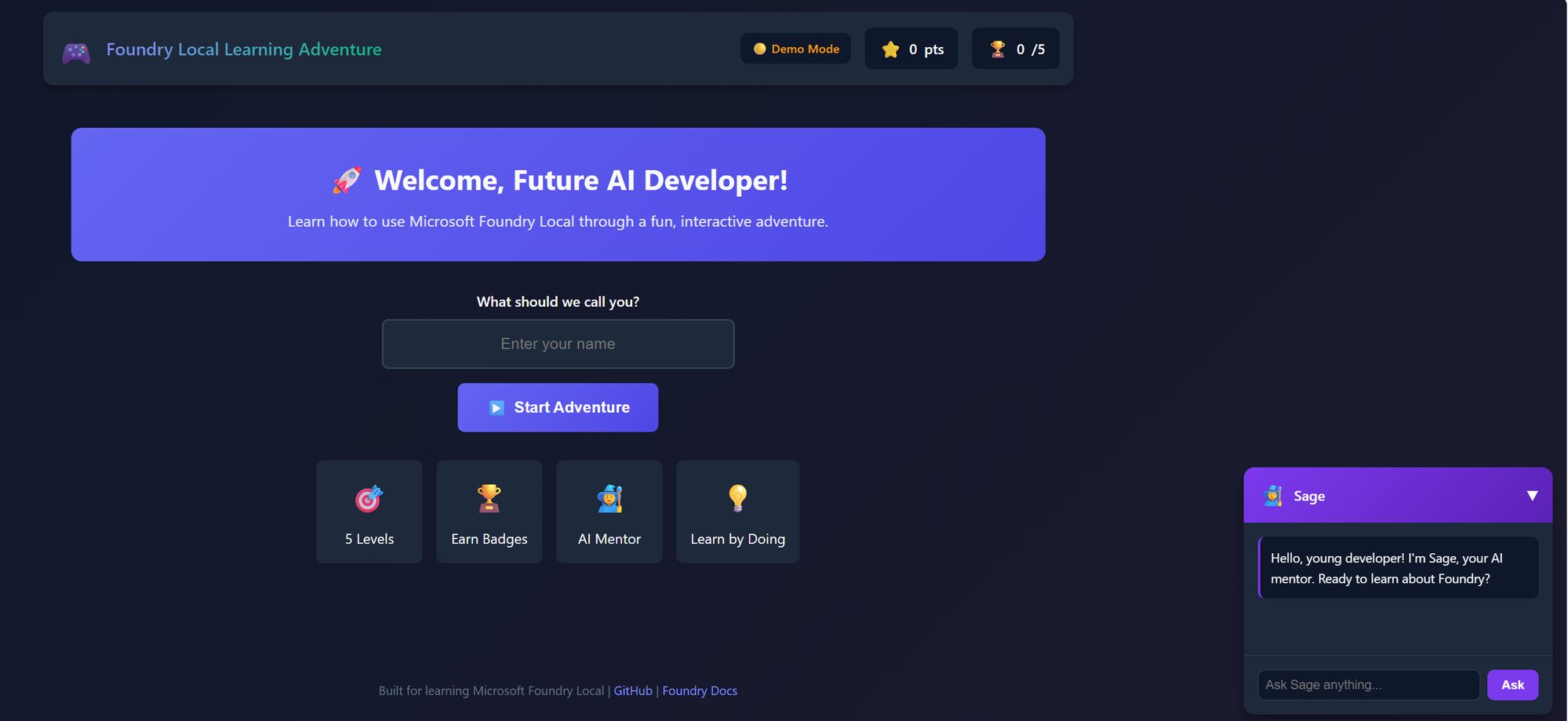
The web version prioritizes zero-friction onboarding. It's deployed to GitHub Pages and can also be opened locally via a simple HTTP server, no build step, no package managers. The game starts with simulated AI responses in demo mode, but crucially, it also supports real AI responses when Foundry Local is installed. The web version auto-discovers Foundry Local's dynamic port through a foundry-port.json file (written by the startup scripts) or by scanning common ports. Progress saves to localStorage, badges unlock as you complete challenges, and an AI-powered mentor named Sage guides you through a chat widget in the corner. This version is perfect for classrooms, conference demos, and learners who want to try before committing to a full CLI setup.
The CLI version provides the full terminal experience with real AI interactions. Built on Node.js with ES modules, this version features a custom FoundryLocalClient class that connects to Foundry Local's OpenAI-compatible REST API. Instead of relying on an external SDK, the game implements its own API client with automatic port discovery, model selection, and graceful fallback to demo mode. The terminal interface includes a rich command system (play, hint, ask, explain, progress, badges) and the Sage mentor provides contextual guidance throughout.
Both versions implement the same five levels and learning objectives independently. The CLI uses game/src/game.js, levels.js, and mentor.js as ES modules, while the web version uses game/web/game-web.js and game-data.js. A key innovation is the automatic port discovery system, which eliminates manual configuration:
// 3-tier port discovery strategy (game/src/game.js)
class FoundryLocalClient {
  constructor() {
    this.commonPorts = [61341, 5272, 51319, 5000, 8080];
    this.mode = 'demo'; // 'local', 'azure', or 'demo'
  }

  async initialize() {
    // Tier 1: CLI discovery - parse 'foundry service status' output
    const cliPort = await this.discoverPortViaCLI();
    if (cliPort) {
      this.baseUrl = cliPort;
      this.mode = 'local';
      return;
    }

    // Tier 2: Try configured URL from config.json
    if (await this.tryFoundryUrl(config.foundryLocal.baseUrl)) {
      this.mode = 'local';
      return;
    }

    // Tier 3: Scan common ports
    for (const port of this.commonPorts) {
      if (await this.tryFoundryUrl(`http://127.0.0.1:${port}`)) {
        this.mode = 'local';
        return;
      }
    }

    // Fallback: demo mode with simulated responses
    console.log('💡 Running in demo mode (no Foundry Local detected)');
    this.mode = 'demo';
  }

  async chat(messages, options = {}) {
    if (this.mode === 'demo') return this.getDemoResponse(messages);

    const response = await fetch(`${this.baseUrl}/v1/chat/completions`, {
      method: 'POST',
      headers: { 'Content-Type': 'application/json' },
      body: JSON.stringify({
        model: this.selectedModel,
        messages,
        temperature: options.temperature || 0.7,
        max_tokens: options.max_tokens || 300
      })
    });
    const data = await response.json();
    return data.choices[0].message.content;
  }
}
This architecture demonstrates several key principles for educational software:
- Progressive disclosure: Start simple (web demo mode), add complexity optionally (real AI via Foundry Local or Azure)
- Consistent learning outcomes: Both platforms teach the same five concepts through independently implemented but equivalent experiences
- Zero barriers to entry: No installation required for the web version eliminates the #1 reason learners abandon technical tutorials
- Automatic service discovery: The 3-tier port discovery strategy means no manual configuration, just install Foundry Local and play
- Graceful degradation: Three connection modes (local, Azure, demo) ensure the game always works regardless of setup
Level Design: Teaching AI Concepts Through Progressive Challenges
The game's five levels form a carefully designed curriculum that builds AI understanding incrementally. Each level introduces one core concept, provides hands-on practice, and validates learning before proceeding.
Level 1: Meet the Model teaches the fundamental request-response pattern. Learners send their first message to an AI and see it respond. The challenge is deliberately trivial, just say hello, because the goal is building confidence. The level succeeds when the learner realizes "I can talk to an AI and it understands me." This moment of agency sets the foundation for everything else.
The implementation focuses on positive reinforcement. In the CLI version, the Sage mentor celebrates each completion with contextual messages, while the web version displays inline celebration banners with badge animations:
// Level 1 execution (game/src/game.js)
async executeLevel1() {
  const level = this.levels.getLevel(1);
  this.displayLevelHeader(level);

  // Sage introduces the level
  const intro = await this.mentor.introduceLevel(1);
  console.log(`\n🧙 Sage: ${intro}`);

  const userPrompt = await this.askQuestion('\nYour prompt: ');

  console.log('\n🤖 AI is thinking...');
  const response = await this.client.chat([
    { role: 'system', content: 'You are Sage, a friendly AI mentor.' },
    { role: 'user', content: userPrompt }
  ]);

  console.log(`\n📨 AI Response:\n${response}`);

  if (response && response.length > 10) {
    // Sage celebrates
    const celebration = await this.mentor.celebrateLevelComplete(1);
    console.log(`\n🧙 Sage: ${celebration}`);
    console.log('\n🎯 You earned the Prompt Apprentice badge!');
    console.log('🏆 +100 points');
    this.progress.completeLevel(1, 100, '🎯 Prompt Apprentice');
  }
}
This celebration pattern repeats throughout, explicit acknowledgment of success via the Sage mentor, explanation of what was learned, and a preview of what's next. The mentor system (game/src/mentor.js) provides contextual encouragement using AI-generated or pre-written fallback messages, transforming abstract concepts into concrete achievements.
Level 2: Prompt Mastery introduces prompt quality through comparison. The game presents a deliberately poor prompt: "tell me stuff about coding." Learners must rewrite it to be specific, contextual, and actionable. The game runs both prompts, displays results side-by-side, and asks learners to evaluate the difference.
// Level 2: Prompt Improvement (game/src/game.js)
async executeLevel2() {
  const level = this.levels.getLevel(2);
  this.displayLevelHeader(level);

  const intro = await this.mentor.introduceLevel(2);
  console.log(`\n🧙 Sage: ${intro}`);

  // Show the bad prompt
  const badPrompt = "tell me stuff about coding";
  console.log(`\n❌ Poor prompt: "${badPrompt}"`);
  console.log('\n🤖 Getting response to bad prompt...');
  const badResponse = await this.client.chat([
    { role: 'user', content: badPrompt }
  ]);
  console.log(`\n📊 Bad prompt result:\n${badResponse}`);

  // Get the learner's improved version
  console.log('\n✍️  Now write a BETTER prompt about the same topic:');
  const goodPrompt = await this.askQuestion('Your improved prompt: ');

  console.log('\n🤖 Getting response to your prompt...');
  const goodResponse = await this.client.chat([
    { role: 'user', content: goodPrompt }
  ]);
  console.log(`\n📊 Your prompt result:\n${goodResponse}`);

  // Evaluate: improved prompt should be longer and more specific
  const isImproved = goodPrompt.length > badPrompt.length
    && goodResponse.length > 0;

  if (isImproved) {
    const celebration = await this.mentor.celebrateLevelComplete(2);
    console.log(`\n🧙 Sage: ${celebration}`);
    console.log('\n✨ You earned the Prompt Engineer badge!');
    console.log('🏆 +150 points');
    this.progress.completeLevel(2, 150, '✨ Prompt Engineer');
  } else {
    const hint = await this.mentor.provideHint(2);
    console.log(`\n💡 Sage: ${hint}`);
  }
}
This comparative approach is powerful, learners don't just read about prompt engineering, they experience its impact directly. The before/after comparison makes quality differences undeniable.
Level 3: Embeddings Explorer demystifies semantic search through practical demonstration. Learners search a knowledge base about Foundry Local using natural language queries. The game shows how embedding similarity works by returning relevant content even when exact keywords don't match.
// Level 3: Embedding Search (game/src/game.js)
async executeLevel3() {
  const level = this.levels.getLevel(3);
  this.displayLevelHeader(level);

  // Knowledge base loaded from game/data/knowledge-base.json
  const knowledgeBase = [
    { id: 1, content: "Foundry Local runs AI models entirely on your device" },
    { id: 2, content: "Embeddings convert text into numerical vectors" },
    { id: 3, content: "Cosine similarity measures how related two texts are" },
    // ... more entries about AI and Foundry Local
  ];

  const query = await this.askQuestion('\n🔍 Search query: ');

  // Get embedding for user's query
  const queryEmbedding = await this.client.getEmbedding(query);

  // Get embeddings for all knowledge base entries
  const results = [];
  for (const item of knowledgeBase) {
    const itemEmbedding = await this.client.getEmbedding(item.content);
    const similarity = this.cosineSimilarity(queryEmbedding, itemEmbedding);
    results.push({ ...item, similarity });
  }

  // Sort by similarity and show top matches
  results.sort((a, b) => b.similarity - a.similarity);
  console.log('\n📑 Top matches:');
  results.slice(0, 3).forEach((r, i) => {
    console.log(`  ${i + 1}. (${(r.similarity * 100).toFixed(1)}%) ${r.content}`);
  });
}

// Cosine similarity calculation (also in TaskHandler)
cosineSimilarity(a, b) {
  const dot = a.reduce((sum, val, i) => sum + val * b[i], 0);
  const magA = Math.sqrt(a.reduce((sum, val) => sum + val * val, 0));
  const magB = Math.sqrt(b.reduce((sum, val) => sum + val * val, 0));
  return dot / (magA * magB);
}

// Demo mode generates pseudo-embeddings when Foundry isn't available
getPseudoEmbedding(text) {
  // 128-dimension hash-based vector for offline demonstration
  const embedding = new Array(128).fill(0);
  for (let i = 0; i < text.length; i++) {
    embedding[i % 128] += text.charCodeAt(i) / 1000;
  }
  return embedding;
}
Learners query things like "How do I run AI offline?" and discover content about Foundry Local's offline capabilities—even though the word "offline" appears nowhere in the result. When Foundry Local is running, the game calls the /v1/embeddings endpoint for real vector representations. In demo mode, a pseudo-embedding function generates 128-dimension hash-based vectors that still demonstrate the concept of similarity search. This concrete demonstration of semantic understanding beats any theoretical explanation.
Level 4: Workflow Wizard teaches AI pipeline composition. Learners build a three-step workflow: summarize text → extract keywords → generate questions. Each step uses the previous output as input, demonstrating how complex AI tasks decompose into chains of simpler operations.
// Level 4: Workflow Builder (game/src/game.js)
async executeLevel4() {
  const level = this.levels.getLevel(4);
  this.displayLevelHeader(level);

  const intro = await this.mentor.introduceLevel(4);
  console.log(`\n🧙 Sage: ${intro}`);

  console.log('\n📝 Enter text for the 3-step AI pipeline:');
  const inputText = await this.askQuestion('Input text: ');

  // Step 1: Summarize
  console.log('\n⚙️  Step 1: Summarizing...');
  const summary = await this.client.chat([
    { role: 'system', content: 'Summarize this in 2 sentences.' },
    { role: 'user', content: inputText }
  ]);
  console.log(`   Result: ${summary}`);

  // Step 2: Extract keywords (chained from Step 1 output)
  console.log('\n🔑 Step 2: Extracting keywords...');
  const keywords = await this.client.chat([
    { role: 'system', content: 'Extract 5 important keywords.' },
    { role: 'user', content: summary }
  ]);
  console.log(`   Keywords: ${keywords}`);

  // Step 3: Generate questions (chained from Step 2 output)
  console.log('\n❓ Step 3: Generating study questions...');
  const questions = await this.client.chat([
    { role: 'system', content: 'Create 3 quiz questions about these topics.' },
    { role: 'user', content: keywords }
  ]);
  console.log(`   Questions:\n${questions}`);

  console.log('\n✅ Workflow complete!');
  const celebration = await this.mentor.celebrateLevelComplete(4);
  console.log(`\n🧙 Sage: ${celebration}`);
  console.log('\n⚡ You earned the Workflow Wizard badge!');
  console.log('🏆 +250 points');
  this.progress.completeLevel(4, 250, '⚡ Workflow Wizard');
}
This level bridges the gap between "toy examples" and real applications. Learners see firsthand how combining simple AI operations creates sophisticated functionality.
Level 5: Build Your Own Tool challenges learners to create a custom AI-powered tool by selecting from pre-built templates and configuring them. Rather than asking learners to write arbitrary code, the game provides four structured templates that demonstrate how AI tools work in practice:
// Level 5: Tool Builder templates (game/web/game-web.js)
const TOOL_TEMPLATES = [
  {
    id: 'summarizer',
    name: '📝 Text Summarizer',
    description: 'Summarizes long text into key points',
    systemPrompt: 'You are a text summarization tool. Provide concise summaries.',
    exampleInput: 'Paste any long article or document...'
  },
  {
    id: 'translator',
    name: '🌐 Code Translator',
    description: 'Translates code between programming languages',
    systemPrompt: 'You are a code translation tool. Convert code accurately.',
    exampleInput: 'function hello() { console.log("Hello!"); }'
  },
  {
    id: 'reviewer',
    name: '🔍 Code Reviewer',
    description: 'Reviews code for bugs, style, and improvements',
    systemPrompt: 'You are a code review tool. Identify issues and suggest fixes.',
    exampleInput: 'Paste code to review...'
  },
  {
    id: 'custom',
    name: '✨ Custom Tool',
    description: 'Design your own AI tool with a custom system prompt',
    systemPrompt: '', // Learner provides this
    exampleInput: ''
  }
];

// Tool testing sends the configured system prompt + user input to Foundry Local
async function testTool(template, userInput) {
  const response = await callFoundryAPI([
    { role: 'system', content: template.systemPrompt },
    { role: 'user', content: userInput }
  ]);
  console.log(`🔧 Tool output: ${response}`);
  return response;
}
This template-based approach is safer and more educational than arbitrary code execution. Learners select a template, customize its system prompt, test it with sample input, and see how the AI responds differently based on the tool's configuration. The "Custom Tool" option lets advanced learners design their own system prompts from scratch. Completing this level marks true understanding—learners aren't just using AI, they're shaping what it can do through prompt design and tool composition.
Building the Web Version: Zero-Install Educational Experience
The web version demonstrates how to create educational software that requires absolutely zero setup. This is critical for workshops, classroom settings, and casual learners who won't commit to installation until they see value.
The architecture is deliberately simple, vanilla JavaScript with ES6 modules, no build tools, no package managers. The HTML includes a multi-screen layout with a welcome screen, level selection grid, game area, and modals for progress, badges, help, and game completion:
<!-- game/web/index.html -->
<!DOCTYPE html>
<html lang="en">
<head>
  <meta charset="UTF-8">
  <meta name="viewport" content="width=device-width, initial-scale=1.0">
  <title>Foundry Local Learning Adventure</title>
  <link rel="stylesheet" href="styles.css">
</head>
<body>
  <!-- Welcome Screen with name input -->
  <div id="welcome-screen" class="screen active">
    <h1>🎮 Foundry Local Learning Adventure</h1>
    <p>Master Microsoft Foundry AI - One Level at a Time!</p>
    <input type="text" id="player-name" placeholder="Enter your name">
    <button id="start-btn">Start Adventure</button>
    <div id="foundry-status"><!-- Auto-detected connection status --></div>
  </div>

  <!-- Menu Screen with level grid -->
  <div id="menu-screen" class="screen">
    <div class="level-grid">
      <!-- 5 level cards with lock/unlock states -->
    </div>
    <div class="stats-bar">
      <span id="points-display">0 points</span>
      <span id="badges-count">0/5 badges</span>
    </div>
  </div>

  <!-- Level Screen with task area -->
  <div id="level-screen" class="screen">
    <div id="level-header"></div>
    <div id="task-area"><!-- Level-specific UI loads here --></div>
    <div id="response-area"></div>
    <div id="hint-area"></div>
  </div>

  <!-- Sage Mentor Chat Widget (fixed bottom-right) -->
  <div id="mentor-chat" class="mentor-widget">
    <div class="mentor-header">🧙 Sage (AI Mentor)</div>
    <div id="mentor-messages"></div>
    <input type="text" id="mentor-input" placeholder="Ask Sage anything...">
  </div>

  <script type="module" src="game-data.js"></script>
  <script type="module" src="game-web.js"></script>
</body>
</html>
A critical feature of the web version is its ability to connect to a real Foundry Local instance. On startup, the game checks for a foundry-port.json file (written by the cross-platform start scripts) and falls back to scanning common ports:
// game/web/game-web.js - Foundry Local auto-discovery
let foundryConnection = { connected: false, baseUrl: null };

async function checkFoundryConnection() {
  // Try reading port from discovery file (written by start scripts)
  const discoveredPort = await readDiscoveredPort();
  if (discoveredPort) {
    try {
      const resp = await fetch(`${discoveredPort}/v1/models`);
      if (resp.ok) {
        foundryConnection = { connected: true, baseUrl: discoveredPort };
        updateStatusBadge('🟢 Foundry Local Connected');
        return;
      }
    } catch (e) { /* continue to port scan */ }
  }

  // Scan common Foundry Local ports
  const ports = [61341, 5272, 51319, 5000, 8080];
  for (const port of ports) {
    try {
      const resp = await fetch(`http://127.0.0.1:${port}/v1/models`);
      if (resp.ok) {
        foundryConnection = { connected: true, baseUrl: `http://127.0.0.1:${port}` };
        updateStatusBadge('🟢 Foundry Local Connected');
        return;
      }
    } catch (e) { continue; }
  }

  // Demo mode - use simulated responses from DEMO_RESPONSES
  updateStatusBadge('🟡 Demo Mode (install Foundry Local for real AI)');
}

async function callFoundryAPI(messages) {
  if (!foundryConnection.connected) {
    return getDemoResponse(messages); // Simulated responses
  }
  const resp = await fetch(`${foundryConnection.baseUrl}/v1/chat/completions`, {
    method: 'POST',
    headers: { 'Content-Type': 'application/json' },
    body: JSON.stringify({ model: 'auto', messages, temperature: 0.7 })
  });
  const data = await resp.json();
  return data.choices[0].message.content;
}
The web version also includes level-specific UIs: each level type has its own builder function that constructs the appropriate interface. For example, Level 2 (Prompt Improvement) shows a split-view with the bad prompt result on one side and the learner's improved prompt on the other. Level 3 (Embeddings) presents a search interface with similarity scores. Level 5 (Tool Builder) offers a template selector with four options (Text Summarizer, Code Translator, Code Reviewer, and Custom).
This architecture teaches several patterns for web-based educational tools:
- LocalStorage for persistence: Progress survives page refreshes without requiring accounts or databases
- ES6 modules for organization: Clean separation between game data (
game-data.js) and engine (game-web.js) - Hybrid AI mode: Real AI when Foundry Local is available, simulated responses when it's not—same code path for both
- Multi-screen navigation: Welcome, menu, level, and completion screens provide clear progression
- Always-available mentor: The Sage chat widget in the corner lets learners ask questions at any point
Implementing the CLI Version with Real AI Integration
The CLI version provides the authentic AI development experience. This version requires Node.js and Foundry Local, but rewards setup effort with genuine model interactions.
Installation uses a startup script that handles prerequisites:
#!/bin/bash
# scripts/start-game.sh

echo "🎮 Starting Foundry Local Learning Adventure..."

# Check Node.js
if ! command -v node &> /dev/null; then
  echo "❌ Node.js not found. Install from https://nodejs.org/"
  exit 1
fi

# Check Foundry Local
if ! command -v foundry &> /dev/null; then
  echo "❌ Foundry Local not found."
  echo "   Install: winget install Microsoft.FoundryLocal"
  exit 1
fi

# Start Foundry service
echo "🚀 Starting Foundry Local service..."
foundry service start

# Wait for service
sleep 2

# Load model
echo "📦 Loading Phi-4 model..."
foundry model load phi-4

# Install dependencies
echo "📥 Installing game dependencies..."
npm install

# Start game
echo "✅ Launching game..."
npm start
The game logic integrates with Foundry Local using the official SDK:
// game/src/game.js
import { FoundryLocalClient } from 'foundry-local-sdk';
import readline from 'readline/promises';

const client = new FoundryLocalClient({
  endpoint: 'http://127.0.0.1:5272' // Default Foundry Local port
});

async function getAIResponse(prompt, level) {
  try {
    const startTime = Date.now();

    const completion = await client.chat.completions.create({
      model: 'phi-4',
      messages: [
        {
          role: 'system',
          content: `You are Sage, a friendly AI mentor teaching ${LEVELS[level-1].title}.`
        },
        {
          role: 'user',
          content: prompt
        }
      ],
      temperature: 0.7,
      max_tokens: 300
    });

    const latency = Date.now() - startTime;

    console.log(`\n⏱️  AI responded in ${latency}ms`);
    return completion.choices[0].message.content;

  } catch (error) {
    console.error('❌ AI error:', error.message);
    console.log('💡 Falling back to demo mode...');
    return getDemoResponse(prompt, level);
  }
}

async function playLevel(levelNumber) {
  const level = LEVELS[levelNumber - 1];

  console.clear();
  console.log(`\n${'='.repeat(60)}`);
  console.log(`   Level ${levelNumber}: ${level.title}`);
  console.log(`${'='.repeat(60)}\n`);
  console.log(`🎯 ${level.objective}\n`);
  console.log(`📚 ${level.description}\n`);

  const rl = readline.createInterface({
    input: process.stdin,
    output: process.stdout
  });

  const userPrompt = await rl.question('Your prompt: ');
  rl.close();

  console.log('\n🤖 AI is thinking...');
  const response = await getAIResponse(userPrompt, levelNumber);

  console.log(`\n📨 AI Response:\n${response}\n`);

  // Evaluate success
  if (level.successCriteria(response, userPrompt)) {
    celebrateSuccess(level);
    updateProgress(levelNumber);

    if (levelNumber < 5) {
      const playNext = await askYesNo('Play next level?');
      if (playNext) {
        await playLevel(levelNumber + 1);
      }
    } else {
      showGameComplete();
    }
  } else {
    console.log(`\n💡 Hint: ${level.hints[0]}\n`);
    const retry = await askYesNo('Try again?');
    if (retry) {
      await playLevel(levelNumber);
    }
  }
}
The CLI version adds several enhancements that deepen learning:
- Latency visibility: Display response times so learners understand local vs cloud performance differences
- Graceful fallback: If Foundry Local fails, switch to demo mode automatically rather than crashing
- Interactive prompts: Use readline for natural command-line interaction patterns
- Progress persistence: Save to JSON files so learners can pause and resume
- Command history: Log all prompts and responses for learners to review their progression
Key Takeaways and Educational Design Principles
Building effective educational software for technical audiences requires balancing several competing concerns: accessibility vs authenticity, simplicity vs depth, guidance vs exploration. The Foundry Local Learning Adventure succeeds by making deliberate architectural choices that prioritize learner experience.
Key principles demonstrated:
- Zero-friction starts win: The web version eliminates all setup barriers, maximizing the chance learners will actually begin
- Automatic service discovery: The 3-tier port discovery strategy means no manual configuration, just install Foundry Local and play
- Progressive challenge curves build confidence: Each level introduces exactly one new concept, building on previous knowledge
- Immediate feedback accelerates learning: Learners know instantly if they succeeded, with Sage providing contextual explanations
- Real tools create transferable skills: The CLI version uses professional developer patterns (OpenAI-compatible REST APIs, ES modules, readline) that apply beyond the game
- Celebration creates emotional investment: Badges, points, and Sage's encouragement transform learning into achievement
- Dual platforms expand reach: Web attracts casual learners, CLI converts them to serious practitioners—and both support real AI
- Graceful degradation ensures reliability: Three connection modes (local, Azure, demo) mean the game always works regardless of setup
To extend this approach for your own educational projects, consider:
- Domain-specific challenges: Adapt level structure to your technical domain (e.g., API design, database optimization, security practices)
- Multiplayer competitions: Add leaderboards and time trials to introduce social motivation
- Adaptive difficulty: Track learner performance and adjust challenge difficulty dynamically
- Sandbox modes: After completing the curriculum, provide free-play areas for experimentation
- Community sharing: Let learners share custom levels or challenges they've created
The complete implementation with all levels, both web and CLI versions, comprehensive tests, and deployment guides is available at github.com/leestott/FoundryLocal-LearningAdventure. You can play the web version immediately at leestott.github.io/FoundryLocal-LearningAdventure or clone the repository to experience the full CLI version with real AI.
Resources and Further Reading
- Foundry Local Learning Adventure Repository - Complete source code for both web and CLI versions
- Play Online Now - Try the web version instantly in your browser (supports real AI with Foundry Local installed)
- Microsoft Foundry Local Documentation - Official SDK and CLI reference
- Contributing Guide - How to contribute new levels or improvements

 Microsoft