Join the Microsoft Foundry Round Table Discussion
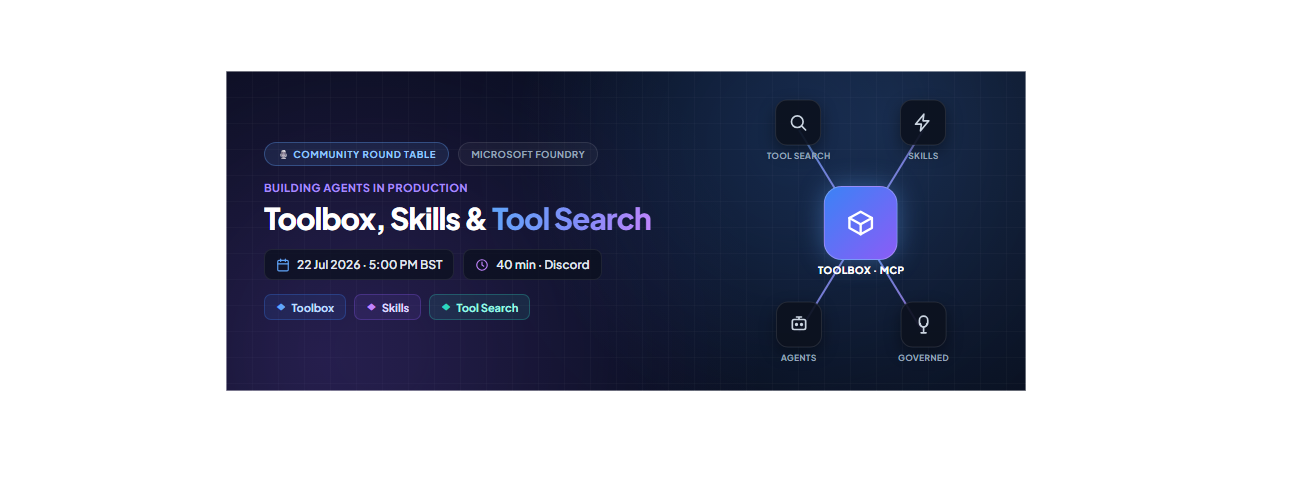
If you are shipping AI agents beyond a demo, you have felt the pain: every agent needs the same tools, each with its own authentication, and the tool list keeps growing until your prompt is bloated and the model picks the wrong one. On 22 July 2026 at 5:00 PM BST, the Microsoft Foundry community is running a 40-minute Discord round table to talk about exactly this, and to gather your feedback on three capabilities built to fix it: Toolbox, Skills, and Tool Search.
This is a discussion, not a slideshow. Bring your real projects, including tool sprawl, duplicated skills, and authentication headaches, and help shape where these features go next. Join us in the Microsoft Foundry Discord community.
Event at a glance
- What: Microsoft Foundry Discord Community Round Table: Building Agents in Production with Foundry Toolbox, Skills, and Tool Search
- When: 22 July 2026, 5:00 PM BST (40 minutes)
- Where: https://aka.ms/foundry/discord Event Link
- Format: Interactive discussion with voice and chat, live polls, and a short prioritisation exercise
- Who it's for: AI engineers and developers building and scaling agents in production
Opening question we'll start with: "As your agents grow, how do you decide which tools to give them, and how do they pick the right one at runtime?"
The problem: agents don't scale by hard-wiring every tool
When several agents, or a mix of Foundry hosted agents, Microsoft Agent Framework, LangGraph, and Copilot SDK apps, need the same governed set of tools, you do not want to re-wire those tools and their authentication into every one. Two things break as you grow:
- Integration sprawl: the same tool gets wired, authenticated, and versioned separately in every agent.
- Tool overload: sending every tool definition to the model on every turn is slow, expensive, and hurts selection accuracy.
The pattern that scales: package the tools once behind a single versioned, governed MCP endpoint, make them discoverable, and let every runtime consume them from the same URL. That is what Toolbox, Skills, and Tool Search deliver together.
The three concepts we'll discuss
Toolbox: build once, govern centrally, consume anywhere
A Toolbox is a reusable, centrally managed bundle of tools exposed through a single MCP-compatible endpoint. Because it is a managed resource, you can add, remove, or reconfigure tools without changing agent code because every agent connects to the same endpoint. Immutable versioning gives you safe, atomic rollouts: build and test a new version on its pinned URL, then promote it to default, and every consumer picks it up with no redeployment.
Skills: reusable, composable capabilities
A Skill is a reusable, published set of behavioural instructions (a SKILL.md file following the open Agent Skills spec) that is registered once and reused across toolboxes and agents, for example, "summarize document" or "create calendar event". In a toolbox, a skill is not a callable tool: it surfaces as an MCP Resource on the same endpoint, so clients discover and read it with plain resources/list and resources/read, with no Foundry SDK required.
Tool Search: runtime discovery instead of hard-wiring
A real toolbox can hold dozens or hundreds of tools. Tool Search keeps that cheap for the model through progressive disclosure: instead of listing every tool, Foundry shows the model just two meta-tools, tool_search and call_tool, plus any pinned tools. The model searches for a capability by intent, Foundry ranks the toolbox's tools by match on name and description, and returns only the hits. The prompt stays small no matter how many tools the toolbox holds.
How they fit together: Skills and tools live in a Toolbox; Tool Search lets agents scale to many tools without prompt bloat or manual wiring. You manage all of it from the Foundry portal or the Foundry Toolkit extension in VS Code.
The scenario we'll walk through
A user asks an agent to "summarize this email and schedule a follow-up." The agent uses Tool Search to find the right tools ("email summarization" and "calendar scheduling") from a shared Toolbox, chains them, and returns a result with no per-agent integration and no hard-coded tool list.
Discussion prompt: "At what point does the number of tools in your agent start to hurt, and would Tool Search help?"
A peek at the code (so you arrive ready)
The full, runnable walkthrough lives in the Mastering Foundry Toolbox notebook in the microsoft-foundry/forgebook repo. The core spine is short. First, build a versioned toolbox from typed tool objects plus an optional list of skills:
# Build an immutable toolbox version from typed tools + skills
version = project.toolboxes.create_version(
    name=TOOLBOX_NAME,
    description="Search, code, knowledge, and connection-backed tools.",
    tools=tools,              # e.g. WebSearchToolboxTool(...), AzureAISearchToolboxTool(...)
    skills=skills or None,    # ToolboxSkillReference(name=..., version=...) - SEPARATE from tools
)
print(f"Created {TOOLBOX_NAME} version {version.version}")

Then turn the same tools into a search-first toolbox by adding the Tool Search meta-tool and pinning only your one or two hottest tools:

from azure.ai.projects.models import ToolboxSearchPreviewToolboxTool, ToolConfig

# Pin the hottest tool so it's always exposed; everything else is search-gated.
tool_configs = {"web_search": ToolConfig(pin=True)}

search_version = project.toolboxes.create_version(
    name=TOOLBOX_NAME,
    tools=tools + [ToolboxSearchPreviewToolboxTool(tool_configs=tool_configs)],
    skills=skills or None,
)
Every consumer talks to the same MCP endpoint: one URL, any framework:

# The default (promoted) version is served from one stable consumer URL
def consumer_mcp_url(name):
    return f"{PROJECT_ENDPOINT.rstrip('/')}/toolboxes/{name}/mcp?api-version=v1"

# Microsoft Agent Framework speaks MCP natively - just point it at the URL.
# LangGraph (AzureAIProjectToolbox) and the GitHub Copilot SDK consume the same endpoint.
How Toolbox simplifies the auth and identity flow
This is one of the most important things to understand before you scale agents, and it is a great topic to bring questions on. A toolbox tool reaches a downstream system through a project connection, and the connection's authentication type decides whose identity is used. Get this right once and every consumer inherits correct, least-privilege access automatically, without writing OAuth or token-exchange plumbing in your agent code.
Running a toolbox behind a hosted agent puts two identities in play, and the platform wires them together for you:
- Agent -> Toolbox (the trust boundary). The hosted agent authenticates to the toolbox MCP endpoint with its own agent identity, which holds the Foundry user role on the project. If the agent doesn't have access, the toolbox rejects the agent. This gates access to the toolbox itself, independent of any single tool.
- Toolbox -> Tool (the end-user passthrough). For oauth2 authentication, the agent forwards the caller's end-user Entra token, and the toolbox uses that token (on-behalf-of) to reach the downstream tool. The tool then acts on behalf of the real end user, providing per-user, least-privilege access with correct downstream audit.
For non-passthrough authentication types (none, custom-keys, project-managed-identity, and agentic-identity), the toolbox authenticates using the connection's configured identity, and the agent never sees the secret. That is the "better-together" story: a stable, governable managed identity to the toolbox, plus true end-user identity on the downstream data call.
What we'll cover in the 40 minutes
https://discord.gg/Z8JZsrP5P5?event=1527379174061379584
- Welcome & framing (0:00-0:08): what Toolbox, Skills, and Tool Search are, and how they fit together.
- Scenario walkthrough (0:08-0:13): the "summarize email, schedule follow-up" flow, end to end.
- Use cases & opportunities (0:13-0:22): which capabilities you would package as reusable Skills, how many tools your agents carry, and where Tool Search would help.
- Trust, security & governance (0:22-0:31): what you are comfortable exposing through a shared endpoint, how to scope which tools an agent may discover, authentication models, and the observability you need.
- Developer experience feedback (0:31-0:36): your biggest adoption blockers, missing docs, and the SDK samples and end-to-end demos you would prioritise.
- Prioritisation & next steps (0:36-0:40): vote live on the top use cases, challenges, and feature requests.
Come prepared to talk about
- What tools and skills your agents use today, and how they're wired up.
- Which capabilities you'd turn into reusable, composable Skills shared across agents.
- How many tools your agents carry, and whether you hit prompt-size or tool-selection accuracy issues.
- Which tools you'd expose through a shared endpoint, and which need tighter scoping.
- How you want to control what an agent is allowed to discover and invoke with Tool Search.
- The examples, samples, and tutorials that would help you get started fastest.
Responsible and secure by design
Because these features let agents discover and invoke tools dynamically, governance is a first-class part of the conversation. Foundry toolboxes are governed by default: you can screen every tool's inputs and outputs with an RAI guardrail, front your MCP servers with a bring-your-own AI gateway (APIM), scope which tools are discoverable, and use least-privilege identity passthrough so downstream calls carry the real user's permissions and audit trail. Bring your enterprise safeguard requirements because they directly shape the roadmap.
Note: Toolbox, Tool Search, and Skills are in preview; APIs and headers may change.
Key takeaways
- Toolbox packages tools once behind a single governed, versioned MCP endpoint, so you can build once and consume from any framework.
- Skills are reusable, composable capabilities you register once and chain across agents.
- Tool Search uses two meta-tools and progressive disclosure so agents scale to hundreds of tools without prompt bloat.
- Auth is simplified: the agent's managed identity gates the toolbox, while end-user token passthrough gives correct, least-privilege downstream access with no OAuth plumbing in your code.
- Your feedback shapes the product because this round table feeds directly into the engineering and product teams.
Save your spot
- Add it to your calendar: 22 July 2026, 5:00 PM BST.
- Join the community: https://aka.ms/foundry/discord
- Prep with the sample: run the Mastering Foundry Toolbox notebook to build, search, and consume a toolbox end to end.
- Read the docs: Toolbox, Tool Search, and Skills.
Agents get more capable as they gain access to more tools and skills, but only if you can build, govern, and scale those capabilities without drowning in integration and prompt bloat. Come and share how you are doing it today, and help shape how Foundry does it next. See you on 22 July.

 Microsoft