zero trust security
3 TopicsMicrosoft Entra Suite hands-on tour of identity and network access protections
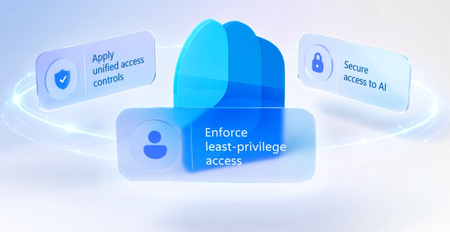
Enforce least privilege access across every app and resource. Wire lifecycle workflows directly to your HR system to strip stale permissions on role changes, gate sensitive data behind biometric step-up verification, and replace your VPN with per-app, identity-scoped access that revokes tokens the moment risk spikes. Secure AI usage at every layer. Block confidential data from reaching public AI tools and stop adversarial prompt injections before your agents process them. John Damon, Microsoft Entra Suite Senior Product Manager, shares how to lock down identity, network access, and AI usage from a single control plane. Zero stale permissions after a role change. Entra Suite lifecycle workflows auto-assign the right access package and remove old entitlements. Check it out. Cut legacy VPN. Global Secure Access in Entra Suite scopes access per app, ties it to identity, and exposes no inbound ports or public IPs. See how it works. Expose adversarial instructions hidden in plain text. Prompt Injection Protection in Entra Suite matches the injection class and blocks the prompt before the model processes it. Check it out. QUICK LINKS: 00:00 — Identity and network controls 00:45 — Lifecycle Workflows 01:28 — Verified ID with Face Check 02:15 — Request access for direct reports 03:17 — Global Secure Access + Token Revocation 04:32 — Secure AI usage 06:20 — Network DLP / ChatGPT Block 07:12 — Prompt Injection Protection 08:31 — Wrap up Link References Check out our related deep dives at https://aka.ms/EntraSuitePlaylist For more information, go to https://aka.ms/EntraSuite Unfamiliar with Microsoft Mechanics? As Microsoft’s official video series for IT, you can watch and share valuable content and demos of current and upcoming tech from the people who build it at Microsoft. Subscribe to our YouTube: https://www.youtube.com/c/MicrosoftMechanicsSeries Talk with other IT Pros, join us on the Microsoft Tech Community: https://techcommunity.microsoft.com/t5/microsoft-mechanics-blog/bg-p/MicrosoftMechanicsBlog Watch or listen from anywhere, subscribe to our podcast: https://microsoftmechanics.libsyn.com/podcast Keep getting this insider knowledge, join us on social: Follow us on Twitter: https://twitter.com/MSFTMechanics Share knowledge on LinkedIn: https://www.linkedin.com/company/microsoft-mechanics/ Enjoy us on Instagram: https://www.instagram.com/msftmechanics/ Loosen up with us on TikTok: https://www.tiktok.com/@msftmechanics Video Transcript: -With AI, where action happens at machine speed and where access can be granted and inherited instantly, identity and network access has never been more important. Securing AI starts with securing people, and for that, your identity and network controls need to come together to close gaps that attackers can exploit, and that’s where Microsoft Entra Suite comes in. It combines best-in-class capabilities into a single solution to help you enforce least-privilege access to make sure users have access to what they need, and only as long as necessary. Apply unified access controls to any app and resource, and secure access to AI by discovering AI apps and agents, assessing risk, and enforcing policy. -Let’s bring this to life by following a user, Violet Martinez, throughout her day, I’ll start by showing how she gets access to exactly what she needs, with least-privilege access. In this scenario, our user has changed job roles. Her role change was signaled overnight by an HR system, Workday, and her permissions need to be adjusted for her new position in the IoT department. This is where a lifecycle workflow we set up in advance in Entra Suite comes into play. We’ve created a “Mover” workflow that automatically adjusts access when a user role changes, and I can click to see how it’s defined. Importantly, stale entitlements from her previous role are automatically removed, and a new access package bundling the right apps and permissions for her new IoT product marketing role is automatically assigned. -Now let’s switch to showing you our user Violet’s experience. When she signs in with a passkey for her new role, every app and permission from the baseline package is already set up, and she can request access to specific resources that she might be missing using the My Access page at myaccess.microsoft.com. For example, in order to start her work in competitive analysis, she needs access to Zava’s on-prem IoT Pricing Dashboard. So she makes the request. Because the package grants access to highly confidential on-prem pricing data, the workflow requires Verified ID step-up with Face Check. This requires Microsoft Authenticator, which prompts for Face Check, a verification process to match her real-time selfie to her government-issued ID on file, and once verified, she’s given access to the dashboard. -Now, as a manager, you can request access for your direct reports to make it easier for users to onboard with the access they need. In fact, let me show you the perspective from Violet’s manager. In the same My Access page, I can see the Pricing Dashboard access package we just saw, along with another access package that I can assign to my team. In this case, I want to extend the access to the Zava Assistant AI agent used by the team, and can initiate an access package request for the agent on Violet’s behalf. -From the dropdown, I see the directs on my team, I’ll choose Violet. Now I’ll choose a start date followed by an end date, and along with those, I’ll type in the business justification, which was set up by IT as mandatory properties for this access package. And because in this instance, as the manager, I am both the requester and approver, Entra ID Governance both provisions and grants just-in-time and time-bound access. Least-privilege access is enforced automatically, with stale permissions removed and updated baselines assigned, and sensitive access controlled using step-up verification. -From here, let’s move on to applying real-time context-aware access controls to apps and resources as our user goes about her day. She starts in the Edge browser and navigates to local IP to open on-prem Pricing Dashboard. We can see that she has the Global Secure Access client installed, so she doesn’t need to use a VPN. To access internal resources, our IT policy requires her to sign in using her work account with passkey, which uses Conditional Access to evaluate her risk and session context before allowing access to on-prem Pricing Dashboard. Importantly, Global Secure Access permissions are granted per app and scoped to identity, with no inbound firewall ports and no public IPs exposed. And by the way, Global Secure Access will also work with other on-prem apps and Active Directory that do not natively support modern authentication. -The good news is, even if her device is compromised because of a hardware-based token theft and a token replay attack, with dynamic policies in place, once the user risk is flagged as elevated, token access can be automatically revoked. This forces self-remediation for any user account with elevated risk. That way, privilege never accumulates and trust is continuously reevaluated without standing privilege to stop identity attacks. Next, we already saw that our user is expected to use AI as part of her job, but how does Entra Suite help with securing AI usage? -Let’s take a look. When our user leaves the office, she uses her personal laptop to work on an FY27 presentation from her team’s SharePoint site. She’s in Microsoft Edge, and using her personal browser profile. A SharePoint site is bookmarked, and she tries to access it. In order to get to the protected location on her laptop, she signs in with her work account, and Conditional Access requires an app protection policy, which then prompts her to switch the Edge profile to her work account. When she does, the device is now registered and the app protection policy is delivered to the browser. This automatically applies security settings and policies to the work browser profile. It enables explicit forward proxy settings and TLS inspection to add visibility into encrypted traffic, so that the company’s data protection policies can work with it. This includes Microsoft Edge data loss protection controls, as well as Microsoft Entra Internet Access, Secure AI and Web gateway policies. That way, she can access her work documents securely, like you’re seeing here with the internal FY27 planning presentation. -That said, when using her work profile in the browser, if she opens a new tab and she tries to access a social media site, we can see access is blocked based on the company policy. But once she switches back to her personal profile, access to Facebook works as expected. Policies are pushed automatically, even though she’s not using a managed device. -In fact, Entra Suite inspects and controls access to data. As she interacts with any website, her traffic routes through Entra Internet Access as a forward proxy. So every egress path is inspected in real time against the Purview sensitivity label applied at the source. Same label, same policy, whether she’s on a corporate laptop or a personal device. This time, our user returns to work with her managed work laptop, and she wants to analyze the data from the Pricing Dashboard using ChatGPT. She has a confidential internal product pricing schedule opened as a PDF and selects everything in the document, and she copies everything on the page. Then she moves over to ChatGPT and pastes the pricing info from her clipboard. -Here, Secure Web and AI Gateway in Entra Suite blocks the upload because there’s an organization-wide policy that prohibits sharing confidential data through a public AI tool. This adds an important layer of protection because a standalone web gateway or CASB can only see traffic, but not the data classification. This is made possible because network DLP parsed the chat text to spot sensitive information before ChatGPT saw the payload, and network DLP also will block the sharing of sensitive files over non-Microsoft email services like Gmail. Next, let’s look at the secure AI usage when the user leverages her company-sanctioned AI tool. Here’s the Zava Assistant that her manager approved. She starts opening a competitor blog and copies everything into her clipboard. Then she invokes the agent and starts to interact by pasting in the blog for summarization, but there’s a catch. Hidden inside the text is a human-invisible instruction telling the model to leak her query history. -Here, prompt injection protection inspects the outbound prompt against Microsoft’s adversarial pattern model, matches the known injection class, and blocks it before it’s processed. Additionally, new web filtering rules let you block agents from conducting risky operations on specified resources, by creating policies for browser-based and local apps communicating over web protocols. This time, our user remembers that she’s left a sensitive Zava partner memo in the shared Dropbox location. -So, using her locally installed Claude app, she requests another in-house developed Zava agent to remove that file from Dropbox. Immediately, she can see that this action was prevented based on the network policy from her company. And moving to the admin experience, these rules can differ whether it’s a user or agent session performing the operation. They can be configured to assess multiple HTTP methods, including POST, PATCH, PUT, and DELETE operations scoped to specific URLs or FQDNs. -Those were just a few examples of Microsoft Entra Suite and its unified approach to access. With Microsoft 365 E7, you can get Entra Suite protections and apply them to AI agents with Agent 365. -Check out our related deep dives at aka.ms/EntraSuitePlaylist, and to learn more, go to aka.ms/EntraSuite. Subscribe to Microsoft Mechanics for the latest tech updates, and thanks for watching.584Views0likes0CommentsZero Trust security for AI agents
Extend Conditional Access in Microsoft Entra to evaluate every agent authorization request in real time against the same risk signals as human users. Assign each agent its own managed identity with Entra Agent ID and scope permissions with Access Packages. Govern your MCP catalog as a software supply chain — unapproved tools don’t run, and approved servers lock behind Azure API Management. Log every agent tool call, API access, and data lookup into Microsoft Sentinel for continuous anomaly detection. Purview Insider Risk Management auto-assigns risk levels so you can investigate fast or revoke access entirely. DLP and sensitivity labels in Microsoft Purview restrict what agents can reach and auto-inherit to everything they generate, and Data Access Governance maps exactly what each agent can access before a prompt fires. Jeremy Chapman, Microsoft 365 Director, shares how to put these controls into practice across every managed, self-hosted, and shadow agent in your estate. Agent identities. Real-time risk evaluation. Conditional Access in Microsoft Entra evaluates every agent authorization request and enforces policy before agents connect. See how. Every tool call. Every API hit. Every data lookup. Microsoft Sentinel captures each one. Purview Insider Risk Management auto-assigns risk scores the moment anomalies surface. Start here. Govern your MCP catalog like a software supply chain. Block unapproved tools by default and scope approved MCP servers per agent behind Azure API Management. Check it out. QUICK LINKS: 00:00 — How AI changes Zero Trust 01:20 — Zero Trust principles 02:27 — How to apply Zero Trust principles 03:40 — Conditional Access for Agent Identities 04:59 — Entra Agent ID + Access Packages 06:07 — Runtime Observability 06:58 — DLP, Sensitivity Labels + Data Access Governance 07:47 — MCP catalog 08:36 — AI apps & experiences 09:24 — Wrap up Link References Watch the rest of this series at https://aka.ms/ZTMechanics For additional resources, check out https://aka.ms/GoZeroTrust Unfamiliar with Microsoft Mechanics? As Microsoft’s official video series for IT, you can watch and share valuable content and demos of current and upcoming tech from the people who build it at Microsoft. Subscribe to our YouTube: https://www.youtube.com/c/MicrosoftMechanicsSeries Talk with other IT Pros, join us on the Microsoft Tech Community: https://techcommunity.microsoft.com/t5/microsoft-mechanics-blog/bg-p/MicrosoftMechanicsBlog Watch or listen from anywhere, subscribe to our podcast: https://microsoftmechanics.libsyn.com/podcast Keep getting this insider knowledge, join us on social: Follow us on Twitter: https://twitter.com/MSFTMechanics Share knowledge on LinkedIn: https://www.linkedin.com/company/microsoft-mechanics/ Enjoy us on Instagram: https://www.instagram.com/msftmechanics/ Loosen up with us on TikTok: https://www.tiktok.com/@msftmechanics Video Transcript: -AI changes the Zero Trust and cybersecurity landscape. It’s reshaping how vulnerabilities in your environment are discovered and how they’re exploited at machine speed. And the question is whether your defenses can keep up. Now, as we’ve seen, new models are optimized to discover security gaps and zero days that have existed for decades undetected, finding exponentially more issues than humans can review in time before public models accessible via bad actors find the same exploits. -And that’s why Zero Trust is more important than ever to stop malicious access attempts as early as possible. The approach needs to be layered across identities, endpoints, your entire network layer, data, AI resources, and your apps and infrastructure because each introduce unique risks and act as a potential entry point. At every layer, real-time policy enforcement and protections are essential to ensure that every identity, every agent, and every endpoint that connects to your resources is thoroughly assessed and verified before gaining access to requested resources. -Today we’ll focus on the access controls and additional layers important to AI and how to apply Zero Trust at every step. Zero Trust principles themselves haven’t changed, but with AI they have to be applied in new ways. First, verify explicitly means always confirm who in terms of a person or device or what in case of AI or other processes is requesting access to your environment, assessing every app being used, deployed or developed in your environment, and giving every agentic actor its own discrete identity separate from the user who invoked it and separate from the workload it runs on. -Next enforce least privilege access now means making sure that AI can only reach the data it needs for the purpose it was authorized for. And it means agents themselves should only have the permissions required to complete the task in front of them, nothing more. And assume breach takes on a new meaning because you now need to assume that any prompt can carry malicious intent. Any response can leak sensitive data and any AI component, whether it’s an SDK, an MCP server connection or an agent itself can have vulnerabilities waiting to be exploited. -So let’s walk through how to apply these as AI access controls. The biggest risk at the access layer is also the most familiar one, your human users and the access tokens they hold. People are still security’s weakest link. And as AI accelerates, unknown or unmanaged agents, especially those running as local AI, impersonating human users now represent some of the greatest risk. That’s because AI just needs a stolen credential an overpermissioned account or a compromised session to get in, it doesn’t need to break encryption or find a brand new zero day. -AI can now autonomously discover weaknesses, can chain multiple lower severity issues and package it into a working end-to-end exploit all in a fraction of the time it would take a human attacker. And alongside your human users, there’s also a new class of identity requesting access to resources, AI agent identities, where unlike a person, it works at machine speed and around the clock. And while it doesn’t fall for phishing or forget its password, it can be hijacked through prompt injection or by being handed a malicious tool. -And if it has broad standing access, a single misconfiguration can open the door to a major breach that could be executed in just seconds, which is why the starting point for Zero Trust with AI and agents is identity itself with identity and access controls, where Conditional Access in Microsoft Entra evaluates every request in real time against signals like user risk, sign in risk, device health and location. And then it pairs that with phishing resistant authentication like passkeys so that only verified users can reach the apps and AI experiences that they’re authorized to use. And Conditional Access can also evaluate agent risk in real time for every authorization request that the agent makes against a resource. AI experiences amplify whatever access a user already has. -For AI, Microsoft Purview’s Data Security Posture Management gives you visibility into how users are interacting with data and AI so that you can spot risky patterns like oversharing or anomalous prompts early and increase your security posture before they become incidents. Using Microsoft Execution Containers, Windows can identify local AI agents and require them to run within the container using their own Agent IDs, which gives you control over them using Conditional Access policies. So at the identity and access management layer, agents need the same Zero Trust treatment as people, but adapted to how they work. -Now, this leads to inventory because you can’t protect what you can’t see. It means that to gain access and become a known object, every agent must have a governed identity. No more borrowed credentials where agents can run under the user’s token. We’re also using Conditional Access policies. Everything unmanaged and unknown should be blocked by default. Now, the first step is discovering every agent in your estate using Agent 365, whether it’s managed or self-hosted or unmanaged shadow agents, then reconciling them with your directory and access controls. -Entra Agent ID gives each agent its own unique manageable identities so that you can apply the same visibility, governance and use Conditional Access policies like you do for human users, but now for non-human actors too, to tightly control exactly what agents can access and under which conditions. And you can scope resource access individually for each agent. Access Packages as part of Microsoft Entra ID Governance with human sponsor approval let you grant just-enough-access for just-enough-time that expire when work is done. But identity is only the first checkpoint. Once an agent is inside your perimeter, you need to see what it’s actually doing in real time and that’s for runtime observability comes in. -So for that, using sign-in and audit logs, you can see every tool call, every API access attempt and every data lookup and every request that an agent makes. It should also be logged against Microsoft Sentinel as your SIEM and continuously evaluated against anomaly detection so that it’s seamlessly integrated with your alerting incident management and investigation controls. And if an agent can’t be observed, well, it can’t be trusted. Insider Risk Management in Microsoft Purview now extends to agents automatically assigning risk levels based on their data activities. So you can prioritize investigations, apply targeted controls or revoke access entirely when something looks wrong. Then there’s the data and tools behind every agent, files that the agent grounds on, the backends it queries, the MCPs it can call, and the models it’s wired to, they’re all reachable and they all need a control with a name on it. -Let’s start with data because that’s ultimately what the agent is after. DLP and sensitivity labels can restrict AI access even when a user has permission to open a document directly. And if labeled content is used, the label is also automatically inherited by anything the agent generates from it. Data access governance shows you exactly which sites, items and sharing links every agent can reach, so you can tighten access at the source before a single prompt is sent. Policy protections also cover your structured data backends, including Fabric, OneLake and others. Moving on to the tools that an AI agent can call, here you should treat the MCP catalog like any third party software supply chain, where unapproved tools don’t run and approved tools run only for the agents that you’ve assigned them to. -In fact, every approved MCP server created by your organization can be protected behind Azure API Management. Likewise, AI agents built in Microsoft Foundry need guardrails to block risky behavior, including jailbreak attempts, prompt injection, and prevent protected material from being processed. Agents have a deep tool belt, and if you only close one door, they’ll quickly find another way to reach files, systems of record or sensitive data. Controls should be continuous at runtime across identity, data as well as the underlying tools and models. -And that brings us to the AI apps and experiences your users and agents are actually trying to reach and the related controls. Microsoft Defender for Cloud Apps gives you visibility into every AI app and use with risk-based controls to govern app behavior and data protection policies that prevent misuse and exfiltration. Microsoft Edge also has controls to prevent users signed into their work accounts from using consumer grade Shadow AI apps. Also for local AI, Microsoft Intune and Microsoft Defender provide agent discovery signals to detect unsanctioned local agents. You can see where these are being used on managed devices in your environment. And an Intune security baseline allows you to restrict common execution paths that local agents like OpenClaw may use. -AI doesn’t just create new risks, it amplifies existing ones, stale permissions, overshared data, ungoverned apps, and weak authentication. It exposes and exploits those gaps faster than any human attacker, but the same works in reverse. Zero Trust controls, strong identity, least privilege, real-time policy, and runtime observability can also operate at machine speed to reduce risk. Agent 365 unifies these AI controls across Microsoft Entra, Purview, Intune and Defender, while letting each domain expert work within their tool of choice. Whether that’s identity and access management, data security and compliance, endpoint management for local AI or security operations for incident and threat management. In the AI era, the principles remain the same. Verify explicitly, enforce least privilege and assume breach across every agent, user and app. -For additional resources, free workshops and hands-on implementation guidance with experts, check out aka.ms/GoZeroTrust. Subscribe to Microsoft Mechanics if you haven’t already. Thanks for watching.1.4KViews1like0CommentsAI with Zero Trust Security
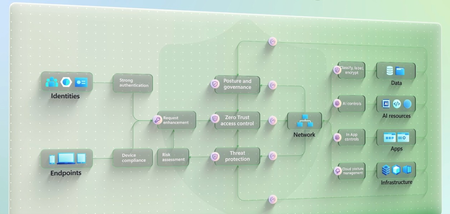
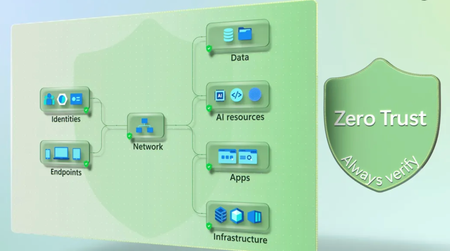
Adopt a Zero Trust approach that lets you verify every access request — human, machine, or AI — before it reaches your most critical resources. As AI agents, semantic search, and automation accelerate how work gets done, you can reduce risk by explicitly validating identity, enforcing least-privilege access, and assuming breach across every step of your environment. Apply layered, continuous protection across identities, endpoints, networks, data, AI resources, applications, and infrastructure so attackers can’t exploit any weak links. Michael Madrigal, Security Product Manager, shares how you can protect productivity and keep pace with an evolving threat landscape, by continuously assessing risk, securing resources at runtime, and adapting policies as conditions change. Govern AI agents like identities. Apply visibility, scoped access, and controls to limit blast radius. Take a look at Zero Trust for AI. Connect only trusted endpoints. Block non-compliant devices and VMs from accessing resources by enforcing endpoint health and policy checks. Get started with Zero Trust for AI. Build security that adapts by design. Continuously assess risk and automate response across identities, endpoints, apps, data, and infrastructure. Get started with Zero Trust for AI. QUICK LINKS: 00:00 — Zero Trust for AI 01:41 — Overview of Zero Trust 02:43 — Identities 04:38 — Endpoints 04:50 — How Zero Trust applies to your network 06:51 — How Zero Trust applies to your data 07:31 — How Zero Trust applies to AI resources 08:24 — App Layer 08:31 — Infrastructure 09:49 — Security 10:23 — Wrap up Link References Check out https://aka.ms/GoZeroTrust Watch our series at https://aka.ms/ZTMechanics Unfamiliar with Microsoft Mechanics? As Microsoft’s official video series for IT, you can watch and share valuable content and demos of current and upcoming tech from the people who build it at Microsoft. Subscribe to our YouTube: https://www.youtube.com/c/MicrosoftMechanicsSeries Talk with other IT Pros, join us on the Microsoft Tech Community: https://techcommunity.microsoft.com/t5/microsoft-mechanics-blog/bg-p/MicrosoftMechanicsBlog Watch or listen from anywhere, subscribe to our podcast: https://microsoftmechanics.libsyn.com/podcast Keep getting this insider knowledge, join us on social: Follow us on Twitter: https://twitter.com/MSFTMechanics Share knowledge on LinkedIn: https://www.linkedin.com/company/microsoft-mechanics/ Enjoy us on Instagram: https://www.instagram.com/msftmechanics/ Loosen up with us on TikTok: https://www.tiktok.com/@msftmechanics Video Transcript: -Zero Trust security is all about one simple idea. Never assume trust, always verify. Whether it’s a person, an AI agent, or an app trying to access your resources, nothing is trusted by default. Equally, protections should be designed to work seamlessly behind the scenes, keeping your business operations secure without impacting productivity. By design, it follows three core principles to guard entry to your network and protect critical assets, you need to first verify explicitly, which means always confirm who, in terms of a person or a device, or what in the case of AI or other processes, is requesting access to your environment. Second, enforce least privilege access means granting only the permissions needed to specific resources to get work done, and then only for as long as necessary. And third, assume breach is where you assume that your environment has already been compromised, so that you have proactive defenses in place to protect your most critical assets. -In fact, whether you’ve already adopted Zero Trust or are just starting to consider it, with AI now working alongside of us, the need for this approach has never been greater. For example, if data isn’t properly classified and protected, AI which uses powerful semantic search can quickly surface information that was once hard to find and potentially share it with the wrong people. -Additionally ungoverned AI agents can often have extensive permissions across systems, enabling agents to move through your organization at unparalleled speed to complete tasks. But if compromised, they can cause significant damage before anyone even notices. And as AI reshapes both work and the risk landscape, this series will show how Microsoft helps you to implement Zero Trust seamlessly. Today, I’ll start with an overview of the Zero Trust architecture. We’ll look at the vulnerabilities that can arise and the core defenses, both new and existing, that you can deploy to mitigate them. Think of your IT environment as a flow. -From the identities, including system processes, and endpoints trying to gain access, all the way across your network, to the sensitive data, AI resources, applications and infrastructure they need to reach. Along that path, every step introduces risk, and attackers don’t need to compromise everything. They only need to exploit one weak link. That’s why protection must be layered across identities, endpoints, your entire network layer, data, AI resources, your apps, and infrastructure, because each introduce unique risks and act as a potential entry point. At every layer, real-time policy enforcement and protections are essential to ensure that any entity requesting access is thoroughly assessed and verified before gaining access to requested resources. -Let’s go deeper, starting with identities across human users, agents, and your workloads. Human identities are a prime target for phishing, impersonation, and credential theft. So you need to start by limiting access to what each person needs then adding phishing-resistant authentication to confirm users are who they say they are and only reach what they’re authorized for. -That’s where, for example, Conditional Access in Microsoft Entra comes in, verifying every request using passkeys and other strong methods. Microsoft Purview’s Data Security Posture Management additionally helps you track how users interact with data and AI, so you can spot risks early and strengthen your posture. Integration with Defender for Cloud Apps mean you can block risky apps from being used, and with Global Secure Access in Entra, you can also enforce identity-integrated network controls to keep unsafe requestors out. Non-human identities like agents, on the other hand, don’t fall for phishing, but they’re still vulnerable. They can be hijacked through user or agent interactions, and if they have broad access, a single misconfiguration or excess permissions can open the door to major breaches. -Here, the new Entra Agent ID gives each AI agent its own unique, manageable identity, letting you apply the same visibility, governance, and Zero Trust controls you use for human users, but now for non-human actors too. For example, Conditional Access can evaluate agent risk in real time for each authorization request to resources and defined access packages using ID governance with human agent sponsor approval, can scope agents for just enough access to what they need to carry out authorized tasks. -Then, similar to human identities, Insider Risk Management in Purview will also automatically assign risk levels to agents in your environment based on their data activities so you can prioritize investigations and apply targeted controls. This way, every identity is verified with real-time access controls and strict policies under Zero Trust. Of course, identities are only part of the picture. Device endpoints, whether corporate or personally owned, can also pose serious risks if compromised or are non-compliant due to missing updates or policies. That’s because they can act as vectors for lateral movement or data exfiltration. -Additionally, AI means that endpoint considerations now also extend to computer-using agents, where this type of agent can interact using endpoints like full virtual machines to temporarily access resources within your network or from your cloud service providers. Regardless of the person or entity interacting with the endpoint as access requests move inward, as part of conditional access, they also pass through control layers to evaluate context and behavior. In real time, the policy engine can detect anomalies and enforce policy boundaries based on detected real-time risks and other conditions. -And endpoint management controls using Microsoft Intune can ensure that any connecting device or VM passes compliance checks before it can access your resources. As a rule, all endpoints should be continually assessed for health and configuration compliance, with non-compliant, stale, or unused devices automatically revoked from access. Here, native controls in Microsoft Defender for Threat Protection and continuous assessment use threat intelligence and forensics to expose patterns, automatically respond and raise defenses against trending attacks. We’ll dive deeper on what you can do to protect identities and endpoints in a another episode of this series. -For now, let’s switch gears for an overview of the resources that can be targeted by compromised identities and endpoints and how Zero Trust applies. In other words, your network, sensitive data, AI resources, internal and cloud applications, as well as infrastructure components, which are often the ultimate objective for attackers. Your network importantly serves as a bridge between malicious actors and your most valuable resources. Here, your first layer of defense uses network and device-based firewalls to filter traffic and help prevent unwanted connections. Network segmentation then adds protections in case of breach to limit lateral movement to other internal resources. These can be combined and are stronger when tied directly with identity controls in Entra using Global Secure Access for strengthened security. -Next, the ultimate target of any security breach is your data, which can fall risk to theft, manipulation, or leakage. Here, Microsoft Purview delivers a unified Zero Trust control set. For unstructured data in Microsoft 365 and beyond, it identifies sensitive data and applies sensitivity labels that act as protection guidance, driving consistent enforcement such as encryption access controls and DLP across collaboration and AI experiences. And for structured data across Fabric and other clouds, the same sensitivity labels extend protection intent to data stores, enabling consistent access controls and policy enforcement so sensitive data is protected wherever it’s used, including AI workloads. Equally, AI resources, models, agents, APIs, data pipelines, and compute, are critical components of your Zero Trust architecture. If compromised, they can leak sensitive data, generate malicious outputs, or enable lateral movement across systems. Protection means securing the resources themselves, not just access, by assessing prompts and outputs with Microsoft Foundry’s Prompt Shields and runtime protections. Securing compute environments like GPU-enabled virtual machines used for AI with isolation and compliance controls using Microsoft Defender for Cloud. And continuously monitoring agent behavior for anomalies and assigning risk scores with Agent 365 for centralized governance. -Together, capabilities like these and more create a layered defense so your AI resources remain secure across the lifecycle. From here in our architecture, the app layer is where AI meets data. That’s because this layer is increasingly powered by AI and semantic search. It enables users to retrieve information with more efficiency. These capabilities are now common in productivity tools, including collaboration platforms and business systems. While these experiences enhance user productivity, they also amplify attacker capabilities if access is compromised, whether through a stolen credential or a risky insider. -This is where Microsoft Defender for Cloud Apps plays a critical role. With visibility into all apps in use, risk-based controls to govern app behavior, and data protection policies to prevent misuse and data exfiltration. And at the foundation of everything in the Zero Trust architecture is infrastructure, spanning cloud environments, servers, containers, and orchestration systems. The consequences of compromised infrastructure can be severe, with service outages, ransomware, instability, and more. Microsoft Defender for Cloud delivers comprehensive workload protection across Azure, AWS, and GCP, including vulnerability scanning and advanced threat detection for your infrastructure. And you can leverage Azure Confidential Computing infrastructure for your most sensitive workloads, which encrypts data while in use in memory using hardware-based trusted execution environments and processes that only after requests are explicitly verified. -And of course, as we go across each layer, security configurations should not be set and forgotten. Continuous validation with constant monitoring and adaptive policies is a critical part of maintaining Zero Trust. Across all layers in the Zero Trust architecture, SecOps needs to be continuously assessed, monitored and optimized with controls to minimize and detect risks. Here, Microsoft Defender with Sentinel as its integrated SIEM extends detection and response across endpoints, identities, SaaS apps, email and collaboration tools, and more. -Please stayed tuned to Microsoft Mechanics to watch the rest of our series with hands-on guidance for implementing Zero Trust across identities and endpoints, data, AI resources, and apps, and your network and infrastructure, at aka.ms/ZTMechanics. And for additional resources, check out aka.ms/GoZeroTrust with free workshops and more. Subscribe to our channel if you haven’t already, and thanks for watching.945Views0likes0Comments