zero trust security
3 TopicsZero Trust security for AI agents
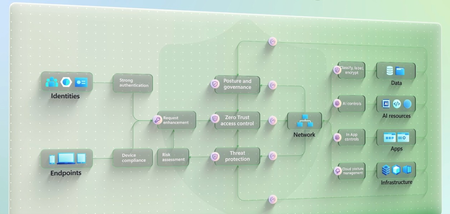
Extend Conditional Access in Microsoft Entra to evaluate every agent authorization request in real time against the same risk signals as human users. Assign each agent its own managed identity with Entra Agent ID and scope permissions with Access Packages. Govern your MCP catalog as a software supply chain — unapproved tools don’t run, and approved servers lock behind Azure API Management. Log every agent tool call, API access, and data lookup into Microsoft Sentinel for continuous anomaly detection. Purview Insider Risk Management auto-assigns risk levels so you can investigate fast or revoke access entirely. DLP and sensitivity labels in Microsoft Purview restrict what agents can reach and auto-inherit to everything they generate, and Data Access Governance maps exactly what each agent can access before a prompt fires. Jeremy Chapman, Microsoft 365 Director, shares how to put these controls into practice across every managed, self-hosted, and shadow agent in your estate. Agent identities. Real-time risk evaluation. Conditional Access in Microsoft Entra evaluates every agent authorization request and enforces policy before agents connect. See how. Every tool call. Every API hit. Every data lookup. Microsoft Sentinel captures each one. Purview Insider Risk Management auto-assigns risk scores the moment anomalies surface. Start here. Govern your MCP catalog like a software supply chain. Block unapproved tools by default and scope approved MCP servers per agent behind Azure API Management. Check it out. QUICK LINKS: 00:00 — How AI changes Zero Trust 01:20 — Zero Trust principles 02:27 — How to apply Zero Trust principles 03:40 — Conditional Access for Agent Identities 04:59 — Entra Agent ID + Access Packages 06:07 — Runtime Observability 06:58 — DLP, Sensitivity Labels + Data Access Governance 07:47 — MCP catalog 08:36 — AI apps & experiences 09:24 — Wrap up Link References Watch the rest of this series at https://aka.ms/ZTMechanics For additional resources, check out https://aka.ms/GoZeroTrust Unfamiliar with Microsoft Mechanics? As Microsoft’s official video series for IT, you can watch and share valuable content and demos of current and upcoming tech from the people who build it at Microsoft. Subscribe to our YouTube: https://www.youtube.com/c/MicrosoftMechanicsSeries Talk with other IT Pros, join us on the Microsoft Tech Community: https://techcommunity.microsoft.com/t5/microsoft-mechanics-blog/bg-p/MicrosoftMechanicsBlog Watch or listen from anywhere, subscribe to our podcast: https://microsoftmechanics.libsyn.com/podcast Keep getting this insider knowledge, join us on social: Follow us on Twitter: https://twitter.com/MSFTMechanics Share knowledge on LinkedIn: https://www.linkedin.com/company/microsoft-mechanics/ Enjoy us on Instagram: https://www.instagram.com/msftmechanics/ Loosen up with us on TikTok: https://www.tiktok.com/@msftmechanics Video Transcript: -AI changes the Zero Trust and cybersecurity landscape. It’s reshaping how vulnerabilities in your environment are discovered and how they’re exploited at machine speed. And the question is whether your defenses can keep up. Now, as we’ve seen, new models are optimized to discover security gaps and zero days that have existed for decades undetected, finding exponentially more issues than humans can review in time before public models accessible via bad actors find the same exploits. -And that’s why Zero Trust is more important than ever to stop malicious access attempts as early as possible. The approach needs to be layered across identities, endpoints, your entire network layer, data, AI resources, and your apps and infrastructure because each introduce unique risks and act as a potential entry point. At every layer, real-time policy enforcement and protections are essential to ensure that every identity, every agent, and every endpoint that connects to your resources is thoroughly assessed and verified before gaining access to requested resources. -Today we’ll focus on the access controls and additional layers important to AI and how to apply Zero Trust at every step. Zero Trust principles themselves haven’t changed, but with AI they have to be applied in new ways. First, verify explicitly means always confirm who in terms of a person or device or what in case of AI or other processes is requesting access to your environment, assessing every app being used, deployed or developed in your environment, and giving every agentic actor its own discrete identity separate from the user who invoked it and separate from the workload it runs on. -Next enforce least privilege access now means making sure that AI can only reach the data it needs for the purpose it was authorized for. And it means agents themselves should only have the permissions required to complete the task in front of them, nothing more. And assume breach takes on a new meaning because you now need to assume that any prompt can carry malicious intent. Any response can leak sensitive data and any AI component, whether it’s an SDK, an MCP server connection or an agent itself can have vulnerabilities waiting to be exploited. -So let’s walk through how to apply these as AI access controls. The biggest risk at the access layer is also the most familiar one, your human users and the access tokens they hold. People are still security’s weakest link. And as AI accelerates, unknown or unmanaged agents, especially those running as local AI, impersonating human users now represent some of the greatest risk. That’s because AI just needs a stolen credential an overpermissioned account or a compromised session to get in, it doesn’t need to break encryption or find a brand new zero day. -AI can now autonomously discover weaknesses, can chain multiple lower severity issues and package it into a working end-to-end exploit all in a fraction of the time it would take a human attacker. And alongside your human users, there’s also a new class of identity requesting access to resources, AI agent identities, where unlike a person, it works at machine speed and around the clock. And while it doesn’t fall for phishing or forget its password, it can be hijacked through prompt injection or by being handed a malicious tool. -And if it has broad standing access, a single misconfiguration can open the door to a major breach that could be executed in just seconds, which is why the starting point for Zero Trust with AI and agents is identity itself with identity and access controls, where Conditional Access in Microsoft Entra evaluates every request in real time against signals like user risk, sign in risk, device health and location. And then it pairs that with phishing resistant authentication like passkeys so that only verified users can reach the apps and AI experiences that they’re authorized to use. And Conditional Access can also evaluate agent risk in real time for every authorization request that the agent makes against a resource. AI experiences amplify whatever access a user already has. -For AI, Microsoft Purview’s Data Security Posture Management gives you visibility into how users are interacting with data and AI so that you can spot risky patterns like oversharing or anomalous prompts early and increase your security posture before they become incidents. Using Microsoft Execution Containers, Windows can identify local AI agents and require them to run within the container using their own Agent IDs, which gives you control over them using Conditional Access policies. So at the identity and access management layer, agents need the same Zero Trust treatment as people, but adapted to how they work. -Now, this leads to inventory because you can’t protect what you can’t see. It means that to gain access and become a known object, every agent must have a governed identity. No more borrowed credentials where agents can run under the user’s token. We’re also using Conditional Access policies. Everything unmanaged and unknown should be blocked by default. Now, the first step is discovering every agent in your estate using Agent 365, whether it’s managed or self-hosted or unmanaged shadow agents, then reconciling them with your directory and access controls. -Entra Agent ID gives each agent its own unique manageable identities so that you can apply the same visibility, governance and use Conditional Access policies like you do for human users, but now for non-human actors too, to tightly control exactly what agents can access and under which conditions. And you can scope resource access individually for each agent. Access Packages as part of Microsoft Entra ID Governance with human sponsor approval let you grant just-enough-access for just-enough-time that expire when work is done. But identity is only the first checkpoint. Once an agent is inside your perimeter, you need to see what it’s actually doing in real time and that’s for runtime observability comes in. -So for that, using sign-in and audit logs, you can see every tool call, every API access attempt and every data lookup and every request that an agent makes. It should also be logged against Microsoft Sentinel as your SIEM and continuously evaluated against anomaly detection so that it’s seamlessly integrated with your alerting incident management and investigation controls. And if an agent can’t be observed, well, it can’t be trusted. Insider Risk Management in Microsoft Purview now extends to agents automatically assigning risk levels based on their data activities. So you can prioritize investigations, apply targeted controls or revoke access entirely when something looks wrong. Then there’s the data and tools behind every agent, files that the agent grounds on, the backends it queries, the MCPs it can call, and the models it’s wired to, they’re all reachable and they all need a control with a name on it. -Let’s start with data because that’s ultimately what the agent is after. DLP and sensitivity labels can restrict AI access even when a user has permission to open a document directly. And if labeled content is used, the label is also automatically inherited by anything the agent generates from it. Data access governance shows you exactly which sites, items and sharing links every agent can reach, so you can tighten access at the source before a single prompt is sent. Policy protections also cover your structured data backends, including Fabric, OneLake and others. Moving on to the tools that an AI agent can call, here you should treat the MCP catalog like any third party software supply chain, where unapproved tools don’t run and approved tools run only for the agents that you’ve assigned them to. -In fact, every approved MCP server created by your organization can be protected behind Azure API Management. Likewise, AI agents built in Microsoft Foundry need guardrails to block risky behavior, including jailbreak attempts, prompt injection, and prevent protected material from being processed. Agents have a deep tool belt, and if you only close one door, they’ll quickly find another way to reach files, systems of record or sensitive data. Controls should be continuous at runtime across identity, data as well as the underlying tools and models. -And that brings us to the AI apps and experiences your users and agents are actually trying to reach and the related controls. Microsoft Defender for Cloud Apps gives you visibility into every AI app and use with risk-based controls to govern app behavior and data protection policies that prevent misuse and exfiltration. Microsoft Edge also has controls to prevent users signed into their work accounts from using consumer grade Shadow AI apps. Also for local AI, Microsoft Intune and Microsoft Defender provide agent discovery signals to detect unsanctioned local agents. You can see where these are being used on managed devices in your environment. And an Intune security baseline allows you to restrict common execution paths that local agents like OpenClaw may use. -AI doesn’t just create new risks, it amplifies existing ones, stale permissions, overshared data, ungoverned apps, and weak authentication. It exposes and exploits those gaps faster than any human attacker, but the same works in reverse. Zero Trust controls, strong identity, least privilege, real-time policy, and runtime observability can also operate at machine speed to reduce risk. Agent 365 unifies these AI controls across Microsoft Entra, Purview, Intune and Defender, while letting each domain expert work within their tool of choice. Whether that’s identity and access management, data security and compliance, endpoint management for local AI or security operations for incident and threat management. In the AI era, the principles remain the same. Verify explicitly, enforce least privilege and assume breach across every agent, user and app. -For additional resources, free workshops and hands-on implementation guidance with experts, check out aka.ms/GoZeroTrust. Subscribe to Microsoft Mechanics if you haven’t already. Thanks for watching.1.4KViews1like0Comments