xslt
15 TopicsBizTalk Patterns part 2 – Sync Async
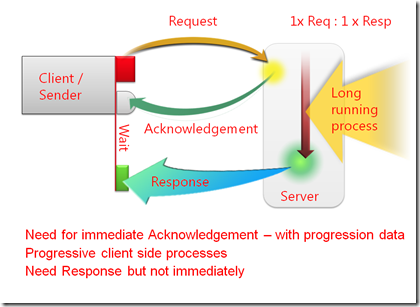
Developing a BizTalk Server solution can be challenging, and especially complex for those who are unfamiliar with it. Developing with BizTalk Server, like any software development effort is like playing chess. There are some great opening moves in chess, and there are some great patterns out there to start a solution. Besides being an outstanding communications tool, design patterns help make the design process faster. This allows solution providers to take the time to concentrate on the business implementation. More importantly, patterns help formalize the design to make it reusable. Reusability not only applies to the components themselves, but also to the stages the design must go through to morph itself into the final solution. The ability to apply a patterned repeatable solution is worth the little time spent learning formal patterns, or to even formalize your own. This entry looks at how architectural design considerations associated to BizTalk Server regarding messaging and orchestration can be applied using patterns, across all industries. The aim is to provide a technical deep-dive using BizTalk Server anchored examples to demonstrate best practices and patterns regarding parallel processing, and correlation. Repost of https://docs.microsoft.com/en-us/archive/blogs/appfabriccat/biztalk-patterns-part-2sync-async4.4KViews3likes0Comments
🚀 New & Improved Data Mapper UX in Azure Logic Apps – Now in Public Preview!
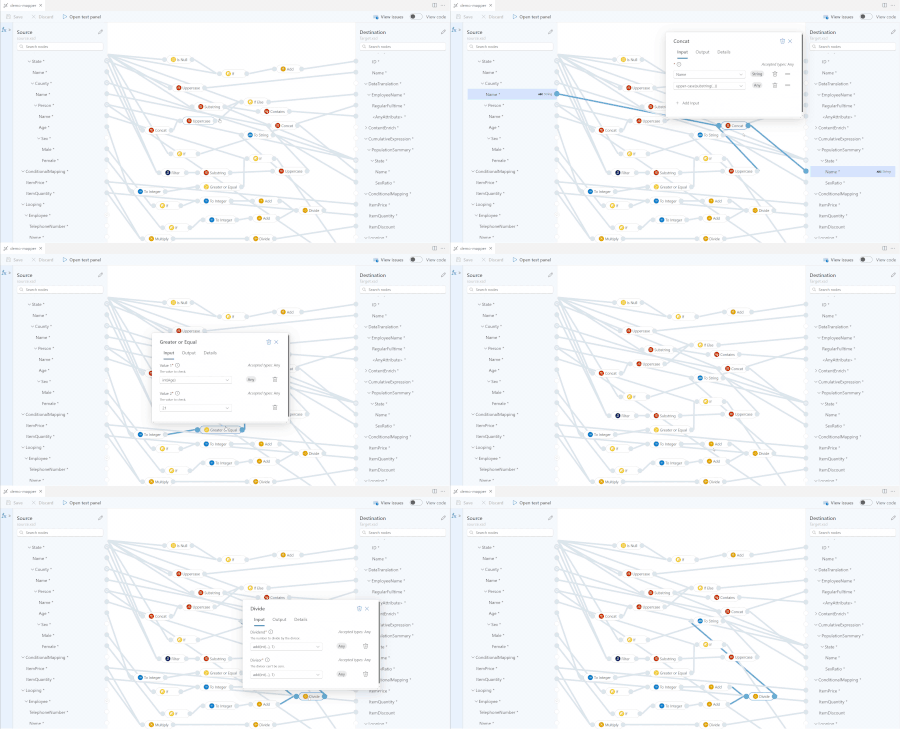
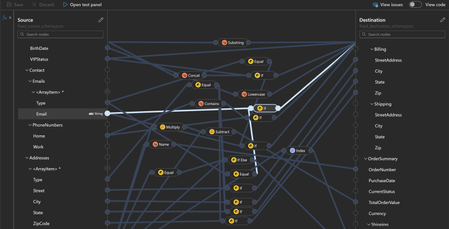
We’re excited to announce that a UX update for Data Mapper in Azure Logic Apps is now in Public Preview! We have continuously improved Data Mapper, which is already generally available (GA), based on customer feedback. Last year, we conducted a private preview to assess the improvements in the new user experience and confirm that we are on the right track in simplifying complex data transformations, including EDI schemas. With the insights gained, we made significant UI enhancements and added features to streamline the mapping process. Feedback We value your feedback to make the Data Mapper even better. Please share your thoughts, suggestions, and overall experience with us through our feedback form. How feedback shaped the Public Preview Throughout the evolution of Data Mapper, we gathered valuable feedback from customers and partners. Key themes that emerged include: Reliability: Ensuring the Data Mapper can handle large schemas and complex transformation logic, including functions. Error handling: Providing real-time validation by allowing users to test payloads and catch errors while authoring maps. Looping: Clearly indicating when repeating nodes are mapped and ensuring complex objects are properly represented Drag & drop enhancements: Improving how connections between nodes are created for better usability. Deserialization & namespace honoring: Ensuring XML deserialization correctly loads mappings without data loss, preserving namespace integrity for seamless schema validation. We’ve incorporated these suggestions into the public preview, ensuring a more refined and user-friendly experience. What’s new in the Data Mapper UX? 1. Easier navigation Docked schema panels keep you oriented within the data map. Easily search for specific nodes to streamline mapping. 2. Side-by-side function panel Search and use 100+ built-in functions, including mainly: Collection functions (for repeating elements) String manipulations Mathematical operations Conditional logic 3. Automatic looping for repeating nodes When mapping repeating nodes, a new loop connection is automatically added on the immediate parent nodes at source and destination. Repeating parent nodes are denoted by "A1, A2" notation on hover. Note: If the child node in the source has a deeper nesting level than in the destination, you must manually map the connection from the repeating source node to the destination to ensure proper data transformation. 4. Real-time error detection On saving the map, instantly view warnings and errors for missing mappings or incorrect configurations 5. Test Your Map Instantly Preview the output before running your workflow. How to set up and test out the new Data Mapper experience Enable the Preview: Go to your Azure Logic App (Standard) extension -> Settings -> Data Mapper. Select “Version ~2” to try out the new user experience. Light theme: Enable "Light Theme" in VS Code before creating a new data map. Dark Theme is not supported, but is on the roadmap and will be prioritized soon. Create a New Data Map: Navigate to the Azure tab on the left-hand panel of your VS Code. Select “Create New Data Map” and name it. Once loaded, select the schemas for source and destination. Upload schemas: Upload your source and destination schemas before creating the map (eg .xsd or .json files). Limitations While the new Data Mapper UX brings significant improvements, a few limitations remain: Filter function: The filter function correctly processes numeric conditions when enclosed in quotes (e.g., ">= 10"), but does not behave consistently for string comparisons (e.g., checking if item name = "Pen"). We are actively working on refining this behavior. Custom Functions: Support for custom functions is coming in the next refresh to enhance flexibility in data mapping. Usability enhancements: Improved tooltips, function labels, error messages and other UX refinements are on the way to provide clearer guidance and a smoother mapping experience, especially for complex transformations. Future investments The product is going to continue getting better and we should be adding more features very soon! Some immediate investments include: Enhanced test map experience: Making it easier to validate mappings during development. Panel resizing: Allowing users to have flexibility in viewing larger schemas and functions when multiple panels are expanded.3.3KViews12likes6Comments🚀 General Availability: Enhanced Data Mapper Experience in Logic Apps (Standard)
We’re excited to announce the General Availability (GA) of the redesigned Data Mapper UX in the Azure Logic Apps (Standard) extension for Visual Studio Code. This release marks a major milestone in our journey to modernize and streamline data transformation workflows for integration developer. What's new The new UX, previously available in public preview, is now the default experience in the Logic Apps Standard extension. This GA release reflects direct feedback from our integration developer community. We’ve resolved blockers that we heard from customers and usability issues that impacted performance and stability, including: Opening V1 maps in V2: Seamlessly open and edit existing maps you have already created with latest visual capabilities. Load schemas on Mac: Addressed schema-related crashes on macOS for a smoother experience. Function documentation updates: Improved guidance and examples for built-in collection functions that apply on repeating nodes. Stay connected We would love to hear your feedback. Please use this form link to let us know if there are any missing gaps or scenarios that are not yet covered1.2KViews1like0Comments🔁 Public Preview Refresh: More Power to Data Mapper in Azure Logic Apps
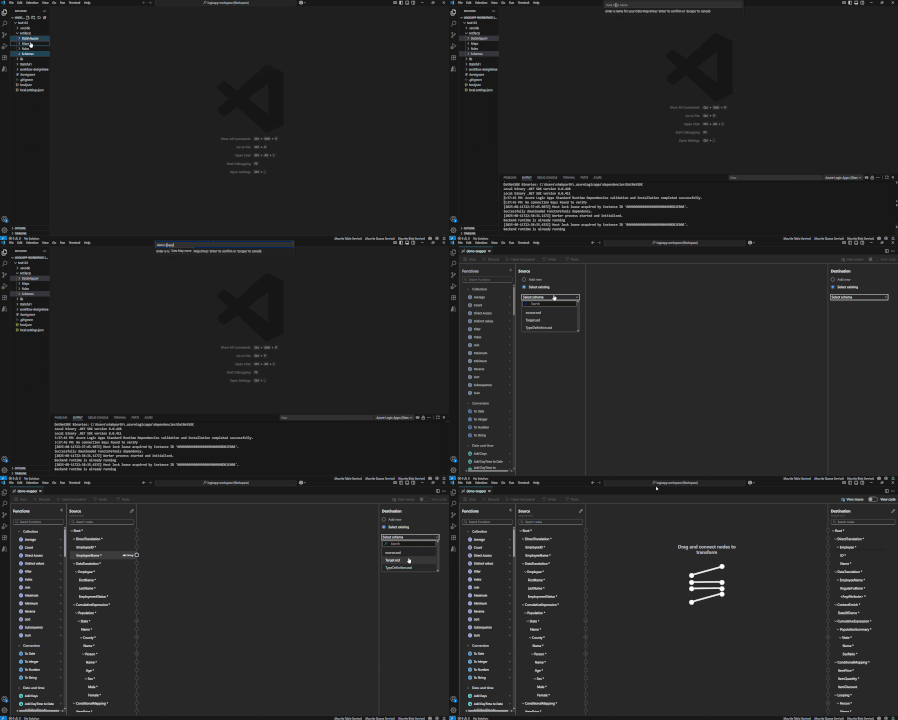
We’re back with a Public Preview refresh for the Data Mapper in Azure Logic Apps (Standard) — bringing forward some long-standing capabilities that are now fully supported in the new UX. In our initial announcement, we introduced a redesigned experience focused on usability, error handling, and improved mapping for complex schemas. As we continue evolving the tool, we’re working to bring feature parity with the classic experience, while layering in modern enhancements along the way. With this update, several existing capabilities from the legacy Data Mapper are now available in the new preview version — so you can bring your advanced scenarios forward with confidence. 🛠️ Run XSLT Inside Your Data Map The ability to apply XSLT has long been a powerful feature in Logic Apps, and we’re excited to bring Run XSLT support into the new UX. You can now invoke reusable transformation logic from your map, including: Enterprise-grade XSLT Predefined templates or logic from your BizTalk workflows How to try it out: Create a new data map. Right-click on the MapDefintions or Maps folder and click Create new data map Store the XSLT file under Artifacts -> DataMapper/Extension -> InlineXslt. Open the data map and search for Run XSLT in the functions panel. Select the function and simply select the function you want to run from the dropdown Connect to desired destination node. In my case, the function simply adds a "Placeholder" value for the Name node at destination, alongside an "EmployeeType" node. Note that you do not need to connect any source node to the XSLT function given this is custom XSLT logic that will be applied directly at destination node. Upon testing the map, right value is generated in the destination schema 🔍 Execute XPath to Extract Targeted Values Execute XPath is now supported in the new experience, giving you control to extract specific values from nested XML structures. This function is particularly useful for: Accessing attributes and nested elements Applying logic based on the structure or content of incoming data How to try it out: Search for Execute XPath in the functions panel. Select the function and add the expression you want to extract Map it to destination node. Here is what the map will look like: The test payload correctly creates multiple Address nodes at destination based on the Address node at source. 🧩 Use Custom XML Functions Custom XML functions allow you to define and reuse logic across your map. This helps reduce duplication and supports schema-specific transformations. Now that support is available in the new UX, you can: Wrap complex logic into manageable components Handle schema-specific edge cases with ease How to try it out: Add the .xml function file under Artifacts -> DataMapper/Extension -> Functions Open the data map and under Utility category of functions, select the new function. In our case, the xml function is called Age Connect function input to Date_of_Birth node at source and output to Age node at destination. The map will look something like this Test the map and notice that the age is calculated correctly at the destination node 🌒 Dark Mode Support in VS Code The new UX now respects Dark Mode in VS Code, giving you a visually cohesive and low-contrast authoring experience — perfect for long mapping sessions. No extra steps needed — Dark Mode works automatically based on your VS Code theme settings. ⚙️ How to Enable the New Experience If you haven’t yet tried the new UX: Open your Logic Apps (Standard) project in VS Code Go to Logic Apps (Standard) extension → Settings → Data Mapper Select Version ~2 You’ll find detailed walkthroughs in the initial preview announcement blog. 💬 We’d Love Your Feedback We’re continuously evolving the Data Mapper, and your feedback is key to getting it right — especially as we bring more advanced transformation scenarios into the new experience. 👉 Submit your feedback here 🐛 Found an issue or have a specific feature request? Let us know on GitHub Issues Thanks again for being part of the journey — more updates coming soon! 🚀Announcing the General Availability of the XML Parse and Compose Actions in Azure Logic Apps
The XML Operations connector We have recently added two actions for the XML Operations connector: Parse XML with schema and Compose XML with schema. With this addition, Logic Apps customers can now interact with the token picker during design time. The tokens are generated from the XML schema provided by the customer. As a result, the XML document and its contained properties will be easily accessible, created and manipulated in the workflow. XML parse with schema The XML parse with schema allow customers to parse XML data using an XSD file (an XML schema file). XSD files need to be uploaded to the Logic App schemas artifacts or an Integration account. Once they have been uploaded, you need to enter the enter your XML content, the source of the schema and the name of the schema file. The XML content may either be provided in-line or selected from previous operations in the workflow using the token picker. For instance, the following is a parsed XML: XML compose with schema The XML compose with schema allows customers to generate XML data, using an XSD file. XSD files need to be uploaded to the Logic App schemas artifacts or an Integration account. Once they have been uploaded, you should select the XSD file along with entering the JSON root element or elements of your input XML schema. The JSON input elements will be dynamically generated based on the selected XML schema. For instance, the following is a Composed file: Learnings from Transition from Public Preview to General Availability: Upon feedback received from multiple customers, we would love to share the following recommendations and considerations, that will you maximize the reliability, flexibility, and internationalization capabilities of XML Parse and Compose actions in Azure Logic Apps. Handling Array Inputs in XML Switch to array input mode when mapping arrays. By default, the Logic App Designer expects individual array items for XML elements with maxOccurs > 1. If you want to assign an entire array token, use the array input mode icon in the Designer. This avoids unnecessary For Each loops and streamlines your workflow. For instance, the following: Click the Switch to input entire array Enter your array token. Managing Non-UTF-8 Encoded XML Leverage the encoding parameter in XML Compose. Customers can specify the desired character encoding (e.g., iso-2022-jp for Japanese). This controls both the .NET XML writer settings and the output encoding, allowing for broader internationalization support. Example configuration: Use the XML writer settings property to set encoding as needed. Safe Transport of Binary and Non-UTF-8 Content Utilize the Logic App content envelope. The XML Compose action outputs content in a safe envelope, enabling transport of binary and non-UTF-8 content within the UTF-8 JSON payload. Downstream actions (e.g., HTTP Request) can consume this envelope directly. Content-Type Header Management XML Compose now specifies the exact character set in the Content-Type header. This ensures downstream systems receive the correct encoding information. For example, application/xml; charset=iso-2022-jp will be set for Japanese-encoded XML. Consuming XML Output in HTTP Actions Reference the XML output property directly in HTTP actions. The envelope’s content-type is promoted to the HTTP header, and the base64-encoded content is decoded and sent as the raw HTTP body. This preserves encoding and binary fidelity. Documentation and External References Consult official documentation for advanced scenarios: Support non-Unicode character encoding in Azure Logic Apps. Content-Type and Content-Encoding for clarifying header usage. Do not confuse Content-Type with Content-Encoding. Content-Type specifies character set encoding (e.g., UTF-8, ISO-2022-JP), while Content-Encoding refers to compression (e.g., gzip). Normalization and prefix and trailer trimming: Here is a sample that shows how XML normalization works for values, and how to achieve prefix and trailing trimming: XSD: <?xml version="1.0" encoding="utf-8"?> <xs:schema id="XmlNormalizationAndWhitespaceCollapsed" targetNamespace="http://schemas.contoso.com/XmlNormalizationAndWhitespace" elementFormDefault="qualified" xmlns="http://schemas.contoso.com/XmlNormalizationAndWhitespace" xmlns:mstns="http://schemas.contoso.com/XmlNormalizationAndWhitespace" xmlns:xs="http://www.w3.org/2001/XMLSchema"> <!-- simple type that preserves whitespace (like xs:string) --> <xs:simpleType name="PreserveString"> <xs:restriction base="xs:string" /> </xs:simpleType> <!-- normalizedString collapses CR/LF/TAB to spaces, but preserves leading/trailing and repeated spaces --> <xs:simpleType name="NormalizedName"> <xs:restriction base="xs:normalizedString" /> </xs:simpleType> <!-- token collapses runs of spaces and trims leading/trailing spaces --> <xs:simpleType name="TokenName"> <xs:restriction base="xs:token" /> </xs:simpleType> <!-- explicit whitespace collapse facet (equivalent to xs:token for this purpose) --> <xs:simpleType name="CollapsedName"> <xs:restriction base="xs:string"> <xs:whiteSpace value="collapse" /> </xs:restriction> </xs:simpleType> <xs:element name="root"> <xs:complexType> <xs:sequence> <xs:element name="header"> <xs:complexType> <xs:sequence> <xs:element name="id" type="xs:int" /> </xs:sequence> </xs:complexType> </xs:element> <xs:element name="row" maxOccurs="unbounded"> <xs:complexType> <xs:sequence> <xs:element name="id" type="xs:int" /> <!-- the three variants on whitespace handling for name and aliases --> <xs:element name="name" type="mstns:TokenName" /> <xs:element name="nameNormalized" type="mstns:NormalizedName" minOccurs="0" /> <xs:element name="nameCollapsed" type="mstns:CollapsedName" minOccurs="0" /> <xs:element name="namePreserved" type="mstns:PreserveString" minOccurs="0" /> </xs:sequence> </xs:complexType> </xs:element> </xs:sequence> </xs:complexType> </xs:element> </xs:schema> JSON: { ":Attribute:xmlns": "http://schemas.contoso.com/XmlNormalizationAndWhitespace", "header": { "id": 1002 }, "row": [ { "id": 1, "name": "cyckel1", "nameNormalized": " cyckel1 end ", "nameCollapsed": "cyckel1", "namePreserved": "cyckel1\r\n\tend" }, { "id": 2, "name": "cyckel2", "nameNormalized": "line1 line2 ", "nameCollapsed": "cyckel2", "namePreserved": "line1\nline2\t" }, { "id": 3, "name": "cyckel12", "nameNormalized": " tabs and lines", "nameCollapsed": "cyckel12", "namePreserved": "\ttabs\tand\r\nlines" } ] } XML: <?xml version="1.0" encoding="utf-8"?> <root xmlns="http://schemas.contoso.com/XmlNormalizationAndWhitespace"> <header> <id>1002</id> </header> <row> <id>1</id> <name>cyckel1 </name> <nameNormalized> cyckel1
	end </nameNormalized> <nameCollapsed>cyckel1 </nameCollapsed> <namePreserved>cyckel1
	end</namePreserved> </row> <row> <id>2</id> <name>cyckel2 </name> <nameNormalized>line1
line2	</nameNormalized> <nameCollapsed>cyckel2 </nameCollapsed> <namePreserved>line1
line2	</namePreserved> </row> <row> <id>3</id> <name> cyckel12</name> <nameNormalized>	tabs	and
lines</nameNormalized> <nameCollapsed> cyckel12</nameCollapsed> <namePreserved>	tabs	and
lines</namePreserved> </row> </root> Check this short video to learn more:819Views1like0CommentsLogic Apps Aviators Newsletter - January 2026
In this issue: Ace Aviator of the Month News from our product group Community Playbook News from our community Ace Aviator of the Month January's Ace Aviator: Sagar Sharma What's your role and title? What are your responsibilities? I’m a cross-domain Business Solution Architect specializing in delivering new business capabilities to customers. I design end-to-end architectures specially on Azure platforms and also in the Integration domain using azure integration services. My role involves marking architectural decisions, defining standards, ensuring platform reliability, guiding teams, and helping organizations transition from legacy integration systems to modern cloud-native patterns. Can you give us some insights into your day-to-day activities and what a typical day in your role looks like? My day usually blends architecture work with hands-on collaboration. I review integration designs, refine patterns, help teams troubleshoot integration flows, and ensure deployments run smoothly through DevOps pipelines. A good part of my time is spent translating business needs into integration patterns and making sure the overall platform stays secure, scalable, and maintainable. What motivates and inspires you to be an active member of the Aviators/Microsoft community? The community has shaped a big part of my career. Many of my early breakthroughs came from blogs, samples, and talks shared by others. Contributing back feels like closing the loop. I enjoy sharing real-world lessons, learning from peers, and helping others adopt integration patterns with confidence. The energy of the community and the conversations it creates keep me inspired. Looking back, what advice do you wish you had been given earlier that you'd now share with those looking to get into STEM/technology? Focus on core concepts—messaging, APIs, security, and distributed systems—because tools evolve, but fundamentals stay relevant. Share your learning early, even if it feels small. Be curious about the “why” behind patterns. Build side projects, not just follow tutorials. And don’t fear a nonlinear career path—diverse experience is an asset in technology. What has helped you grow professionally? Hands-on customer work, strong mentors, and consistent learning habits have been key. Community involvement—writing, speaking, and collaborating—has pushed me to structure my knowledge and stay current. And working in environments that encourage experimentation has helped me develop faster and with more confidence. If you had a magic wand that could create a feature in Logic Apps, what would it be and why? I’d love to see a unified, out-of-the-box business transaction tracing experience across Logic Apps, Service Bus, APIM, Functions, and downstream services. Something that automatically correlates events, visualizes the full journey of a transaction, and simplifies root-cause analysis. This would make operational troubleshooting dramatically easier in enterprise environments. News from our product group Microsoft BizTalk Server Product Lifecycle Update BizTalk Server 2020 will be the final release, with support extending through 2030. Microsoft encourages a gradual transition to Azure Logic Apps, offering migration tooling, hybrid deployment options, and reuse of existing BizTalk artifacts. Customers can modernize at their own pace while maintaining operational continuity. Data Mapper Test Executor: A New Addition to Logic Apps Standard Test Framework The Data Mapper Test Executor adds native support for testing XSLT and Data Mapper transformations directly within the Logic Apps Standard test framework. It streamlines validation, improves feedback cycles, and integrates with the latest SDK to enable reliable, automated testing of map generation and execution. Announcing General Availability of AI & RAG Connectors in Logic Apps (Standard) Logic Apps Standard AI and RAG connectors are now GA333, enabling native document processing, semantic search, embeddings, and agentic workflows. These capabilities let teams build intelligent, context‑aware automations using their own data, reducing complexity and enhancing decisioning across enterprise integrations. Logic Apps Labs The Logic Apps Labs, which introduces Azure Logic Apps agentic workflows learning path, offering guided modules on building conversational and autonomous agents, extending capabilities with MCP tools, and orchestrating multi‑agent workflows. It serves as a starting point for hands‑on labs covering design, deployment, and advanced patterns for intelligent automation. News from our community Handling Empty SQL Query Results in Azure Logic Apps Post by Anitha Eswaran If a SQL stored procedure returns no rows, you can detect the empty result set in Logic Apps by checking whether the output’s ResultSets object is {}. When empty, the workflow can be cleanly terminated or used to trigger alerts, ensuring predictable behavior and more resilient integrations. Azure Logic Apps MCP Server Post by Laveesh Bansal Our own Laveesh Bansal spent some time creating an Azure Logic Apps MCP Server that enables natural‑language debugging, workflow inspection, and updates without using the portal. It supports both Standard and Consumption apps, integrates with AI clients like Copilot and Claude, and offers tools for local or cloud‑hosted setups, testing, and workflow lifecycle operations. Azure Logic Apps: Change Detection in JSON Objects and Arrays Post by Suraj Somani Logic Apps offers native functions to detect changes in JSON objects and arrays without worrying about field or item order. Using equals() for objects and intersection() for arrays, you can determine when data has truly changed and trigger workflows only when updates occur, improving efficiency and reducing unnecessary processing. Logic Apps Standard: A clever hack to use JSON schemas in your Artifacts folder for JSON message validation (Part 1) Post by Şahin Özdemir Şahin outlines a workaround for using JSON schemas stored in the Artifacts folder to validate messages in Logic Apps Standard. It revisits integration needs from BizTalk migrations and shows how to bring structured validation into modern workflows without relying on Integration Accounts. This is a two part series and you can find part two here. Let's integrate SAP with Microsoft Video by Sebastian Meyer Sebastian has a new video out, and in this episode he and Martin Pankraz break down SAP GROW and RISE for Microsoft integration developers, covering key differences and integration options across IDoc, RFC, BAPI, SOAP, HTTPS, and OData, giving a concise overview of today’s SAP landscape and what it means for building integrations on Azure. Logic Apps Initialize variables action has a max limit of 20 variables Post by Sandro Pereira Logic Apps allows only 20 variables per Initialize variables action, and exceeding it triggers a validation error. This limit applies per action, not per workflow. Using objects, parameters, or Compose actions often reduces the need for many scalars and leads to cleaner, more maintainable workflows. Did you know that? It is a Friday Fact!Data Mapper Test Executor: A New Addition to Logic Apps Standard Test Framework
Why Does It Matter? Testing complex data transformations has always been a challenge for Logic Apps developers. With workflows relying on XSLT, Liquid templates, and custom maps, validating these transformations often required manual steps or external tools. The Data Mapper Test Executor changes that by bringing first-class support for map testing directly into the Logic Apps Standard Automated Test Framework. This means faster feedback loops, improved reliability, and a more streamlined developer experience. Key Highlights Native Support for Data Mapper Testing Execute unit tests for XSLT 1.0/2.0/3.0 and Logic Apps Data Mapper (.lml) files without leaving your development environment. Integrated with Automated Test Framework SDK Leverages the latest SDK capabilities for consistent test execution and reporting. Enhanced Validation Supports schema validation and transformation checks, ensuring your maps behave as expected across scenarios. Performance Optimizations Built-in caching and resource management for efficient test runs. How to Get Started Install and reference the Latest Automated Test Framework SDK Make sure you’re referencing the version 1.0.1 or higher of the framework to access the new executor class. You can find the latest version in the NuGet gallery. <PackageReference Include="Microsoft.Azure.Workflows.WebJobs.Tests.Extension" Version="1.0.1" /> Add the Data Mapper Test Executor to Your Test Project Include the new class in your unit test suite for Logic Apps workflows. Write Your First Test Check the sample code below with three different methods, highlighting the options that can be used with the DataMapTestExecutor using System.Collections.Generic; using System.Threading.Tasks; using Microsoft.Azure.Workflows.UnitTesting.Definitions; using Microsoft.VisualStudio.TestTools.UnitTesting; using la1.Tests.Mocks.Stateful1; using Microsoft.Azure.Workflows.UnitTesting; using System.IO; using System.Text; using Microsoft.Azure.Workflows.Data.Entities; using Newtonsoft.Json.Linq; namespace la1.Tests { /// <summary> /// The unit test class. /// </summary> [TestClass] public class DataMapTest { /// <summary> /// The map to test. /// </summary> public const string MapName = "source_order_to_canonical_order"; public string PathToMapDefinition { get; private set; } public string PathToCompiledXslt { get; private set; } public string PathToXsltTestInputs { get; private set; } /// <summary> /// The data map test executor. /// </summary> public TestExecutor TestExecutor; [TestInitialize] public void Setup() { this.TestExecutor = new TestExecutor("Stateful1/testSettings.config"); this.PathToMapDefinition = Path.Combine(this.TestExecutor.rootDirectory, this.TestExecutor.logicAppName, "Artifacts", "MapDefinitions", $"{DataMapTest.MapName}.lml"); this.PathToCompiledXslt = Path.Combine(this.TestExecutor.rootDirectory, this.TestExecutor.logicAppName, "Artifacts", "Maps", $"{DataMapTest.MapName}.xslt"); this.PathToXsltTestInputs = Path.Combine(this.TestExecutor.rootDirectory, "Tests", "la1", "Stateful1", "DataMapTest", "test-input.json"); } /// <summary> /// Sample comparing compiled XSLT to generated XSLT using map name. /// </summary> [TestMethod] public async Task DataMapTest_GenerateXslt() { var dataMapTestExecutor = this.TestExecutor.CreateMapExecutor(); var xsltBytes = await dataMapTestExecutor .GenerateXslt(mapName: DataMapTest.MapName) .ConfigureAwait(continueOnCapturedContext: false); Assert.IsNotNull(xsltBytes); Assert.AreEqual(expected: File.ReadAllText(this.PathToCompiledXslt), actual: Encoding.UTF8.GetString(xsltBytes)); } /// <summary> /// Sample comparing compiled XSLT to generated XSLT using map content. /// </summary> [TestMethod] public async Task DataMapTest_GenerateXsltWithMapContent() { var mapContent = File.ReadAllText(this.PathToMapDefinition); var generateXsltInput = new GenerateXsltInput { MapContent = mapContent }; var dataMapTestExecutor = this.TestExecutor.CreateMapExecutor(); var xsltBytes = await dataMapTestExecutor .GenerateXslt(generateXsltInput: generateXsltInput) .ConfigureAwait(continueOnCapturedContext: false); Assert.IsNotNull(xsltBytes); Assert.AreEqual(expected: File.ReadAllText(this.PathToCompiledXslt), actual: Encoding.UTF8.GetString(xsltBytes)); } /// <summary> /// Sample running data map using map name and test inputs. /// </summary> [TestMethod] public async Task DataMapTest_RunMap() { var dataMapTestExecutor = this.TestExecutor.CreateMapExecutor(); var mapOutput = await dataMapTestExecutor .RunMapAsync( mapName: DataMapTest.MapName, inputContent: File.ReadAllBytes(this.PathToXsltTestInputs)) .ConfigureAwait(continueOnCapturedContext: false); Assert.IsNotNull(mapOutput); Assert.IsTrue(mapOutput.Type == JTokenType.Object); Assert.AreEqual(expected: "FC-20250603-001", actual: mapOutput["orderId"]); Assert.AreEqual(expected: "VIP-789456", actual: mapOutput["customerId"]); Assert.AreEqual(expected: "NEW", actual: mapOutput["status"]); } /// <summary> /// Sample running data map using generated XSLT content and test inputs. /// </summary> [TestMethod] public async Task DataMapTest_RunMapWithXsltContentBytes() { var dataMapTestExecutor = this.TestExecutor.CreateMapExecutor(); var mapContent = File.ReadAllText(this.PathToMapDefinition); var generateXsltInput = new GenerateXsltInput { MapContent = mapContent }; var xsltContent = await dataMapTestExecutor .GenerateXslt(generateXsltInput: generateXsltInput) .ConfigureAwait(continueOnCapturedContext: false); var mapOutput = await dataMapTestExecutor .RunMapAsync( xsltContent: xsltContent, inputContent: File.ReadAllBytes(this.PathToXsltTestInputs)) .ConfigureAwait(continueOnCapturedContext: false); Assert.IsNotNull(mapOutput); Assert.IsTrue(mapOutput.Type == JTokenType.Object); Assert.AreEqual(expected: "FC-20250603-001", actual: mapOutput["orderId"]); Assert.AreEqual(expected: "VIP-789456", actual: mapOutput["customerId"]); Assert.AreEqual(expected: "NEW", actual: mapOutput["status"]); } } } The default TestExecutor should be updated with a new method, so you can use the same class to create UnitTestExecutor and DataMapTestExecutor instances: public DataMapTestExecutor CreateMapExecutor() { // Set the path for workflow-related input files in the workspace and build the full paths to the required JSON files. var appDirectoryPath = Path.Combine(this.rootDirectory, this.logicAppName); return new DataMapTestExecutor(appDirectoryPath: appDirectoryPath); } Note: This feature is available starting with the latest SDK release. Update your dependencies before making changes to your code, to get full intelisense support. Limitations Loop Structures: Dynamic execution within repeating structures is not yet supported. Non-Mocked Connectors: All actions in the execution path should be mocked. Unsupported Actions: Integration Account maps, custom code actions, and EDI encode/decode remain out of scope for this release. Preview Caveats: If you’re using private preview components, expect limited testing compared to GA releases. Learn More Logic Apps Standard Automated Test Framework SDK666Views0likes2CommentsIntroducing Unit Test Agent Profiles for Logic Apps & Data Maps
I did some experimentation this week with GitHub Copilot custom agents and custom prompts. The result was a couple of agents to help with creation of unit tests for Logic Apps Standard workflows and data maps. These agent profiles are designed to keep test artifacts consistent and maintainable by separating discovery, specification, data generation, and implementation. Specifications serve as the single source of truth; generated code and data follow from the specs. Discover: Enumerate workflows/maps, triggers/actions, dependencies, and control flow to build a testability inventory. Spec (Speckit): Write reusable test specifications (intent, inputs/mocks, expected outcomes) stored in a predictable location. Cases: Design scenario catalogs with categories (Happy Path, Error Handling, Boundary Conditions, etc.). Test Data: Generate typed mocks (Logic Apps) or input/expected data files (Data Maps) per scenario. Implement: Produce MSTest code against the Automated Test SDK on net8.0, enforcing strict constraints for reliability. Project Batch: Run operations across all workflows/maps with pre-checks, scaffolding verification, and summary reporting. ℹ️ You can find this project on GitHub: https://github.com/wsilveiranz/logicapps-unittest-custom-agent. This is an example of how those agents can be created using what is available in GitHub Copilot, so feel free to fork it and adjust it to your own requirements. Agent Profiles Available Logic Apps Workflow Unit Test Author Specialist agent for authoring Logic Apps Standard workflow unit tests using MSTest (net8.0) and the Automated Test SDK. Produces spec-first test cases, typed mocks, and runnable MSTest implementations. How It Works Discover workflows: Locate workflow.json, summarize triggers/actions, and identify external dependencies to mock. Spec-first: Write reusable specs capturing intent, mock plan, inputs, and expected outcomes. Create cases: Build scenario catalogs (Happy Path, Error Handling, Boundary Conditions, etc.). Generate test data: Produce typed MockOutput and ActionMock classes instances mapped to action names. This step is optional, as implementation will create test data if not available. Implement tests: Generate MSTest code enforcing SDK constraints and required annotations. Validate: Build and run tests; refine specs and data as needed. Batch (optional): Apply the flow across all workflows once scaffolding is verified. Skill Description Prompt File Discover Workflows Discover workflow definitions, summarize triggers/actions, and produce a mock inventory. .github/prompts/la-unit-tests-discover.prompt.md Create Test Cases Create unit test cases from a workflow definition; define intent, inputs, mock plan, and expected outcomes. .github/prompts/la-unit-tests-create-cases.prompt.md Write Speckit Specs Write and maintain Speckit-style specification documents for reusable scenarios. .github/prompts/la-unit-tests-speckit-specs.prompt.md Implement Tests Implement MSTest unit tests using the Automated Test SDK with enforced constraints. .github/prompts/la-unit-tests-implement.prompt.md Generate Test Data Generate trigger/action mock payloads and typed outputs for success and failure variants. .github/prompts/la-unit-tests-generate-test-data.prompt.md Project Batch Execute project-wide operations with scaffolding verification and roll-up reporting. .github/prompts/la-unit-tests-project-batch.prompt.md Logic Apps Data Map Unit Test Author Specialist agent for authoring Data Map unit tests from LML or XSLT using MSTest (net8.0). Produces spec-first test cases, sample input/expected data, and MSTest implementations. How It Works Discover data maps: Locate Artifacts/MapDefinitions/*.lml and Artifacts/Maps/*.xslt; summarize transformations and schema requirements. Spec-first: Write reusable specs capturing intent, input data, expected output, and validation criteria. Create cases: Build scenario catalogs (Happy Path, Empty/Missing, Boundary Values, Special Characters, Large Data, etc.). Generate test data: Produce representative input files and expected output files aligned to schemas and mapping rules. This step is optional, as implementation will create test data if not available. Implement tests: Generate MSTest classes using DataMapTestExecutor. Validate: Build and run tests; refine specs and data as needed. Batch (optional): Apply the flow across all maps; verify project scaffolding first. Skill Description Prompt File Discover Data Maps Discover LML/XSLT maps and schemas; summarize transformation structure and complexity. .github/prompts/dm-unit-tests-discover.prompt.md Create Test Cases Design scenarios covering happy path, edge cases, and error handling. .github/prompts/dm-unit-tests-create-cases.prompt.md Write Speckit Specs Write and maintain Speckit-style specs with mapping rules and validations. .github/prompts/dm-unit-tests-speckit-specs.prompt.md Implement Tests Implement MSTest suites using DataMapTestExecutor with required defaults. .github/prompts/dm-unit-tests-implement.prompt.md Generate Test Data Generate input and expected output files matched to map rules and schemas. .github/prompts/dm-unit-tests-generate-test-data.prompt.md Project Batch Execute project-wide operations with scaffolding and summary reporting. .github/prompts/dm-unit-tests-project-batch.prompt.md FAQ Why Speckit-style specs? Specs are human-readable contracts that drive consistent test implementation across teams and time. They decouple scenario design from code generation, improving reuse. Can I run batch operations? Yes. Use the project-batch profiles to orchestrate discovery and implementation across all workflows/maps once scaffolding is verified. What if scaffolding is missing? The Implement and Project Batch agents will stop and report the exact folders/files you need to create (via the Logic Apps Designer’s Create Unit Test command or manual steps).650Views2likes0CommentsLogic Apps Aviators Newsletter - November 2025
In this issue: Ace Aviator of the Month News from our product group News from our community Ace Aviator of the Month Novembers’s Ace Aviator: Al Ghoniem What's your role and title? What are your responsibilities? As a Senior Integration Consultant, I design and deliver enterprise-grade integration on Microsoft Azure, primarily using Logic Apps Standard, API Management, Service Bus, Event Grid and Azure Functions. My remit covers reference architectures, “golden” templates, governance and FinOps guardrails, CI/CD automation (Bicep and YAML), and production-ready patterns for reliability, observability and cost efficiency. Alongside my technical work, I lead teams of consultants and engineers, helping them adopt standardised delivery models, mentor through code reviews and architectural walkthroughs, and ensure we deliver consistent, high-quality outcomes across projects. I also help teams apply decisioning patterns (embedded versus external rules) and integrate AI responsibly within enterprise workflows. Can you give us some insights into your day-to-day activities and what a typical day in your role looks like? Architecture and patterns: refining solution designs, sequence diagrams and rules models for new and existing integrations. Build and automation: evolving reusable Logic App Standard templates, Bicep modules and pipelines, embedding monitoring, alerts and identity-first security. Problem-solving: addressing performance tuning, transient fault handling, poison/DLQ flows and “design for reprocessing.” Leadership and enablement: mentoring consultants, facilitating technical discussions, and ensuring knowledge is shared across teams. Community and writing: publishing articles and examples to demystify real-world integration trade-offs. What motivates and inspires you to be an active member of the Aviators/Microsoft community? The community continuously turns hard-won lessons into reusable practices. Sharing patterns (and anti-patterns) saves others time and incidents, while learning from peers strengthens my own work. Microsoft’s product teams also listen closely, and seeing customer feedback directly shape the platform is genuinely rewarding. Looking back, what advice do you wish you had been given earlier that you'd now share with those looking to get into STEM/technology? Optimise for learning speed, not titles. Choose problems that stretch you and deliver in small, measurable increments. Master the fundamentals. Naming, idempotency, retries and observability are not glamorous but make systems dependable. Document everything. Diagrams, runbooks and ADRs multiply your impact. Understand trade-offs. Every decision buys something and costs something; acknowledge both sides clearly. Value collaboration over heroics. Ask questions, share knowledge and give credit freely. What has helped you grow professionally? Reusable scaffolding: creating golden templates and reference repositories that capture best practice once and reuse it everywhere. Feedback loops: leveraging telemetry, post-incident reviews and peer critique to improve. Teaching and mentoring: explaining concepts to others brings clarity and strengthens leadership. Cross-disciplinary curiosity: combining architecture, DevOps, FinOps and AI to address problems holistically. If you had a magic wand that could create a feature in Logic Apps, what would it be and why? "Stateful Sessions and Decisions” as a first-class capability: Built-in session state across multiple workflows, durable correlation and resumable orchestrations without external storage. A native decisioning activity with versioned decision tables and rule auditing (“why this rule fired”). A local-first developer experience with fast testing and contract validation for confident iteration. This would simplify complex, human-in-the-loop and event-driven scenarios, reduce custom plumbing, and make advanced orchestration patterns accessible to a wider audience. News from our product group Logic Apps Community Day 2025 Did you miss or want to catch up again on your favorite Logic Apps Community Day videos – jump back into action on this four hours long learning session, with 10 sessions from our Community Experts. And stay tuned for individual sessions being shared throughout the week. Announcing Parse & Chunk with Metadata in Logic Apps: Build Context-Aware RAG Agents New Parse & Chunk actions add metadata like page numbers and sentence completeness—perfect for context-aware document Q&A using Azure AI Search and Agent Loop. Introducing the RabbitMQ Connector (Public Preview) The new connector (Public Preview) lets you send and receive messages with RabbitMQ in Logic Apps Standard and Hybrid—ideal for scalable, reliable messaging across industries. News from our community EventGrid And Entra Auth In Logic Apps Standard Post by Riccardo Viglianisi Learn how to use Entra Auth for webhook authentication, ditch SAS tokens, and configure private endpoints with public access rules—perfect for secure, scalable integrations. Debugging XSLT Made Easy in VS Code: .NET-Based Debugging for Logic Apps Post by Daniel Jonathan A new .NET-based extension brings real debugging to XSLT for Logic Apps. Set breakpoints, step through transformations, and inspect variables—making XSLT development clear and productive. This is the 3 rd post in a 5 part series, so worth checking out the other posts too. Modifying the Logic App Azure Workbook: Custom Views for Multi Workflow Monitoring Post by Jeff Wessling Learn how to tailor dashboards with KQL, multi-workflow views, and context panes—boosting visibility, troubleshooting speed, and operational efficiency across your integrations. Azure AI Agents in Logic Apps: A Guide to Automate Decisions Post by Imashi Kinigama Discover how GPT-powered agents, created using Logic Apps Agent Loop, automate decisions, extract data, and adapt in real time. Build intelligent workflows with minimal effort—no hardcoding, just instructions and tools. How to Turn Logic App Connectors into MCP Servers (Step-by-Step Guide) Post by Stephen W. Thomas Learn how to expose connectors like Google Drive or Salesforce as MCP endpoints using Azure API Center—giving AI agents secure, real-time access to 1,400+ services directly from VS Code. Custom SAP MCP Server with Logic Apps Post by Sebastian Meyer Learn how to turn Logic Apps into AI-accessible tools using MCP. From workflow descriptions to Easy Auth setup and VS Code integration—this guide unlocks SAP automation with Copilot. How Azure Logic Apps as MCP Servers Accelerate AI Agent Development Post by Monisha S Turn 1,400+ connectors into AI tools with Logic Apps Standard. Build agents fast, integrate with legacy systems, and scale intelligent workflows across your organization. Designing Business Rules in Azure Logic Apps: When to Go Embedded vs External Post by Al Ghoniem Learn when to use Logic Apps' native Rules Engine or offload to Azure Functions with NRules or JSON RulesEngine. Discover hybrid patterns for scalable, testable decision automation. Syncing SharePoint with Azure Blob Storage using Logic Apps & Azure Functions for Azure AI Search Post by Daniel Jonathan Solve folder delete issues by tagging blobs with SharePoint metadata. Use Logic Apps and a custom Azure Function to clean up orphaned files and keep Azure AI Search in sync. Step-by-Step Guide: Building a Conversational Agent in Azure Logic Apps Post by Stephen W. Thomas Use Azure AI Foundry and Logic Apps Standard to create chatbots that shuffle cards, answer questions, and embed into websites—no code required, just smart workflows and EasyAuth. You can hide sensitive data from the Logic App run history Post by Francisco Leal Learn how to protect sensitive data like authentication tokens, credentials, and personal information in Logic App, so this data don’t appear in the run history, which could pose security and privacy risks.588Views0likes0Comments