xdr
124 TopicsI built a free, open-source M365 security assessment tool - looking for feedback
I work as an IT consultant, and a good chunk of my time is spent assessing Microsoft 365 environments for small and mid-sized businesses. Every engagement started the same way: connect to five different PowerShell modules, run dozens of commands across Entra ID, Exchange Online, Defender, SharePoint, and Teams, manually compare each setting against CIS benchmarks, then spend hours assembling everything into a report the client could actually read. The tools that automate this either cost thousands per year, require standing up Azure infrastructure just to run, or only cover one service area. I wanted something simpler: one command that connects, assesses, and produces a client-ready deliverable. So I built it. What M365 Assess does https://github.com/Daren9m/M365-Assess is a PowerShell-based security assessment tool that runs against a Microsoft 365 tenant and produces a comprehensive set of reports. Here is what you get from a single run: 57 automated security checks aligned to the CIS Microsoft 365 Foundations Benchmark v6.0.1, covering Entra ID, Exchange Online, Defender for Office 365, SharePoint Online, and Teams 12 compliance frameworks mapped simultaneously -- every finding is cross-referenced against NIST 800-53, NIST CSF 2.0, ISO 27001:2022, SOC 2, HIPAA, PCI DSS v4.0.1, CMMC 2.0, CISA SCuBA, and DISA STIG (plus CIS profiles for E3 L1/L2 and E5 L1/L2) 20+ CSV exports covering users, mailboxes, MFA status, admin roles, conditional access policies, mail flow rules, device compliance, and more A self-contained HTML report with an executive summary, severity badges, sortable tables, and a compliance overview dashboard -- no external dependencies, fully base64-encoded, just open it in any browser or email it directly The entire assessment is read-only. It never modifies tenant settings. Only Get-* cmdlets are used. A few things I'm proud of Real-time progress in the console. As the assessment runs, you see each check complete with live status indicators and timing. No staring at a blank terminal wondering if it hung. The HTML report is a single file. Logos, backgrounds, fonts -- everything is embedded. You can email the report as an attachment and it renders perfectly. It supports dark mode (auto-detects system preference), and all tables are sortable by clicking column headers. Compliance framework mapping. This was the feature that took the most work. The compliance overview shows coverage percentages across all 12 frameworks, with drill-down to individual controls. Each finding links back to its CIS control ID and maps to every applicable framework control. Pass/Fail detail tables. Each security check shows the CIS control reference, what was checked, what the expected value is, what the actual value is, and a clear Pass/Fail/Warning status. Findings include remediation descriptions to help prioritize fixes. Quick start If you want to try it out, it takes about 5 minutes to get running: # Install prerequisites (if you don't have them already) Install-Module Microsoft.Graph, ExchangeOnlineManagement -Scope CurrentUser Clone and run git clone https://github.com/Daren9m/M365-Assess.git cd M365-Assess .\Invoke-M365Assessment.ps1 The interactive wizard walks you through selecting assessment sections, entering your tenant ID, and choosing an authentication method (interactive browser login, certificate-based, or pre-existing connections). Results land in a timestamped folder with all CSVs and the HTML report. Requires PowerShell 7.x and runs on Windows (macOS and Linux are experimental -- I would love help testing those platforms). Cloud support M365 Assess works with: Commercial (global) tenants GCC, GCC High, and DoD environments If you work in government cloud, the tool handles the different endpoint URIs automatically. What is next This is actively maintained and I have a roadmap of improvements: More automated checks -- 140 CIS v6.0.1 controls are tracked in the registry, with 57 automated today. Expanding coverage is the top priority. Remediation commands -- PowerShell snippets and portal steps for each finding, so you can fix issues directly from the report. XLSX compliance matrix -- A spreadsheet export for audit teams who need to work in Excel. Standalone report regeneration -- Re-run the report from existing CSV data without re-assessing the tenant. I would love your feedback I have been building this for my own consulting work, but I think it could be useful to the broader community. If you try it, I would genuinely appreciate hearing: What checks should I prioritize next? Which security controls matter most in your environment? What compliance frameworks are most requested by your clients or auditors? How does the report land with non-technical stakeholders? Is the executive summary useful, or does it need work? macOS/Linux users -- does it run? What breaks? I have tested it on macOS, but not extensively. Bug reports, feature requests, and contributions are all welcome on GitHub. Repository: https://github.com/Daren9m/M365-Assess License: MIT (free for commercial and personal use) Runtime: PowerShell 7.x Thanks for reading. Happy to answer any questions in the comments.6.5KViews2likes6Comments
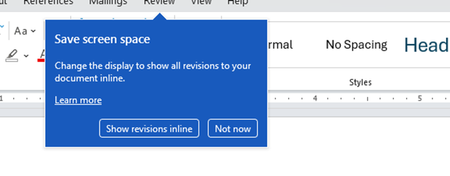
Disable incessant nagware popups
I don't know about everyone else, but I am sick and tired of the nagware pop ups in Word, Excel, PowerPoint, Outlook, etc. Every single product harasses me with pop ups trying to tell me "hey, did you know this feature was here?", "you can do this if you click that", "let me hold your hand through using products you've used for decades even though you don't want daddy Microslop to do that". This is a prime example. I keep getting the same ones again and again and again and everything I've read indicates they should only appear once. But they don't. They keep coming back like a psychotic stalker ex who wants alimony even though you were never married. How do I get this nagware to stop?!746Views1like2Comments
Microsoft 365 Developer E5 license lacking endpoints and device ON defender portal
Dear Support Team, I am a microsoft certified trainer (MCT). I currently have a Microsoft 365 Developer E5 license assigned to my tenant. However, I have noticed that my Microsoft Defender portal (security.microsoft.com) is missing several critical features. For example, I cannot see the Endpoints or Devices menus, which is preventing me from implementing and testing Microsoft Defender for Endpoint. Additionally, my Azure tenant and Microsoft 365 tenant are separate. This has created challenges when configuring security services such as Microsoft Sentinel (SIEM), as certain prerequisites and integrations require configuration through the Microsoft Defender portal. Due to the missing Defender features, I am unable to complete the necessary setup. I would appreciate your assistance in understanding: Why the Endpoints and Devices sections are unavailable in my Defender portal despite having a Microsoft 365 Developer E5 license. Whether additional licensing, onboarding steps, or tenant configurations are required to enable Microsoft Defender for Endpoint features. How best to integrate or align my separate Azure and Microsoft 365 tenants to support services such as Microsoft Sentinel and Defender XDR. These issues are significantly impacting my ability to evaluate and implement Microsoft's security solutions. I would appreciate any guidance or recommendations to resolve them.827Views1like2CommentsSecurity Admin Center Tenant Allow/Block List Not Able to Block IPv4?
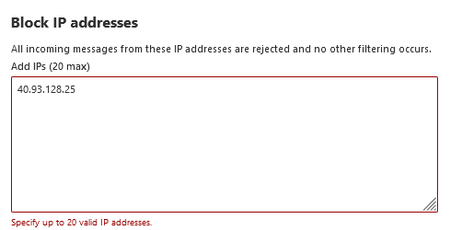
While using the Security Admin Center Tenant Allow/Block List we have been able to block specific email addresses and IPv6 IP addresses but are unable to block IPv4 IP addresses. We have tried both using the console and the CLI but have turned up unsuccessful both times when it comes to IPv4. A large majority of the phishing attempts that we encounter come from IPv4 addresses but we have been unable to block any of these. Will there ever be functionality for IPv4 within the Tenant Allow/Block list or is the only option to use conditional access policies? Also why is this enterprise tool only functional with IPv6 and without documentation stating that it does not work for IPv4?2.7KViews4likes6CommentsMicrosoft 365 E5 Security is now available as an add-on to Microsoft 365 Business Premium
The threat landscape continues to evolve creating ongoing challenges for small and medium businesses (SMBs) that are faced with increased regulations and cyberinsurance requirements. Today, Microsoft 365 Business Premium delivers core security solutions to SMBs that help safeguard data, defend against cyberthreats, and manage access and devices. With the growing volume of attacks and increased sophistication of threats, there are SMBs that want enhanced cybersecurity protection for their business. We are pleased to announce that Business Premium customers are now able to purchase Microsoft 365 E5 Security as an add-on to further enhance their security. E5 Security brings new security value on top of Business Premium with Microsoft Entra ID Plan 2, Microsoft Defender for Identity, Microsoft Defender for Endpoint Plan 2, Microsoft Defender for Office 365 Plan 2, and Microsoft Defender for Cloud Apps. (ENHANCED) Identity and access controls Business Premium includes Microsoft Entra ID P1, which provides single sign-on, multi-factor authentication (MFA), and conditional access to help SMBs manage user identities and enable access to applications and resources from trusted users, devices, and locations. Microsoft Entra ID P2 offers advanced security and governance features including Microsoft Entra ID Protection and Microsoft Entra ID Governance. Microsoft Entra ID protection offers risk-based conditional access that helps block identity attacks in real time using behavioral analytics and signals from both user risk and sign-in risk. It also enables SMBs to detect, investigate, and remediate potential identity-based risks using sophisticated machine learning and anomaly detection capabilities. With detailed reports and alerts, your business is notified of suspicious user activities and sign-in attempts, including scenarios like a password-spray where attackers try to gain unauthorized access to company employee accounts by trying a small number of commonly used passwords across many different accounts. ID Governance capabilities are also included to help automate workflows and processes that give users access to resources. For example, IT admins historically manage the onboarding process manually and generate repetitive user access requests for Managers to review which is time consuming and inefficient. With ID Governance capabilities, pre-configured workflows facilitate the automation of employee onboarding, user access, and lifecycle management throughout their employment, streamlining the process and reducing onboarding time. (NEW) Extended Detection and Response (XDR) Microsoft Defender XDR delivers a unified and efficient approach to incident-level visibility across the attack lifecycle. Together XDR and exposure management (XSPM) consolidate multiple siloed security solutions to provide best-of-breed capabilities across identities, endpoints, apps, and email. (NEW) Identity threat detection and response (ITDR) Identities are one of the most common attack vectors making identity-specific threat detection and response a critical element to secure your business. Microsoft Defender for Identity includes dedicated sensors and connectors for common identity elements that offer visibility into your unique identity landscape and provide detailed posture recommendations, robust detections and response actions. These powerful detections are then automatically enriched and correlated with data from other domains across Defender XDR for true incident-level visibility. (ENHANCED) Device security Microsoft Defender for Business (MDB) already brings enterprise-grade device protection capabilities to Business Premium customers across Windows, MacOS, iOS, and Android devices. It includes vulnerability management, next-generation antivirus protection, AI-powered endpoint detection and response with automatic attack disruption, and automated investigation and remediation. With streaming APIs, customers and partners can build Managed Detection and Response (MDR) services with Defender for Business. For customers who need advanced hunting, Microsoft Defender for Endpoint P2 adds advanced hunting, and 6 months of data retention on the device, along with endpoint security for IoT devices. (ENHANCED) Email and Collaboration security Microsoft Defender for Office 365 P1 in Business Premium includes SafeLinks with time of click URL filtering, safe attachments with real-time attachment scanning in sandbox, and phishing and malware defense across email, Microsoft Teams, OneDrive and SharePoint. It also has AI-powered LLM-based threat protection with 99.995% attacker intent detection accuracy. With Defender for Office 365 P2, you gain access to cyber-attack simulation training, which provides SMBs with a safe and controlled environment to simulate real-world cyber-attacks, helping to train employees in recognizing phishing attempts. Additionally automated response capabilities and post-breach investigations help reduce the time and resources required to identify and remediate potential security breaches. Detailed reports are also available that capture information on employees’ URL clicks, internal and external email distribution, and more. (NEW) Software-as-a-service (SaaS) security Microsoft Defender for Cloud Apps is a comprehensive, AI-powered software-as-a-service (SaaS) security solution that enables IT teams to identify and manage shadow IT and ensure that only approved applications are used. It protects against sophisticated SaaS-based attacks, OAuth attacks, and risky interactions with GenAI apps by combing SaaS app discovery, security posture management, app-to-app protection, and integrated threat protection. IT teams can gain full visibility into their SaaS app landscape, understand the risks and set up controls to manage the apps. SaaS security posture management quickly identifies app misconfigurations and provides remediation actions to reduce the attack surface. E5 Security delivers added protection to meet the growing needs of SMBs in a package that is cost-effective. Purchasing E5 Security has 57% savings when compared to the cost of separately purchasing the individual products that are included. FAQ When will E5 Security be available for purchase? E5 Security is available for purchase as an add-on to Business Premium starting today, 3/6. How can I purchase E5 Security? You can purchase E5 Security as an add-on to Business Premium through Microsoft Security for SMBs website or through your Partner. Does Microsoft 365 Business Premium plus Microsoft 365 E5 Security allow mixed licensing for endpoint security solutions? Microsoft Defender for Business does not support mixed licensing so a tenant with Defender for Business (included in Microsoft 365 Business Premium) along with Defender for Endpoint Plan 2 (included in Microsoft 365 Security) will default to Defender for Business. For example, if you have 80 users licensed for Microsoft 365 Business Premium and you’ve added Microsoft 365 E5 Security for 30 of those users, the experience for all users will default to Defender for Business. If you would like to change that to the Defender for Endpoint Plan 2 experience, you should license all users for Defender for Endpoint Plan 2 (either through standalone or Microsoft 365 E5 Security) and then contact Microsoft Support to request the switch for your tenant. You can learn more here. What are the differences between Microsoft Defender for Business and Microsoft Defender for Endpoint P2? MDB includes many of the same features as MDE P2, including enterprise-grade device protection for Windows, MacOS, iOS, and Android devices, vulnerability management, next-generation antivirus protection, AI-powered endpoint detection and response with automatic attack disruption, and automated investigation and remediation. MDE P2 adds endpoint security for IoT devices, threat hunting, and 6 months of data retention on the device. A detailed comparison is available here. As a Partner, how do I build Managed Detection and Response (MDR) services with MDB? For partners or customers looking to build their own security operations center (SOC) with MDR, Defender for Business supports the streaming of device events (device file, registry, network, logon events and more) to Azure Event Hub, Azure Storage, and Microsoft Sentinel to support advanced hunting and attack detection. If you are using the streaming API for the first time, you can find step-by-step instructions in the Microsoft 365 Streaming API Guide on configuring the Microsoft 365 Streaming API to stream events to your Azure Event Hubs or to your Azure Storage Account. To learn more about Microsoft Security solutions for SMBs you can visit our website. Partners can access training resources, customer decks and deployment checklists from our Business Premium Partner Playbook and find additional resources for Microsoft Security for Partners.97KViews11likes19Comments
Ugly Defender awareness training screen
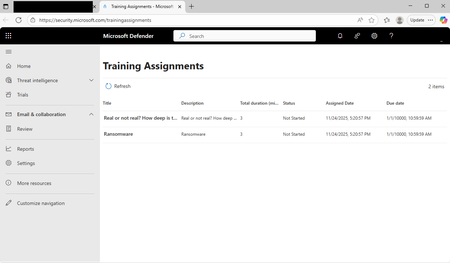
I want to use the extensive training material available from the E5 licenses we just shelled out a boat load of $$ for. However, when someone gets an invite and they click the link to do the training they are taken to the Defender page. This might be fine for a technical person but its ugly as F for my users. Plus, there is extra rubbish like Threat Intelligence, Trials, Reports, settings etc they can access that I don't want them too. This is not a very polished interface for non-technical people. Is there a way to fix this? Can it send them the direct training URL, so it just opens the training and not the defender page from them to open the video? Can we do a custom landing page but put the assigned training URLs into that? This is ugly there has to be a way to make this more user friendly.207Views0likes3CommentsHow to Check if Shared Mailboxes Need MDO Licenses
Shared mailboxes might need Microsoft Defender for Office 365 licenses, but how do you identify how many licenses? We use PowerShell to do the job by analyzing external email sent to shared mailboxes. If a mailbox receives external email, then by definition the mailbox receives benefit from MDO, and that’s the test for requiring a license. https://office365itpros.com/2025/11/25/microsoft-defender-for-office-365-3/196Views0likes0Comments
Security Score in Security Admin center not updating
Hi, I am looking at the security score in the security admin center and trying to apply some of the easy items to improve the score. For example, "Move messages that are detected as impersonated users by mailbox intelligence" which needs anti-phishing policy with the ‘Enable mailbox intelligence’ and ‘Enable intelligence for impersonation protection’ options enabled ensure that the ‘If mailbox Intelligence detects an impersonated user’ option set to ‘Quarantine the message’ Both of which are now done But my score will not change and the reccomendation doesn't go away. In this example i have only the default policy, Office365 AntiPhish Default, and it is applied to all users - 408 users (100%). Can anyone point me towards what I am doing wrong or missed? I have applied 7 of the listed recommended actions with no score change so far so i'd like to work it out before I get too far into it if i'm doing it wrong. Thanks for any advice IanSolved519Views0likes2Comments