wpf
38 Topics
Microsoft Partner Center Support Not Working
Hi, I was wondering if someone can help, I recently created a Microsoft Partner Center Individual account, created an app in ten languages, and released it into the Microsoft Store. That part was the easy part. Then I noticed the search terms weren't working for my app, if I used all seven, my app didn't appear. My app only appears if I search for it by name, so nobody is ever going to see it, unless they guess my app name. So I go into Microsoft Partner Center to see if I can get some help, nothing in there works for help, I don't see a workspace for 'Apps and Games'. If I try to get help on my account settings I'm taken to something called the 'Engage Center', which doesn't work, it shows 2 flashing '...' icons and nothing more. So I'm a bit stuck, I cannot find any other way to contact Microsoft for help, I guess there is something wrong with my account maybe? Anyone got any advice on how I can get help with my Microsoft Partner Center issues? (Oh and yeah, I cannot post this either without using a tag which makes no sense either so sorry about that) Thanks, Phil.72Views0likes2Comments
Build Reliable AI Agents with Monitoring, Tool Integration, and Responsible AI in Microsoft Foundry
Build Reliable AI Agents with Monitoring, Tool Integration, and Responsible AI in Microsoft Foundry Introduction AI agents are becoming an important part of modern business applications. They can answer customer questions, automate repetitive tasks, retrieve information, and interact with external services. However, building an AI agent that works correctly in a development environment does not always mean it will perform reliably in production and https://geometrydasshapk.com/ As applications grow, agents must handle more complex requests, unexpected user inputs, changing data, and different operational conditions. Without proper monitoring and evaluation, it can become difficult to understand why an agent produces incorrect responses or fails to complete a task. Microsoft Foundry provides tools and capabilities that help development teams build, test, monitor, and improve AI-powered applications. By combining structured tool integration, evaluation workflows, observability, and responsible AI practices, teams can create agents that are easier to maintain and more dependable. This article explores a practical approach to building reliable AI agents using Microsoft Foundry. 1. Understand the Architecture of an AI Agent Before developing an AI agent, it is important to understand how its main components work together. A typical agent application includes several components: User interface: Receives questions and displays responses. Language model: Understands requests and generates responses. Instructions: Define the agent's role, limitations, and expected behavior. Tools: Allow the agent to interact with APIs, databases, and other services. Evaluation system: Measures response quality and task completion. Monitoring: Tracks errors, performance, and resource consumption. These components work together to process user requests and deliver useful results. For example, consider a customer support agent that helps users check their order status. The agent receives a question, identifies the required information, calls an order-management tool, and returns the result. A well-designed architecture should ensure that the agent does not invent order information or report an action as completed without confirmation from the relevant system. 2. Configure Agent Instructions and Responsibilities Agent instructions are an important part of application development. They explain what the agent should do, how it should communicate, and which actions it is allowed to perform. Poor instructions can lead to inconsistent responses, unnecessary tool calls, or unsupported claims. A practical instruction structure should include: Role definition Describe the agent's primary responsibility. Task boundaries Explain which requests the agent can handle and which requests require additional support. Tool usage Define when the agent should call available tools and what information it needs before doing so. Response requirements Specify how the agent should present results, errors, and incomplete operations. For example, an order support agent might follow these rules: Role: You are a customer order support assistant. Responsibilities: - Help users check order information. - Retrieve order details using approved tools. - Explain order status in simple language. Rules: - Never invent an order number or delivery date. - Verify information before reporting a completed action. - Ask for missing information when necessary. - Do not expose private customer information. - Explain tool errors clearly. These instructions establish a predictable foundation for the agent. 3. Connect AI Agents with External Tools An AI agent becomes more useful when it can interact with external systems. For example, an agent may need access to: Customer support platforms. Product information databases. Order management systems. Internal business APIs. Document repositories. Reporting services. Tool integration should follow a clearly defined contract. Each tool should have a specific purpose, expected input parameters, and a predictable output format. Consider an illustrative order lookup tool: def get_order_status(order_id): if not order_id: return { "success": False, "error": "Order ID is required" } order = find_order(order_id) if order is None: return { "success": False, "error": "Order not found" } return { "success": True, "order_id": order_id, "status": order.status } This example demonstrates the expected structure rather than a built-in Microsoft Foundry API. When integrating tools into an agent, developers should also consider authentication, authorization, input validation, API timeouts, and error handling. A tool should only have access to the resources required for its assigned task. 4. Evaluate Agent Responses Before Production Testing an AI agent is not limited to checking whether it produces grammatically correct answers. A response can sound convincing while containing incorrect information. Evaluation should measure multiple aspects of agent performance: Evaluation area What to measure Accuracy Does the response contain correct information? Groundedness Is the response supported by available data? Task completion Did the agent successfully complete the request? Tool selection Did it select the correct tool? Safety Did it follow security and privacy requirements? Consistency Does it behave reliably across similar requests? Microsoft Foundry provides evaluation capabilities that can help teams assess AI application performance. A useful evaluation dataset should contain representative user requests, expected outcomes, and relevant supporting information. For an order support agent, test cases might include: A valid order number. An invalid order number. A missing order number. An order with a pending delivery. An unavailable external service. A request containing instructions that attempt to override the agent's rules. Testing these scenarios helps developers identify weaknesses before releasing the application. 5. Monitor Performance and Identify Errors After deployment, monitoring becomes essential. Real users often submit requests that developers did not consider during initial testing. Monitoring helps teams understand how the agent behaves under actual operating conditions. Important metrics include: Request volume. Response latency. Tool execution time. Failed tool calls. Model token consumption. Evaluation scores. Application exceptions. Microsoft Foundry can be integrated with monitoring and observability services such as Azure Application Insights. Development teams can use monitoring information to identify recurring failures and investigate the underlying causes. For example, if an agent begins responding slowly, developers should investigate whether the issue comes from model processing, external API latency, database queries, or network connectivity. It is important to distinguish infrastructure problems from problems in the agent's instructions or configuration. 6. Implement Responsible AI and Security Controls Reliability also depends on how an AI agent handles sensitive information and potentially harmful requests. Developers should establish security controls before allowing an agent to interact with production systems. Important considerations include: Data protection: Avoid exposing personal or confidential information in responses and logs. Access control: Use appropriate identity and permission mechanisms to restrict access to external resources. Input validation: Validate information received from users before passing it to external tools. Prompt injection protection: Treat retrieved documents, user-provided content, and external tool outputs as untrusted data. Human oversight: Require human approval for sensitive operations such as financial transactions or account changes. Auditability: Maintain appropriate records of important agent actions and failures. Responsible AI practices should be included throughout development rather than added only after deployment. 7. Improve Agent Performance Through Continuous Testing An AI agent should not be considered a finished product after its first successful deployment. Models, instructions, tools, and user requirements can change over time. These changes may improve performance, but they can also introduce unexpected problems. A continuous improvement process can include: Collect representative production traces. Identify frequently occurring errors. Review failed interactions. Update instructions or tool descriptions. Run evaluation tests against the updated configuration. Compare the new results with the previous baseline. Deploy changes only after they pass the required checks. For example, if an order support agent frequently reports incorrect delivery information, developers should investigate whether the issue comes from outdated data, incorrect tool selection, or unsupported response generation. The appropriate fix should address the underlying cause rather than simply changing the wording of the agent's response. 8. Establish a Production Release Checklist Before releasing an AI agent, development teams should verify that the application meets its operational requirements. A practical release checklist includes: Agent instructions have been reviewed. All external tools have defined input and output contracts. Authentication and authorization are configured. Evaluation datasets cover important user scenarios. Critical safety tests have passed. Monitoring and error reporting are enabled. API failures and timeouts are handled correctly. Sensitive operations have appropriate approval controls. A rollback strategy is available. Production performance has been reviewed. These checks help reduce deployment risks and make ongoing maintenance easier. Conclusion Building reliable AI agents requires more than selecting a language model and writing a set of instructions. Developers must consider the entire application lifecycle, including architecture, tool integration, evaluation, monitoring, security, and continuous improvement. Microsoft Foundry offers a platform for developing and evaluating AI applications, while integrations with Azure services can help teams monitor and manage production workloads. By establishing clear agent responsibilities, testing different scenarios, monitoring actual performance, and reviewing every important configuration change, development teams can build AI applications that are more reliable, secure, and maintainable. The most effective approach is to treat AI agent development as an ongoing engineering process rather than a one-time deployment. Next Steps If you are developing AI-powered applications, consider exploring these areas: Microsoft Foundry documentation and agent development. Azure Application Insights for application monitoring. AI evaluation techniques for measuring response quality. Responsible AI principles for production applications. Automated testing and deployment workflows. Start with a small use case, establish measurable performance requirements, and gradually expand your agent's capabilities as your evaluation results improve.76Views0likes0CommentsNext-Gen Suite Modernization & Legacy Lifecycle Strategy
Hi Microsoft team As Microsoft continues to evolve its ecosystem, balancing the introduction of modern capabilities with long-term enterprise sustainability offers a compelling product architecture challenge. From a product lifecycle and system design perspective, a two-tier strategy could bridge this gap effectively: 1-Controlled Internal Penetration Testing During Next-Gen Development: While engineering and building the new suite, the primary focus should be on controlled internal penetration testing (red teaming) and controlled exploitation. This proactive auditing ensures identifying and patching structural security vulnerabilities at the root level before release, preventing post-launch patching cycles. 2-Next-Generation Modern Suite: Re-building modern iterations of the core Microsoft suite from the ground up, featuring advanced security architectures and embedded AI capabilities, while preserving the familiar user interface. Once this new version is fully launched and stabilized, feature updates for the legacy suite can be formally discontinued. 3-Legacy Suite Lifecycle & Sunset Strategy: Maintaining the classic suite for users and organizations attached to the legacy experience. After transitioning to the Next-Gen platform, support for the legacy suite will shift strictly to critical security patches until it reaches its end-of-life. 4-Strategic Go-To-Market Pricing: Leveraging the legacy suite through aggressive discounting or a freemium model to drive massive user acquisition and retain legacy-bound clients within the Microsoft ecosystem, while positioning the Next-Gen suite as the flagship solution. I’d be very interested to hear how the product strategy team evaluates the trade-offs between legacy maintenance costs and freemium/discounted user acquisition models. 5-Refactoring Legacy Code Dynamics: Legacy architectures often suffer from excessive code verbosity, deeply entangled logic, and inherent structural limitations that cannot natively support modern parallel processing or AI workloads. Continuing to append features onto these bloated codebases only increases system overhead and latency. Freezing new feature development on legacy suites—while re-engineering the Next-Gen platform with clean, modern, and concise frameworks—ensures optimal performance without carrying decades of technical debt forward. Best regards74Views0likes0Comments
Showcase: Real-Time Revit API Polling Bridge Built with C# / .NET
Hello .NET Community, I wanted to share an implementation project I recently built for a Devpost hackathon called "BIM MPT Urban Optimize." It focuses on using C# and .NET infrastructure to handle real-time data streaming between external execution environments and localized CAD/BIM client engines. Key Technical Highlights: • Built a custom background polling bridge in C# that safely interacts with the Revit API thread context. • Pushes data-optimized, active 3D geometric loops directly into running modeling document sessions in real-time. • Integrates external optimization logic using Modern Portfolio Theory (MPT) linear algebra and Simplex Projection mathematics to dynamically resolve parcel footprint boundaries. You can view the code breakdown, system workflow diagrams, and video demo here: https://devpost.com/software/bim-mpt-urban-optimize I would love to get your technical feedback on managing long-polling loops or background worker services safely within single-threaded legacy desktop API contexts. Best regards, Eng. Sherif Magd151Views0likes0Comments
Configure registry permissions
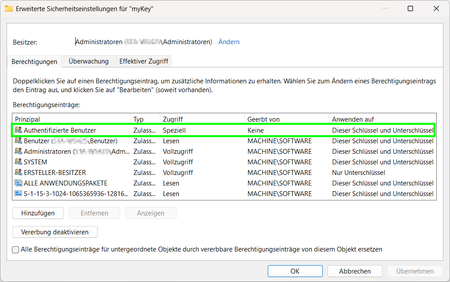
Hi I have strange problem to set specific permission to a registry key. According to Microsoft's https://learn.microsoft.com/en-us/dotnet/api/system.security.accesscontrol.registrysecurity?view=net-10.0, it should work like this: private static RegistryKey CreateRegistryKey(RegistryKey parentPath) { RegistryKey childKey = parentPath.CreateSubKey("myKey"); RegistryAccessRule rule = new RegistryAccessRule( new SecurityIdentifier(WellKnownSidType.AuthenticatedUserSid, null), RegistryRights.ReadKey | RegistryRights.Delete, InheritanceFlags.ContainerInherit, PropagationFlags.None, AccessControlType.Allow); RegistrySecurity childACL = childKey.GetAccessControl(); childACL.AddAccessRule(rule); ShowSecurity(childACL); childKey.SetAccessControl(childACL); return childKey; } But if the code is executed in a windows service, I missing my permission!? How can this be? Am I doing something wrong? Have I overlooked something?452Views0likes1Comment
WPF application becomes unresponsive after plugging/ unplugging USB device supporting pen events
I've run across an issue on Windows 10 and 11 where WPF apps seem to become unresponsive when unplugging or plugging in a USB device that registers as an input device that can receive touch/stylus events. This can be seen by creating a basic WPF app in Visual Studio, running it, and then adding/removing one of these devices. I used Spy++ to see which messages the app was receiving. I saw a number of messages I was expecting to see - WM_DEVICECHANGE, WM_POINTERDEVICECHANGE, as well as 0x02C8 or 0x02C9 (WM_TABLET_ADDED or WM_TABLET_DELETED, respectively). However, after this, thousands (or sometimes tens of thousands) of messages were sent to a window belonging to the app that is at (0,0) with dimensions 0x0. Its caption is "OLEChannelWnd". The messages are mostly the same: They're all posted to the window The message ID is 0x0400 (WM_USER + 0) The wParam is always the same (0x0000BABE) The lParam varies each time I restart the WPF app, but they seem to settle on a small number of values - for example, the last time I tried this, I saw 0x05D08BB0 4-6 times, then 0x0D1B8E98 a dozen or more times, then 0x0D1B7B90 several times, and so on. During these messages, the app would become unresponsive for as long as these messages were posted. This could take upwards of 5- 10 minutes before recovering, and sometimes would result in a crash from the app running out of memory. After doing research online, I found some posts that talked about a possible issue in the PenThreadWorker thread - that it could be running into some kind of deadlock when initializing certain objects. I also found several posts that mentioned disabling the stylus & touch events by setting "Switch.System.Windows.Input.Stylus.DisableStylusAndTouchSupport". I can add this to the app.config for my app as follows: <runtime> <AppContextSwitchOverrides value="Switch.System.Windows.Input.Stylus.DisableStylusAndTouchSupport=true" /> </runtime> or, equivalently, I can do the following during application startup: AppContext.SetSwitch("Switch.System.Windows.Input.Stylus.DisableStylusAndTouchSupport", true); This does fix the issue - I don't see these WM_USER messages being sent to the app, and as such the app becomes immediately responsive once the device is plugged/unplugged. However, one of the WPF apps that I'm working with (i.e. not the simple test app) needs to process tablet events, so this setting can't be used there. Furthermore, it can only be set either in app.config or during application startup - any calls to it after that are ignored. I've tried this with .NET 4.5.1, .NET 4.6 (which is required to use the code-based method) as well as .NET 4.8.1, but in all cases I see this same result. As mentioned, I know this isn't an issue unique to my app since I'm able to reproduce this issue by creating a basic WPF app and following the same steps. Additionally, I observed the same issue with other test applications I've found online while trying to troubleshoot this issue. Interestingly, I have observed this within Microsoft's own Visual Studios 2017 (which is what I'm using for development) and have found a few other threads online from other people running into the same problem with their apps. I have also tried updating to later Visual Studios versions for development of my app, but this doesn't solve the issue either. Finally, I followed this post from Microsoft regarding https://learn.microsoft.com/en-us/dotnet/desktop/wpf/advanced/disable-the-realtimestylus-for-wpf-applications and still was unable to fix the issue.285Views0likes0CommentsWPF App on Windows Server (RDP) – Error Sometimes When Opening New Window
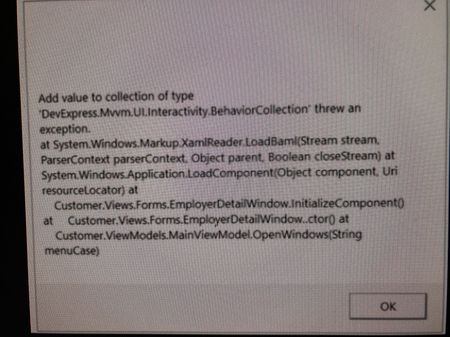
Hi everyone, I have a WPF app that runs from a network drive. It works fine on Windows 11 at the office. But when users run it through Remote Desktop on a Windows Server 2019 virtual machine (using the exact same .exe from the same network drive location), some of them get an error when opening a new window. The app starts normally, but the error happens only when opening another window — and not for every user. Strangely, the next day the same user can open the app and use it normally again without changing anything. Has anyone seen this before or know how to fix it? I’ve also attached: A screenshot of the error message The function that causes the error Thanks a lot!314Views0likes0Comments
How to decouple views from view models using CommunityToolKit.mvvm
I am writing my first MVVM app using CommunityTookit.mvvm. I am using as reference the Micrsoft Learning link https://learn.microsoft.com/en-us/dotnet/communitytoolkit/mvvm/ioc. This link shows the setting of the viewmodel to the view DataContext using the following statement in the view's .cs file: this.DataContext = App.Current.Services.GetService<ContactsViewModel>(); The problem with this as I see it is that this statement couples the view to the view model, in this case ContactsViewModel. This means that in another app the view cannot be used with another viewmodel without modifying the view, i.e. changing ContactsViewModel above to another viewmodel type. This means that the view cannot be stored in a common library that is shared among different apps. There is a C# Corner example with the older MVVM TookKit that solved this problem using a ViewModelLocator class. This project is found https://www.c-sharpcorner.com/article/getting-started-with-mvvm-light-with-wpf/. The solution is to put the following code in the view's XAML file: DataContext="{Binding Main, Source={StaticResource Locator}}" The source object for the binding is found by looking for a ResourceDictionary that is in the scope of the view and which has an entry whose key is "Locator". In app.xaml which by definition is always in scope we have: <Application.Resources> <ResourceDictionary> <vm:ViewModelLocator x:Key="Locator" d:IsDataSource="True" /> </ResourceDictionary> </Application.Resources> The Dictionary element with key "Locator" is an object of type ViewModelLocator. In the ViewModelLocator class there is a Main property that always returns an instance of MainViewModel: public MainViewModel Main { get { return ServiceLocator.Current.GetInstance<MainViewModel>(); } } In our example, the view's DataContext binds to the Main property of the ViewModelLocator object. The value of the Main property is a MainViewModel object and this becomes the DataContext of the view. We can now in a different app re-use the view without changing it. All we have to do in the next app is to create a different ViewModelLocator object that specifies a different viewmodel in its Main property. The view is now completely decoupled from the view model. My question is, how would we de-couple the view from the view model using the CommunityToolkit.Mvvm? Do we also use a ViewModelLocator class? Is there a more elegant way with dependency injection? Another question I have is, suppose we want to use in one app the same view twice with different view models. An example of where we might want to do this is if we had a view that displayed a chart. It is conceivable that we might want to have more than one view model display its data using the same chart view. I cannot see how to do this in either of the above Microsoft or C# Corner examples.385Views1like0CommentsDeeply Disappointed with Copilot+
At the company where I work, we purchased a Copilot+ laptop with the hope of being able to use the new Windows AI libraries, such as Windows.AI.TextRecognition. The library works well, but we are unable to process more than 2 documents concurrently, which severely limits our document processing capacity. We also feel misled, as we did not see any mention anywhere of such a limitation regarding the library. I would appreciate it if a Microsoft representative could confirm whether this limitation exists and, if not, let us know if there is any way to increase this limit. Thank you in advance.498Views0likes1Comment
Microsoft Store Service APIs v9.0 publisherQuery - Uniquely identifying user subscription
I'm working on a WPF app that will be published to the Windows Store. It supports an add-on monthly subscription. That subscription comes with consumable credits for using my app. Per user, per month, I want to track the user's credit balance. I'm using the following Microsoft Store Service API endpoint to get the user's subscription details from my backend service: collections.mp.microsoft.com/v9.0/collections/publisherQuery Here's an example response (with identifying information replaced with fake data): { "ContinuationToken": null, "Items": [ { "RecurrenceId": null, "AcquiredDate": "2025-04-28T20:34:54.2761169+00:00", "AcquisitionType": "Recurring", "EndDate": "2025-05-31T00:00:00+00:00", "Id": "11111111111122222222222333333333", "ModifiedDate": "2025-04-28T20:34:54.277868+00:00", "ProductId": "AAAAAAAAAAAA", "ProductKind": "Durable", "Quantity": 1, "SatisfiedByProductIds": [], "SkuId": "0020", "StartDate": "2025-04-28T00:00:00+00:00", "Status": "Active", "Tags": [], "TransactionId": "11111111-1111-1111-1111-111111111111", "TrialData": { "IsInTrialPeriod": false, "IsTrial": false, "TrialTimeRemaining": "00:00:00" } } ] } Based on this response, I can see there's an active subscription, with the start and end date. I'm trying to determine whether anything in this response uniquely represents this user's subscription for this month, and could be used as my own identifier when tracking user credit consumption. It looks like Id and TransactionId are the only two potential candidates, but I don't know for certain that I can count on either of these for this scenario. Can anyone confirm? Is there some altogether better approach I should be using?257Views0likes0Comments