workitem
2 Topics
Azure Python how to link child/related tickets to an already created ticket?
I am trying to use the azure-devops python pip package in order to migrate a large amount of Epic/Story/Feature tickets into Azure Devops. I can create singular tickets just fine, but I'm having trouble linking those tickets together by specifying the hierarchy (ticket A is a parent to child tickets B / C / D) In order to create an EPIC ticket I'm running code like this: #set field jpo = JsonPatchOperation() jpo.from_ = None jpo.op = "add" jpo.path = "/fields/Microsoft.VSTS.Scheduling.FinishDate" jpo.value = default_field jpos.append(jpo) #create work item createdWorkItem = wit_client.create_work_item( document=jpos, project=project.id, type="EPIC", validate_only=validate_only, bypass_rules=bypass_rules, suppress_notifications=suppress_notifications ) Which works, but now I'm trying to figure out how to give this Epic ticket a linked Child ticket. In the github repo for this azure-devops python package, I can see that in the definition for `create_work_item` there is a string variable `expand` which has an option for `Relations` https://github.com/microsoft/azure-devops-python-api/blob/master/azure-devops/azure/devops/v5_1/work_item_tracking/work_item_tracking_client.py#L1578 ``` :param str expand: The expand parameters for work item attributes. Possible options are { None, Relations, Fields, Links, All }. ``` It's also discussed in the official azure-devops documentation for the create_work_item function: https://docs.microsoft.com/en-us/rest/api/azure/devops/wit/work-items/create?view=azure-devops-rest-6.0#workitemexpand But if I add `expand='Relations'` to my code it results in an error: createdWorkItem = wit_client.create_work_item( document=jpos, project=project.id, type="EPIC", validate_only=validate_only, bypass_rules=bypass_rules, suppress_notifications=suppress_notifications, expand='Relations' ) `TypeError: WorkItemTrackingClient.create_work_item() got an unexpected keyword argument 'expand'` Am I using this 'expand' variable correctly? Or is there a different way I should add a child ticket to an epic in azure using python? Thanks1.6KViews0likes1CommentAdding a comment to a DevOps Work Item using a given user
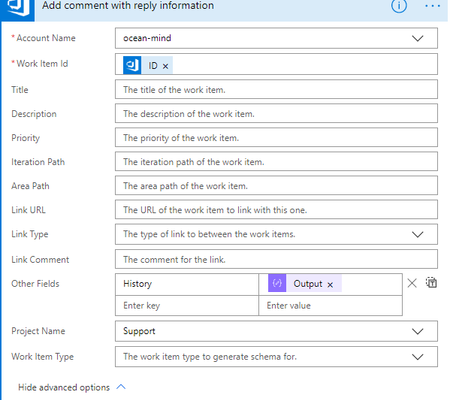
Second time writing this, as when trying to post the first time it gave me an error "invalid html" and discarded all my content -.- In Flow, I am using a DevOps - Update Work Item action, that updates a work item and adds a comment to it, using the Other Field "history" as the content of the comment. The problem is that the author is set to be the owner of the connection that the action is using, yet since the flow is triggering using an email, the author needs to be set dynamically using the email's author (provided he has an account in DevOps). How can I do this? Is there another name in "other fields" section, perhaps something like "Author" that I can use to set the author of the comment given the name, email or id from the email that started the flow? Screenshot: