windows containers
10 Topics
Simplifying gMSA for Windows Containers on AKS: Open-Source Tooling Now Available
We’re excited to announce that the Windows Containers AKS gMSA tooling is now publicly available on our GitHub repo (Microsoft/Windows-Containers-AKS-gMSA): Windows-Containers-AKS-gMSA. This open-source repository provides tooling to simplify configuring Group Managed Service Accounts (gMSA) for Windows containers running on Azure Kubernetes Service (AKS)—making it easier to containerize and run Active Directory–dependent applications in Kubernetes. Many enterprises rely on Windows applications that integrate with Active Directory (AD) for authentication and authorization. As these workloads move to AKS using Windows containers, it’s critical that they continue to securely support AD‑based authentication. This tooling helps organizations modernize to containers while maintaining trusted identity and authorization workflows built on Active Directory. Who this is for This tooling is intended for: Teams modernizing existing AD-dependent Windows applications Customers running Windows containers on AKS who require Kerberos or Integrated Windows Authentication Platform and infrastructure teams looking to standardize gMSA setup across environments Anyone evaluating whether gMSA is the right fit for their Windows container scenarios If you’re running workloads that depend on Active Directory and want to bring them to AKS with minimal refactoring, this repository can serve as a starting point for validating gMSA in your environment. Why gMSA on AKS matters Windows containers are a natural fit for modernizing existing IIS, .NET Framework, and other AD-integrated applications with minimal code changes. However, containers themselves can’t be domain joined, which historically made AD authentication challenging in containerized environments. With gMSA support on AKS, Windows containers can securely authenticate to Active Directory without requiring domain-joined nodes, instead relying on the AKS host to perform authentication on the application’s behalf. This enables: Secure AD authentication for Windows containers Easier cluster scaling and upgrades Reduced operational overhead compared to domain-joined node models with no changes to the AD infrastructure required While platform support exists, configuring gMSA on AKS still involves multiple moving parts—including AKS, Active Directory, Azure Key Vault, and credential specifications. This tooling is intended to help streamline that setup by reducing manual configuration across these components. What’s in the repository The Windows-Containers-AKS-gMSA repository provides a PowerShell module and supporting scripts designed to simplify the end-to-end setup of gMSA for Windows containers on AKS. Key highlights include: A PowerShell module to help configure an AKS cluster for gMSA usage Automation to reduce manual setup across Azure, AD, and AKS components Documentation and troubleshooting guidance for prerequisites and common pitfalls A trial/validation setup to help stand up a test environment for gMSA on AKS The goal is to lower the barrier to entry and make it easier for teams to experiment with—and ultimately adopt—gMSA for their Windows container workloads. Getting started To get started, visit the GitHub repository and review the README and documentation: https://github.com/microsoft/Windows-Containers-AKS-gMSA You’ll find: Environment and prerequisite requirements Instructions for importing and using the PowerShell module Guidance for validating your setup in a non-production environment For the official documentation, please visit Use gMSA on Azure Kubernetes service in Windows containers | Microsoft Learn. Open source and community feedback By making this repository public, we’re inviting the community to explore, experiment, and provide feedback. While this tooling is designed to simplify setup, it’s important to review the documentation carefully and validate configurations in test environments before production use. We welcome issues and feedback, suggestions for improvements, and any contributions that help improve reliability, clarity, or usability. What’s next This release is part of our continued effort to improve the experience of running Windows containers on AKS—particularly for customers modernizing existing Windows Server workloads that depend on Active Directory. We look forward to hearing how you’re using gMSA on AKS and where we can continue to improve the setup and deployment experience.252Views0likes0CommentsDiscover the New Era of Windows Server 2025 Nano Server Containers
Overview Today, we’re excited to announce a new era of Windows Server containers with more powerful Windows Server 2025 Nano Server containers. Windows Server containers have long been a go-to solution for delivering lightweight, scalable applications. However, users working with Nano Server containers have traditionally faced a trade-off between efficiency and functionality. While Nano Server’s minimal footprint made it ideal for resource-constrained environments, it lacked key features required by modern applications. In this blog, we explore how the Windows Server 2025 Nano Server container addresses these challenges, bringing a new level of flexibility and functionality with the introduction of Features on Demand (FoD) support for Nano Server containers. When Efficiency Limits Functionality: Overcoming Nano Server’s Trade-Offs Nano Server was designed with a singular focus: maximum efficiency through a minimal footprint (typically around 175MB compressed). This approach reduces resource consumption, minimizes attack surfaces, and accelerates deployment. However, such minimalism comes with trade-offs. When an application requires functionality not included in the Nano Server image—such as 32-bit (WoW64) application support, IIS components, or PowerShell—users have traditionally had to switch to the larger Windows Server Core container image. Although Server Core offers broader compatibility, it does so at the expense of a significantly larger size (around 2GB compressed and potentially growing with updates). These limitations made Nano Server less suitable for workloads that demand additional features or legacy compatibility, despite its impressive performance and efficiency. Introducing Features on Demand (FoD) Support To overcome Nano Server's limitations without compromising its hallmark lightweight design, Windows Server 2025 introduces Features on Demand (FoD) support for Nano Server containers. FoD offers a dynamic approach to container image management, allowing developers to include only the specific capabilities they need—such as 32-bit (WoW64) application support—during the container build process. By avoiding the need to bundle all features into a single pre-installed image, this model preserves the minimal footprint of Nano Server while enabling broader application compatibility. The underlying technology not only resolves current compatibility challenges but also lays the groundwork for future innovations in Windows containers. As the platform evolves, FoD will enable new roles and capabilities, empowering users to incorporate only what is necessary, maintain optimized images, and unlock greater flexibility with future releases. Key Benefits of Features on Demand Reduced Image Footprint and Faster Pull Times: By excluding optional features from the base image, the initial download and storage size remain minimal, leading to quicker pull times and faster deployment. Enhanced Density and Performance: Smaller images consume less memory and disk space, allowing a higher density of containers to run on the same infrastructure, which improves overall application performance. Granular Control Over Features: Users can precisely select and add only the specific components their applications need, resulting in highly tailored and optimized container images. This also improves security by reducing the attack surface. Cost Optimization: Maintaining smaller image sizes by including only the necessary features can lead to tangible cost savings in cloud environments. Addressing 32-bit Application Support Through this investment, we’ve also addressed one of the most significant limitations of the original Nano Server container image: its inability to run 32-bit applications. This limitation arose from the deliberate design choice to minimize the image footprint, as supporting 32-bit applications requires additional libraries and components. With Windows Server 2025, users can now optionally add the necessary components for running 32-bit applications to the Nano Server container image as needed. This provides a more optimized approach compared to relying on the larger, monolithic Server Core image for all workloads, making Nano Server a viable option for a wider range of applications, including those with legacy dependencies. Integration and Use Cases The Features on Demand (FoD) capability in Windows Server 2025 Nano Server containers leverages the existing Windows FoD infrastructure. It utilizes tools like Deployment Image Servicing and Management (DISM) and PowerShell cmdlets to manage the installation and removal of optional features in Windows images. For containerized environments, these tools interact with the container runtime to seamlessly add necessary feature packages to the Nano Server base image. In addition to enabling 32-bit application support, FoD also allows for the inclusion of specialized server roles or features that were previously unavailable in Nano Server. These include minimal IIS components for hosting web applications or specific networking functionalities. Features on Demand for Nano Server Containers Feature Name Capability Name (Example) Description Use Case 32-bit Application Compatibility Microsoft.NanoServer.Datacenter.WOWSupport Enables running 32-bit applications. Running legacy applications in a lightweight container. Windows Management Instrumentation (WMI) Microsoft.NanoServer.WinMgmt Enables basic WMI functionality. Obtain data through queries and enumerations. Minimal IIS Components Microsoft.NanoServer.IIS Enables basic web server functionality. Hosting lightweight web applications. Getting Started with FoD Support in Nano Server Ready to try Features on Demand with the Windows Server 2025 Nano Server image? Here’s how to get started: Prepare the environment — Ensure that the Windows container host is properly configured and ready for building containers. Create an installation script — Write a batch file containing the DISM commands to install the required FoDs. In this example, the script installs Microsoft.NanoServer.Datacenter.WOWSupport to enable WOW64 support. Save the file as install_wowsupport.cmd: @echo off REM FoDs such as Microsoft.NanoServer.Datacenter.WOWSupport will trigger a request for reboot. REM For those FoDs, DISM will exit with 3010 which must be handled to prevent the batch from exiting with a non-zero status. REM Additionally we must supply the /NoRestart argument to suppress the reboot prompt. DISM /Online /Add-Capability /CapabilityName:Microsoft.NanoServer.Datacenter.WOWSupport /NoRestart if errorlevel 3010 ( echo The specified optional feature requested a reboot which was suppressed. exit /b 0 ) NOTE: The FoD name used with the /CapabilityName parameter should match one of the available options which can be obtained using DISM from inside the Nano Server container. Access to Windows Update is required for the Nano Server container to download and install the specified FoD. 3. Update the Dockerfile — The following Dockerfile example adds the batch script and installs the specified FoD during the container build process: FROM mcr.microsoft.com/windows/nanoserver:ltsc2025 WORKDIR /install COPY install_wowsupport.cmd . RUN install_wowsupport.cmd # Download tools to be used for the sample workload RUN curl -L https://download.sysinternals.com/files/PSTools.zip > PSTools.zip RUN mkdir pstools RUN tar -xf PSTools.zip -C pstools 4. Build and tag the container image — Use the following command to build the container image and apply a custom tag: docker build -t <newname:tag> . 5. Validate using a 32-bit sample workload — Create and run a new container from the updated image to verify that the configuration is correct. In this example, validation is done by running the 32-bit version of the Sysinternals PSInfo tool (downloaded in step 3) using the following command to observe Nano Server’s WOW64 support: PsInfo.exe -accepteula Closing With the introduction of Features on Demand in Windows Server 2025 Nano Server containers, users now have the best of both worlds: a minimal footprint with the flexibility to add only the features needed for their specific workloads. This innovation marks a significant leap forward, delivering enhanced app compatibility, all while retaining Nano Server’s efficiency. And this is just the beginning—FoD unlocks exciting possibilities for the future of Windows containers. As always, your feedback is invaluable in shaping the future of Windows Containers. We encourage you to share your experiences and insights through the Windows Container GitHub Community.6.4KViews2likes8CommentsAnnouncing Windows Container on Azure Kubernetes Service Demos
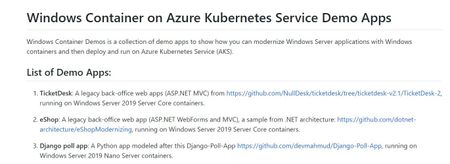
Today I am very happy to announce the release of Windows Container on Azure Kubernetes Service Demos. This Demos repo is a collection of demos to show how you can modernize Windows Server applications with Windows containers running on Azure Kubernetes Service (AKS). GitHub Repo: Windows Container on Azure Kubernetes Service Demos7.2KViews2likes2Comments
Announcing Active Directory Identity Improvement on AKS on Azure Stack HCI
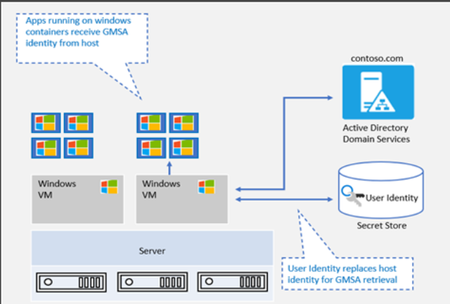
We’re very pleased to announce that Group Managed Service Account (gMSA) for Containers with non-domain joined host solution is now available in the recently announced AKS on Azure Stack HCI Release Candidate! “gMSA with non-domain joined host” vs. “gMSA with domain-joined host” gMSA with non-domain joined host gMSA with domain-joined host Credentials are stored as K8 secret and authenticated parties can retrieve the secret. These creds are used to retrieve the gMSA identity from AD. This eliminates the need for container host to be domain joined and solves challenges with container host updates. Updates to Windows container host can pose considerable challenges. All previous settings need to be reconfigured to domain join the new container host. Simplified end-to-end gMSA configuration process by build-in cmdlets In AKS on Azure Stack HCI, even though you don't need to domain join Windows worker nodes anymore, there are other configuration steps that you can't skip. These steps include installing the webhook, the custom resource definition (CRD), and the credential spec, as well as enabling role-based access control (RBAC). We provide a few PowerShell cmdlets to simply the end-to-end experience. Please refer to Configure group Managed Service Accounts with AKS on Azure Stack HCI - AKS-HCI | Microsoft Docs. Getting started We have provided detailed documentation on how to integrate your gMSA with containers in AKS-HCI with non-domain joined solution. Preparing gMSA in domain controller Configure group Managed Service Accounts with AKS on Azure Stack HCI - AKS-HCI | Microsoft Docs Prepare the gMSA credential spec JSON file (This is a one-time action. Please use the gMSA account in your domain) Install webhook, add Kubernetes secret and add gMSA Credential Spec can be finished by three cmdlets Deploy your application. As always, we love to see you try it out, and give us feedback. You can share your feedback at our GitHub community Issues · microsoft/Windows-Containers (github.com) , or contact us directly at win-containers@microsoft.com. Jing Twitter: https://twitter.com/JingLi0046523111KViews1like2Comments