windows 10
25 Topics
COM port connection issue
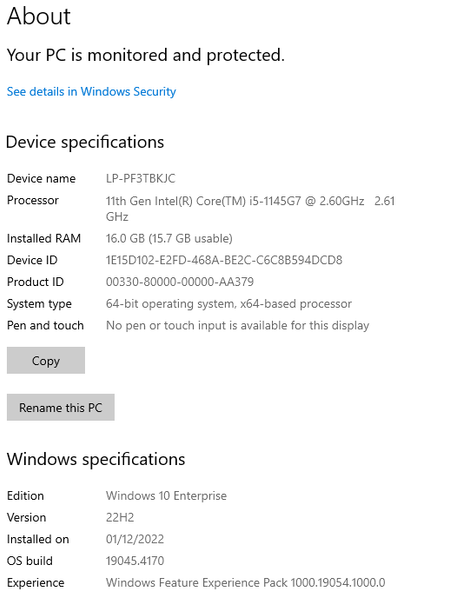
There is a connection issue with the COM port after changing the port name. The device is assigned to COM1 and the connection is established using the CreateFile function: HANDLEm_Hdl = CreateFile(reinterpret_cast<const wchar_t *>(portname.utf16()), GENERIC_READ | GENERIC_WRITE, 0, NULL, OPEN_EXISTING, FILE_ATTRIBUTE_NORMAL, NULL); After the handle is closed and the port name is changed from COM1 to COM2 using Device Manager it is not possible to connect COM2. The CreateFile returns error 2(the system cannot find the path specified). But the attempt to connect the old port COM1 succeeds. The problem goes away after plugging/plugging the device. The device is connected using USB. The driver is CP210x USB to UART Bridge VCP. This happens on certain Windows 10 machines and does not happen on Windows 11 machines. The driver is the latest and the same on all machines. The Windows 10 machine where the issue happens: The Windows 10 machine where the issue does not happen. The Windows 11 machine where the issue does not happen.434Views0likes0Comments
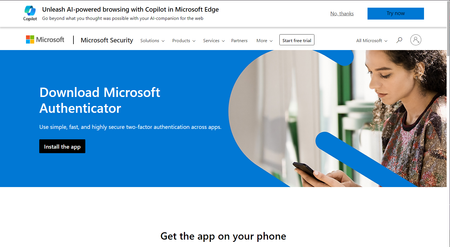
When is Microsoft going to bring Microsoft Authenticator windows aka desktop or within edge itself?
When is Microsoft going to bring Microsoft Authenticator windows aka desktop or within edge itself? (People like me lose mobiles) Isn't Windows device considered anything? Only mobiles and android and iOS devices matter? People like don't store important info on Windows devices? Edge has support for in-built password manager like chrome with chrome and google passwords then why is edge not having 2fa support on windows yet in 2024? Is windows still usable if my phones goes for service center, dies randomly, or is stolen? Can I consider windows devices to be of valuable in 2024 or should I shift 100 percent to android and MacOS and ios? Should I throw my windows devices out of window since it is not dependent device when any other fails? On a sidenote, I tried checking out but WinAuth Authenticator exists for Windows PC is open-source & offers 2-step verification (but unfortunately not updated since 2016) so why Microsoft which focuses so much of AI of everything has been able to bring desktop version for windows users? Or am I asking too much in the name of security and privacy that big tech promotes all the time? Can we trust microsoft and windows devices? Or is everything going to be done by google and chrome?2KViews0likes2Comments
How to retrieve History for related websites ? User Profile as solution isn't programming-immune...
Because History View As-Is don't have filtering, I create Profile to browse websites so that I can view history on related websites; however, to get more (such as Path Name), I need to access History File; which unfortunately is not Profile specific. Is it possible for History file profile-specific without involving non-Microsoft apps such as SQLite DB? My company policy is to avoid programming.... Thanks Ahead!501Views0likes0CommentsYou can now sync your favorites with Application Guard Window from Windows Defender
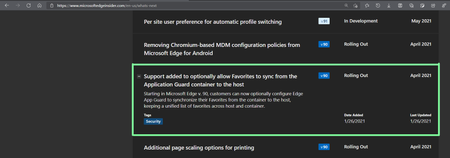
Microsoft Edge version 91.0.831.0 (Official build) canary (64-bit) you need to enable this newly added flag: edge://flags/#edge-wdag-favorites-sync and then when you open a new application guard window, your favorites will be there. Learn more about Windows Defender Application Guard mode (WDAG) and it's security features here: https://docs.microsoft.com/en-us/windows/security/threat-protection/microsoft-defender-application-guard/md-app-guard-overview https://docs.microsoft.com/en-us/deployedge/microsoft-edge-security-windows-defender-application-guard3.6KViews1like1CommentAnyone sees web history in Windows timeline?
I'm only talking about Edge stable users with history syncing on. so people that have history syncing on Edge stable (probably only UK users for now as it's a controlled feature rollout), do you see web history, just like Edge legacy, in Windows timeline? web history don't appear in timeline from insider channels, I'm assuming maybe it only works on stable channel.2.5KViews0likes9CommentsMicrosoft Family safety feature is not working with Edge Android or stable on Windows 10
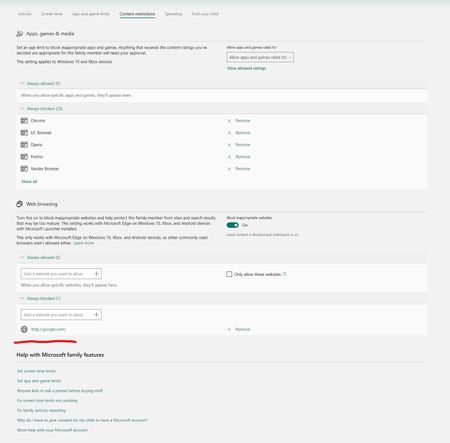
My account is the group's organizer, the Microsoft account that I've added to my family group, as a member has Windows 10 latest version 20H2 with Edge stable and Windows Defender on laptop. signed in with the same Microsoft account in Windows 10 and Edge profile. when I add a website to be blocked in here, it's never blocked, I can still access it on Windows 10 using Edge stable 87. does anyone have any experience with this that can help? only if you've done this before successfully.3.2KViews0likes8CommentsProblem with PWA icons on Start menu on Edge dev
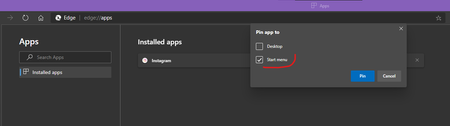
When installing a website, such as Instagram, as PWA in Edge dev (Version 88.0.685.3), the Instagram icon appears in the apps list of Start menu, at the top under "recently added" list (not pinned yet). when you drag & drop it on the Start menu to Pin it, it will have a small centered icon. but if you go to edge://apps/ and Pin Instagram's icon from there then Instagram's icon will be in normal big size in the Start menu Left side is big and normal, right side is very small pea-sized icon created by drag & drop. Instagram is one of the websites used as example, the same thing happens to Twitter, YouTube, Bing etc (tried all of them). see if you can reproduce it and send feedback through browser (preferably with "recreate my problem") Windows 10 20H2 latest version5.9KViews1like6Comments
Edge Version 87.0.644.0 (Official version) canary (64 bits)
Hello When there is a Windows app that asks to log into our Google Account to identify itself and access our app user account, the current version of Canary can no longer perform this task. There is always a "connection timeout" error message. (I used the Dev version of Edge, this problem was fixed) Knowing that with Edge Canary I have tried several times and each time there is this error message. The last try was to deactivate all extensions which did not fix this problem. --- 2 / Another problem which I think is linked, I use the "KEEPER" password manager and its Chrome extension. I am not using a Google account to identify myself. With Canary Edge, I was unable to log in and view passwords with the extension. There is a blockage ... the identification tries to connect and cannot, it loops and nothing happens .... Hope this is a bug. And no, of an "improvement" or restriction which will prevent me in the future from using my password manager. With other versions of Edge, stable or beta and dev, Keeper connects and I can see my passwords saved in my vault. I wanted to report these issues and am well aware that Canary is not a stable release.2KViews0likes1CommentAn error occurred while checking for updates: Failed to cache the downloaded installer
An error occurred while checking for updates: Failed to cache the downloaded installer. Error: 0x800b0001. (error code 7: 0xA043050D -- system level).Learn moreVersion 85.0.564.41 (Official build) (64-bit) Windows 10 (up to date) Edge stable is preinstalled so I can't uninstall it. tried to download the offline installer last time I got this error, Edge got updated, but now that there is a new update available, it's giving me this error again. also tried to run Edge as admin, no luck.4.5KViews1like6Comments