what's new
108 TopicsWhat’s new in Microsoft Sentinel: September 2026
Welcome back to What's new in Microsoft Sentinel. In September, Case Management brings investigation and collaboration together in Microsoft Defender, with a shared workspace to track work through resolution. Defender unified RBAC custom roles for granular delegated admin privileges (GDAP) give you finer control over what managed security service providers (MSSPs) and other partners can access. In Sentinel data lake, a single Codeless Connector Framework (CCF) connector can bring in data from many accounts, and our connector catalog has passed 500 data connectors. Read on for the details. Sentinel innovations: Sentinel SIEM Sentinel data lake Sentinel SIEM Case Management (Public Preview) Starting September 23, 2026, Case Management brings investigation and collaboration together in one experience in Defender. With Incident Cases, you can investigate, coordinate response, assign work, capture notes, and track progress through resolution, all from a shared workspace that holds investigation context alongside tasks and workflow tracking. Your existing Sentinel automation, playbooks, workbooks, and integrations carry over unchanged. This builds on the integrated security operations (ISOC) vision of bringing the context and workflows practitioners need to investigate and respond together in Defender. Read our Case Management blog, see the documentation, and watch the demo to learn more. Unified RBAC custom roles (Public Preview) If you work with a managed security service provider (MSSP) or manage multiple tenants, giving partners the right level of access is simpler. Granular delegated admin privileges (GDAP) sets which partner groups can be delegated access to your tenant, and Defender unified role-based access control (RBAC) sets what they can see and do once delegated. You can assign unified RBAC custom roles to GDAP remote tenant groups and scope each role down to specific security products, data sources, and data collections so partners receive only the access they need. GDAP previously only supported Microsoft Entra directory roles, which often meant handing partners more access than the job needed. Anyone who is a member of a remote tenant group receives its permissions. Your partner manages who belongs to the group, while you keep control of the role and its scope. Learn more. Sentinel data lake Multi-account support for codeless connectors (Public Preview) A single connector built on the Codeless Connector Framework (CCF) can bring data from many accounts, tenants, or environments into one Sentinel workspace. A unified connections list shows each account as its own row, labeled so you can tell them apart by account name, tenant ID, or environment. An “Add connection” experience walks you through setting up each one, and an independent lifecycle per connection means you can edit or remove any account without affecting the rest. Shared, efficient ingestion sends all of it to the same table, so you have one place to investigate instead of a separate connector for every account. This helps if you run separate production and development accounts, segment by region or business unit, or manage several customers in one workspace. Learn more. Sentinel data connectors pass the 500 mark Sentinel has reached an exciting milestone of more than 500 data connectors. Our connectors bring security signals from Microsoft services, non-Microsoft solutions, multicloud environments, applications, infrastructure, and custom sources into Sentinel, where they can be correlated and analyzed to help teams detect threats, investigate incidents, hunt across their digital estate, and automate response. With 500+ connectors and growing, Sentinel makes it easier for organizations to unify their security ecosystem and give the security operations center (SOC) broader visibility where it matters most. Find your connector. Additional resources Blogs and documentation: Integrated Security Operations Center in Microsoft Defender ISOC in Microsoft Defender (preview) Activate Microsoft Defender unified role-based access control (URBAC) Support multiple connections in a codeless connector Upcoming webinars: Oct 6: Security Immersion Event: Into the Breach Oct 14: Microsoft Security Immersion Event: Shadow Hunter Upcoming events: Oct 19: Microsoft Security Days Summit: Dallas Edition (In Person) ISOC: What's new with the Defenders Capture the Flag: Agent Wars (Hands-on) Nov 17–20: Microsoft Ignite at Moscone Center in San Francisco, CA, USA. See what's next in Microsoft Security. Register now. Stay connected Check back each month for the latest innovations, updates, and events to ensure you’re getting the most out of Microsoft Sentinel. We’ll see you in the next edition!341Views1like1CommentWhat’s new in Microsoft Sentinel: August 2026
Welcome back to What's new in Microsoft Sentinel. This August, Sentinel innovation kicks off with the AI-powered playbook generator, generally available to all Sentinel customers in the Microsoft Defender portal. Meanwhile, User and Entity Behavior Analytics (UEBA) anomalies enter public preview on the Behaviors layer, with coverage across Fortinet, AWS GuardDuty, Check Point, and Zscaler. In Sentinel data lake, nested API support in the Codeless Connector Framework (CCF) enters public preview to connect data sources whose APIs span multiple calls, and multi-account data ingestion is now generally available for Auth0, CrowdStrike, and Salesforce. Finally, the free Microsoft Threat Intelligence connector for unified SecOps, marking the final phase of MDTI convergence, is now generally available in the Defender portal. Read on for the details, and explore our resources at the end to go deeper. Sentinel innovations: Sentinel SIEM Sentinel data lake Sentinel SIEM AI-powered playbook generator expanded to all Sentinel customers in the Defender portal [Generally Available] Go from intent to action faster with the AI-powered playbook generator. It is available to all Sentinel customers using the Defender portal with no Security Copilot enablement or additional cost required. Describe the response you want in natural language and generate an editable, code-based playbook complete with tests, documentation, and a visual flow. To get started, confirm you have Automation Playbooks Unified RBAC Read and Write permissions, then select Automation > + Create > Playbook Generator. Read our blog to learn more. UEBA Anomalies are now built on top of Behaviors, along with expanded coverage through new data sources [Public Preview] Understand what happened and why it matters in one place. Sentinel adds UEBA anomaly insights and explainable context directly to the Behaviors layer, while expanding coverage across Fortinet, AWS GuardDuty, Check Point, and Zscaler data. This helps you identify unusual activity across identity, network, and cloud environments, reduce investigation time, and focus on the highest-risk behaviors. Enable the Behaviors layer, connect supported data sources, and explore the Insights column in the BehaviorInfo table to get started. Read our blog to learn more and watch our training video for a guided walkthrough. Sentinel data lake Nested API support in Codeless Connector Framework [Public Preview] Nested API support in the Sentinel Codeless Connector Framework (CCF) handles the list-then-detail pattern common across ISV log sources, where a single polling cycle spans multiple dependent API calls. An initial call returns a list of records such as alert IDs or case references, and one or more follow-up calls fetch the full detail for each record in that list. This means you can connect data sources whose APIs are naturally paginated across multiple calls and ingest complete records into Sentinel without building custom middleware or restructuring your endpoints. The pattern is also available through the Visual Studio Code (VS Code) extension for Sentinel connectors, which gives you a guided way to build, test, and package connectors that orchestrate chained requests. Read our blog to learn more, or try it with mock data in our Nested API Lab. Multi-account ingestion for Auth0, CrowdStrike, and Salesforce [Generally Available] Sentinel data connectors for Auth0, CrowdStrike Falcon, and Salesforce Service Cloud now support multi-account ingestion — powered by the Codeless Connector Framework (CCF). You can now connect and monitor multiple accounts or tenants from a single, unified connector configuration — no scripts, no hacks. 🔑 Auth0 — Multi-tenant identity monitoring Security teams managing multiple Auth0 tenants can now ingest logs from all of them into a single Sentinel workspace. Get complete visibility into authentication events, anomalous login patterns, and policy violations across every tenant without switching contexts. 🦅 CrowdStrike Falcon — Consolidated endpoint telemetry Organizations running multiple CrowdStrike tenants (e.g., across M&A entities or regional subsidiaries) can now stream detection alerts, threat intelligence, and endpoint telemetry from all tenants into Sentinel. One workspace. Full coverage. ☁️ Salesforce — Cross-org security insights Enterprises with multiple Salesforce orgs can now centralize audit logs, login history, and API activity across all orgs. Detect insider threats, unauthorized access, and compliance gaps without stitching data together manually. Get started with multi-account ingestion by finding your supported Sentinel data connector. Microsoft Threat Intelligence connector [Generally Available] The final phase of Microsoft Defender Threat Intelligence (MDTI) convergence is generally available in the Defender portal, giving you real-time Microsoft threat intelligence across detection, investigation, response, hunting, and automation at no additional cost. The result is a unified SecOps experience that reduces fragmented context and tool handoffs, and creates a clear path from threat signal to informed action. Microsoft Threat Intelligence data that previously required the Premium MDTI connector is available through the free Microsoft Threat Intelligence connector in Sentinel, enabling free and premium indicator feeds through one setup. MDTI APIs are also included for Sentinel customers without a separate license, and the API surface is unchanged, so no migration action is required. Read the blog to learn more. Additional resources Blogs and documentation: Investigate anomalies on UEBA behaviors in Microsoft Sentinel | Microsoft Learn UEBA behaviors layer pricing model in Microsoft Sentinel | Microsoft Learn Turn Complexity into Clarity: Introducing the New UEBA Behaviors Layer in Microsoft Sentinel | Microsoft Community Hub Microsoft Sentinel’s AI-driven UEBA ushers in the next era of behavioral analytics | Microsoft Community Hub Create pull codeless data connectors using nested API polling | Microsoft Learn View threat intelligence in entity pages in Microsoft Defender - Microsoft Defender XDR | Microsoft Learn Microsoft Threat Intelligence in Microsoft Defender XDR - Microsoft Defender XDR | Microsoft Learn Upcoming webinars: Sep 2: Microsoft Security Immersion Event: Agent Hackathon Sep 8: Security Immersion Event: Into the Breach Sep 8–9: Microsoft Virtual Training Day: Predict and Defend Against Cybersecurity Threats Sep 22: Tech Brief: Modernize security operations with a unified platform Sep 23: Microsoft Security Immersion Event: Shadow Hunter Stay connected Check back each month for the latest innovations, updates, and events to ensure you’re getting the most out of Microsoft Sentinel. We’ll see you in the next edition!989Views1like0CommentsWhat’s new in Microsoft Sentinel: July 2026
Welcome back to What's new in Microsoft Sentinel. In July, Sentinel adds custom detections support in Sentinel repositories, so you can manage detections as code alongside your analytics rules, playbooks, parsers, and workbooks, authoring in GitHub and deploying through the CI/CD pipelines you already use. In Sentinel data lake, table insights brings table-level observability into the Microsoft Defender portal, helping you track ingestion volume, spot week-over-week changes, and catch connectors that have gone silent, all without running a single KQL query. Connector coverage also expands with GitHub Audit logs, Agari, and Airlock Digital, bringing more of the signals that matter to you into one place. Read on for the details, and if you're joining us at Black Hat USA 2026, don't miss the keynote from Agentic Security CVP David Weston and other Microsoft Security activities at this event. Explore our resources at the end to go deeper. Sentinel innovations: Sentinel SIEM Sentinel data lake Sentinel SIEM Custom detections support in Sentinel repositories [Public Preview] Custom detections can be managed as code through Sentinel repositories, alongside analytics rules, playbooks, parsers, and workbooks, completing the detections-as-code workflow across the full Sentinel portfolio. Teams can author detections in GitHub, review through pull requests, and deploy via existing CI/CD pipelines or the Microsoft Security Bicep extension. Learn how to manage custom content with repository connections. Behind the Build with Gigamon: Enriching Sentinel with network-derived telemetry Learn how Gigamon's integration with Sentinel brings network-derived telemetry into your security investigations, correlated with the identity, endpoint, and cloud signals already in your workspace. By adding this runtime context, you can trace suspicious activity across environments and investigate threats that span traditionally siloed domains, with faster and more accurate investigations, higher-quality signal, and clearer visibility into encrypted and hybrid cloud traffic that logs alone often miss. Read the blog to explore the integration and what it means for your security operations. Sentinel data lake Table insights [Public Preview] Table insights is a built-in monitoring view on the tables page in the Microsoft Defender portal that gives you table-level observability for your Sentinel workspace without running KQL queries or opening a separate workbook. Table insights surfaces the signals you rely on most: 📊 Ingestion volume by tier – compare analytics versus data lake 📉 Day-over-week ingestion fluctuations – spot drops or spikes against the same day last week 🔝 Top 5 tables by daily ingestion volume – identify your biggest cost drivers at a glance 🕐 Last data received – catch connectors that stopped sending data 💰 Estimated daily ingestion cost – per-table cost to inform tier and retention decisions ⚠️ Volume anomaly – signed percentage change versus baseline to flag unusual behavior early Figure 1: View all table insights and investigate your table behavior with Sentinel in the Defender portal. Together, these signals help you spot collection failures early, so you can act before they turn into bigger problems. Learn more. Connectors [Public Preview] GitHub Audit logs (via Azure Storage Blob) The GitHub Audit logs connector ingests GitHub Enterprise audit logs into Sentinel from Azure Blob Storage with near real-time latency, so you can view this data in workbooks, create custom alerts, and strengthen your investigations. This requires Audit log streaming to be set up on GitHub for an Enterprise. Learn how to stream audit logs. Agari The Agari Data connector allows ingesting logs from Agari APIs into Sentinel. This connector integrates with Agari Brand Protection (BP) and Phishing Defense (APD). It supports Data Collection Rules-based ingestion time transformations for efficient query execution. Airlock Digital Ingests Airlock Digital application control and execution events to strengthen endpoint threat detection and response. Additional resources Blogs and documentation: Configure table settings in Sentinel Manage data tiers and retention in Sentinel Sentinel CI/CD repositories sample Upcoming events: Featured event: Aug 1–6, Black Hat USA 2026 (Mandalay Bay, Las Vegas) Keynote with Agentic Security CVP David Weston The end of rare: Defending when offense is cheap Wednesday, Aug 5 | 9:15 AM – 10 AM Main stage with Microsoft Security CVP Aarti Borkar and Microsoft Security Research VP Tanmay Ganacharya Poisoned at the source: Inside Microsoft Threat Intelligence's hunt for supply chain attacks Wednesday, Aug 5 | 2:30 PM – 3 PM Main stage with Customer Success GM Wes Malaby Mind the gap: Turning threat intelligence into decisive action with expert-led defense Wednesday, Aug 5 | 11:25 AM – 11:45 AM Mandalay Bay K with Principal Product Manager Naadia Sayed Agentic security: What's next Wednesday, Aug 5 | 11:15 AM – 12 PM Microsoft Security Black Hat USA 2026 VIP mixer hosted by Microsoft Security CVP Aarti Borkar Swingers at Mandalay Bay Resort – Register here Wednesday, Aug 5 | 6 PM – 9 PM Microsoft booth #2144 with live sessions, AMAs, and hands-on demos of our latest security innovations Learn more in our Black Hat 2026 blog Upcoming webinars: Aug 6: Security Immersion Event: Into the Breach Aug 13–14: Microsoft Virtual Training Day: Predict and Defend Against Cybersecurity Threats Aug 19: Microsoft Security Immersion Event: Shadow Hunter Aug 20: Microsoft Security Immersion Event: Agent Hackathon Aug 25: Tech Brief: Modernize security operations with a unified platform Stay connected Check back each month for the latest innovations, updates, and events to ensure you’re getting the most out of Microsoft Sentinel. We’ll see you in the next edition!1.1KViews2likes0CommentsWhat’s new in Microsoft Sentinel: June 2026
Welcome back to What's new in Microsoft Sentinel. In June, Sentinel SIEM’s Advanced Security Information Model (ASIM) broadens its normalization, so one analytic rule can reach more sources with less per-source work and, additionally, two new ASIM schemas can now bring asset inventory and AI agent telemetry into common form. In Microsoft Sentinel data lake, the Agent Identities Asset Connector adds the identity context behind your AI agents, helping you see who owns an agent and what permissions it holds. In Sentinel MCP, graph tools help security teams investigate threats and optimize security coverage by visualizing relationships across identities, devices, alerts, and signals in a unified graph experience. Read on for the details, and explore the resources at the end to go deeper. Sentinel innovations: Sentinel SIEM Sentinel data lake Sentinel MCP Microsoft Security Store Sentinel SIEM Advanced Security Information Model (ASIM) parsers and schemas [Generally available] The Advanced Security Information Model (ASIM) in Sentinel normalizes logs into common schemas, so one analytic rule can cover many sources without managing each native schema. ASIM coverage has expanded across more Azure services, broader AWS CloudTrail activity, and a range of third-party firewall, identity, and proxy products, so your detections reach more of your environment with less per-source work. Two schemas also join ASIM: Asset Entities normalizes asset inventory so you can correlate files and assets across investigations, and AI Agent Events normalizes telemetry from AI-driven workflows and autonomous agents. Browse the ASIM parsers on GitHub to explore, file issues, or contribute. Learn more in our blog. Sentinel transition to Defender blog series By March 31, 2027, all Microsoft Sentinel customers transition to Defender. This six-part series guides you through moving your Sentinel experience from the Azure portal to Defender, where SIEM, XDR, threat intelligence, AI, and automation come together in one experience. Your analytics rules, playbooks, workbooks, log analytics workspace, and access assignments all carry forward while the operational layer becomes more connected and intelligent. Starting early matters because you realize the benefits sooner, including a unified incident queue, cross-product correlation, Security Copilot, Sentinel data lake, and SOC optimization. Across the six-part blog series you get 1) the strategic shift, 2) the anatomy of incident and data changes, 3) detection and automation, 4) the governance shift across roles and access, 5) a readiness playbook with the adoption helper and cost guidance, and 6) a look at the AI-first SOC. Each part stands alone, so you can read in order or jump to what matters most to you. Sentinel data lake Agent Identities Asset Connector [Public preview] The Agent Identities Asset Connector brings identity context for AI agents into Sentinel. Activity connectors like Agent 365 and Microsoft 365 Copilot already show you what AI agents do, but activity alone cannot tell you who owns an agent, what permissions it holds, or how it is governed. This connector fills that gap with four asset tables covering agent owners, agent identities, agent blueprints, and the service principals tied to those blueprints. Together they form a connected agent identity graph you can trace from owner to identity to blueprint to permissions to the resources an agent touches. Joining this asset data with activity data in Sentinel data lake lets you detect anomalous behavior relative to permissions, spot over-permissioned or misconfigured agents, and follow full execution chains for end-to-end traceability. To get started, install the Agent 365 and Microsoft 365 Copilot solutions in Content Hub and enable the asset and activity connectors. Learn more. Sentinel MCP Sentinel MCP graph tools [Public preview] Microsoft Security Graph MCP tools, recently introduced in the Microsoft Sentinel MCP Server data exploration collection helps security teams investigate threats by exploring relationships between identities and device assets, and threat and activity signals ingested by data connectors and surfaced by analytic rules. Starting from an alert, analysts can follow the exposure path across connected entities — tracing lateral movement, understanding blast radius, and identifying configuration gaps — all from a single, interactive workspace. The tool provides a clear graph view that highlights dependencies and makes it easier to understand how content interacts across your environment. This helps security teams assess coverage, optimize content deployment, and identify areas that may need tuning or additional data sources. Executing graph queries via the MCP tools will trigger the graph meter. Learn more. Microsoft Security Store Partner testimonials from Adaquest and Glueckkanja For partners like Adaquest and Glueckkanja, the Microsoft Security Store helps not only put their years of knowledge, understanding, and best practices into a scalable, packaged solution, it gives them the ability to democratize that expertise and take it to market globally. Security Store operationalizes their expertise as always-on defenses — discoverable, deployable, and driving real outcomes inside the tools that security teams rely on every day. See how the Security Store is helping security teams act on threats faster with the right solutions and to be ready when it matters most: Watch: Adaquest unlocks faster response times for customers (testimonial) Watch: Glueckkanja builds agents with purpose (testimonial) Additional resources Blogs and documentation: The Advanced Security Information Model (ASIM) Process Event normalization schema reference How BlueVoyant's ASIM-First Strategy Simplifies Threat Detection in Microsoft Sentinel Migrate Sentinel to Defender – Why It Is a Security Architecture Decision, Not Just a Portal Change Connect Microsoft Sentinel to the Microsoft Defender portal Agent 365 connector: Monitor, hunt, and investigate AI agent activity in Microsoft Sentinel Get started with Microsoft Sentinel MCP server Upcoming webinars and events: July 15–16: Microsoft Virtual Training Day: Predict and Defend Against Cybersecurity Threats July 22: Microsoft Security Immersion Event: Shadow Hunter July 23-24: Microsoft Virtual Training Day: Introduction to Microsoft Security July 28: Tech Brief: Modernize security operations with a unified platform July 29: Security Immersion Event: Into the Breach Stay connected Check back each month for the latest innovations, updates, and events to ensure you’re getting the most out of Microsoft Sentinel. We’ll see you in the next edition!994Views2likes0CommentsWhat’s new in Microsoft Sentinel: May 2026
Welcome to the May edition of What's new in Microsoft Sentinel. This month’s updates focus on unified role-based access control (RBAC), ecosystem breadth, AI-agent security, and high-assurance identity. RBAC and row-level scoping are now generally available, giving security teams a single, granular permissions model across Sentinel and the Microsoft Defender portal and enabling multi-team SOC collaboration. The Sentinel connector catalog has passed 400 connectors, expanding coverage across Microsoft and third-party data sources and helping customers and partners onboard new data faster with the Codeless Connector Framework (CCF). The Agent 365 connector, now in public preview, brings AI agent telemetry into Sentinel data lake as first-class standardized signals so you can monitor agent behavior alongside identity, endpoint, and cloud activity. Finally, Entra Verified ID partner integrations in Microsoft Security Store are now generally available, delivering high‑assurance identity verification that makes account recovery after compromise far safer and significantly reduces the risk of re‑compromise. Read on for the full list of updates across Sentinel in May. Sentinel innovations: Sentinel SIEM Sentinel data lake Microsoft Security Store Sentinel SIEM Unified role-based access controls and row level scoping [Generally available] Sentinel now delivers general availability of two powerful access management capabilities: Unified RBAC and row-level data scoping. Together, these innovations provide a consistent, end-to-end model for controlling who can access data and what actions they can take — extending unified permissions management across the Defender portal while enabling granular, row-level visibility within a single Sentinel workspace. With Unified RBAC, organizations can simplify and centralize permissions across security workloads, reducing operational overhead, while row-level scoping enables secure collaboration across multiple teams by ensuring users only see data aligned to their role or scope. This milestone unlocks more scalable, multi-team SOC operations without the need for workspace segmentation, helping us to advance toward fully unified, granular access control across Microsoft Security. Tenant groups [Public preview] Managing security across multiple tenants just got simpler. Tenant Groups in the Microsoft Defender multi-tenant portal (MTO) give managed security service providers (MSSPs), cloud service partners (CSPs), and multi-tenant security teams a flexible way to organize tenants into logical groupings such as customer segment, geography, or operational priority, and instantly switch views with a single click. This streamlined experience reduces noise, improves investigation focus, and aligns to how teams actually work, all while respecting existing permissions and access controls. Learn more. Out-of-the-box integrations for Sentinel automation [Public preview] Out-of-the-box (OOTB) integrations for Sentinel automation brings a centralized catalog to easily discover, configure, and manage both Microsoft and third-party integrations. With simple, authentication-based setup, users can quickly add integrations and seamlessly incorporate them into playbooks. The experience places OOTB and custom integrations side by side, with enhanced with smart search, recommendations, and duplicate prevention to streamline automation workflows end to end. Learn more. UEBA enhancements [Public preview] Microsoft Sentinel UEBA continues to evolve with improvements that simplify management and expand detection coverage. A dedicated UEBA tab view in the Sentinel settings page consolidates UEBA and behaviors settings, making configuration easier to find and manage. Learn more. UEBA insights and anomalies now support the OktaV2_CL table alongside the existing Okta_CL table, extending anomalous activity and anomalous MFA failures detections to customers using the newer Okta connector format, without requiring new anomaly types. Learn more. UEBA extends GCP Audit Logs coverage with five anomaly detections for login activity, privileged actions, resource deployments, secret/KMS key access, and infrastructure usage. Learn more. Together, these updates make UEBA easier to operate while extending its visibility into identity and behavior signals from additional cloud and identity providers. Read the latest blog from the Microsoft Defender Research Team to learn more about Microsoft Sentinel UEBA and binary feature stacking, which uses clear binary signals to help establish behavioral context and inform investigation and detection decisions. Threat Intelligence – TAXII Export connector [Generally available] Sentinel supports threat intelligence export through the built-in Threat Intelligence – Trusted Automated Exchange of Intelligence Information (TAXII) Export connector, giving customers a standards-based way to share curated Structured Threat Information Expression (STIX) objects with supported TAXII 2.1 platforms. Configured from the Defender portal, the connector handles destination setup and intelligence delivery to external platforms. The capability supports cross-organization intelligence sharing for collective defense and centralized management in multi-tenant environments, with use cases across government, critical infrastructure, and large distributed organizations. Additional enhancements are planned, including more export options and expanded destination support. Learn more. Decision-stage resources for SIEM migration to Sentinel The AI-powered SIEM migration experience helps teams analyze detections, identify required data sources and connectors, and plan a phased move to Sentinel. But, customers still need help turning that analysis into a clear decision. To support that step, we’re introducing two new customer-facing resources: the Sentinel SIEM Migration Decision and Planning Guide, which explains the migration journey, outputs, and decision checkpoints before execution, and the Decision-Stage Customer FAQ, which answers common questions around disruption, cost, dual running, detection coverage, and delivery support. Together, these resources help make migration conversations more concrete and move teams more quickly from evaluation to a clearer, lower-risk next step. Learn more: Read the blog: AI-powered SIEM migration experience announcement Download the guide: Decision and planning guide Download the FAQ: Decision-stage customer FAQ Learn more: SIEM migration experience documentation Register for live AMA (Jun 23 at 9am PT): Live Microsoft Tech Community AMA on SIEM migration Sentinel data lake 400+ Sentinel data connectors The Sentinel connector catalog now includes 400+ connectors, providing broad, ready-to-deploy coverage across Microsoft and third-party data sources. Customers can flexibly ingest security data into Microsoft Sentinel analytics tier or the data lake tier. The Codeless Connector Framework (CCF) and VS code-based connector builder agent enables partners and customers to onboard new data sources faster and scale the catalog. Discover connectors in the Sentinel Content hub within the Defender portal or build custom connectors when needed. Learn more. Agent 365 connector [Public preview] Agent 365 connector streams AI agent telemetry from Agent 365 into Sentinel data lake, giving SOC teams visibility into agent behavior alongside identity, endpoint, and cloud signals. With the Agent 365 connector in place, Sentinel data lake becomes the system of record for agent security, turning activity such as data exposure or access drift into first-class security signals that analysts can correlate, hunt across, and investigate. Telemetry is normalized and to mapped to standard Advanced Security Information Model (ASIM) schemas, ready for analytics and detections, and end-to-end investigations can run through KQL, graph, and MCP-powered workflows. Install the connector with a single click from Sentinel Content Hub in the Defender portal. Learn more. CCF support for Azure Blob Storage [Public preview] Sentinel Codeless Connector Framework (CCF) supports Azure Blob Storage as a data source, providing an ingestion pattern designed for high-volume security data. Partners and customers can build CCF connectors that read from Blob Storage through a durable architecture that buffers spikes, handles backpressure, and reduces data loss risk during outages or throttling, making ingestion more reliable for variable or distributed pipelines. The pattern broadens compatibility with partners already streaming logs to Azure as part of their audit data delivery, with Cloudflare and Netskope as early adopters. App Assure further provides engineering-backed support for designing, validating, and remediating the Azure Blob Storage CCF connector integration. Learn more. Data filtering and splitting [Generally available] At RSAC, we announced built‑in filtering and splitting capabilities in Microsoft Sentinel, which is now generally available. As security teams ingest more data, it is important to optimize security data pipeline by controlling what data is ingested and in which tier. With filtering and splitting natively integrated into the Defender portal, security teams can shape data before it reaches Sentinel, without switching tools or managing custom JSON files. Using simple KQL‑based transformations directly in the UI, you can filter low‑value events and intelligently route data, making ingestion optimization faster, more intuitive, and easier to manage at scale. Filtering at ingest time allows you to remove low‑value or benign events to reduce noise, lower unnecessary processing, and ensure high‑signal data drives detections and investigations. Splitting enables intelligent routing of data between the analytics tier and the data lake tier based on relevance and usage. Together, these capabilities help you balance cost and performance while scaling data ingestion sustainably as your digital estate grows. Learn more. Transition your Sentinel connectors to the Codeless Connector Framework (CCF) [Action required] Azure has announced that the legacy Azure Data Collection API will be deprecated on September 14, 2026. Sentinel recommends customers review existing connectors and upgrade to the latest Codeless Connector Framework (CCF) versions to ensure continued access to the newest Sentinel capabilities. CCF delivers a fully managed SaaS experience with built-in health monitoring, centralized credential management, and improved performance. This enables partners and customers to onboard new data sources faster and at scale. Microsoft Security Store Entra Verified ID partner integrations via Security Store [Generally available] Security Store helps organizations secure one of the most critical steps in incident response: safe account recovery after compromise. Once a SOC team detects and contains a potential account takeover (ATO), restoring access requires high confidence that the user is legitimate. Through partner integrations with IDEMIA, AU10TIX, CLEAR, 1Kosmos, and WhoAmI, customers can extend Entra Verified ID with high-assurance identity verification (such as document and biometric checks) to validate users during recovery, onboarding, or helpdesk workflows. This helps replace weaker fallback methods that attackers often exploit, enabling SOC and IT teams to safely restore access while reducing risk of re-compromise. Learn more. Purview Data Security Triage Agent in Defender [Public preview] Security Store powers how customers discover and activate data security agents across Defender and Microsoft Purview, starting with the Data Security Triage Agent. This capability delivers AI-generated summaries and prioritization of Data Loss Prevention (DLP) alerts directly into Defender XDR, helping security teams reduce noise and focus on the incidents that matter most. By unifying discovery and activation through Security Store, customers can deploy data security agents in fewer steps and enable more integrated workflows across threat and data protection surfaces. Learn more. Additional resources Blogs and documentation: From idea to production: Building Security Store Advisor with an agentic SDLC Upcoming webinars: June 4: End-to-End Security in the Age of Agentic AI June 10: Deploy, optimize, and implement threat protection with Sentinel June 10: Security Foundations for AI Adoption June 24: Modern Security Made Simple: Stay Ahead of Threats with Sentinel Upcoming events: June 2–3: Microsoft Build, San Francisco (and free online) CEO Satya Nadella Day 1 keynote 90+ sessions, Microsoft Security experts onsite Register: build.microsoft.com Stay connected Check back each month for the latest innovations, updates, and events to ensure you’re getting the most out of Microsoft Sentinel. We’ll see you in the next edition!1.5KViews3likes0Comments
Agent 365 connector: Monitor, hunt, and investigate AI agent activity in Microsoft Sentinel
As enterprises scale the use of AI agents, SOC teams need visibility into AI agent behavior. The Agent 365 connector, now in public preview, streams rich agent telemetry from Agent 365 into Microsoft Sentinel data lake. Agent activity, such as agent data exposure or access drift, is surfaced alongside other security data, giving SOC teams a unified view across digital environments. AI Agent actions are correlated with agent identity, endpoint, and cloud signals, enabling analysts to run end‑to‑end investigations using KQL, graph, and MCP-powered workflows. Why this matters for organizations By centralizing security and AI agent telemetry in Sentinel data lake, organizations establish a unified control plane for securing AI agents. This enables security teams to analyze agent activity in context with broader signals and investigate using familiar Sentinel tools. This unlocks the ability for SOCs to detect risky or anomalous agent behavior early, understand impact quickly, and respond with speed and confidence. As AI agents take on real operational responsibility, this level of visibility is critical to prevent blind spots, reduce risk, and ensure agents operate safely at enterprise scale. End‑to‑end visibility into AI agent behavior: A centralized view of AI agent behavior allows AI agents to be treated as first-class entities alongside users, identities, endpoints, and workloads. Advanced hunting with KQL: Hunt using KQL to proactively uncover unusual AI agent execution patterns, sensitive actions, or activity without clear human context. These hunts help surface potential risk early using the same workflows already used for other security data. Analyzing blast radius and impact with Sentinel graph: Security teams can correlate AI agent activity with identities, endpoints, and cloud resources to understand blast radius and potential impact during an investigation. By pivoting across related entities in Sentinel, analysts can assess how agent actions connect to the broader environment and support deeper, end‑to‑end investigations. Querying agent data through MCP: Use MCP to surface agent observability data through AI assistants, letting analysts pull agent telemetry into investigation workflows alongside other Sentinel data. Agent 365 connector key capabilities Install the Agent 365 connector with a single click using Sentinel Content Hub in the Defender portal. Once enabled, two capabilities come online automatically: Unified agent telemetry across Agent 365 agent experiences: Rich Agent 365 agent telemetry streams into Sentinel data lake, ready to analyze alongside identity, endpoint, and cloud signals using familiar SOC workflows. ASIM unified schema for AI agent observability: Agent 365 agent observability data is normalized into an ASIM-aligned schema so it is consistent, queryable, and ready for analytics and detections. With the connector in place, Sentinel data lake becomes the system of record and the control plane for Agent 365 agent security—turning agent behavior into first-class security signals across SecOps workflows like hunting, investigation, detection engineering, and response. Use cases Prevent sensitive data exposure from misconfigured agents When an AI agent is granted broader access than intended, a crafted prompt could override safeguards and expose confidential data. With agent telemetry, security teams can trace the full execution path—from prompt to tools to data access—to quickly identify the root cause and contain the exposure. Detect and control agent access drift over time As agents take on new tasks, their permissions can expand beyond the original scope, often without clear visibility. Agent telemetry enables continuous behavioral baselining, making it easier to spot abnormal access patterns early and prevent privilege misuse before it escalates. Uncover hidden lateral movement across agent workflows Agents often collaborate and delegate tasks across systems, creating complex chains of execution that are difficult to track. Agent telemetry provides visibility into these interactions, mapping delegation paths and helping teams understand and limit the potential blast radius. Defend against prompt injection and manipulation attacks Attackers can craft prompts to override agent instructions and manipulate behavior. By capturing prompts and reasoning flows, agent telemetry enables detection of these attacks and provides the context needed to investigate and remediate quickly. Accelerate SOC investigations with end-to-end visibility When an agent is involved in a security alert, understanding its actions can be challenging. Agent telemetry correlates prompts, identities, tools, and data access into a unified timeline, giving SOC teams the clarity needed to investigate faster and respond with confidence. Strengthen governance and compliance for AI agents Organizations need visibility into what agents exist and what data they can access. Agent telemetry provides a comprehensive audit trail of agent activity and access patterns, supporting compliance reporting and policy enforcement. Enable proactive threat hunting on agent behavior Security teams need to stay ahead of emerging risks as agent usage grows. Agent telemetry enables advanced hunting across agent activity, helping detect anomalies, uncover patterns, and identify threats before they impact the organization. Get started with Agent 365 connector Getting started is straightforward. In the Microsoft Defender portal, navigate to Microsoft Sentinel Open Content hub and search for Agent 365 Install the Agent 365 Connector (if not already installed) Open the connector page and select Connect to begin ingestion Once connected, AI agent telemetry starts flowing into Sentinel, ready for hunting, investigation, and response. Data ingestion and analytics are billed using existing Sentinel meters. Learn more Find the Agent 365 data connector | Microsoft Learn Discover and manage Sentinel out-of-the-box content | Microsoft Learn Connect data sources to Sentinel by using data connectors | Microsoft Learn Sample KQL queries for Sentinel data lake | Microsoft Learn Watch the Sentinel data lake video playlist | Microsoft Security Get started with Sentinel data lake | Microsoft Learn2.8KViews1like0CommentsWhat’s new in Microsoft Sentinel: April 2026
Welcome to the April 2026 edition of What's new in Microsoft Sentinel. April brings a broad set of updates, with RSAC 2026 announcements rolling out alongside new features. Highlights include cost limit enforcement to prevent runaway query costs, curated open-source intelligence in Threat Analytics, and new data connectors for CrowdStrike, Imperva, AWS, and Logstash. Together, these innovations help security teams control costs, stay ahead of emerging threats, and broaden visibility without added complexity. Read on to learn what's new with Sentinel. What's new OSINT reports in Threat Analytics [Preview] Customers can now consume curated OSINT articles alongside Microsoft-authored Threat Analytics reports, all in one place. (OSINT, or open-source intelligence, is any information readily available to the public.) These OSINT articles come enriched, as detailed in the following list, to help security teams move quickly from awareness to action. What’s included: Curated OSINT articles derived from trusted open-source research Clear summaries with links back to original sources Extracted indicators of compromise (IOCs) Mapped MITRE ATT&CK tactics and techniques Microsoft enrichment, analysis, and recommended actions (when available) By bringing OSINT directly into Threat Analytics, we’re reducing context switching, improving analyst efficiency, and helping customers operationalize open-source intelligence faster within their Defender workflows. Learn more. Cost limit enforcement for KQL queries and notebooks [Preview] Sentinel data lake cost policies do more than just send an alert when usage gets too high. You can set hard limits for KQL queries, jobs, and notebook sessions that block new work once a threshold is exceeded, eliminating surprise bills from runaway queries or heavy workloads. For example, instead of finding out about cost spikes after you run large queries against the data lake tier, enforcement stops further queries before the damage is done. Anything already running still finishes normally, and you get clear messaging about what happened and what to do next. You can lift guardrails temporarily, adjust thresholds, or disable enforcement on the fly. Learn more. Sentinel data connectors With 380 Sentinel data connectors, customers achieve broad visibility into complex digital environments and can expand their security operations effectively. Below are the latest updates. CrowdStrike API Connector [Generally Available] The CrowdStrike API Connector ingests logs from CrowdStrike APIs into Sentinel, fetching details on hosts, detections, incidents, alerts, and vulnerabilities from your CrowdStrike environment. Imperva Cloud WAF [Preview] The Imperva Cloud WAF data connector ingests Imperva logs into Sentinel through AWS S3 buckets, giving you visibility into web application traffic and threats detected by your Imperva deployment for monitoring, investigation, and threat hunting in Sentinel. AWS Elastic Load Balancer (ELB) [Preview] This connector allows you to ingest AWS Elastic Load Balancer (ALB, NLB, and GLB) logs into Sentinel. These logs contain detailed records for requests handled by your load balancers, including client IPs, latencies, request paths, and status codes. These logs are useful for monitoring traffic patterns, investigating anomalies, and ensuring security compliance. Logstash Output Plugin [Preview] For organizations that rely on Logstash to collect from on-premises, legacy, or air-gapped environments, the Sentinel Logstash Output Plugin has been rebuilt in Java to align with Microsoft's Secure Future Initiative (SFI) and provide improved security and long-term maintainability. The plugin uses the Azure Monitor Logs Ingestion API with Data Collection Rules (DCRs), giving you full schema control and the ability to ingest directly into Sentinel data lake as well as standard Sentinel tables. Learn more. Sentinel data federation [Preview] Sentinel data federation enables unified visibility and security analytics across federated and ingested data, without compromising data governance. Security teams can quickly query data in Microsoft Fabric, Azure Data Lake Storage (ADLS) Gen2, and Azure Databricks directly from Sentinel, no data movement required. This approach allows teams to explore data broadly through federation, then selectively ingest what matters most into Sentinel to unlock advanced detections, automation, and AI‑powered analytics. Learn more. Sentinel cost estimation tool [Preview] Customers and partners can confidently estimate Sentinel costs using the cost estimation tool. With meter-level guidance, you can model ingestion across analytics and data lake tiers, compare retention options, and estimate compute costs. Built‑in projections of up to three years offer transparency into spend, making it easier to plan, optimize, and share estimates. Try the Sentinel Cost Estimator. Microsoft Entra and Azure Resource Graph (ARG) connector enhancements [Preview] Enable new Entra assets (EntraDevices, EntraOrgContacts) and ARG assets (ARGRoleDefinitions) in existing asset connectors, expanding inventory coverage and powering richer, built‑in graph experiences for greater visibility. Create workbook reports directly from the data lake [Preview] Sentinel workbooks can directly run on the data lake using KQL, enabling you to visualize and monitor security data straight from the data lake. By selecting the data lake as the workbook data source, you can create trend analysis and executive reporting. Custom graphs [Preview] Custom graphs let you model relationships unique to your organization using data from Sentinel data lake, non-Microsoft sources, and federated data sources, all powered by Fabric. Instead of stitching together dozens of tables manually, you can build graphs that surface blast radius, trace attack paths, map privilege chains, and spot structural outliers like unusually broad access or anomalous email exfiltration. You can generate custom graphs using AI-assisted coding in the Microsoft Sentinel VS Code extension, persist them via a schedule job, and access them in the graphs experience in the Defender portal. Run Graph Query Language (GQL) queries, visualize results, and interactively traverse the graph to the next hop with a single click. These graphs also provide the knowledge context that enables AI-powered agent experiences to work more effectively, speeding investigations and helping you move from disconnected alerts to confident decisions at scale. Custom graph API usage for creating and querying graphs is billed according to the Sentinel graph meter. Learn more. MCP entity analyzer [General availability] Entity analyzer provides reasoned, out-of-the-box risk assessments that help you quickly understand whether a URL or user identity represents potential malicious activity. It analyzes data across threat intelligence, prevalence, and organizational context to generate clear, explainable verdicts you can trust. Entity analyzer integrates with your agents through Sentinel MCP server connections to first-party and third-party AI runtime platforms, or with your SOAR workflows through Logic Apps. It also serves as a trusted foundation for the Defender Triage Agent, delivering more accurate alert classifications and deeper investigative reasoning. Entity analyzer is billed based on Security Compute Units (SCU) consumption. Learn more about entity analyzer and MCP billing. Claude MCP connector [Preview] Anthropic Claude can connect to Sentinel through a custom MCP connector, giving you AI-assisted analysis across your Sentinel environment. Microsoft provides step-by-step guidance for configuring a custom connector in Claude that securely connects to a Sentinel MCP server. With this connection you can summarize incidents, investigate alerts, and reason over security signals while keeping data inside Microsoft's security boundary. Access to large language models (LLMs) is managed through Microsoft authentication and role-based controls, supporting faster triage and investigation workflows while maintaining compliance and visibility. CVEs of interest in the Threat Intelligence Briefing Agent [Preview] The Threat Intelligence Briefing Agent delivers curated intelligence based on your organization’s configuration, preferences, and unique industry and geographic needs. The agent surfaces Common Vulnerabilities and Exposures (CVEs) of interest, highlighting vulnerabilities actively discussed across the security landscape and assessing their potential impact on your environment for more timely threat intelligence insights. The agent automatically incorporates internet exposure data powered by the Sentinel platform to surface threats targeting technologies exposed in your organization. Together, these enhancements help you focus faster on the threats that matter most, without manual investigation. Additional resources Blogs and documentation: Featured blog: App Assure launches its Sentinel Advisory Service Agentic use cases for developers on Microsoft Sentinel The Unified SecOps Transition: Why It Is a Security Architecture Decision, Not Just a Portal Change What's new in Microsoft Defender – April 2026 Webinars and training: Featured webinar: Powering the Agentic SOC with Scott Woodgate, General Manager, Microsoft Threat Protection Featured training: Introducing the Microsoft Sentinel Training Lab. Hands-On Security Operations in Minutes Beyond KQL – Unlocking SOC Insights with Sentinel data lake Jupyter Notebooks Hyper scale your SOC: Manage delegated access and role-based scoping in Microsoft Defender Stay connected Check back each month for the latest innovations, updates, and events to ensure you’re getting the most out of Microsoft Sentinel. We’ll see you in the next edition!1.7KViews2likes0Comments
Enforce Cost Limits on KQL Queries and Notebooks in the Microsoft Sentinel Data Lake
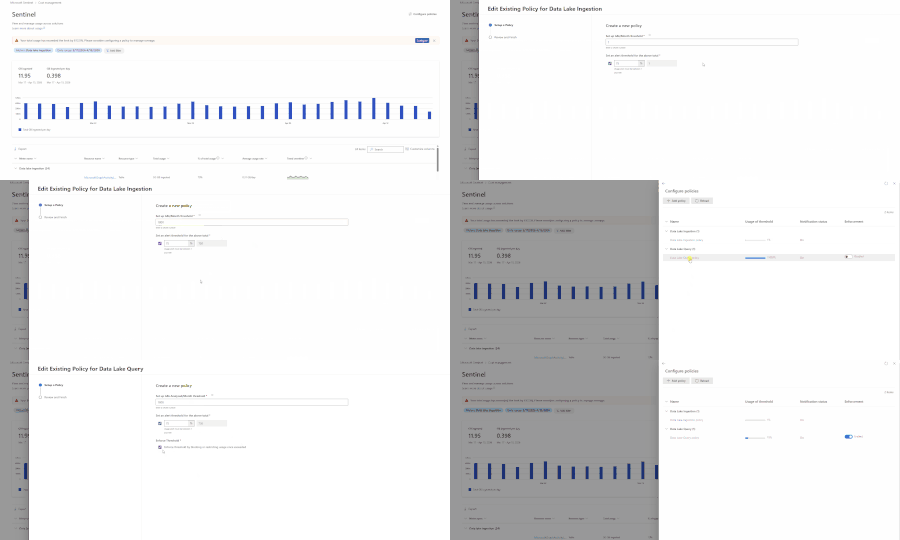
Security teams face a constant tension: run the advanced analytics you need to stay ahead of threats, or hold back to keep costs predictable. Until now, Microsoft Sentinel let you set alerts to get notified when data lake usage approached a threshold — useful for awareness, but not enough to prevent budget overruns. Today, we're excited to announce threshold enforcement for KQL queries and notebooks in the Microsoft Sentinel data lake. With this release, you can go beyond notifications and automatically block new queries and jobs when your configured usage limits are exceeded. Your analysts keep working confidently, and your budgets stay protected. What's new Previously, the Configure Policies experience in Microsoft Sentinel let you set threshold-based alerts for data lake usage. You'd receive an email notification when consumption approached a limit — but nothing stopped usage from continuing past that point. Now, you can enable enforcement on those same policies. When enforcement is turned on and a threshold is exceeded, Microsoft Sentinel blocks new queries, jobs, and notebook sessions with a clear "Limit exceeded" error. No more surprise cost spikes from runaway queries or analysts who mistakenly run heavy workloads against data lake data. Enforcement is supported for two data lake capability categories: Data Lake Query — interactive KQL queries and KQL jobs (scheduled and ad hoc) Advanced Data Insights — notebook runs and notebook jobs How it works Consistent controls across KQL queries and notebooks Cost controls are enforced consistently across Sentinel data lake workloads, regardless of how analysts access the data. The same policy applies whether someone is running a quick investigation or executing a long-running job. Controls apply to: Interactive KQL queries in the data lake explorer in the Defender portal KQL jobs, including scheduled and ad-hoc jobs Notebook queries run through the Microsoft Sentinel VS Code extension Notebook jobs running as background or scheduled workloads This ensures advanced analytics remain powerful — but predictable and governed. Clear enforcement without disruption Enforcement is applied at execution and validation boundaries — not retroactively. This means: Queries or jobs already running are not interrupted. In-flight work completes normally. New queries, jobs, or notebook sessions are blocked once limits are exceeded. Failures occur early (for example, during validation), avoiding wasted compute. From an analyst's perspective, enforcement is explicit and consistent. Clear messaging appears in query editors, job validation responses, and notebooks when limits are reached — so your team always understands what happened and what to do next. How to set it up Prerequisites To configure enforcement policies, ensure you have the necessary permissions that are outlined here: Manage and monitor costs for Microsoft Sentinel | Microsoft Learn. Where to access Navigate to Microsoft Sentinel > Cost management > Configure Policies in the Microsoft Defender portal (https://security.microsoft.com). Step-by-step configuration In Microsoft Sentinel > Cost management, select Configure Policies. Select the policy you want to edit (Data Lake Query or Advanced Data Insights). Enter the total threshold value for the policy. Enter an alert percentage to receive email notifications before the threshold is reached. Enable the Enforcement toggle to block usage after the threshold is exceeded. Review your settings and select Submit. Once enforcement is active, administrators receive advance notifications as usage approaches the threshold. If circumstances change — for example, during an active breach — you can adjust the threshold, disable enforcement temporarily, or modify the policy to give your SOC the room it needs to respond without being blocked. Real-world scenario: Preventing unexpected cost spikes Consider a large SOC that ingests roughly 6 TB of data per day, with 1 TB going to the Sentinel Analytics tier and the remaining 5 TB going to the Sentinel data lake. Analysts are proactively hunting for threats, performing investigations, and running automation. Tier 3 analysts are also running Jupyter Notebooks against the Sentinel data lake to build graphs, execute queries, and automate incident investigation and remediation with code. Last month, the SOC experienced a cost spike after a newly hired analyst ran large, frequent queries against data lake data — mistakenly thinking it was Analytics tier. The SOC manager needs to prevent this from happening again. With enforcement now available, the SOC manager can navigate to Microsoft Sentinel > Cost management > Configure Policies in the Defender portal and set up two policies: A Data Lake Query policy to cap data processing for KQL queries An Advanced Data Insights policy to cap notebook compute consumption With these policies in place, the SOC manager gets notified in advance when consumption approaches the threshold while having confidence that the thresholds set will be enforced to prevent unexpected consumption and cost. Analysts can continue their day-to-day work without worrying about accidental overages. Should a breach scenario demand more capacity, the SOC manager can quickly adjust or temporarily disable the policies — keeping the team unblocked while maintaining overall budget governance. Outside of a breach scenario, should the same SOC analyst generate large amounts of data scanned, the threshold will take action and prevent queries from being performed. Learn more With enforceable KQL and notebook guardrails, Microsoft Sentinel data lake helps security teams scale advanced analytics with confidence. You can control usage in production and keep investigations moving — without tradeoffs between visibility, analytics, and budget. To get started, visit the documentation: Manage and monitor costs for Microsoft Sentinel | Microsoft Learn We'd love to hear your feedback. Share your thoughts in the comments below or reach out through your usual Microsoft support channels.1.3KViews1like0CommentsEstimate Microsoft Sentinel Costs with Confidence Using the New Sentinel Cost Estimator
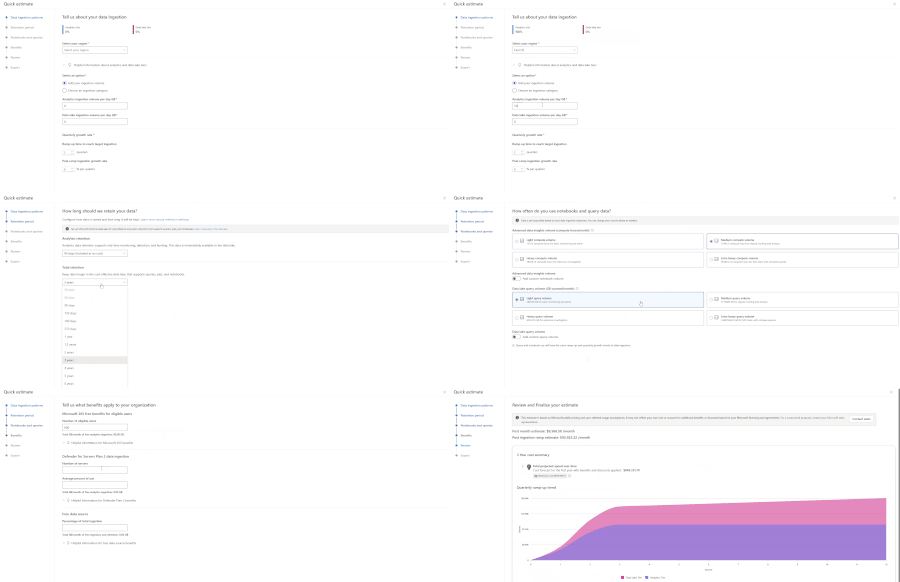
One of the first questions teams ask when evaluating Microsoft Sentinel is simple: what will this actually cost? Today, many customers and partners estimate Sentinel costs using the Azure Pricing Calculator, but it doesn’t provide the Sentinel-specific usage guidance needed to understand how each Sentinel meter contributes to overall spend. As a result, it can be hard to produce accurate, trustworthy estimates, especially early on, when you may not know every input upfront. To make these conversations easier and budgets more predictable, Microsoft is introducing the new Sentinel Cost Estimator (public preview) for Microsoft customers and partners. The Sentinel Cost Estimator gives organizations better visibility into spend and more confidence in budgeting as they operate at scale. You can access the Microsoft Sentinel Cost Estimator here: https://microsoft.com/en-us/security/pricing/microsoft-sentinel/cost-estimator What the Sentinel Cost Estimator does The new Sentinel Cost Estimator makes pricing transparent and predictable for Microsoft customers and partners. The Sentinel Cost Estimator helps you understand what drives costs at a meter level and ensures your estimates are accurate with step-by-step guidance. You can model multi-year estimates with built-in projections for up to three years, making it easy to anticipate data growth, plan for future spend, and avoid budget surprises as your security operations mature. Estimates can be easily shared with finance and security teams to support better budgeting and planning. When to Use the Sentinel Cost Estimator Use the Sentinel Cost Estimator to: Model ingestion growth over time as new data sources are onboarded Explore tradeoffs between Analytics and Data Lake storage tiers Understand the impact of retention requirements on total spend Estimate compute usage for notebooks and advanced queries Project costs across a multi‑year deployment timeline For broader Azure infrastructure cost planning, the Azure Pricing Calculator can still be used alongside the Sentinel Cost Estimator. Cost Estimator Example Let’s walk through a practical example using the Cost Estimator. A medium-sized company that is new to Microsoft Sentinel wants a high-level estimate of expected costs. In their previous SIEM, they performed proactive threat hunting across identity, endpoint, and network logs; ran detections on high-security-value data sources from multiple vendors; built a small set of dashboards; and required three years of retention for compliance and audit purposes. Based on their prior SIEM, they estimate they currently ingest about 2 TB per day. In the Cost Estimator, they select their region and enter their daily ingestion volume. As they are not currently using Sentinel data lake, they can explore different ways of splitting ingestion between tiers to understand the potential cost benefit of using the data lake. Their retention requirement is three years. If they choose to use Sentinel data lake, they can plan to retain 90 days in the Analytics tier (included with Microsoft Sentinel) and keep the remaining data in Sentinel data lake for the full three years. As notebooks are new to them, they plan to evaluate notebooks for SOC workflows and graph building. They expect to start in the light usage tier and may move to medium as they mature. Since they occasionally query data older than 90 days to build trends—and anticipate using the Sentinel MCP server for SOC workflows on Sentinel lake data—they expect to start in the medium query volume tier. Note: These tiers are for estimation purposes only; they do not lock in pricing when using the Microsoft Sentinel platform. Because this customer is upgrading from Microsoft 365 E3 to E5, they may be eligible for free ingestion based on their user count. Combined with their eligible server data from Defender for Servers, this can reduce their billable ingestion. In the review step, the Cost Estimator projects costs across a three-year window and breaks down drivers such as data tiers, commitment tiers, and comparisons with alternative storage options. From there, the customer can go back to earlier steps to adjust inputs and explore different scenarios. Once done, the estimate report can be exported for reference with Microsoft representatives and internal leadership when discussing the deployment of Microsoft Sentinel and Sentinel Platform. Finalize Your Estimate with Microsoft The Microsoft Sentinel Cost Estimator is designed to provide directional guidance and help organizations understand how architectural decisions may influence cost. Final pricing may vary based on factors such as deployment architecture, commitment tiers, and applicable discounts. We recommend working with your Microsoft account team or a Security sales specialist to develop a formal proposal tailored to your organization’s requirements. Try the Microsoft Sentinel Cost Estimator Start building your Microsoft Sentinel cost estimate today: https://microsoft.com/en-us/security/pricing/microsoft-sentinel/cost-estimator.3.2KViews0likes1CommentIntroducing the New Microsoft Sentinel Logstash Output Plugin (Public Preview!)
Many organizations rely on Logstash as a flexible, trusted data pipeline for collecting, transforming, and forwarding logs from on-premises and hybrid environments. Microsoft Sentinel has long supported a Logstash output plugin, enabling customers to send data directly into Sentinel as part of their existing pipelines. The original plugin was implemented in Ruby, and while it has served its purpose, it no longer meets Microsoft’s Secure Future Initiative (SFI) standards and has limited engineering support. To address both security and sustainability, we have rebuilt the plugin from the ground up in Java, a language that is more secure, better supported across Microsoft, and aligned with long-term platform investments. To ensure a seamless transition, the new implementation is still packaged and distributed as a standard Logstash Ruby gem. This means the installation and usage experience remains unchanged for customers, while benefiting from a more secure and maintainable foundation. What's New in This Version Java‑based and SFI‑compliant Same Logstash plugin experience, now rebuilt on a stronger foundation. The new implementation is fully Java‑based, aligning with Microsoft’s Secure Future Initiative (SFI) and providing improved security, supportability, and long-term maintainability. Modern, DCR‑based ingestion The plugin now uses the Azure Monitor Logs Ingestion API with Data Collection Rules (DCRs), replacing the legacy HTTP Data Collection API (For more info, see Migrate from the HTTP Data Collector API to the Log Ingestion API - Azure Monitor | Microsoft Learn). This gives customers full schema control, enables custom log tables, and supports ingestion into standard Microsoft Sentinel tables as well as Microsoft Sentinel data lake. Flexible authentication options Authentication is automatically determined based on your configuration, with support for: Client secret (App registration / service principal) Managed identity, eliminating the need to store credentials in configuration files Sovereign cloud support: The plugin supports Azure sovereign clouds, including Azure US Government, Azure China, and Azure Germany. Standard Logstash distribution model The plugin is published on RubyGems.org, the standard distribution channel for Logstash plugins, and can be installed directly using the Logstash plugin manager, no change to your existing installation workflow. What the Plugin Does Logstash plugin operates as a three-stage data pipeline: Input → Filter → Output. Input: You control how data enters the pipeline, using sources such as syslog, filebeat, Kafka, Event Hubs, databases (via JDBC), files, and more. Filter: You enrich and transform events using Logstash’s powerful filtering ecosystem, including plugins like grok, mutate, and Json, shaping data to match your security and operational needs. Output: This is where Microsoft comes in. The Microsoft Sentinel Logstash Output Plugin securely sends your processed events to an Azure Monitor Data Collection Endpoint, where they are ingested into Sentinel via a Data Collection Rule (DCR). With this model, you retain full control over your Logstash pipeline and data processing logic, while the Sentinel plugin provides a secure, reliable path to ingest data into Microsoft Sentinel. Getting Started Prerequisites Logstash installed and running An Azure Monitor Data Collection Endpoint (DCE) and Data Collection Rule (DCR) in your subscription Contributor role on your Log Analytics workspace Who Is This For? Organizations that already have Logstash pipelines, need to collect from on-premises or legacy systems, and operate in distributed/hybrid environments including air-gapped networks. To learn more, see: microsoft-sentinel-log-analytics-logstash-output-plugin | RubyGems.org | your community gem host1.6KViews1like2Comments