what's new
441 TopicsHands-on webinar: Teach Module in M365 Copilot and Copilot Notebooks (available for all educators)
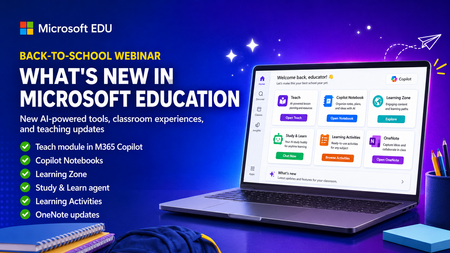
Join us on Wednesday, July 8th @ 8am Pacific Time for an in-depth professional development webinar on the new AI-powered "Teach" module in M365 Copilot that is fully rolled out and available to everyone. We will also be covering Copilot Notebooks and the Study Guide which is now also available to all M365 Educators and Students. This will be a 60-minute hands-on webinar where the Product Management team will walk through the new updates in detail and you can follow-along at home with your own M365 Education account. To reiterate, the Teach Module and Copilot Notebooks are available globally to all educators using Microsoft 365. And don’t worry – we’ll be recording these and posting on our Microsoft Education YouTube channel so you’ll always to able to watch later or share with others. Register here: https://msit.events.teams.microsoft.com/event/msit.ed7f065d-57a5-437c-ba23-12b0ef06a259@72f988bf-86f1-41af-91ab-2d7cd011db47 Agenda: How to use the new AI-powered "Teach" module in M365. ✅ Lesson plans and the new Keep Going feature ✅ Learning Zone integration ✅ Modifying Existing content ✅ Learning Activities ✅ Coplot Notebooks plus Study Guide We look forward to having you attend the event! Mike Tholfsen Group Product Manager Microsoft Education team58Views0likes0CommentsWhat’s new in Microsoft Sentinel: June 2026
Welcome back to What's new in Microsoft Sentinel. In June, Sentinel SIEM’s Advanced Security Information Model (ASIM) broadens its normalization, so one analytic rule can reach more sources with less per-source work and, additionally, two new ASIM schemas can now bring asset inventory and AI agent telemetry into common form. In Microsoft Sentinel data lake, the Agent Identities Asset Connector adds the identity context behind your AI agents, helping you see who owns an agent and what permissions it holds. In Sentinel MCP, graph tools help security teams investigate threats and optimize security coverage by visualizing relationships across identities, devices, alerts, and signals in a unified graph experience. Read on for the details, and explore the resources at the end to go deeper. Sentinel innovations: Sentinel SIEM Sentinel data lake Sentinel MCP Microsoft Security Store Sentinel SIEM Advanced Security Information Model (ASIM) parsers and schemas [Generally available] The Advanced Security Information Model (ASIM) in Sentinel normalizes logs into common schemas, so one analytic rule can cover many sources without managing each native schema. ASIM coverage has expanded across more Azure services, broader AWS CloudTrail activity, and a range of third-party firewall, identity, and proxy products, so your detections reach more of your environment with less per-source work. Two schemas also join ASIM: Asset Entities normalizes asset inventory so you can correlate files and assets across investigations, and AI Agent Events normalizes telemetry from AI-driven workflows and autonomous agents. Browse the ASIM parsers on GitHub to explore, file issues, or contribute. Learn more in our blog. Sentinel transition to Defender blog series By March 31, 2027, all Microsoft Sentinel customers transition to Defender. This six-part series guides you through moving your Sentinel experience from the Azure portal to Defender, where SIEM, XDR, threat intelligence, AI, and automation come together in one experience. Your analytics rules, playbooks, workbooks, log analytics workspace, and access assignments all carry forward while the operational layer becomes more connected and intelligent. Starting early matters because you realize the benefits sooner, including a unified incident queue, cross-product correlation, Security Copilot, Sentinel data lake, and SOC optimization. Across the six-part blog series you get 1) the strategic shift, 2) the anatomy of incident and data changes, 3) detection and automation, 4) the governance shift across roles and access, 5) a readiness playbook with the adoption helper and cost guidance, and 6) a look at the AI-first SOC. Each part stands alone, so you can read in order or jump to what matters most to you. Sentinel data lake Agent Identities Asset Connector [Public preview] The Agent Identities Asset Connector brings identity context for AI agents into Sentinel. Activity connectors like Agent 365 and Microsoft 365 Copilot already show you what AI agents do, but activity alone cannot tell you who owns an agent, what permissions it holds, or how it is governed. This connector fills that gap with four asset tables covering agent owners, agent identities, agent blueprints, and the service principals tied to those blueprints. Together they form a connected agent identity graph you can trace from owner to identity to blueprint to permissions to the resources an agent touches. Joining this asset data with activity data in Sentinel data lake lets you detect anomalous behavior relative to permissions, spot over-permissioned or misconfigured agents, and follow full execution chains for end-to-end traceability. To get started, install the Agent 365 and Microsoft 365 Copilot solutions in Content Hub and enable the asset and activity connectors. Learn more. Sentinel MCP Sentinel MCP graph tools [Public preview] Microsoft Security Graph MCP tools, recently introduced in the Microsoft Sentinel MCP Server data exploration collection helps security teams investigate threats by exploring relationships between identities and device assets, and threat and activity signals ingested by data connectors and surfaced by analytic rules. Starting from an alert, analysts can follow the exposure path across connected entities — tracing lateral movement, understanding blast radius, and identifying configuration gaps — all from a single, interactive workspace. The tool provides a clear graph view that highlights dependencies and makes it easier to understand how content interacts across your environment. This helps security teams assess coverage, optimize content deployment, and identify areas that may need tuning or additional data sources. Executing graph queries via the MCP tools will trigger the graph meter. Learn more. Microsoft Security Store Partner testimonials from Adaquest and Glueckkanja For partners like Adaquest and Glueckkanja, the Microsoft Security Store helps not only put their years of knowledge, understanding, and best practices into a scalable, packaged solution, it gives them the ability to democratize that expertise and take it to market globally. Security Store operationalizes their expertise as always-on defenses — discoverable, deployable, and driving real outcomes inside the tools that security teams rely on every day. See how the Security Store is helping security teams act on threats faster with the right solutions and to be ready when it matters most: Watch: Adaquest unlocks faster response times for customers (testimonial) Watch: Glueckkanja builds agents with purpose (testimonial) Additional resources Blogs and documentation: The Advanced Security Information Model (ASIM) Process Event normalization schema reference How BlueVoyant's ASIM-First Strategy Simplifies Threat Detection in Microsoft Sentinel Migrate Sentinel to Defender – Why It Is a Security Architecture Decision, Not Just a Portal Change Connect Microsoft Sentinel to the Microsoft Defender portal Agent 365 connector: Monitor, hunt, and investigate AI agent activity in Microsoft Sentinel Get started with Microsoft Sentinel MCP server Upcoming webinars and events: July 15–16: Microsoft Virtual Training Day: Predict and Defend Against Cybersecurity Threats July 22: Microsoft Security Immersion Event: Shadow Hunter July 23-24: Microsoft Virtual Training Day: Introduction to Microsoft Security July 28: Tech Brief: Modernize security operations with a unified platform July 29: Security Immersion Event: Into the Breach Stay connected Check back each month for the latest innovations, updates, and events to ensure you’re getting the most out of Microsoft Sentinel. We’ll see you in the next edition!282Views2likes0CommentsWhat’s New in Microsoft Teams | June 2026 – InfoComm Edition
Where did the first half of the year go? This edition of What's New in Teams comes to you on the heels of InfoComm 2026 in Las Vegas, the largest professional AV show in North America, and the week where the people who design, build, and run the world's collaboration spaces all gather in one place. It's a fitting backdrop, because so much of what's new in Teams this month comes back to a single idea: bringing people and AI together to get work done. That was the high-level takeaway of our InfoComm keynote, where our Corporate Vice President for Teams Calling, Meetings, and Devices, Ilya Bukshteyn, showed how AI now shows up across Teams like a teammate, in your calls, in your meetings, and in the environments where work happens. A few highlights from each worth calling out: In your calls and conversations New calling agents: Teams Phone Agent is a new AI calling experience that answers incoming calls for a department or organization, understanding what each caller needs and routing or resolving common information requests and appointments scheduling conversationally. Custom voice agents your organization builds in Microsoft Copilot Studio integrate with Teams Phone for help with specialized processes, like enabling a customer to pay a bill in a call. Brand impersonation protection: Teams now detects and warns you when a caller may be posing as a trusted brand, like your IT help desk or bank, with a clear in-call signal so you can decline or leave before you engage. In your meetings Redesigned in-meeting controls: Customize your meeting controls around how you work, and share with more confidence through an improved experience for previewing and presenting content. Bot detection: A new Teams admin policy helps identify likely bots, route them to the lobby in a separate group, and requires organizer approval before they join. In your rooms Facilitator in Teams Rooms: with new skills, the Facilitator agent can help extend the meeting lifecycle in Teams Rooms. For the room itself, Facilitator agent can now notify of any issues with the room and find a suitable replacement, use voice to interact with users in the Teams Room, provide information about how to get the most out of using the space, and access external knowledge to answer general questions. These new skills make Teams Rooms smarter before, during, and after meetings. IntelliFrame people labels: IntelliFrame now identifies each person in the room and places their name right alongside them, so remote participants always know exactly who's speaking. A small thing that makes hybrid meetings feel more inclusive and equitable. These are just some of what's new to explore in Teams this month. For more information about all the features we highlighted at InfoComm 2026, watch Ilya’s full keynote presentation here. Read on to see everything we've released in June across Teams. Product areas covered in this update: (All features are generally available unless otherwise noted.) Chat and Collaboration Meetings Teams Phone Workplace - Places and Teams Rooms Fundamentals and Security Frontline workers Platform Certified for Teams Devices Chat and Collaboration Contextual search in Copilot in Teams Sometimes the fastest path to an answer in Teams is to ask rather than scroll through search results. Contextual search in Copilot is now built into Teams search—invoked from autosuggest or a new button on the search results page—so you can get answers without leaving the search experience. Advanced file discovery and filters in Teams Find in chat and channels Finding the right file in a busy channel often means scrolling or asking someone to resend it. Enhanced contextual search now indexes every file uploaded to a channel—even files added outside messages—and adds filters for file type, sender, and date, with instant typeahead to narrow results as you search. Press Ctrl+F (Windows), Cmd+F (Mac), or click Find in chat to start. Improved preview experience for Microsoft PowerPoint and Excel files in Teams on mobile Slow or unreliable previews on mobile can stall you between meetings. PowerPoint and Excel previews in Teams now load faster and more reliably, so you can review presentations and spreadsheets shared in chats and channels while on the go. The new preview experience also enables you to open Information Rights Management (IRM)-protected files, improving access to protected content. List view for "View more apps" A cluttered tile view in “View more apps” makes it hard to scan and find the app you need. A streamlined list view now reduces visual noise and helps you discover and open apps more quickly. Context preservation in Teams Teams automatically restores your workspace when you return to a conversation shortly after leaving it. Your selected tab, open side panel, and layout are preserved, allowing you to pick up where you left off without resetting your view. This helps reduce friction and keeps you focused as you move between conversations. Live meeting indicator for threaded channels in Teams (government clouds) Live meetings happening right now in a busy threaded channel can go unnoticed in the scroll. A new live meeting indicator in Teams for government clouds highlights active meetings in the channel so you can spot them and join in real time. Improved organization for muted and meeting chats in Teams A long, mixed chat list makes it hard to find the conversations that actually need your attention. Teams now automatically groups muted chats (on by default) and, optionally, meeting chats into dedicated sections you can turn on or off, so your most important conversations remain easy to find. Improved visibility and control for downloads in Teams Tracking the status of files you’ve downloaded shouldn’t get in the way of your chats. The download manager now opens from the title bar or with a keyboard shortcut and lets you monitor downloads without blocking chat and channel actions, so you can stay on top of files while keeping the conversation moving. Quick Share for images in Teams Quick Share in Teams now makes it easier to share images across chats and channels in just a few clicks. You can access sharing options from hover, right-click, overflow menus, and shared tabs to quickly copy links or share images. For images stored in OneDrive or SharePoint, Quick Share preserves existing permissions so the right people maintain access, while images pasted directly into chat are stored separately and do not support permission-based sharing. Meetings Smarter bot protection in Teams meetings AI note-taking bots have started showing up in meetings, creating privacy and security risks when sensitive topics are discussed. A new Teams admin policy, Manage external bots and their access to meetings, helps Teams identify likely bots, route them to the lobby in a separate "Suspected threats" group, and require organizer approval before they join. Confirmation prompts on admission and an upcoming registration path for trusted ISVs make admitting a bot a deliberate decision rather than an accidental one. Learn more. Branded reactions Visual identity shapes how your organization shows up. Whether it's a client presentation, an internal milestone, or a seasonal event, the right visuals set the tone and reinforce your brand. With new branded reactions, organizations can now extend their visual identity directly into meetings. IT admins simply upload custom reaction icons reflecting brand elements or event themes, and these instantly become available for meeting participants. Every clap, thumbs-up, or celebration now aligns with your organization's look and feel. A simple way to create more cohesive, on-brand meeting experiences. Teams Phone Teams Phone Agent and extensibilty for Copilot Studio voice agents [Frontier public preview] Callers reaching a service line shouldn’t have to wait on hold just to ask a simple question or schedule an appointment. The new Teams Phone Agent answers incoming calls to your Teams Phone service line quickly, handles common questions, schedules appointments, and routes calls to the right person or department when human help is needed. It also integrates with custom AI voice agents built in Microsoft Copilot Studio for specialized workflows like paying a bill over the phone. This is experience is available in preview through the Fronter Program. Learn more. Outlook, Teams: Enhanced voicemail transcription and support for new languages Inaccurate or limited-language voicemail transcripts can leave you guessing what callers actually said. Starting in June, voicemail transcription moves to Azure LLM Speech via the Fast Transcription API, bringing more accurate transcripts, faster processing, automatic language detection, and 14 new languages: Arabic, Czech, Danish, Finnish, Hebrew, Hindi, Hungarian, Korean, Norwegian Bokmål, Polish, Russian, Swedish, Thai, and Turkish. Simplified app management for Teams Phone devices via Teams admin center Empower IT admins to customize Teams Phone devices at scale with centralized app management in the Teams admin center. Administrators can now select and remove applications on Teams Phone devices directly from a single management console, eliminating the need for on-device configuration. This streamlined experience helps organizations tailor the app experience for different roles, reduce administrative effort, and maintain greater control across their device fleet. Learn more. Workplace: Teams Rooms Facilitator agent skills in Teams Rooms [Public preview] Facilitator agent now brings a persistent, voice-activated AI presence to your Teams Rooms before and after every meeting, understanding the space, your work data, and even the web to keep collaboration moving. With room readiness checks, it catches problems like camera obstructions, clutter, or too few seats before anyone walks in, and surfaces the issue. You can now invoke Facilitator by voice, just speak to the Teams Room to join a meeting or get help and it answers out loud. As a persistent Teams Room expert, Facilitator can answer questions about how the space is set up, from the room's name to how to share wirelessly. Facilitator agent in Teams Rooms can now also access external knowledge, it pulls trusted answers from the web to settle in-the-moment questions, so people stay in the flow instead of reaching for a laptop. The result is a room that's ready when you are, captures what matters, and gives everyone more out of every meeting. IntelliFrame people labels [Public preview] IntelliFrame people labels put names to faces for everyone joining from a Teams Room, so the whole meeting knows exactly who's who. Powered by intelligent cameras and enrollment-based recognition, the labels appear when you hover over an in-room participant. These labels are there when you need them, out of the way when you don't, and if someone hasn't enrolled, others in the meeting can identify them so their contributions still get attributed. Department of Defense (DoD) cloud support for Teams Rooms on Android While available for commercial customers, DoD customers couldn’t yet take advantage of Teams Rooms on Android. But now, Teams Rooms on Android app meeting and collaboration functionalities are fully supported for Department of Defense (DoD) customers. Available with Teams Rooms Pro. Front-of-room view control for Webinars & structured meetings in Teams Rooms on Android When a Teams Rooms on Android joins a webinar or structured meeting as a presenter, you don't want the front-of-room display flipping to presenter view in front of the audience. The front-of-room display now defaults to attendee view, and presenters keep full control from the console—including green room and off-stage management—and can switch the front-of-room display to presenter view without impacting attendees. Learn more. Proximity join support for presenters in Teams Events from Teams Rooms on Windows or Android Getting set up to present an event from a meeting room can be a bit cumbersome and confusing for users. Now, proximity join in Teams Rooms on Windows or Android lets presenters connect quickly and effortlessly to nearby room systems during Teams Events such as town halls, webinars, and structured meetings, enabling smooth live presentations. Learn more. Room availability signal in the Teams events app Booking a room for a Teams event without knowing whether it's free at that time can lead to conflicts and last-minute scrambles. In the Events app, event organizers can now see whether the chosen room or space is available at the designated time before confirming. Available for any Teams event organizer with a Teams Enterprise license. Learn more. Fundamentals and Security Admins can define Teams policies in TAC that are specific to Blueprints or Digital Workers Governing digital workers and their blueprints with the same Teams policies used for regular users creates risk and limits flexibility. IT admins can now associate a Policy Template, a reusable set of licensing, security, and compliance policies, with one or more blueprints in the Teams admin center, so every agent created from a blueprint automatically inherits the right policies, without disrupting existing blueprint management. Manage Teams core agents in the Teams admin center Managing Teams core agents alongside general Microsoft app settings makes it hard to control where they show up. IT admins can now manage Teams core agents like Facilitator from a dedicated experience in the Teams admin center, controlling availability for all users, specific users, or groups. These agents are native to Teams and no longer affected by org-wide Microsoft app settings. Security Detection Report in Teams Admin Center Investigating phishing, impersonation, and message safety incidents in Teams has meant piecing together signals from multiple places. The Security Detection Report in the Teams admin center gives IT admins a unified view that consolidates impersonation, malicious URL, and weaponizable file detection data across Teams messaging. Admins can export the report as a CSV with sender MRI and thread ID for deeper investigation, and access reporting directly in the Teams admin center alongside existing security workflows. Meeting impersonation detection and high‑risk alerts for Teams on iOS and Android Impersonation attempts in meetings are hard to spot in the moment, and in the past, mobile users have had fewer protections than desktop. Now, new security signals in Teams identify potential impersonation and surface contextual alerts when elevated risk is detected, so you can make more informed decisions during collaboration. This release brings high-risk detection capabilities to Teams on iOS and Android, extending protection across more endpoints without disrupting meeting experiences. Report a Security Concern in Calls Suspicious calls are often the first sign of vishing, impersonation, or fraud attempts—but until now, you’ve had no easy way to flag them. From Teams call history and post-call surfaces, you can now report suspicious or unexpected VoIP and PSTN calls, add context, and optionally block the caller. If a call was flagged in error, you can mark it “not a concern” to reduce false positives. Your reports feed Microsoft security and investigation systems, strengthening protections against emerging calling-based threats. Microsoft Teams VDI Optimization for Omnissa on Mac VDI users on Omnissa for Mac haven’t had the same modern Teams performance as native desktop users, especially for meetings, audio, video, and screen sharing. Teams now brings its modern VDI optimization architecture to Omnissa on Mac, delivering better performance, greater feature parity with the native desktop client, and a more reliable experience—while keeping the centralized management, security, and scalability of VDI. New Teams VDI optimization for macOS Users accessing Teams through existing virtual desktops systems on macOS often experience lower call quality and limited meeting features compared to local devices. Now in GA, the new Teams optimization for macOS improves performance The new Teams optimization for macOS improves performance and reliability for users connecting to Azure Virtual Desktop (AVD) and Windows 365. It replaces the previous solution with better video quality (up to 1080p), larger gallery views, and enhanced calling features like Quality of Service (QoS) and noise suppression. For IT admins, it adds Teams Admin Center integration, Call Quality Dashboard support, and simpler updates via a bundled plugin. For more info, check New VDI solution for Teams - Microsoft Teams | Microsoft Learn. Frontline Workers What's New in Shifts: Smarter Scheduling, Faster Workflows Frontline managers spend far too much of their day wrestling with schedules. This wave of Shifts updates is all about giving that time back — automating the tedious parts, making every interaction feel natural, and helping new teams get up and running in minutes. Here's everything shipping now and what's just around the corner. Build a Full Schedule in Seconds with Assign Open Shifts Assign Open Shifts intelligently matches your available workers to open shifts while honoring the rules that matter most — maximum weekly hours, minimum rest periods, and more — so you can build a ready-to-publish schedule in just a few clicks. Start by creating open shifts for when you need coverage, edit constraints as needed, then watch as a draft schedule is created. Changed your mind? One-click undo rolls the whole thing back instantly. Whether you're standing up a brand-new week or scrambling to cover a last-minute vacation, Assign Open Shifts turns hours of work into seconds. Move Shifts the Way You'd Expect with Drag and Drop One of our most-requested features of all time has arrived. Simply grab a shift and drop it wherever it needs to go. Reassign a shift from one worker to another, to a different day or schedule group, or move it into the open shifts pool. It's the intuitive, hands-on scheduling experience managers have been asking for, and it makes mid-week changes the easiest part of your day. Work at the Speed of a Spreadsheet with Improved Multi-Selection With improved multi-selection, the familiar shortcuts you already rely on — Ctrl+Select, Shift+Select, and Ctrl+A — let you grab dozens of shifts at once and bulk copy, paste, or delete them in a single motion. Cloning a productive week, clearing out a draft, or making sweeping updates across your team now takes a fraction of the effort. It's the speed and muscle memory of a spreadsheet, brought right into the Shifts app you use every day. See the Bigger Picture with Two-Week View Plan further ahead and stop flipping back and forth between weeks. The new two-week view lets you build and review a full fourteen days of shifts side by side — perfect for teams paid biweekly. Spot coverage gaps, balance workloads fairly, and finalize your next pay cycle all in one continuous view. It's a wider lens on your schedule that helps make long-range planning effortless. Platform Express voice enrollment in Microsoft Teams If you haven’t registered your voice in Teams, you’ll miss out on key features like intelligent speaker recognition, richer Microsoft 365 Copilot recaps, and smart audio and video experiences. Express voice enrollment makes registering your voice fast and easy. If you don’t yet have a voice profile, just go to the recognition tab in Teams settings and opt-in to enroll your voice simply by speaking during a meeting. Admins can enable or disable this feature for their organization. Learn more. App support for private and shared channels Users often need to leave private and shared channel conversations to access the apps they rely on. But now, app support for private and shared channels brings tabs, bots, and message extensions directly into these collaboration spaces (subject to admin policy). Channel owners can add apps at the channel level, helping teams stay in flow and move work forward without switching contexts. To implement these updates, follow Teams connects shared and private channels - Teams | Microsoft Learn. Certified for Teams Devices Biamp Ceiling Tile Mic w/ Configurable DSP for Medium, Large and Extra-Large Rooms The Biamp BMA 360D Ceiling Tile Mic, powered by the TesiraFORTÉ X — the industry's most trusted conference room DSP — brings gold-standard Tesira audio to medium, large and extra-large Microsoft Teams Rooms on drop-tile or hard ceilings. Learn More. New Logitech Express Install bundles Logitech, in partnership with Urben Express, Vison Express and Samsung, is simplifying room installations with Express Install solutions for Microsoft Teams Rooms on Windows and Android. Each bundle makes high-quality meeting spaces more accessible and easier to deploy. Logitech's Express Install kits for huddle rooms, medium rooms, and large rooms, can be installed in under an hour, with minimal labor and no specialist help needed. Logitech Rally Bar & Urben Express Range 65 for Teams Rooms on Windows Logitech MeetUp 2 & Vision Express Desk Mount for Teams Rooms on Windows Logitech Express Install: Logitech Rally Bar Mini & Vision Express Desk Mount for Teams Rooms on Android Logitech Rally Bar Huddle & Vision Express Desk Mount for Teams Rooms on Android Logitech Rally Bar & Urben U-Cart HD for Teams Rooms on Android2.2KViews0likes1CommentDetecting AI agents and non-human identities in Microsoft Sentinel: the classic-agent blind spot
Build 2026 made the direction official. The industry is moving from the app era into the agent era, and Microsoft spent a real share of the keynote on securing agents across their lifecycle, from discovering what is exploitable to governing what is running in production. On the identity side the centerpiece is Microsoft Entra Agent ID, now generally available, which gives AI agents first-class identities and extends Conditional Access, Identity Protection, and full audit logging to them. That is good news for agents you build the new way. It is not the whole picture, and the gap is where most SOCs will get hurt first. Modern agents are covered. Classic agents are not. Entra Agent ID draws a hard line between two kinds of agent. Modern agents are created through the Agent ID platform, each backed by an agent identity blueprint. They carry a proper Agent ID, a full audit trail, and the complete set of governance capabilities, including Identity Protection for Agents, which establishes a baseline for an agent's normal activity and flags anomalies automatically. Classic agents are everything that came before, or that gets built outside the platform: AI agents implemented as ordinary service principals or app registrations, for example Copilot Studio agents created before Agent ID was enabled, or any home-grown automation calling Graph with client credentials. In the Entra agent registry they appear with "Has Agent ID: No," and that flag matters, because the Agent ID protections apply to identities that actually hold an Agent ID. Classic agents sit outside Identity Protection for Agents and Conditional Access for Agents. Here is the uncomfortable part. The non-human identities you already run, the service principals behind your pipelines, your integrations, your scripts, your pre-platform Copilot Studio bots, are almost all classic agents. They tend to outnumber your human accounts, they have no MFA in any meaningful sense, and a credential added to one does not show up in the Azure portal. The new platform protections do not reach them. Until you migrate them, the only place you get detection coverage on that population is your SIEM. So this is the job Sentinel does that Agent ID does not: detect risky behavior on the classic, service-principal-backed agents that the platform cannot yet protect. The telemetry you have, and the one switch people forget Three tables carry most of the signal. AADServicePrincipalSignInLogs records service principal authentications, the client-credentials sign-ins your agents and automation use. No user, no MFA, just an app proving it holds a secret or certificate. AADManagedIdentitySignInLogs does the same for managed identities. AuditLogs records directory changes, including the one that matters most for persistence: a new credential added to an application or service principal. One practical warning before any of this works. Service principal and managed identity sign-in logs are not streamed by default. You have to enable those categories explicitly in the Entra diagnostic settings feeding your workspace. Plenty of teams write the detection, never check, and never notice the table is empty. Verify that first. Detection 1: a new credential on a service principal or app Adding a secret or certificate to an existing service principal is one of the cleanest persistence techniques in a Microsoft cloud. The attacker compromises a privileged user or app, drops a fresh credential on a service principal that already holds useful Graph permissions, and now has access that survives password resets and session revocation. It maps to MITRE T1098.001, Account Manipulation: Additional Cloud Credentials. For a classic agent it is especially nasty, because there is no Identity Protection baseline watching it. // Detection 1: new secret or certificate added to an application or service principal // MITRE T1098.001 - Account Manipulation: Additional Cloud Credentials AuditLogs | where OperationName has_any ("Add service principal", "Certificates and secrets management") | where Result =~ "success" | extend Initiator = coalesce( tostring(InitiatedBy.user.userPrincipalName), tostring(InitiatedBy.app.displayName)) | extend InitiatorIp = tostring(InitiatedBy.user.ipAddress) | mv-apply Target = TargetResources on ( where Target.type =~ "Application" | extend TargetName = tostring(Target.displayName), TargetId = tostring(Target.id), KeyChanges = Target.modifiedProperties ) | mv-apply Prop = KeyChanges on ( where tostring(Prop.displayName) =~ "KeyDescription" | extend NewKeys = parse_json(tostring(Prop.newValue)), OldKeys = parse_json(tostring(Prop.oldValue)) ) | extend AddedKeys = set_difference(NewKeys, OldKeys) | where array_length(AddedKeys) > 0 | project TimeGenerated, Initiator, InitiatorIp, TargetName, TargetId, AddedKeys | order by TimeGenerated desc The operation filter catches the three shapes this event takes in the log: "Add service principal," "Add service principal credentials," and "Update application - Certificates and secrets management." The modifiedProperties parsing isolates the KeyDescription change, and set_difference confirms a key was actually added rather than removed, so rotating out an old credential does not, on its own, fire the rule. False positives come from legitimate rotation and from automation that provisions app credentials (CI/CD, infrastructure as code). The initiator is the discriminant. A credential added by your deployment pipeline's service account at the usual time is routine. The same change initiated by an interactive admin out of hours, or by an account that never normally touches app credentials, is what you want to surface. Allow-list the expected initiators, not the targets. Detection 2: a classic agent signing in from a first-seen IP A service principal that has only ever authenticated from your Azure regions and suddenly signs in from somewhere new is a strong signal that its credential has been lifted and is being used elsewhere. Service principals have stable, boring network behavior, which makes a first-seen IP a far cleaner indicator for them than it is for roaming human users. This is the behavioral baseline Identity Protection gives you for free on modern agents, rebuilt in KQL for the classic ones it ignores. MITRE T1078.004, Valid Accounts: Cloud Accounts. // Detection 2: classic-agent service principal signing in from a previously unseen IP // MITRE T1078.004 - Valid Accounts: Cloud Accounts let baseline = 14d; let detection = 1d; let KnownIPs = AADServicePrincipalSignInLogs | where TimeGenerated between (ago(baseline + detection) .. ago(detection)) | where tostring(ResultType) == "0" | summarize KnownIPSet = make_set(IPAddress) by AppId; AADServicePrincipalSignInLogs | where TimeGenerated > ago(detection) | where tostring(ResultType) == "0" | lookup kind=leftouter KnownIPs on AppId | where set_has_element(KnownIPSet, IPAddress) == false | summarize FirstSeen = min(TimeGenerated), Resources = make_set(ResourceDisplayName, 10) by ServicePrincipalName, AppId, IPAddress | order by FirstSeen desc The query builds a per-application baseline of source IPs over the previous two weeks, then flags any successful sign-in today from an address outside that set. Two tuning notes. Brand-new service principals have no baseline, so they surface on first use. That is usually worth seeing once, but you can exclude AppIds younger than the baseline window if it gets noisy. And if your agents egress through shifting cloud IP ranges, widen the comparison from an exact IP to the autonomous system number or a known-range allow-list, otherwise you will chase your own infrastructure. This complements Agent ID, it does not replace it! The endgame is not to run these rules forever. It is to shrink the population they apply to. Inventory your tenant for agents marked "Has Agent ID: No," prioritize the ones holding sensitive Graph permissions, and migrate them onto the Agent ID platform, where Identity Protection and Conditional Access take over the baselining you are doing here by hand. Microsoft has signaled a migration path from classic to modern agents. Treat these two detections as the coverage you need in the meantime, and as a permanent safety net for anything that never makes the move. If you do one thing this week: enable the service principal sign-in log category, deploy detection 1, and pull a list of every service principal that had a credential added in the last 90 days. That list alone tends to be more interesting than people expect. Cheers, Marcel300Views0likes0CommentsWhat's New in Microsoft Teams | May 2026 - Build Edition
It's hard to believe May is over already! You may have noticed this edition of What's new in Teams is landing a few days later than usual — that's intentional. We're publishing alongside Microsoft Build, our annual developer conference where we showcase the latest in AI, agents, and the tools that help developers. It's one of the most energizing weeks of the year, full of announcements, hands-on sessions, and a first look at where the platform is headed. A lot of what's in this release ties directly to what's being unveiled on the Build stage, and I wanted to highlight a few Teams Platform features worth calling out: Linear, Cursor, and Atlassian Rovo agents in Teams — three powerful new partner agents that turn channel conversations into shipped code, filed issues, and updated project plans without ever leaving the chat. New Teams CLI — one command to register, configure, and deploy a Teams agent, so developers can spend their time on agent logic instead of managing complex processes Collaborative features for agents – our new agent capabilities include quoted replies to keep conversations anchored, slash commands to quickly take action in the flow of work, and expressive emoji reactions that add nuance without adding noise, all helping teams stay aligned and move faster in collaboration with agents. A few other highlights I'm especially excited about beyond Platform: New AI-generated Video recap in Teams turns meeting recordings into short, narrated highlight reels—so you can quickly catch up on what matters most without watching the full session. In Teams Phone, Brand Impersonation Protection alerts you in real time when a caller may be posing as a trusted brand like your bank or IT helpdesk, so you can decline or report the call with confidence. These are just a taste of what's new. Read on to see everything we've released in May across chat, meetings, phone, rooms, frontline, and more. Product areas covered in this update: (All features are generally available unless otherwise noted.) Teams Platform Chat and Collaboration Meetings Teams Phone Workplace - Places and Teams Rooms Fundamentals and Security Frontline workers Certified for Teams Devices Teams Platform Slash commands for agents- Public Preview Triggering an agent shouldn't break your flow. With slash commands, users can invoke agent actions, retrieve information, or kick off tasks directly from the compose box using simple "/" prompts — keeping agents one keystroke away in any chat or channel. Quoted replies for agents- Public Preview Threaded conversations are easier to follow when agents stay anchored to the right message. With quoted replies, your agent can now reference the exact message a user is responding to so context isn't lost as threads grow longer or branch into side discussions. Agents can also send quoted replies of their own, keeping multi-turn exchanges clear and traceable for everyone in the chat. Message Reactions for Agents – Public Preview Ever wish your agent could just give a thumbs-up instead of cluttering a thread with another reply? Now it can. Agents in Teams can now respond with emoji reactions the same way people do, matching the rhythm of the conversation with a lightweight signal instead of an extra message. Threads stay clean, exchanges feel more natural, and you get a clear acknowledgment without the noise. New Teams CLI Building an agent today means juggling registration, credentials, manifest creation, and deployment across multiple tools, slowing developers down before they even get to the interesting work. The new Teams CLI collapses all of it into a single command, working alongside coding agents to take a Teams agent from idea to running instance in minutes. By handling setup and diagnostics behind the scenes, developers can focus on agent logic instead of managing configuration complexity. Learn more here. Linear agent in Teams Software teams lose momentum every time a channel decision has to be manually translated into a Linear issue or project update. The Linear agent in Teams closes that gap by turning conversations directly into actionable work — creating issues, capturing context, and updating project workflows from inside the thread where the decision was made. The Linear agent is available now in the Microsoft Marketplace. Cursor agent in Teams Engineering work stalls every time you have to leave a Teams discussion to fix a bug or ship a feature in a separate tool. The Cursor agent in Teams keeps you in the flow: @mention it in any channel or chat to invoke Cursor's Cloud Agents directly inside the conversation, where it returns results with full context of the discussion. The result is a faster path from idea to production, without ever leaving Teams. The Cursor agent is available now in the Microsoft Marketplace. Atlassian Rovo agent in Teams Jumping between Teams, Jira, and Confluence to turn a chat decision into actual project work slows everyone down. The Atlassian Rovo agent in Teams brings AI-powered context and action across Jira, Confluence, and Teamwork Graph organizational data into your conversations — so you can go from a question in chat to creating Jira issues, drafting Confluence pages, and updating workflows in a single interaction. Rovo evolves Atlassian's previous Jira and Confluence apps into an orchestrating "uber agent" for Atlassian AI, now available in the Microsoft Marketplace. MCP servers/connectors discovery and connection UI from agent settings- Public Preview Connecting an agent to the right external system used to mean piecing together configurations from multiple places. Now, you can discover, connect, and manage MCP servers and connectors all from one unified experience inside agent settings in Teams — so it's faster and more secure to plug external data and services into agent workflows. App centric management in Teams Admin Center to manage the Apps access for tenants, end-users, and groups in GCC In GCC environments, controlling who can install which Teams apps used to require broad permission policies that didn't scale well as app catalogs grew. With app-centric management, GCC admins can now set defaults for newly published apps and decide app-by-app whether everyone, specific users and groups, or no one, can install them. Existing app permission policies are migrated automatically, so current availability stays intact. Visual enhancements in adaptive cards Agent responses used to feel flat, with long walls of text and little room for users to drill into the details that matter. New visual TableSet, Accordion, and Loop components let agent builders structure responses into navigable tabs, expandable sections, and repeating content so users can scan and act on information the same way they would in a polished app. Expanded action capabilities such as Popover and richer content support through references and Citations round out the experience. Organization evaluation score for apps and agents- Public Preview IT admins used to manually review trust data for Teams agents and apps in the admin center to verify security, privacy, and compliance standards. This new feature enables admins to define their company's approval requirements once; the system then automatically assesses apps and agents, generating an evaluation score and detailed report per agent/app. This speeds up decision-making by clearly surfacing which ones meet all company standards and which need further review. M365 Agents Toolkit and Developer Portal Support for Agents in Gov Clouds Developers building for regulated customers used to face a choice: ship in commercial cloud, or rebuild from scratch for government environments. Now, the Microsoft 365 Agents Toolkit and Developer Portal are expanding support for building agents in Government Community Cloud (GCC), GCC High (GCCH), and DoD — so the same solution can reach highly regulated organizations without redesign or re-architecture. M365 certification bulk management IT admins today have to enable trusted third-party apps one at a time in the Teams admin center, a slow and repetitive process when working across hundreds of apps. This feature evolves the org-wide third-party app setting from a simple ON/OFF toggle into a granular dropdown with a new "Allow only Microsoft 365 certified apps" option, letting admins turn on every Microsoft-certified app across their tenant in a single click. As apps earn or lose certification, the platform keeps availability in sync automatically — no ongoing manual upkeep. Observability features for A365 Agents in Teams- Public Preview As more A365 agents act on behalf of users in Teams, IT needs more than just visibility and control—they need to understand how those agents are operating in real time. These new observability capabilities provide deep insights into agent activity, usage, performance, and interactions across Teams and the Microsoft 365 Copilot Agent Store. By surfacing real-time metrics and governance signals, admins can monitor behavior, identify issues, and ensure agents are operating securely, compliantly, and effectively at scale. A365 agents on Teams mobile- Public Preview Bring AI agents with you wherever work happens. A365 agents are now available on Teams mobile in public preview, so you can discover, chat with, and add approved agents to conversations and meetings from your phone, the same way you would from desktop. From the Teams mobile app store, browse the "Agents for your team" category, request an agent, and start delegating tasks on the go after admin approval. Enhanced Teams Store- Public Preview Finding the right agent in Teams just got easier, and knowing what it does is now instant. The enhanced Teams Agents & Apps Store solves both problems. Smarter search surfaces helpful suggestions that appear the moment you open the search box, and results update instantly as you type. Once you find what you're looking for, redesigned tiles, clickable sample prompts, and a personalized "Your Agents & Apps" view make it easy to evaluate an agent and put it to work right away. Chat and Collaboration Create workflows with slash commands Jumping out of a chat to update your status or schedule a message breaks your concentration just when you're trying to get something done. Now, you can stay in the compose box using slash commands. Type / on an empty line to interact with apps and agents, create and manage workflows, or run Teams actions like /busy, /goto, or /schedulemessage. Whether you're inserting a GIF or managing workflows, slash commands offer a consistent and efficient way to get things done without leaving your flow. Improved code readability with line numbers Pointing teammates to "the third line from the bottom" gets old fast when you're reviewing code in a chat. Teams now displays automatic line numbers in code blocks so you can reference specific lines naturally in reviews and discussions, and enhanced keyboard navigation lets you move through code without reaching for the mouse. Badging updates help find messages that count in the chat list That little badge on your Teams app icon tells you something needs attention, but tracking down exactly which message is driving it can take longer than you'd like. Now, unmuted chats show a purple indicator when they affect the badge. In addition, mentions, followed threads, and tag mentions display a purple number showing how many unread items are part of the count. Catch up on Teams conversations on mobile Catch up on everything that needs your attention in a single, unified view. Each conversation appears on its own swipeable card with full context and all the actions you need - reply, react, save, mark read/unread, follow/unfollow - to complete your triage. Simply tap the Catch up button at the top of your chat list to get started and get swiping! Learn more about Catch up. Quick access to read items from unread-only mode Unread-only mode keeps your chat list focused on what needs attention, but sometimes you still need to find a message you read earlier. Now, hovering over any section in unread-only view reveals an eye icon that opens a list of read chats and channels for that section, without leaving your unread view. Instant search results when typing in Teams Find in chat and channel Hitting Enter, scanning results, refining your query, and trying again is a slow way to find a message. Find in chat and Find in channel now show results instantly as you type, so you can refine on the fly and get to the right message faster. Advanced filters in Teams Find in chat and channel When the right message is buried under hundreds of others, scrolling isn't a search strategy. New filters in Find in chat and Find in channel let you narrow results by sender, date, attachments, or mentions directly from the right rail — accessible via Ctrl+F (Windows), Cmd+F (Mac), or the Find icon in any chat or channel header. Teams honors the Windows Do not disturb setting Setting Windows to Do not disturb but still getting pinged by Teams defeats the whole point of focus time. Teams integrates with the Do not disturb setting in Windows to help reduce interruptions during focused work. Teams notifications are paused when the Windows Do not disturb setting is turned on, and resume after it is turned off. Meetings Video recap Catching up on meetings just got a whole lot faster. Video recap turns your recorded Teams meetings into short, narrated highlight reels, pairing an AI-generated voiceover with real clips of the key moments, decisions, and shared visuals from the conversation. Whether you missed a meeting or just want to revisit the most important parts, video recap helps you quickly grasp the flow, tone, and outcomes without scrubbing through the full recording. Available to Microsoft 365 Copilot–licensed users on Teams for Windows, Mac, and the web, for recorded English-language meetings between 10 and 90 minutes. Ability to delete recap Cleaning up after a sensitive meeting used to mean deleting recording, transcript, AI summary, and notes from separate places, or asking an admin for help. Organizers can now delete all of it in one place from the recap page's More (…) menu. Shared files stay put in their original locations. It's a quick, confident way to support your retention practices — no admin setup required. Teams Phone Brand Impersonation Protection in Microsoft Teams Calling Stay one step ahead of scammers. Teams now detects and warns you when a caller may be impersonating a trusted brand—like your IT helpdesk, bank, or Microsoft Support—before you engage. When a potential threat is detected, you'll see an in-call alert with clear identity signals (such as "Scam suspected"), empowering you to decline, leave, or report the call instantly. No extra tools needed—protection is built right into your calling experience. It's proactive security that keeps your credentials, data, and organization safe without disrupting your workflow. Report a Suspicious Call in Teams Suspicious calls used to be easy to hang up on but hard to actually do anything about. Users can now report calls that appear unusual or suspicious directly in the Calls app history. After selecting, “Report call”, in the call’s additional options, users can add a reason to the report and have the option to block the caller. When a call is reported, the signal helps strengthen Microsoft’s detection systems to reduce future unwanted or malicious activity. By making it easy to report in the moment, users can contribute to ongoing threat protection while helping improve overall call security across the organization. Queues app for Teams Mobile Customer-facing employees can't always sit at a desk all day, but stepping away used to mean dropping out of the queue and missing calls. The Queues app — with advanced queue management and collaborative calling — is now supported on Teams mobile, so information workers like bank tellers or IT help desk representatives can stay opted in, review recent calls, and return missed customer calls from their phone. The result: faster response, fewer missed opportunities, and a more consistent customer experience away from the desk. Consult and merge a PSTN caller through DTMF Need to consult a subject matter expert in a private conversation before merging them into a meeting, but they're behind an auto attendant phone menu? Now you can. Meeting organizers can consult and merge PSTN callers into active Teams meetings, even when reaching them requires navigating Dual-Tone Multi-Frequency (DTMF) menus, so the right person joins the conversation without delays or call drops. Workplace - Places and Teams Rooms Enhanced media quality for Direct Guest Join in Teams Rooms on Windows You’ll notice media quality improvements including support for up to 16 participant videos (4×4 grid) available in May and simulcast streaming (June) when using Direct Guest Join. These updates make cross-platform meetings more immersive and reliable when joining Teams meetings from Zoom, Google Meet, or Cisco devices. Learn more. Miracast support for Teams Rooms on Windows devices including touch boards Cables and connectors slow down meetings, especially in flex spaces where guests and visitors need to share quickly. Teams Rooms on Windows all-in-one touch boards, now support Miracast for cable-free wireless screen mirroring alongside Teams Cast and HDMI ingest. Walk in, mirror your screen, present. Available with Teams Rooms Pro. Learn more. Multi-camera view support for GCC-H and DoD in Teams Rooms on Windows Remote participants in large rooms often miss what's happening because they're stuck looking at a single, fixed camera angle. GCC-H and DoD cloud customers can now use multi-camera views in Microsoft Teams Rooms on Windows, allowing remote participants to switch between multiple in-room camera feeds for improved visibility and engagement in larger spaces. Find camera requirements here. Available with Teams Rooms Pro. Learn more. Multi-stream IntelliFrame support for GCC-H and DoD in Teams Rooms on Windows In hybrid meetings, remote attendees often see in-room participants in a single distant frame— making it hard to read faces and engage. Multi-stream IntelliFrame, now available for GCC-H and DoD customers in Teams Rooms on Windows, sends a separate video feed of each in-room participant for far more inclusive hybrid conversations. Requires a compatible intelligent camera. Available with Teams Rooms Pro. Learn more. Book future meetings directly from Teams panels You can now make an upcoming meeting reservation from a Teams panel by browsing the calendar on the device and choosing any open time slot through midnight the next day. Add a guest during booking streamlining ad-hoc scheduling and coordination. Available with Teams Rooms Pro and Shared Device licenses. Learn more. Enhanced issue detection in Teams Rooms on Windows and auto-remediation with Teams Rooms Pro Management To minimize delays due to equipment issues, Teams Rooms on Windows proactively monitors room audio, video, and display signals to detect issues in meeting spaces. Teams Rooms Pro Management automatically remediates common issues that can be resolved through software, configuration changes, or device resets during nightly maintenance. This ensures users have reliable, ready-to-use meeting rooms, while IT admins benefit from reduced manual troubleshooting and increased uptime. Available for Teams Rooms Pro-licensed rooms. Learn more. Room health signals and notifications in Teams Rooms on Windows When critical issues impact room functionality, meetings can be delayed or derailed. Room health signals now trigger display of a banner notification on both the front-of-room display and console in Teams Rooms on Windows. Room health signals help get issues resolved quickly and ensure productive meetings. Available with Teams Rooms Pro. Learn more. Expanded access to the AI Assistant for all roles in the Teams Rooms Pro Management portal Admins now have broader access to the AI Assistant in the Teams Rooms Pro Management portal, no longer limited to global admin roles. Using role-based access controls (RBAC), admins see only rooms and devices they manage, improving visibility and support while adhering to security policies. Learn more. Fundamentals and Security Agent metadata visibility in Teams Admin Center Approving an AI agent for the organization used to mean piecing together what it could actually do from multiple places. IT admins can now view detailed agent metadata — capabilities, knowledge sources, and allowed actions — directly in the Teams Admin Center before approving or enabling agents. With this visibility centralized in one place, admins can understand what kind of agent they are approving and broaden rollout once they're certain agents meet their security and compliance standards. User-Reported Teams Message Security Signals in the Teams Admin Center Users flag suspicious messages every day, but those signals used to be hard for IT to act on at scale. Admins can now monitor user-reported security signals directly in the Teams Admin Center through the Security Message Violation report, surfacing flagged messages and false-positive reports in one centralized view, so security controls can be tuned to real-world threat exposure without leaving the admin center. Account switching for native Mac controls via dock and menu bar Juggling work, guest, and tenant accounts in Teams on Mac used to mean opening the full app every time you needed to switch. Now, account and tenant switching controls live directly in the macOS dock and menu bar — exactly where Mac users expect them — so toggling between organizations or accounts takes one click. Frontline workers Explore our learn docs for more information on all of our Teams for frontline solutions. Guided setup for Frontline Rolling Teams out to thousands of frontline workers used to mean stitching together onboarding, team structure, and pinned-app policies across multiple tools. Guided setup in the Teams Admin Center now walks admins through all of it in one place — making it easier to expand pilots, keep app layouts uniform, and track adoption with built-in insights. Learn more in the official documentation here or sign up here to explore additional deployment capabilities in private preview. Automatically fill open shifts with Smart Scheduling Smart scheduling in Shifts takes the manual effort out of building frontline schedules. Managers can automatically assign open shifts based on employee availability, scheduled time off, constraints such as maximum weekly or daily hours, and historical data about what shifts people usually work. Simply create open shifts for the required number of positions, select "Assign open shifts," and let Teams find the best match for each slot. Any shifts that can't be filled automatically are flagged for manual review, so managers stay in control while saving significant time. The result: faster, fairer schedules with less effort for managers and frontline workers alike. Deliver operational updates with the Communicator app Critical updates for frontline workers — safety alerts, training reminders, outage notifications — often get lost in long channel threads or scattered across other apps. The Communicator app in Microsoft Teams enables operations teams to deliver structured, actionable updates directly within the channels frontline workers already use. Whether sharing safety alerts, training reminders, or outage notifications, teams can publish consistent, easy-to-act-on messages, track delivery and engagement, and communicate seamlessly without requiring additional apps or workflow changes. Sign up for the limited public preview: aka.ms/CommunicatorApp Run hands-free site walkthroughs with voice in Frontline Agent Typing inspection notes on a phone while walking a site is slow, error-prone, and can be a safety risk. Frontline Agent enables voice-driven site walkthroughs, allowing workers to complete inspections, capture issues, and document compliance tasks using natural speech. Inputs are automatically transcribed into structured digital records, reducing manual data entry, speeding up reporting, and ensuring critical insights from the field are consistently captured. Sign up for the limited public preview: aka.ms/SiteWalkthrough Certified for Teams Devices Barco ClickShare Hub Core with Logitech Meetup 2 The ClickShare Hub Core and Logitech MeetUp 2 bundle is a solution certified for Microsoft Teams Rooms designed for small meeting rooms. ClickShare Hub Core enables one-click, wireless conferencing and 4K content sharing with one next-gen ClickShare Button (featuring Wi-Fi 6E and USB-C DisplayPort™). Built on the Microsoft Device Ecosystem Platform (MDEP), it’s designed to deliver a secure meeting experience. The widely recognized Logitech MeetUp 2 video bar delivers USB-connected high-quality audio and video with AI-enhanced performance. For meeting participants, this bundle ensures intuitive and engaging meetings. For IT managers, it pairs ease of installation and eco-friendliness with enterprise-grade security, compliance, and standardized integration. Learn more Jabra Scheduler Jabra Scheduler is a smart, professional room scheduling panel that makes finding and booking meeting rooms fast. With an integrated lightbar and intuitive touchscreen, it’s certified for Microsoft Teams. Easy to deploy, simple to scale, and built to unlock more productive meetings across your workplace. Learn more Neat Pad Pro Neat Pad Pro elevates how meetings come together. As a meeting room controller or scheduling display, it gives teams effortless command and IT a simple, scalable way to manage rooms. With a 10-inch touchscreen, built-in microphones, and intelligent processing, it enhances audio, sharpens control, and improves accessibility—so meetings run more smoothly and sound clearer. Learn more Jabra Speak2 40 Built for hybrid workers who take meetings from anywhere, the Jabra Speak2 40 delivers true full-duplex audio with a 50mm speaker, wideband sound, and four advanced beamforming microphones — connecting via either USB-C or USB-A on the same cable. Learn more. Owl Labs Meeting Owl 5 Pro The Meeting Owl 5 Pro is redefining the center-of-table experience by making hybrid meetings simpler and smarter than ever. Our next-gen camera, speaker, and microphone device powers enterprise-grade hybrid meetings with an easy-to-use BYOD solution. It combines 360-degree 4K video with award-winning automatic speaker-switching software to enable effective hybrid collaboration in any space. Features native HDMI and Ethernet ports for a seamless single-cable BYOD experience built with security and reliability in mind. Compatible with all video conferencing platforms, including Microsoft Teams, Zoom, and many others. Learn more.5.2KViews0likes0CommentsWhat’s new in Microsoft Sentinel: May 2026
Welcome to the May edition of What's new in Microsoft Sentinel. This month’s updates focus on unified role-based access control (RBAC), ecosystem breadth, AI-agent security, and high-assurance identity. RBAC and row-level scoping are now generally available, giving security teams a single, granular permissions model across Sentinel and the Microsoft Defender portal and enabling multi-team SOC collaboration. The Sentinel connector catalog has passed 400 connectors, expanding coverage across Microsoft and third-party data sources and helping customers and partners onboard new data faster with the Codeless Connector Framework (CCF). The Agent 365 connector, now in public preview, brings AI agent telemetry into Sentinel data lake as first-class standardized signals so you can monitor agent behavior alongside identity, endpoint, and cloud activity. Finally, Entra Verified ID partner integrations in Microsoft Security Store are now generally available, delivering high‑assurance identity verification that makes account recovery after compromise far safer and significantly reduces the risk of re‑compromise. Read on for the full list of updates across Sentinel in May. Sentinel innovations: Sentinel SIEM Sentinel data lake Microsoft Security Store Sentinel SIEM Unified role-based access controls and row level scoping [Generally available] Sentinel now delivers general availability of two powerful access management capabilities: Unified RBAC and row-level data scoping. Together, these innovations provide a consistent, end-to-end model for controlling who can access data and what actions they can take — extending unified permissions management across the Defender portal while enabling granular, row-level visibility within a single Sentinel workspace. With Unified RBAC, organizations can simplify and centralize permissions across security workloads, reducing operational overhead, while row-level scoping enables secure collaboration across multiple teams by ensuring users only see data aligned to their role or scope. This milestone unlocks more scalable, multi-team SOC operations without the need for workspace segmentation, helping us to advance toward fully unified, granular access control across Microsoft Security. Tenant groups [Public preview] Managing security across multiple tenants just got simpler. Tenant Groups in the Microsoft Defender multi-tenant portal (MTO) give managed security service providers (MSSPs), cloud service partners (CSPs), and multi-tenant security teams a flexible way to organize tenants into logical groupings such as customer segment, geography, or operational priority, and instantly switch views with a single click. This streamlined experience reduces noise, improves investigation focus, and aligns to how teams actually work, all while respecting existing permissions and access controls. Learn more. Out-of-the-box integrations for Sentinel automation [Public preview] Out-of-the-box (OOTB) integrations for Sentinel automation brings a centralized catalog to easily discover, configure, and manage both Microsoft and third-party integrations. With simple, authentication-based setup, users can quickly add integrations and seamlessly incorporate them into playbooks. The experience places OOTB and custom integrations side by side, with enhanced with smart search, recommendations, and duplicate prevention to streamline automation workflows end to end. Learn more. UEBA enhancements [Public preview] Microsoft Sentinel UEBA continues to evolve with improvements that simplify management and expand detection coverage. A dedicated UEBA tab view in the Sentinel settings page consolidates UEBA and behaviors settings, making configuration easier to find and manage. Learn more. UEBA insights and anomalies now support the OktaV2_CL table alongside the existing Okta_CL table, extending anomalous activity and anomalous MFA failures detections to customers using the newer Okta connector format, without requiring new anomaly types. Learn more. UEBA extends GCP Audit Logs coverage with five anomaly detections for login activity, privileged actions, resource deployments, secret/KMS key access, and infrastructure usage. Learn more. Together, these updates make UEBA easier to operate while extending its visibility into identity and behavior signals from additional cloud and identity providers. Read the latest blog from the Microsoft Defender Research Team to learn more about Microsoft Sentinel UEBA and binary feature stacking, which uses clear binary signals to help establish behavioral context and inform investigation and detection decisions. Threat Intelligence – TAXII Export connector [Generally available] Sentinel supports threat intelligence export through the built-in Threat Intelligence – Trusted Automated Exchange of Intelligence Information (TAXII) Export connector, giving customers a standards-based way to share curated Structured Threat Information Expression (STIX) objects with supported TAXII 2.1 platforms. Configured from the Defender portal, the connector handles destination setup and intelligence delivery to external platforms. The capability supports cross-organization intelligence sharing for collective defense and centralized management in multi-tenant environments, with use cases across government, critical infrastructure, and large distributed organizations. Additional enhancements are planned, including more export options and expanded destination support. Learn more. Decision-stage resources for SIEM migration to Sentinel The AI-powered SIEM migration experience helps teams analyze detections, identify required data sources and connectors, and plan a phased move to Sentinel. But, customers still need help turning that analysis into a clear decision. To support that step, we’re introducing two new customer-facing resources: the Sentinel SIEM Migration Decision and Planning Guide, which explains the migration journey, outputs, and decision checkpoints before execution, and the Decision-Stage Customer FAQ, which answers common questions around disruption, cost, dual running, detection coverage, and delivery support. Together, these resources help make migration conversations more concrete and move teams more quickly from evaluation to a clearer, lower-risk next step. Learn more: Read the blog: AI-powered SIEM migration experience announcement Download the guide: Decision and planning guide Download the FAQ: Decision-stage customer FAQ Learn more: SIEM migration experience documentation Register for live AMA (Jun 23 at 9am PT): Live Microsoft Tech Community AMA on SIEM migration Sentinel data lake 400+ Sentinel data connectors The Sentinel connector catalog now includes 400+ connectors, providing broad, ready-to-deploy coverage across Microsoft and third-party data sources. Customers can flexibly ingest security data into Microsoft Sentinel analytics tier or the data lake tier. The Codeless Connector Framework (CCF) and VS code-based connector builder agent enables partners and customers to onboard new data sources faster and scale the catalog. Discover connectors in the Sentinel Content hub within the Defender portal or build custom connectors when needed. Learn more. Agent 365 connector [Public preview] Agent 365 connector streams AI agent telemetry from Agent 365 into Sentinel data lake, giving SOC teams visibility into agent behavior alongside identity, endpoint, and cloud signals. With the Agent 365 connector in place, Sentinel data lake becomes the system of record for agent security, turning activity such as data exposure or access drift into first-class security signals that analysts can correlate, hunt across, and investigate. Telemetry is normalized and to mapped to standard Advanced Security Information Model (ASIM) schemas, ready for analytics and detections, and end-to-end investigations can run through KQL, graph, and MCP-powered workflows. Install the connector with a single click from Sentinel Content Hub in the Defender portal. Learn more. CCF support for Azure Blob Storage [Public preview] Sentinel Codeless Connector Framework (CCF) supports Azure Blob Storage as a data source, providing an ingestion pattern designed for high-volume security data. Partners and customers can build CCF connectors that read from Blob Storage through a durable architecture that buffers spikes, handles backpressure, and reduces data loss risk during outages or throttling, making ingestion more reliable for variable or distributed pipelines. The pattern broadens compatibility with partners already streaming logs to Azure as part of their audit data delivery, with Cloudflare and Netskope as early adopters. App Assure further provides engineering-backed support for designing, validating, and remediating the Azure Blob Storage CCF connector integration. Learn more. Data filtering and splitting [Generally available] At RSAC, we announced built‑in filtering and splitting capabilities in Microsoft Sentinel, which is now generally available. As security teams ingest more data, it is important to optimize security data pipeline by controlling what data is ingested and in which tier. With filtering and splitting natively integrated into the Defender portal, security teams can shape data before it reaches Sentinel, without switching tools or managing custom JSON files. Using simple KQL‑based transformations directly in the UI, you can filter low‑value events and intelligently route data, making ingestion optimization faster, more intuitive, and easier to manage at scale. Filtering at ingest time allows you to remove low‑value or benign events to reduce noise, lower unnecessary processing, and ensure high‑signal data drives detections and investigations. Splitting enables intelligent routing of data between the analytics tier and the data lake tier based on relevance and usage. Together, these capabilities help you balance cost and performance while scaling data ingestion sustainably as your digital estate grows. Learn more. Transition your Sentinel connectors to the Codeless Connector Framework (CCF) [Action required] Azure has announced that the legacy Azure Data Collection API will be deprecated on September 14, 2026. Sentinel recommends customers review existing connectors and upgrade to the latest Codeless Connector Framework (CCF) versions to ensure continued access to the newest Sentinel capabilities. CCF delivers a fully managed SaaS experience with built-in health monitoring, centralized credential management, and improved performance. This enables partners and customers to onboard new data sources faster and at scale. Microsoft Security Store Entra Verified ID partner integrations via Security Store [Generally available] Security Store helps organizations secure one of the most critical steps in incident response: safe account recovery after compromise. Once a SOC team detects and contains a potential account takeover (ATO), restoring access requires high confidence that the user is legitimate. Through partner integrations with IDEMIA, AU10TIX, CLEAR, 1Kosmos, and WhoAmI, customers can extend Entra Verified ID with high-assurance identity verification (such as document and biometric checks) to validate users during recovery, onboarding, or helpdesk workflows. This helps replace weaker fallback methods that attackers often exploit, enabling SOC and IT teams to safely restore access while reducing risk of re-compromise. Learn more. Purview Data Security Triage Agent in Defender [Public preview] Security Store powers how customers discover and activate data security agents across Defender and Microsoft Purview, starting with the Data Security Triage Agent. This capability delivers AI-generated summaries and prioritization of Data Loss Prevention (DLP) alerts directly into Defender XDR, helping security teams reduce noise and focus on the incidents that matter most. By unifying discovery and activation through Security Store, customers can deploy data security agents in fewer steps and enable more integrated workflows across threat and data protection surfaces. Learn more. Additional resources Blogs and documentation: From idea to production: Building Security Store Advisor with an agentic SDLC Upcoming webinars: June 4: End-to-End Security in the Age of Agentic AI June 10: Deploy, optimize, and implement threat protection with Sentinel June 10: Security Foundations for AI Adoption June 24: Modern Security Made Simple: Stay Ahead of Threats with Sentinel Upcoming events: June 2–3: Microsoft Build, San Francisco (and free online) CEO Satya Nadella Day 1 keynote 90+ sessions, Microsoft Security experts onsite Register: build.microsoft.com Stay connected Check back each month for the latest innovations, updates, and events to ensure you’re getting the most out of Microsoft Sentinel. We’ll see you in the next edition!1KViews3likes0CommentsWhat’s New in Microsoft 365 Copilot | May 2026
Welcome to the May 2026 edition of What's New in Microsoft 365 Copilot! Every month, we highlight new features and enhancements to keep Microsoft 365 admins up to date with Copilot features that help your users be more productive and efficient in the apps they use every day.23KViews11likes5CommentsLaunched: Microsoft 365 Copilot Adoption Hub Redesign
Microsoft 365 Copilot Adoption hub has an updated user centric design. Focused on AI business users, AI Champions and AI Leaders we've simplified the design to better support your use of AI experiences at Microsoft. Use our Prompt Gallery to immediately try suggested prompts and get work done. Take a look at adoption.microsoft.com/copilot5.6KViews8likes0CommentsAgent 365 connector: Monitor, hunt, and investigate AI agent activity in Microsoft Sentinel
As enterprises scale the use of AI agents, SOC teams need visibility into AI agent behavior. The Agent 365 connector, now in public preview, streams rich agent telemetry from Agent 365 into Microsoft Sentinel data lake. Agent activity, such as agent data exposure or access drift, is surfaced alongside other security data, giving SOC teams a unified view across digital environments. AI Agent actions are correlated with agent identity, endpoint, and cloud signals, enabling analysts to run end‑to‑end investigations using KQL, graph, and MCP-powered workflows. Why this matters for organizations By centralizing security and AI agent telemetry in Sentinel data lake, organizations establish a unified control plane for securing AI agents. This enables security teams to analyze agent activity in context with broader signals and investigate using familiar Sentinel tools. This unlocks the ability for SOCs to detect risky or anomalous agent behavior early, understand impact quickly, and respond with speed and confidence. As AI agents take on real operational responsibility, this level of visibility is critical to prevent blind spots, reduce risk, and ensure agents operate safely at enterprise scale. End‑to‑end visibility into AI agent behavior: A centralized view of AI agent behavior allows AI agents to be treated as first-class entities alongside users, identities, endpoints, and workloads. Advanced hunting with KQL: Hunt using KQL to proactively uncover unusual AI agent execution patterns, sensitive actions, or activity without clear human context. These hunts help surface potential risk early using the same workflows already used for other security data. Analyzing blast radius and impact with Sentinel graph: Security teams can correlate AI agent activity with identities, endpoints, and cloud resources to understand blast radius and potential impact during an investigation. By pivoting across related entities in Sentinel, analysts can assess how agent actions connect to the broader environment and support deeper, end‑to‑end investigations. Querying agent data through MCP: Use MCP to surface agent observability data through AI assistants, letting analysts pull agent telemetry into investigation workflows alongside other Sentinel data. Agent 365 connector key capabilities Install the Agent 365 connector with a single click using Sentinel Content Hub in the Defender portal. Once enabled, two capabilities come online automatically: Unified agent telemetry across Agent 365 agent experiences: Rich Agent 365 agent telemetry streams into Sentinel data lake, ready to analyze alongside identity, endpoint, and cloud signals using familiar SOC workflows. ASIM unified schema for AI agent observability: Agent 365 agent observability data is normalized into an ASIM-aligned schema so it is consistent, queryable, and ready for analytics and detections. With the connector in place, Sentinel data lake becomes the system of record and the control plane for Agent 365 agent security—turning agent behavior into first-class security signals across SecOps workflows like hunting, investigation, detection engineering, and response. Use cases Prevent sensitive data exposure from misconfigured agents When an AI agent is granted broader access than intended, a crafted prompt could override safeguards and expose confidential data. With agent telemetry, security teams can trace the full execution path—from prompt to tools to data access—to quickly identify the root cause and contain the exposure. Detect and control agent access drift over time As agents take on new tasks, their permissions can expand beyond the original scope, often without clear visibility. Agent telemetry enables continuous behavioral baselining, making it easier to spot abnormal access patterns early and prevent privilege misuse before it escalates. Uncover hidden lateral movement across agent workflows Agents often collaborate and delegate tasks across systems, creating complex chains of execution that are difficult to track. Agent telemetry provides visibility into these interactions, mapping delegation paths and helping teams understand and limit the potential blast radius. Defend against prompt injection and manipulation attacks Attackers can craft prompts to override agent instructions and manipulate behavior. By capturing prompts and reasoning flows, agent telemetry enables detection of these attacks and provides the context needed to investigate and remediate quickly. Accelerate SOC investigations with end-to-end visibility When an agent is involved in a security alert, understanding its actions can be challenging. Agent telemetry correlates prompts, identities, tools, and data access into a unified timeline, giving SOC teams the clarity needed to investigate faster and respond with confidence. Strengthen governance and compliance for AI agents Organizations need visibility into what agents exist and what data they can access. Agent telemetry provides a comprehensive audit trail of agent activity and access patterns, supporting compliance reporting and policy enforcement. Enable proactive threat hunting on agent behavior Security teams need to stay ahead of emerging risks as agent usage grows. Agent telemetry enables advanced hunting across agent activity, helping detect anomalies, uncover patterns, and identify threats before they impact the organization. Get started with Agent 365 connector Getting started is straightforward. In the Microsoft Defender portal, navigate to Microsoft Sentinel Open Content hub and search for Agent 365 Install the Agent 365 Connector (if not already installed) Open the connector page and select Connect to begin ingestion Once connected, AI agent telemetry starts flowing into Sentinel, ready for hunting, investigation, and response. Data ingestion and analytics are billed using existing Sentinel meters. Learn more Find the Agent 365 data connector | Microsoft Learn Discover and manage Sentinel out-of-the-box content | Microsoft Learn Connect data sources to Sentinel by using data connectors | Microsoft Learn Sample KQL queries for Sentinel data lake | Microsoft Learn Watch the Sentinel data lake video playlist | Microsoft Security Get started with Sentinel data lake | Microsoft Learn1.9KViews1like0Comments