what's new
24 TopicsYour Sentinel AMA Logs & Queries Are Public by Default - AMPLS Architectures to Fix That
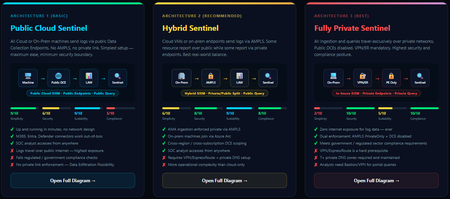
When you deploy Microsoft Sentinel, security log ingestion travels over public Azure Data Collection Endpoints by default. The connection is encrypted, and the data arrives correctly — but the endpoint is publicly reachable, and so is the workspace itself, queryable from any browser on any network. For many organisations, that trade-off is fine. For others — regulated industries, healthcare, financial services, critical infrastructure — it is the exact problem they need to solve. Azure Monitor Private Link Scope (AMPLS) is how you solve it. What AMPLS Actually Does AMPLS is a single Azure resource that wraps your monitoring pipeline and controls two settings: Where logs are allowed to go (ingestion mode: Open or PrivateOnly) Where analysts are allowed to query from (query mode: Open or PrivateOnly) Change those two settings and you fundamentally change the security posture — not as a policy recommendation, but as a hard platform enforcement. Set ingestion to PrivateOnly and the public endpoint stops working. It does not fall back gracefully. It returns an error. That is the point. It is not a firewall rule someone can bypass or a policy someone can override. Control is baked in at the infrastructure level. Three Patterns — One Spectrum There is no universally correct answer. The right architecture depends on your organisation's risk appetite, existing network infrastructure, and how much operational complexity your team can realistically manage. These three patterns cover the full range: Architecture 1 — Open / Public (Basic) No AMPLS. Logs travel to public Data Collection Endpoints over the internet. The workspace is open to queries from anywhere. This is the default — operational in minutes with zero network setup. Cloud service connectors (Microsoft 365, Defender, third-party) work immediately because they are server-side/API/Graph pulls and are unaffected by AMPLS. Azure Monitor Agents and Azure Arc agents handle ingestion from cloud or on-prem machines via public network. Simplicity: 9/10 | Security: 6/10 Good for: Dev environments, teams getting started, low-sensitivity workloads Architecture 2 — Hybrid: Private Ingestion, Open Queries (Recommended for most) AMPLS is in place. Ingestion is locked to PrivateOnly — logs from virtual machines travel through a Private Endpoint inside your own network, never touching a public route. On-premises or hybrid machines connect through Azure Arc over VPN or a dedicated circuit and feed into the same private pipeline. Query access stays open, so analysts can work from anywhere without needing a VPN/Jumpbox to reach the Sentinel portal — the investigation workflow stays flexible, but the log ingestion path is fully ring-fenced. You can also split ingestion mode per DCE if you need some sources public and some private. This is the architecture most organisations land on as their steady state. Simplicity: 6/10 | Security: 8/10 Good for: Organisations with mixed cloud and on-premises estates that need private ingestion without restricting analyst access Architecture 3 — Fully Private (Maximum Control) Infrastructure is essentially identical to Architecture 2 — AMPLS, Private Endpoints, Private DNS zones, VPN or dedicated circuit, Azure Arc for on-premises machines. The single difference: query mode is also set to PrivateOnly. Analysts can only reach Sentinel from inside the private network. VPN or Jumpbox required to access the portal. Both the pipe that carries logs in and the channel analysts use to read them are fully contained within the defined boundary. This is the right choice when your organisation needs to demonstrate — not just claim — that security data never moves outside a defined network perimeter. Simplicity: 2/10 | Security: 10/10 Good for: Organisations with strict data boundary requirements (regulated industries, audit, compliance mandates) Quick Reference — Which Pattern Fits? Scenario Architecture Getting started / low-sensitivity workloads Arch 1 — No network setup, public endpoints accepted Private log ingestion, analysts work anywhere Arch 2 — AMPLS PrivateOnly ingestion, query mode open Both ingestion and queries must be fully private Arch 3 — Same as Arch 2 + query mode set to PrivateOnly One thing all three share: Microsoft 365, Entra ID, and Defender connectors work in every pattern — they are server-side pulls by Sentinel and are not affected by your network posture. Please feel free to reach out if you have any questions regarding the information provided.667Views3likes2Comments
Unified SecOps XDR
Hi, I am reaching out to community to seek understanding regarding Unified SecOps XDR portal for Multi-tenant Multi-workspace. Our organization already has a Azure lighthouse setup. My question is if M365 lighthouse license also required for the Multi-tenant Multi-workspace in unified SecOps XDR portal?406Views2likes4CommentsWhat's New: Tags column is now available in Azure Sentinel incidents page!
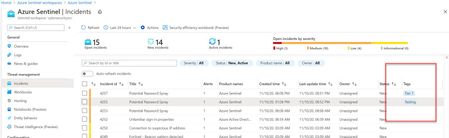
Hello everyone, We are happy to share with you a small but important improvement we added to our incidents blade – a new tag column is now available as part of the Incidents list! Tags are an integral part of the triaging process so we are now exposing them in a new column of the incident list. This improvement allows users to get informed about the tags that are related to the incidents without having to pivot to the incident preview page or full details. Every second counts, right?10KViews2likes7Comments
GITHUB - AI Sentinel attack simulation
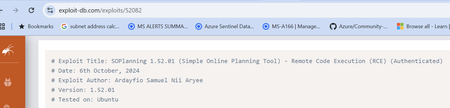
The recent support for Model Context Protocol (MCP) with Claude Desktop has opened the door for some really useful testing capability with Sentinel and emerging threats. I'm happy to share with the community a GitHub project that demonstrates the use of MCP against current exploits to generate simulated attack data that can be used with testing migrated ASIM alert rules. MCP allows for up-to-date exploits to be queried... ... and with AI prompting, simulated attack events can be created against our Sentinel test environments. Which results in a simulated attack based on the exploit being referenced. This is really useful for testing the migration of our Sentinel alert rules to ASIM! The full code and details about the project are available here: https://laurierhodes.info/node/175328Views1like1Comment
Pre-rqieist for Defender for endpoint and MMA agent installation
Dear All, We need to install the Defender for endpoint agent and the latest MMA agent(Sentienl) in our environment. Kindly let me know the minimum permissons required for the service account for both:- 1) Domain joined machine? 2) Non-domain joined machine? (what min. role required for service account? is it local admin? or any other min. role possible)498Views1like0Comments