wds
12 Topics
WDS: PXE-Boot a client with CA2023 certificate and CA2011 revoked
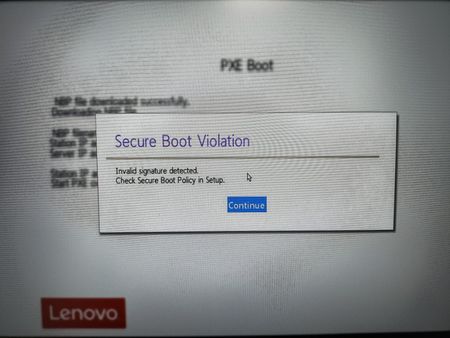
Hi Microsoft, we try to PXE-Boot Notebooks that have SecureBoot enabled and have the CA2023 certificates. Furthermore the Clients have CA2011 Certificates revoked. Our Environment / Setup: WDS-Server: Fresh installed Windows Server 2025 (24H2) with latest cumulative Update (2026-05). WDS-Serverrole enabled. WDS configured and boot-image attached When booting a client with SecureBoot disabled, booting works. But when SecureBoot is enabled we get the shown message: When having a look at the files in the WDS Folder c:\RemoteInstall\boot\x64 I can see that there are still the EFi-Files signed with the old 2011 CA... So it is necessary to have EFI-Files (especially for WDS!) which are signed with CA 2023. I already tried to use wdsmgfw.efi and bootmgfw.efi Files from a winpe.wim from a Win 11 ADK 2025, but then I get errors like "0xc0000704". Disabling SecureBoot works, but is just a workaround. We need a fix for that Issue....543Views1like2Comments
SRV 2022 WDS - Can't import Realtek NIC Drivers
hello, i'm using windows deployment services (WDS) on my windows server 2022. many clients (windows 10 and windows 11) have a "Realtek PCIe GbE Family Controller" as onboard NIC. if i get the required driver from ex. HP or DELL i can't import it into my WDS server (error code:0xC10408A6). even the driver from the microsoft catalog won't import. normally i would get it from realtek homepage, but this driver won't import either. a friend of mine has a WDS on a windows server 2019. he can import the driver from the realtek homepage an it works fine. what can i do? the error description says that the cause for failed packages includes unsigned x64 driver-package (it's signed), network connectivity (it's fine) and package corruption (but it works on server 2019). my 2022 server has the latest windows updates.322Views1like2Comments
Moving from MDT/WDS to Autopilot – Real-World Lessons, Wins & Gotchas
Hi all, We’ve been moving away from an ageing WDS + MDT setup and over to Windows Autopilot, and I thought I’d share a few key lessons and experiences from the journey. In case anyone else is working through the same transition (...or about to). Why the change? MDT was becoming unreliable, drivers/apps would randomly fail to install, WDS is on the way out, and we needed a more remote-friendly approach. We also wanted to simplify things for our small IT team and shift from Hybrid Azure AD Join to Azure AD Join only. We’re doing this as a phased rollout. I harvested existing device hashes using a script from a central server, and manually added machines that weren’t online at the time (most of which were just unused spares, we haven't introduced new hardware yet). If you want a copy of this auto-harvest, please see my next post, this script is useful as it'll just go off and import the hardware hashes into Intune, and can run against multiple computers at a time. (I will add the link to the post once made). Some of the biggest hurdles: • 0x80070002 / 0x80070643 errors (typically due to incomplete registration or app deployment failures) • Enrollment Status Page (ESP) hangs due to app targeting issues (user vs device) and BitLocker config conflicts • Wi-Fi setup with RADIUS (NPS) was complex, Enterprise Certificates and we're still using internal AD for authentication, so user accounts exist there and sync over to Azure. • Legacy GPOs had to be rebuilt manually in Intune, lots of trial and error • Some software (like SolidWorks) wouldn’t install silently via Intune, so I used NinjaOne to handle these, along with remediation scripts in Intune where needed We also moved from WSUS to Windows Autopatch, which improved update reliability and even helped with driver delivery via Windows Update. What’s gone well: Device provisioning is more consistent, updates are more reliable, build time per machine has dropped, and remote users get systems faster. It’s also reduced our reliance on legacy infrastructure. What I’m still working on: Tightening up compliance and reporting, improving detection/remediation coverage, figuring out new errors that may occur, and automating as much manual processes as possible. Ask me anything or share your own experience! I’m happy to help anyone dealing with similar issues or just curious about the move. Feel free to reply here or message me. Always happy to trade lessons learned, especially if you’re in the middle of an Autopilot project yourself. Cheers, Timothy Jeens2.2KViews3likes5CommentsMoving from MDT/WDS to Autopilot part 2
Hi everyone Following up on my previous post about moving from MDT/WDS to Windows Autopilot, I wanted to share some of the more detailed parts of the deployment and config that might help others working through similar issues. Wi-Fi (RADIUS + NPS + Azure AD Join): This was hands-down one of the trickiest bits. We use a local RADIUS server (Windows NPS) with certificates for EAP authentication, and users authenticate using local AD credentials, despite Autopilot devices being Azure AD joined. I had to build a custom Wi-Fi configuration profile in Intune that handled certificate trust, proper targeting, and worked with our existing NPS policies. If anyone needs help with this scenario, I’m happy to share more details. I’ll be posting the full configuration soon. BitLocker Conflicts: BitLocker generally worked but only after cleaning up overlapping configurations. Intune allows BitLocker settings to be applied via multiple paths (Device Configuration, Endpoint Security, Encryption, even legacy GPOs via ADMX). I found they MUST be aligned across all sources — otherwise, ESP fails or encryption doesn’t trigger. My fix: consolidate BitLocker settings under Endpoint Security and Windows Configurations and ensure nothing else contradicts them, they give different options hence the need for the two. App Deployment + Detection Scripts: Some software just doesn’t play nice with Intune alone. We had issues with SolidWorks and other legacy tools. For these, I used NinjaOne to run custom silent installers and Intune detection scripts to track success and reapply if needed. For complex installs, I had to fall back on Proactive Remediation scripts to detect and fix problems. Compliance Baselines & Settings: We're gradually shifting to Intune-based compliance. I ported over our core GPO baselines and rebuilt them using Configuration Profiles, Settings Catalog, and Security Baselines. Compliance policies then reference these, so non-conformant machines are flagged. Still evolving this as we onboard more devices. Licensing Requirements: For anyone wondering, some of these capabilities require specific licensing. We're running "Microsoft 365 E3" + "Enterprise Mobility + Security E3", which gives us access to: Proactive Remediations Intune-based compliance management Scripted deployments and reporting Note, only 1 user in the tenant needs these two licences to enable the features. Summary This move to Autopilot wasn’t just a deployment change, it pushed us to rethink how we handle security, authentication, app installs, and policy enforcement. There’s still more to do, but we’ve built a solid foundation that’s scalable and more resilient than our old MDT-based approach. If you’re dealing with similar challenges or stuck on something like Wi-Fi, BitLocker or app installs, feel free to reach out. I’ve probably hit the same wall and am happy to compare notes or share scripts/settings if it helps. Cheers, Timothy Jeens205Views0likes0CommentsMDT - Getting LapsAdmin User - Apps not getting installed
Hi, Thank you in advance for your help. If I don't join the computer to the domain, it uses local Administrator account and installs all the apps (office, adobe, etc.) correctly. Once I use the domain settings (highlighted below) it will join the domain, boots up into login screen using "LAPSAdmin" user displays "password incorrect" error, and none of the apps get installed. Thoughts? (TY) ---------------------------------------------------------------- [Settings] Priority=Default Properties=MyCustomProperty [Default] OSInstall=Y SkipCapture=YES SkipAdminPassword=YES SkipProductKey=YES SkipComputerBackup=YES SkipBitLocker=YES ;SkipComputerName=YES OSDComputerName=MDT-%SerialNumber% ;SkipDomainMembership=YES ;JoinDomain=domain.xyz.com ;DomainAdmin=admin ;DomainAdminPassword=password1 ;DomainAdminDomain=domain.xyz.com SkipUserData=YES UserDataLocation=NONE ;SkipLocaleSelection=YES InputLocale=0409:00000409 SystemLocale=en-US UILanguage=en-US UserLocale=en-US SkipTimeZone=YES TimeZoneName=Eastern Standard Time ;SkipAdminPassword=YES AdminPassword=LocalAdmin!331Views0likes1CommentDeployment Win11 on OEM Licence
Hello, does anyone know which Licence i need for Installing an Win 11 iso and Deploy it with MDT / WDS Creating is Free i think. The Pcs we buy have an installed Win 11 Pro for example Lenovo ThinkCentre so they have an OEM Version of Win 11 and i want to Deploy our own Win 11 Pro with Pre Installed Software. Is this included in the Win 11 Pro Version or do i need Win 11 SA or a System Builder Licence? Do i just need one Licence or for each Device one? i hope someone can help me with this Question.478Views0likes1CommentChecking the connection to Microsoft. This might take a while.
I have WDS and MDT configured to deploy windows 10 to Lenovo ThinkPad 15 Gen2 along with network driver and all the things needed. Due to a minor misconfiguration right network drivers were not being injected. But when we are doing the same windows 10 installation through Bootable USB, we won't be including any drivers in that, but that still works. What I don't understand is the whole WDS deployment happens on the private network which doesn't need internet which I am being mandated for the process after MDT GUI has done its work the laptop restarts and saying "Checking the connection to Microsoft. This might take a while." as the landing page and getting stuck there for hours not letting me go any further. Please help me understand the part where it says it is trying to connect to Microsoft and getting stuck meaning it is trying to connect to internet when there is no need for that.962Views0likes1Comment
Windows Server 2022 WDS & OEM License
Hello I've got a problem. I need to clone some PC with Windows 10 OEM license. I've prepared a 2022 WDS Server with a W10Pro image (iso from an MVLSC), the deployment works without problem. BUT I can't activate my Licence because i guess he's looking for an KMS license... Maybe I don't understand something, maybe I do womething wrong. Could you please help me what is really possible with a 2022 WDS Server and an W10Pro OEM ? Thank you very much2.1KViews0likes2CommentsWDS wdsutil
Server 2022 STD We've got WDS installed trough PowerShell, and the wdsutil. But im missing an option to set the following setting trough PowerShell Server > Properties > Boot 'tab' options: > Known clients: Unknown clients: I want to set these 2 options both to: 'Always Continue the PXE boot' I did set the "PXE Response" trough PowerShell, but im missing an way to set the other options. Does anyone knows how to set these options trough PowerShell?671Views0likes0Comments